pengenalan
Thank you for choosing the SENTRY HPXKX50 RGB Gaming Mouse. This high-performance wired gaming mouse is designed to enhance your gaming and computing experience with its precise optical sensor, customizable RGB lighting, and ergonomic design. This manual provides detailed instructions on setting up, operating, maintaining, and troubleshooting your new mouse.
Kandungan Pakej
- SENTRY HPXKX50 RGB Gaming Mouse
- Manual Pengguna (dokumen ini)

Image: The retail packaging for the SENTRY HPXKX50 RGB Gaming Mouse, showing the mouse inside the box with its features highlighted.
Persediaan
Follow these simple steps to set up your SENTRY HPXKX50 RGB Gaming Mouse:
- Buka bungkusan Tetikus: Carefully remove the mouse and its USB cable from the packaging.
- Sambung ke Peranti Anda: Locate an available USB port on your computer (PC, Laptop, Mac) or compatible gaming console (PS4/PS5). Insert the USB connector of the mouse into the USB port.
- Pemasangan Pemandu: The SENTRY HPXKX50 is a plug-and-play device. Your operating system (Windows, macOS) will automatically detect and install the necessary drivers. No additional software installation is required for basic functionality.
- Sahkan Sambungan: Once connected, the mouse's RGB lighting will illuminate, indicating a successful connection. You can now move the mouse to test cursor movement.

Imej: Dari dekat view of the USB connector of the SENTRY HPXKX50 RGB Gaming Mouse, which is used for connecting to a computer.

Image: Icons illustrating the compatibility of the SENTRY HPXKX50 RGB Gaming Mouse with various devices, including laptops, desktop computers, HDTVs, PS4/PS5 consoles, and Mac computers.
Beroperasi
The SENTRY HPXKX50 RGB Gaming Mouse offers intuitive operation with its standard buttons and advanced features.
Fungsi Asas
- Klik Kiri: Butang tindakan utama.
- Klik kanan: Butang tindakan kedua, biasanya untuk menu konteks.
- Roda Tatal: Menatal kandungan ke atas atau ke bawah. Boleh juga ditekan untuk fungsi klik tengah.
- Butang DPI: Located behind the scroll wheel, this button allows you to cycle through different DPI (Dots Per Inch) sensitivity settings.
Pencahayaan RGB
The mouse features dynamic RGB lighting that illuminates the edges and scroll wheel. The lighting effects are pre-programmed and will cycle automatically, adding an aesthetic appeal to your setup.
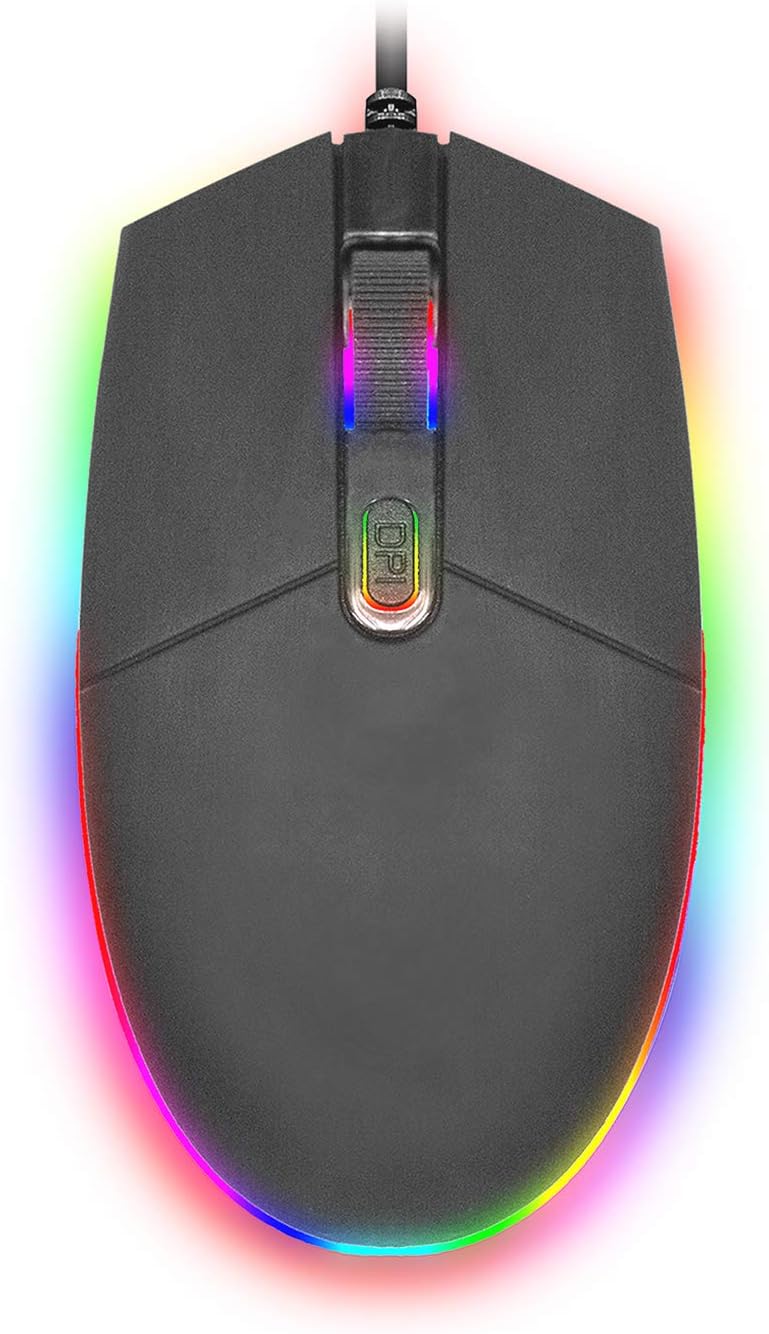
Imej: Atas ke bawah view of the SENTRY HPXKX50 RGB Gaming Mouse, showcasing its vibrant, multi-color RGB lighting along the base and around the scroll wheel.

Imej: Pro sampinganfile view of the SENTRY HPXKX50 RGB Gaming Mouse, highlighting the illuminated RGB strip along its bottom edge in a dark environment.
Sensitiviti DPI
The HPXKX50 mouse is equipped with a high-precision optical sensor, offering up to 7200 DPI. This allows for highly sensitive and accurate cursor movements, ideal for fast-paced gaming or precise graphic design work. Press the DPI button to switch between sensitivity levels. The mouse is designed for smooth tracking and ultra-high sensitivity.

Image: The SENTRY HPXKX50 RGB Gaming Mouse with an overlay indicating its 7200 DPI high-precision optical sensor, emphasizing its accuracy for gaming.
Penyelenggaraan
To ensure the longevity and optimal performance of your SENTRY HPXKX50 RGB Gaming Mouse, follow these maintenance guidelines:
- Pembersihan: Gunakan kain lembut, kering dan tidak berbulu untuk mengelap permukaan tetikus. Untuk kotoran degil, lap sedikitampen kain dengan air. Elakkan daripada menggunakan bahan kimia yang keras, pelarut atau pembersih yang melelas.
- Penjagaan Sensor: Pastikan sensor optik di bahagian bawah tetikus bersih dan bebas daripada habuk atau serpihan. Gunakan kapas atau udara termampat untuk membersihkan kawasan sensor dengan lembut.
- Pengurusan Kabel: Avoid sharp bends or kinks in the USB cable. Store the mouse in a way that prevents the cable from being tangled or stressed. The braided cable is designed for durability.
- Storan: Apabila tidak digunakan untuk tempoh yang lama, simpan tetikus di tempat yang sejuk dan kering, jauh daripada cahaya matahari langsung dan suhu yang melampau.
Menyelesaikan masalah
If you encounter issues with your SENTRY HPXKX50 RGB Gaming Mouse, refer to the table below for common problems and solutions:
| Masalah | Kemungkinan Punca | Penyelesaian |
|---|---|---|
| Tetikus tidak bertindak balas | Sambungan USB longgar, port USB rosak, isu pemandu. | Ensure USB cable is firmly plugged in. Try a different USB port. Restart your computer. |
| Pergerakan kursor tidak menentu atau gelisah | Penderia optik kotor, permukaan pad tetikus tidak sesuai. | Clean the optical sensor. Use a clean, uniform mouse pad surface. |
| RGB lighting is off or flickering | Insufficient power from USB port, internal fault. | Try a different USB port, preferably a direct port on the motherboard (for desktops). If the issue persists, contact support. |
| Butang DPI tidak mengubah kepekaan | Konflik perisian, kerosakan butang. | Ensure no conflicting mouse software is running. Restart your computer. |
Spesifikasi
| Ciri | Perincian |
|---|---|
| Jenama | SENTRY |
| Nombor Model | 50M1-05000 |
| Teknologi Ketersambungan | Berwayar USB |
| Teknologi Pengesanan Pergerakan | Optik |
| DPI (Titik Seinci) | Sehingga 7200 DPI |
| Pencahayaan | RGB |
| warna | Hitam |
| Platform Perkakasan | PC |
| Keserasian Sistem Pengendalian | Windows, macOS (Plug & Play) |
| Berat Barang | 6.4 auns (lebih kurang 181g) |
| Dimensi Produk (LxWxH) | 4.75 x 2 x 7.25 inci (lebih kurang 12.07 x 5.08 x 18.42 cm) |
| Ciri Khas | Reka Bentuk Ergonomik |
| Pengeluar | KabelBorong |
Waranti dan Sokongan
For warranty information and customer support, please refer to the documentation provided with your purchase or visit the official SENTRY or CableWholesale webtapak. Simpan bukti pembelian anda untuk tuntutan waranti.
For additional assistance, you may contact the manufacturer directly through their official support channels.


