1. Produk Lebihview
The Jansite Motorcycle TPMS (Tire Pressure Monitoring System) M2 is designed to enhance riding safety by providing real-time monitoring of your motorcycle's tire pressure and temperature. This system features an LCD display, external sensors, and multiple alarm functions to alert you to potential tire issues.
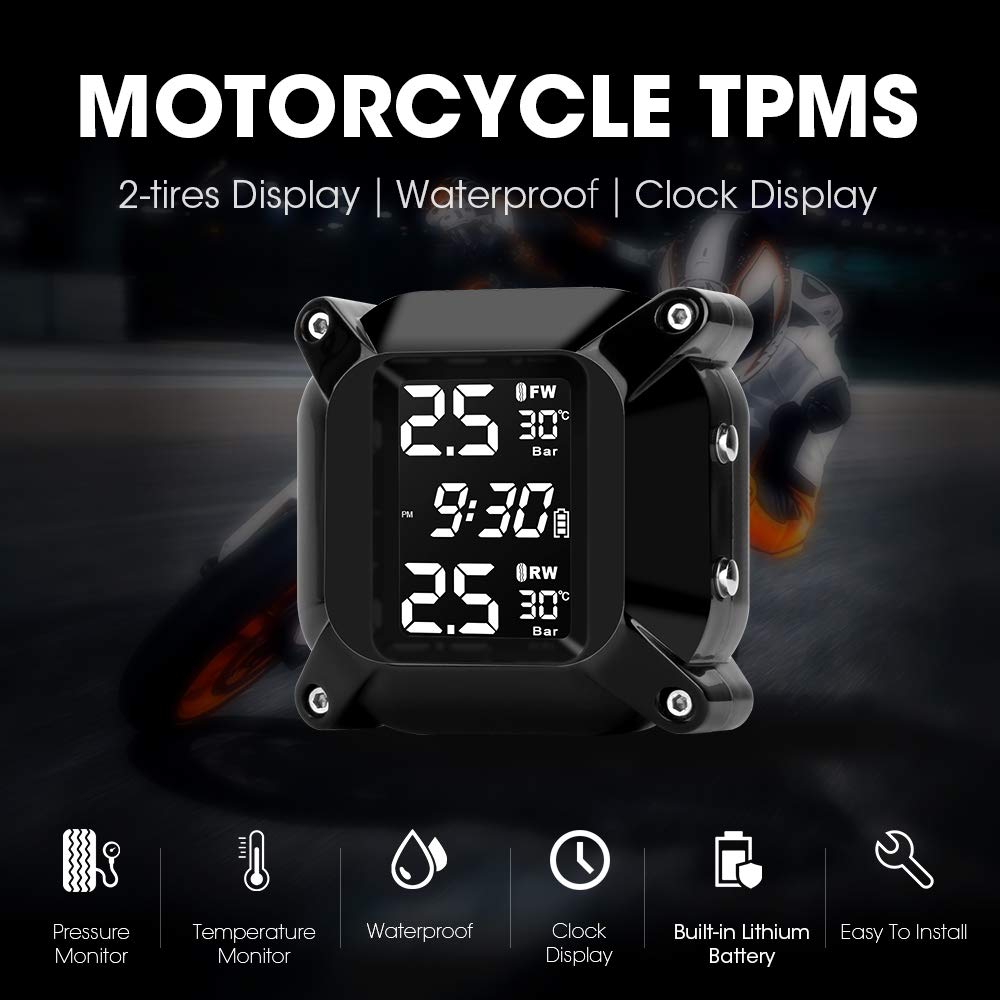
Image 1.1: Jansite Motorcycle TPMS M2 display unit and key features.
Ciri-ciri Utama:
- Pemantauan masa nyata: Displays tire pressure and temperature simultaneously.
- Paparan Digital LCD: Clear and compact screen for easy readability.
- Adjustable Alarm Values: Customizable pressure alarm thresholds for various motorcycle models.
- Berbilang Mod Penggera: Includes alarms for air leakage, low/high pressure, high temperature, sensor low battery, no signal, and receiver low battery.
- Pengecasan USB magnetik: Convenient charging for the display unit.
- Waterproof and Dustproof Sensors: Designed for use in all weather conditions.
- Reka bentuk anti-kecurian: External sensors include an anti-theft nut.
- Unit Boleh Tukar: Pressure units (Psi/Bar) and temperature units (°C/°F) are switchable.
2. Kandungan Pakej
Sebelum pemasangan, sila sahkan bahawa semua komponen terdapat dalam pakej:

Image 2.1: Jansite Motorcycle TPMS M2 package contents.
- 1 x TPMS Display Unit
- 2 x Sensor Luaran (Roda Depan 'FW' dan Roda Belakang 'RW')
- 1 x Kurungan Pemasangan
- 1 x Kabel Pengecas USB
- 2 x Nat Anti-kecurian
- 1 x Sepana
3. Persediaan dan Pemasangan
3.1 Pemasangan Unit Paparan
- Attach the mounting bracket to your motorcycle's handlebar or a suitable location using the provided hardware.
- Secure the TPMS display unit onto the mounting bracket.
- Ensure the display unit is positioned for clear visibility during riding.
3.2 Pemasangan Sensor Luaran
Follow these steps to install the external sensors on your motorcycle tires:

Image 3.1: Schematic diagram of external sensor installation.
- Tanggalkan Penutup Injap: Unscrew the original valve cap from the tire valve stem.
- Install Anti-theft Nut: Screw the hexagonal anti-theft nut onto the valve stem. Do not tighten it yet.
- Install Sensor: Screw the corresponding sensor (FW for front, RW for rear) onto the valve stem. Ensure it is hand-tight.
- Penderia Selamat: Use the provided wrench to tighten the anti-theft nut against the sensor. This secures the sensor and prevents theft.
- Semak Kebocoran: Apply soapy water around the valve stem and sensor connection to check for any air leaks. If bubbles appear, re-tighten the sensor and nut.
Nota: Ensure the correct sensor (FW/RW) is installed on the corresponding tire. Incorrect placement may lead to inaccurate readings.
4. Arahan Operasi
4.1 Menghidupkan/Mematikan
- Press and hold the "Power/Selec" button (usually the top button on the side) to turn the display unit on or off.
4.2 Paparan Maklumat

Image 4.1: Real-time monitoring display of the TPMS unit.
Skrin LCD memaparkan maklumat berikut:
- Front Wheel (FW) Pressure and Temperature
- Rear Wheel (RW) Pressure and Temperature
- Masa Semasa
- Battery Level Indicator for the display unit
4.3 Setting Parameters (Pressure/Temperature Units, Alarm Values)
Use the "Menu" button (usually the bottom button on the side) to enter the settings menu. Use the "Power/Selec" button to navigate through options and adjust values.
- Masukkan Menu: Press and hold the "Menu" button until the settings interface appears.
- Navigate Options: Short press the "Menu" button to cycle through different settings (e.g., pressure unit, temperature unit, high pressure alarm, low pressure alarm, high temperature alarm).
- Laraskan Nilai: When an option is selected, short press the "Power/Selec" button to change the value.
- Simpan dan keluar: Press and hold the "Menu" button again to save your settings and exit the menu.
Default Alarm Values: Refer to your motorcycle's manual for recommended tire pressures. Adjust the alarm thresholds accordingly.
4.4 Fungsi Penggera
The system provides visual and audible alerts for the following conditions:
- Air Leakage Alarm: Rapid pressure drop.
- Penggera Tekanan Rendah: Tire pressure falls below the set low threshold.
- Penggera Tekanan Tinggi: Tire pressure exceeds the set high threshold.
- Penggera Suhu Tinggi: Tire temperature exceeds the set high threshold.
- Sensor Low Battery Alarm: Indicates a low battery in one of the external sensors.
- No Signal Alarm: Loss of communication with a sensor.
- Receiver Low Battery Alarm: Indicates a low battery in the display unit.
When an alarm is triggered, the display will flash the affected parameter, and an audible alert will sound. Address the issue promptly.
5. Penyelenggaraan
5.1 Mengecas Unit Paparan
- The display unit has a built-in lithium battery. When the receiver low battery alarm activates or the battery indicator is low, connect the unit to a USB power source using the provided magnetic USB charging cable.
- Cas penuh biasanya mengambil masa beberapa jam.
5.2 Penggantian Bateri Sensor
The external sensors use replaceable batteries. When a sensor low battery alarm occurs, replace the battery as follows:
Image 5.1: External sensor battery replacement diagram.
- Keluarkan Sensor: Use the wrench to loosen the anti-theft nut, then unscrew the sensor from the valve stem.
- Open Sensor Casing: Buka penderia dengan berhati-hati casing. Some models may require a small tool or the provided wrench to pry open.
- Remove Gasket: Remove the waterproofing gasket.
- Gantikan Bateri: Remove the old battery and insert a new CR1632 lithium coin cell battery, ensuring correct polarity.
- Pasang semula: Place the waterproofing gasket back correctly, then close the sensor casing.
- Reinstall Sensor: Reinstall the sensor onto the tire valve stem, following the installation steps in Section 3.2.
Nota: Ensure the waterproofing gasket is properly seated to maintain the sensor's waterproof integrity.
5.3 Pembersihan
- Lap unit paparan dan penderia dengan lembut, damp kain. Jangan gunakan pembersih atau pelarut yang melelas.
- Pastikan port pengecasan bersih dan kering sebelum mengecas.
6. Penyelesaian masalah
| Masalah | Kemungkinan Punca | Penyelesaian |
|---|---|---|
| Display unit does not power on. | Bateri lemah atau habis. | Charge the display unit using the USB cable. |
| No signal from sensor / Inaccurate readings. |
|
|
| Air leakage alarm. |
|
|
| Paparan menunjukkan masa yang salah. | Masa tidak ditetapkan atau ditetapkan semula. | Adjust the time through the settings menu (refer to Section 4.3). |
7. Spesifikasi
| Parameter | Nilai |
|---|---|
| Jenama | Jansite |
| Nombor Model | M2 |
| Jenis Paparan | LCD Digital |
| Unit Tekanan | Psi, Bar |
| Unit Suhu | °C, °F |
| Jenis Sensor | Luaran |
| Jenis Bateri Sensor | CR1632 Lithium Coin Cell (replaceable) |
| Bateri Unit Paparan | Built-in Lithium-ion (rechargeable via USB) |
| Penilaian Kalis Air | Sensors are waterproof and dustproof. |
| Dimensi Pakej | 13.8 x 13.5 x 5.2 cm |
| Berat Produk | 220 Gram |
| UPC | 759337624907 |

Image 7.1: Dimensions and display layout of the TPMS unit.
8. Waranti dan Sokongan
8.1 Maklumat Waranti
This Jansite TPMS M2 product comes with a Waranti 1 tahun dari tarikh pembelian. Waranti ini meliputi kecacatan pembuatan dan kerosakan dalam penggunaan biasa.
Waranti tidak melindungi kerosakan yang disebabkan oleh:
- Pemasangan atau penggunaan yang tidak betul.
- Kerosakan, penyalahgunaan atau penyalahgunaan yang tidak disengajakan.
- Pembaikan atau pengubahsuaian yang tidak dibenarkan.
- Natural disasters or external causes.
8.2 Sokongan Pelanggan
For any questions, technical assistance, or warranty claims, please contact Jansite customer support. Refer to your purchase documentation or the seller's contact information for the most up-to-date support channels.
When contacting support, please have your product model (M2) and purchase details ready.


