pengenalan
Welcome to the user manual for your Technical Pro BOOM8 Wireless TWS Portable 8" LED Party Speakers. This manual provides essential information for the safe and efficient operation of your new speakers. Please read it thoroughly before use and retain it for future reference.
The BOOM8 speakers are designed to deliver powerful audio with dynamic LED lighting, offering versatile connectivity options including Bluetooth, USB, FM radio, and AUX input. With True Wireless Stereo (TWS) functionality, you can connect two BOOM8 speakers for an immersive stereo sound experience.
Maklumat Keselamatan
Untuk memastikan operasi yang selamat dan mengelakkan kerosakan, sila patuhi langkah berjaga-jaga berikut:
- Do not expose the speakers to water, moisture, or extreme temperatures.
- Avoid placing the speakers near heat sources such as radiators, heat registers, stoves, or other apparatus (including amppenghidup) yang menghasilkan haba.
- Gunakan hanya lampiran/aksesori yang ditentukan oleh pengilang.
- Bersihkan hanya dengan kain kering. Jangan gunakan pembersih cecair atau pembersih aerosol.
- Lindungi kord kuasa daripada berjalan atau tersepit, terutamanya pada palam, bekas kemudahan dan tempat keluar dari radas.
- Cabut plag radas semasa ribut petir atau apabila tidak digunakan untuk jangka masa yang lama.
- Rujuk semua servis kepada kakitangan perkhidmatan yang berkelayakan. Servis diperlukan apabila radas telah rosak dalam apa jua cara, seperti kord bekalan kuasa atau palam rosak, cecair telah tertumpah atau objek jatuh ke dalam radas, radas telah terdedah kepada hujan atau lembapan, tidak beroperasi seperti biasa. , atau telah digugurkan.
Kandungan Pakej
Sahkan bahawa semua item yang disenaraikan di bawah disertakan dalam pakej anda:
- Technical Pro BOOM8 Portable Rechargeable 8" LED Speaker (x2)
- Kabel Pengecasan USB (x1)
- Manual Pengguna (x1)

Image: Technical Pro BOOM8 User Manual and USB Charging Cable
Produk Selesaiview
Familiarize yourself with the various components and controls of your BOOM8 speaker.

Imej: Depan View of BOOM8 Speaker with Blue LED

Imej: Atas View of BOOM8 Speaker Control Panel

Image: Close-up of BOOM8 Control Panel
Ciri Panel Kawalan:
- Tombol KUASA/VOLUME: Turns the speaker on/off and adjusts the master volume.
- 5V DC DALAM: Charging port for the built-in battery.
- Input AUX: Bicu 3.5mm untuk menyambungkan peranti audio luaran.
- Kawalan Main Semula: Trek Sebelumnya, Main/Jeda, Trek Seterusnya.
- Suis LED: Menghidupkan/mematikan lampu LED.
- Port USB: Untuk memainkan MP3 files from a USB flash drive (up to 64GB).
- MIC DALAM: 1/4" input for a microphone.
- Skrin LCD: Memaparkan mod semasa dan maklumat trek.
Persediaan
Mengecas Bateri
Before initial use, fully charge the speaker's built-in rechargeable battery for 8-10 hours. Connect the provided USB charging cable to the 5V DC IN port on the speaker and to a compatible USB power adapter (not included). The charging indicator light will illuminate during charging.
Menghidupkan/Mematikan
To power on the speaker, rotate the POWER/VOLUME knob clockwise until it clicks and the display illuminates. To power off, rotate the knob counter-clockwise until it clicks.
Penempatan Awal
Place the speakers on a stable, flat surface. For optimal sound dispersion, ensure there are no obstructions directly in front of the speaker grille.
Arahan Operasi
Penggandingan Bluetooth (Pembesar Suara Tunggal)
- Ensure the speaker is powered on and in Bluetooth mode (indicated on the LCD screen). If not, press the Mode button to cycle through modes until "Bluetooth" is displayed.
- Enable Bluetooth on your A2DP stereo Bluetooth device (e.g., smartphone, tablet).
- Cari untuk available Bluetooth devices. The speaker will appear as "BOOM8".
- Select "BOOM8" from the list to pair. A confirmation tone will sound upon successful pairing.
- Anda kini boleh memainkan audio daripada peranti anda melalui pembesar suara. Julat Bluetooth adalah lebih kurang 30 kaki.
Pasangan Stereo Tanpa Wayar Sejati (TWS)
TWS allows you to connect two BOOM8 speakers wirelessly to a single Bluetooth device for a true stereo sound experience.

Image: Two BOOM8 Speakers in TWS Configuration
- Ensure both BOOM8 speakers are powered on and in Bluetooth mode.
- On one of the speakers (this will be your primary speaker), press and hold the Play/Pause button for a few seconds until you hear a pairing tone. The two speakers will automatically connect to each other.
- Once the speakers are paired with each other, enable Bluetooth on your A2DP stereo Bluetooth device.
- Cari untuk available Bluetooth devices and select "BOOM8".
- Both speakers will now play audio in stereo from your device.
Main Balik USB
- Insert a USB flash drive (formatted with MP3 files, maximum 64GB) into the USB port on the control panel.
- The speaker will automatically switch to USB mode and begin playing the first compatible MP3 file.
- Use the Previous Track, Play/Pause, and Next Track buttons to control playback.
- The speaker supports a repeat function for USB playback.
Operasi Radio FM
- Tekan butang Mod untuk bertukar kepada mod Radio FM.
- Tekan butang Main/Jeda sekali untuk memulakan imbasan stesen automatik. Pembesar suara akan mengimbas dan menyimpan stesen FM yang tersedia.
- Use the Previous Track and Next Track buttons to navigate between saved stations.
Input AUX
- Connect an external audio device (e.g., smartphone, MP3 player) to the AUX input port using a 3.5mm audio cable (not included).
- Press the Mode button to switch to AUX mode.
- Audio daripada peranti anda yang disambungkan kini akan dimainkan melalui pembesar suara. Kawal main balik daripada peranti luaran anda.
Input Mikrofon
- Connect a 1/4" microphone (not included) to the MIC IN port.
- Adjust the microphone volume using the dedicated microphone volume control (if available on your microphone or speaker model).
- The microphone input can be used simultaneously with other audio sources (Bluetooth, USB, AUX).
Kawalan Lampu LED
The BOOM8 speakers feature dynamic LED lights around the woofer. To toggle the LED lights on or off, press the dedicated LED switch on the control panel.
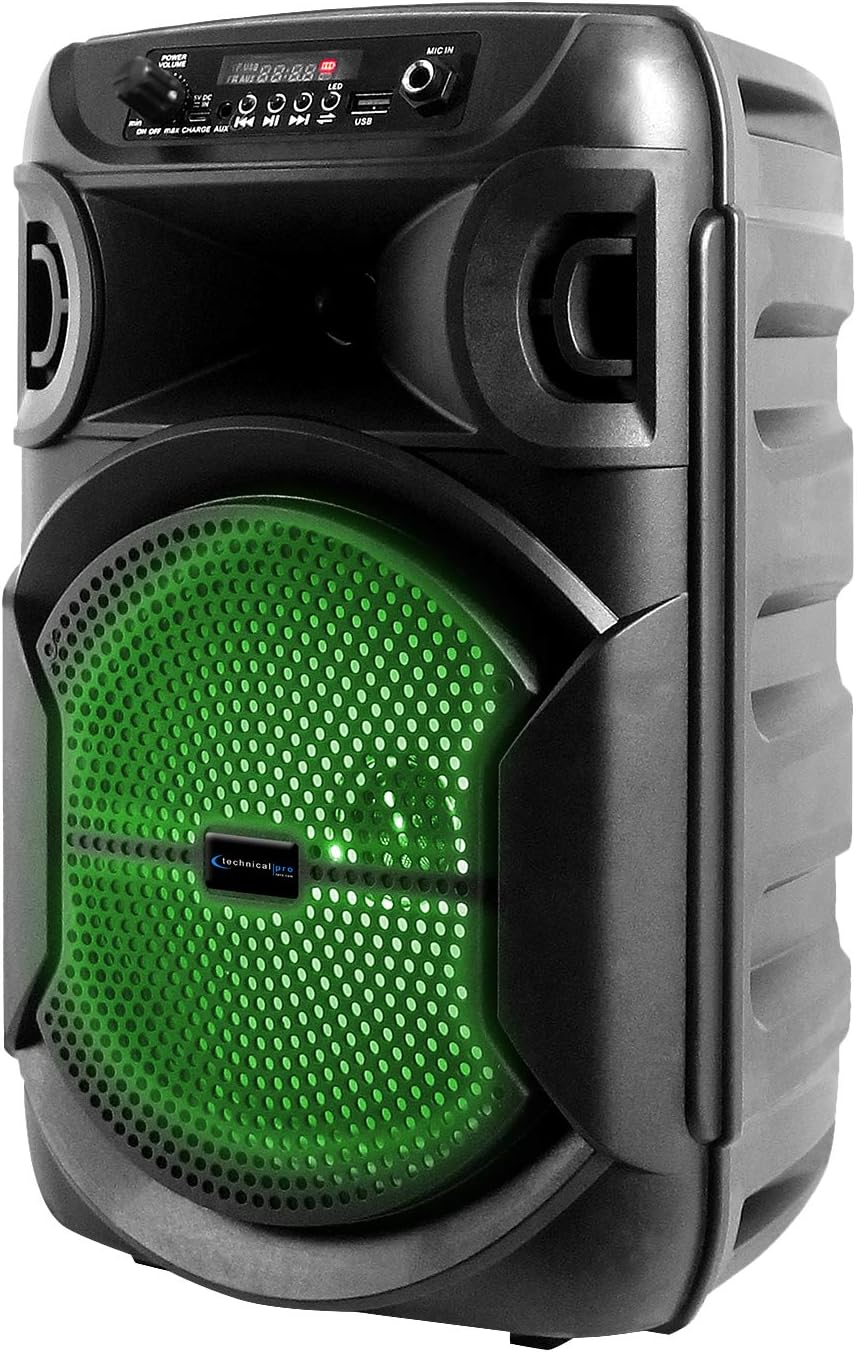
Image: BOOM8 Speaker with Green LED Illumination
Penyelenggaraan
Pembersihan
- Sentiasa matikan dan cabut plag pembesar suara sebelum membersihkan.
- Gunakan kain lembut dan kering untuk mengelap permukaan luar pembesar suara.
- Jangan gunakan pembersih, lilin atau pelarut yang melelas kerana ia boleh merosakkan kemasan.
Penyimpanan
- Simpan pembesar suara di tempat yang sejuk dan kering jauh dari cahaya matahari langsung dan suhu yang melampau.
- If storing for an extended period, ensure the battery is partially charged (around 50%) to maintain battery health. Recharge every few months if not in use.
Menyelesaikan masalah
If you encounter issues with your BOOM8 speakers, refer to the following table for common problems and solutions.
| Masalah | Kemungkinan Punca | Penyelesaian |
|---|---|---|
| Speaker tidak dihidupkan. | Bateri habis. | Connect the speaker to a power source using the USB charging cable and allow it to charge. |
| Tiada bunyi dari pembesar suara. | Volume is too low or muted. Incorrect input mode. Bluetooth not paired. | Increase the volume. Ensure the correct input mode (Bluetooth, USB, AUX, FM) is selected. Re-pair Bluetooth device. |
| Peranti Bluetooth tidak dapat mencari pembesar suara. | Speaker not in Bluetooth pairing mode. Device too far. Interference. | Ensure speaker is in Bluetooth mode. Move device closer to speaker. Avoid strong electromagnetic interference. |
| Gandingan TWS gagal. | Speakers not reset. One speaker already paired to a device. | Ensure both speakers are in Bluetooth mode and not connected to any device. Try holding the Play/Pause button on one speaker again to initiate TWS pairing. |
| Main balik USB tidak berfungsi. | USB drive not formatted correctly. Incompatible file type. Drive size too large. | Ensure USB drive is formatted correctly and contains MP3 files. Max USB size is 64GB. |
Spesifikasi
| Ciri | Perincian |
|---|---|
| Kuasa Puncak | 1000 Watt |
| Saiz Woofer | 8 inches (LED woofer) |
| Input | USB flash drive, FM Radio, AUX, Bluetooth, 1/4'' microphone input |
| Versi Bluetooth | A2DP & AVRCP stereo Bluetooth device compatible |
| Julat Bluetooth | 30 Kaki |
| USB Card Maximum Size | 64GB |
| Audio yang disokong Files (USB) | .mp3 files |
| Impedans | 3 ohm |
| Sensitiviti | 80 ± 2dB (1W@1M) |
| Respons Kekerapan | 80Hz - 18KHz |
| bahan | ABS Plastic Face & Rugged perforated grill |
| Sumber Kuasa | Bateri boleh dicas semula terbina dalam |
| Battery Charge Time (Initial) | 8-10 jam |
| Berat Barang | 8 paun (setiap pembesar suara) |
| Dimensi Pakej | 15 x 9 x 8 inci |
Waranti dan Sokongan
For warranty information and technical support, please refer to the documentation provided with your purchase or contact Technical Pro directly.
Maklumat Hubungan:
Questions / Comments: Call 888-842-6277
e-mel: info@tpro.com


