Produk Selesaiview
The ORIVISION UCH602 Video Capture Card is a compact device designed for capturing HDMI video and audio signals. It supports a maximum input resolution of 4K and outputs at a maximum resolution of 1080P. This device facilitates live streaming, broadcasting, and video conferencing by allowing connection of various HDMI sources, such as DSLR cameras, camcorders, game consoles (PS3/PS4/Xbox One/Switch), and other HDMI devices, to a PC or Mac.

Image: The ORIVISION UCH602 Video Capture Card, a small black rectangular device with HDMI input and USB output ports.
Ciri-ciri Utama:
- Output HD Penuh 1080P: Supports input resolutions up to 4K and outputs at a maximum resolution of 1080P.
- Keserasian Luas: Compatible with most acquisition software, including VLC, OBS, and Amcap. Supports Windows, Android, and MacOS operating systems.
- Pasang dan Main: Requires no driver installation for operation, offering ease of use for quick setup and immediate recording or streaming.
- Maklum Balas Masa Nyata: Enables real-time monitoring and production within preferred software tools.
- Keluaran HDMI: Features an HDMI loop out port for simultaneous display on a monitor while capturing.
Arahan Persediaan
Follow these steps to set up your ORIVISION UCH602 Video Capture Card:
- Sambungkan Sumber HDMI: Connect your HDMI source device (e.g., game console, camera, camcorder) to the "Input" port of the capture card using an HDMI cable.
- Sambung ke Komputer: Connect the USB 2.0 output of the capture card to a USB port on your computer (PC or Mac) using the provided USB cable.
- Connect HDMI Loop Out (Optional): If you wish to monitor your video feed on a separate display, connect an HDMI cable from the "Output" port of the capture card to your monitor.
- Sambungan Kuasa (Pilihan): For stable operation, especially with certain devices or extended use, connect the DC/5V port to a 5V power source using the micro USB cable.
- Persediaan Perisian: Open your preferred video acquisition software (e.g., OBS Studio, VLC, Amcap) on your computer. Select the ORIVISION UCH602 as your video input device within the software settings.

Image: A diagram illustrating the connection setup for the video capture card, showing HDMI input from various sources, USB 2.0 connection to PC/laptop/phone, and HDMI loop out to a display.
Arahan Operasi
The UCH602 is designed for plug-and-play operation, requiring no driver installation on most Windows, Android, and MacOS systems. Once connected, your computer should recognize the device as a webcam or video input source.
- Pemilihan Perisian: Launch your chosen video capture or streaming software (e.g., OBS Studio, VLC, Amcap).
- Pemilihan Peranti: In the software's settings or source selection menu, choose "USB Video" or "ORIVISION UCH602" as your video input device.
- Konfigurasi Audio: Ensure the correct audio input is selected within your software. The capture card typically provides audio alongside the video signal.
- Resolusi dan Kadar Bingkai: Configure your desired output resolution (up to 1080P) and frame rate (up to 60fps under optimal PC conditions) within the software.
- Start Streaming/Recording: Begin your live stream, broadcast, or recording session through your software.
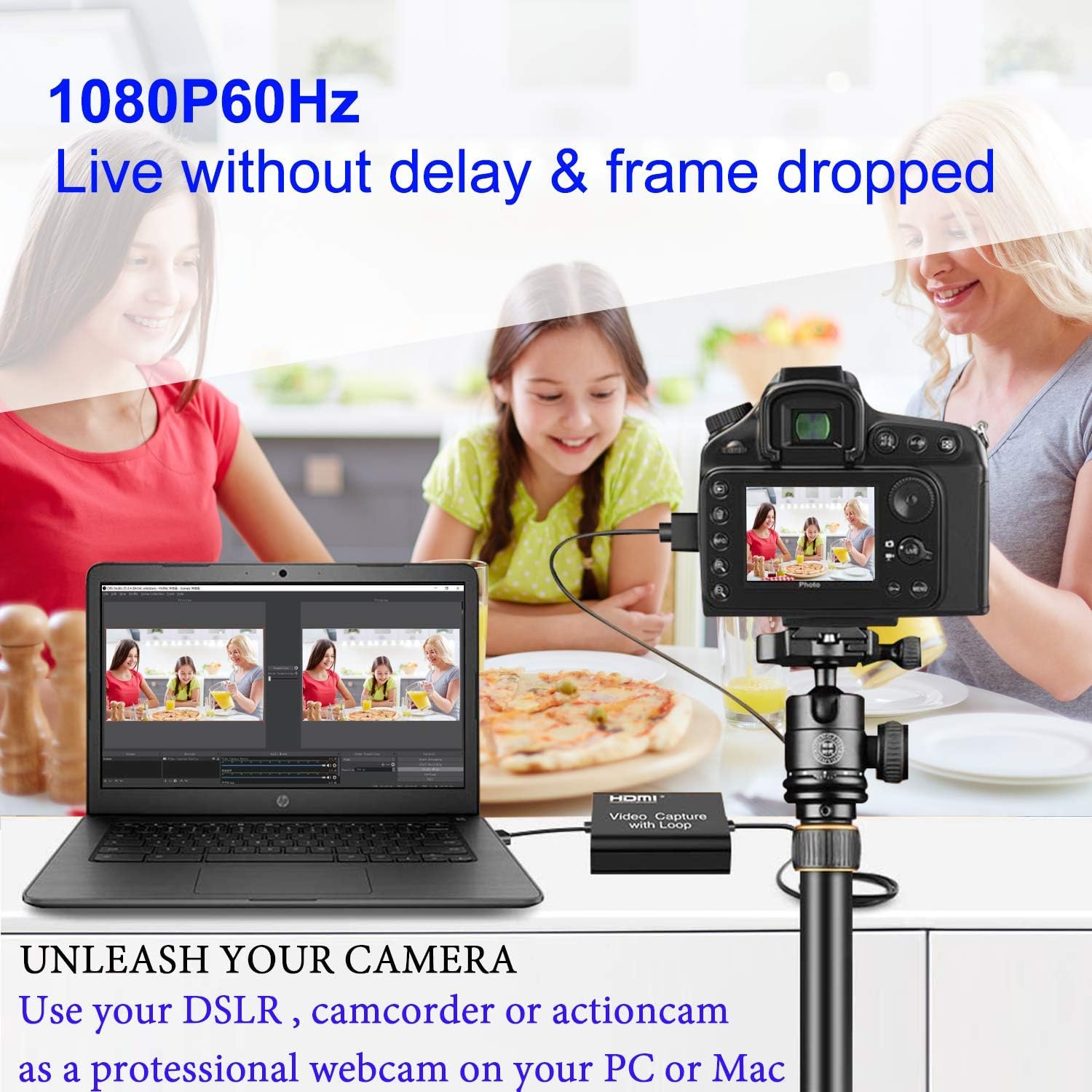
Image: A DSLR camera connected to a laptop via the ORIVISION UCH602 Video Capture Card, demonstrating its use for live video feeds.
Penyelenggaraan
To ensure the longevity and optimal performance of your ORIVISION UCH602 Video Capture Card, consider the following maintenance tips:
- Storan: Simpan peranti di tempat yang sejuk dan kering jauh dari cahaya matahari langsung dan suhu yang melampau.
- Pembersihan: Gunakan kain lembut dan kering untuk membersihkan bahagian luar peranti. Elakkan menggunakan pembersih cecair atau bahan yang melelas.
- Pengendalian: Handle the capture card and its cables with care to prevent damage to ports or internal components. Avoid bending cables sharply.
- Pengudaraan: Ensure the device has adequate ventilation during operation to prevent overheating.
Menyelesaikan masalah
If you encounter issues with your ORIVISION UCH602 Video Capture Card, refer to the following common problems and solutions:
- Tiada Output Video/Audio:
- Pastikan semua kabel HDMI dan USB disambungkan dengan selamat.
- Verify that the capture card is selected as the input device in your software.
- Check the resolution and refresh rate settings of your source device; ensure they are compatible with the capture card's capabilities (max 4K input, max 1080P output).
- Try connecting the optional 5V power supply to the DC/5V port for stable power.
- FPS Cannot Reach 60fps:
While the device generally supports 30fps, it can reach a maximum of 60fps under specific PC circumstances. Please verify your computer's hardware configuration:
- CPU: PC i5-3400 or above; Notebook i7-3537U 2.0GHZ or above.
- Kad Grafik: PC NVIDIA GT630 or above; Notebook NVIDIA GT735M or above.
- RAM: 4G RAM.
If your system meets these requirements and you still experience issues, ensure your software settings are correctly configured for 60fps output.
- Perisian Tidak Mengecam Peranti:
- Try restarting your computer and the capture software.
- Pastikan sistem pengendalian anda dikemas kini.
- Test with different USB ports on your computer.
Spesifikasi
Detailed specifications for the ORIVISION UCH602 Video Capture Card:

Image: A table detailing the technical specifications of the capture card, including resolution, video format, audio format, and dimensions.
| Ciri | Perincian |
|---|---|
| Jenama | ORIVISION |
| Model | UCH602 Video Capture Card with Loop Out |
| Nombor Model Item | HDMI video capture with loop |
| Antara Muka Perkakasan | USB |
| Resolusi Input Maks | 4K |
| Resolusi Output Maks | 1080P |
| Format Video yang Disokong | 8/10/12bit Deep color, YUV/JPEG |
| Format Audio yang Disokong | L-PCM |
| Input Cable Distance | ≤15m, kabel standard HDMI AWG26 |
| Max Bekerja Semasa | 0.7A / 5VDC |
| Suhu Operasi | -10 hingga +55°C |
| Dimensi (L x W x H) | 2.32 x 2.2 x 0.74 inci (59 x 56 x 19 mm) |
| Berat Barang | 2.39 auns (52g) |
| Platform Perkakasan | PC Mac |
| Sokongan Sistem Pengendalian | Windows, Android, MacOS |
| Penggunaan yang Disyorkan | Rakaman Video |
Apa yang ada dalam Kotak
The ORIVISION UCH602 Video Capture Card package includes:
- 1 x UCH602 Video Capture Card
- 1 x Manual Pengguna
- 1 x USB Cable (Male to Male)
- 1 x Micro USB Cable (for power)

Image: The contents of the product package, including the capture card, user manual, and connecting cables.
Waranti dan Sokongan
ORIVISION is committed to providing quality products and customer satisfaction. For any questions regarding setup, operation, or troubleshooting, please contact our support team. We are dedicated to offering assistance to the best of our ability.
While this model is suitable for general use, for professional or high-quality needs, consider ORIVISION Model No. ZY-UCH201.
For detailed warranty information, please refer to the official ORIVISION webtapak atau hubungi perkhidmatan pelanggan secara terus.


