1. Pengenalan
This manual provides detailed instructions for the installation, operation, and maintenance of your SpeaKa Professional Dual Monitor Mount, model SP-8986136. This monitor mount is designed for office and retail environments, offering flexible monitor positioning with 360° rotation and stepless adjustment. Please read this manual thoroughly before installation and use to ensure proper function and safety.
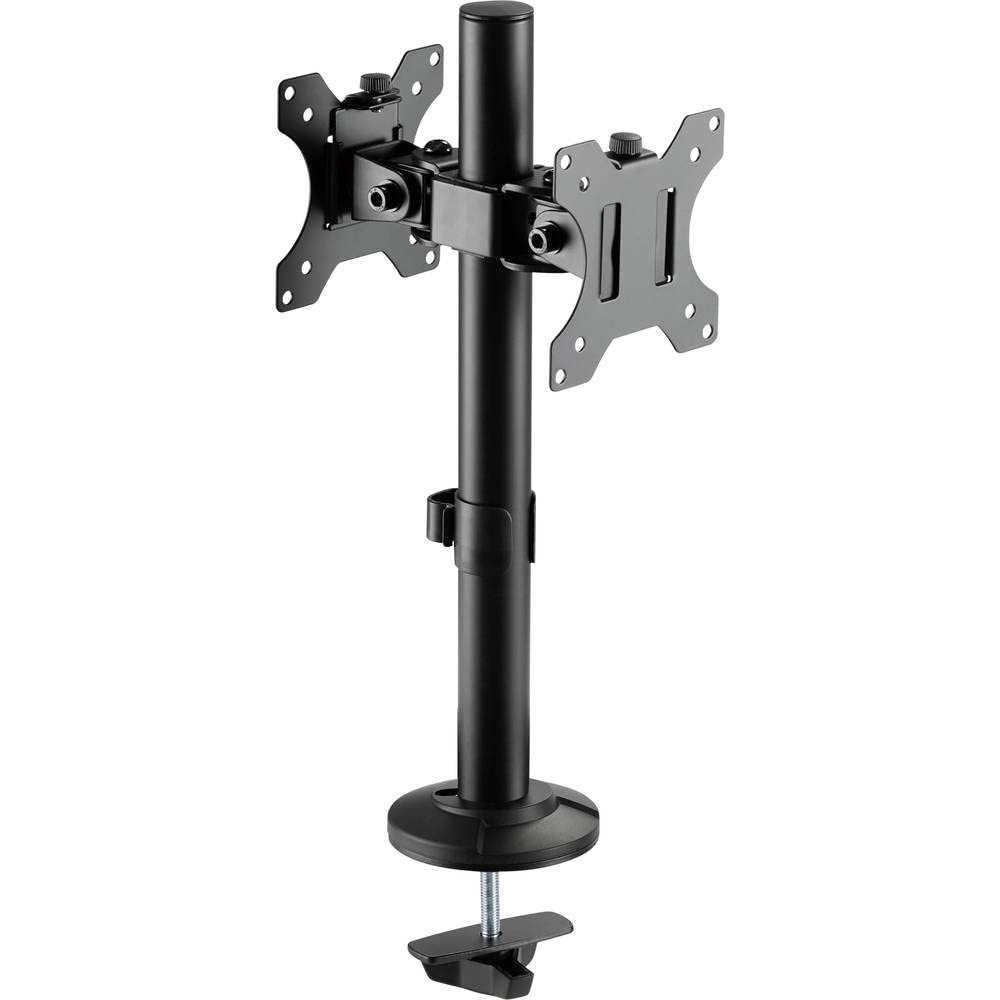
Figure 1: SpeaKa Professional Dual Monitor Mount (SP-8986136) overview.
2. Maklumat Keselamatan
- Pastikan semua komponen ada dan tidak rosak sebelum pemasangan.
- Do not exceed the maximum weight capacity specified for the mount.
- Install the mount on a stable and sturdy surface capable of supporting the combined weight of the mount and monitors.
- Tighten all screws securely, but do not overtighten to avoid stripping threads.
- Jauhkan kanak-kanak dan haiwan peliharaan semasa pemasangan.
- If you encounter any difficulties, consult a qualified professional.
3. Kandungan Pakej
Please verify that all parts are included in your package. If any parts are missing or damaged, contact customer support.
- Main Pole with Clamp Pangkalan
- VESA Monitor Arms (2x)
- Plat VESA (2x)
- Optional Screw Base
- Kit Perkakasan (skru, pencuci, kunci Allen)
- Klip Pengurusan Kabel
4. Persediaan dan Pemasangan
The SpeaKa Professional Dual Monitor Mount offers two installation options: a clamp base for most tables and desks, and a screw base for added security.
4.1. Memilih Pilihan Pemasangan Anda

Rajah 2: Clamp base (left) and screw base (right) options.
- Clamp Pangkalan: Ideal for desks with an edge. Provides strong support without drilling.
- Screw Base: Requires drilling a hole through the desk. Offers maximum stability and security.
4.2. Clamp Pemasangan Pangkalan
- Lampirkan clamp tapak ke bahagian bawah tiang utama.
- Letakkan tiang utama di tepi meja anda.
- Ketatkan clamp skru sehingga dudukan dipasang dengan kukuh pada meja. Pastikan ia stabil dan tidak goyah.
4.3. Screw Base Installation (Grommet Mount)
- If your desk has a grommet hole, ensure it is large enough for the screw base. If not, drill a suitable hole (consult desk manufacturer for recommendations).
- Attach the screw base to the bottom of the main pole.
- Masukkan tiang utama melalui lubang grommet.
- Secure the screw base from underneath the desk using the provided hardware. Tighten firmly.
4.4. Attaching Monitor Arms and VESA Plates
- Slide the monitor arms onto the main pole at your desired height. Use the provided Allen key to tighten the set screw on each arm.
- Attach the VESA plates to the back of your monitors using the appropriate screws from the hardware kit. Ensure the VESA pattern (e.g., 75x75mm or 100x100mm) matches your monitor.
- Carefully slide the monitors (with VESA plates attached) onto the monitor arms. Secure them with the locking mechanism on the VESA plate.
5. Pengendalian dan Pelarasan
The monitor mount allows for various adjustments to achieve an optimal viewpengalaman dalam.
- Pelarasan Ketinggian: Loosen the set screw on the monitor arm, adjust the arm to the desired height on the main pole, and re-tighten the screw.
- Pelarasan Kecondongan: The monitor can be tilted up to 90 degrees. Loosen the tilt knob on the VESA plate, adjust the monitor angle, and re-tighten.
- Pelarasan Pusing: The monitor arms can swivel horizontally along the main pole. The VESA plate also allows for 360-degree rotation, enabling portrait or landscape orientation.
- Pengurusan Kabel: Use the integrated cable management clips on the main pole to route and organize your monitor cables for a tidy workspace.

Gambar 3: Cthample of dual monitor application in a retail setting.
6. Penyelenggaraan
Penyelenggaraan berkala memastikan ketahanan dan operasi yang selamat pada dudukan monitor anda.
- Pembersihan: Lap pelekap dengan lembut, damp kain. Elakkan pembersih atau pelarut yang melelas.
- Pemeriksaan kekejangan: Periksa semua skru dan sambungan secara berkala untuk memastikan ia kekal ketat. Ketatkan semula jika perlu.
- Kapasiti Berat: Do not add monitors that exceed the specified weight capacity.
7. Penyelesaian masalah
| Masalah | Kemungkinan Punca | Penyelesaian |
|---|---|---|
| Monitor wobbles or sags. | Screws are loose; mount not securely fastened to desk; monitor too heavy. | Check and tighten all screws on the VESA plate, monitor arm, and desk clamp/screw base. Ensure monitor weight is within limits. |
| Difficulty adjusting monitor position. | Adjustment knobs/screws are too tight. | Slightly loosen the relevant adjustment knob or screw (e.g., tilt knob, arm height screw) before attempting to adjust. Re-tighten after positioning. |
| Cables are messy. | Pengurusan kabel tidak digunakan. | Route cables through the integrated cable management clips on the main pole. |
8. Spesifikasi
| Nombor Model | SP-8986136 |
| Jenama | SpeaKa Professional |
| Jenis Pemasangan | Tabletop Mount (Clamp atau Grommet) |
| Jenis Pergerakan | Swivel, Tilt, Rotation (360°) |
| Sudut Kecondongan Maksimum | 90 Darjah |
| Peranti Serasi | Monitor (VESA compatible) |
| warna | Hitam |
| Berat Barang | 2.15 Kilogram |
| Dimensi Pakej | 46.3 x 35.2 x 10.1 cm |
| Tarikh Tersedia Pertama | 24 Julai 2020 |
9. Maklumat Waranti
SpeaKa Professional products are designed for durability and performance. For specific warranty terms and conditions, please refer to the warranty card included with your product or visit the official SpeaKa Professional webtapak. Simpan bukti pembelian anda untuk tuntutan waranti.
10. Sokongan Pelanggan
If you have any questions, require technical assistance, or need to report a missing/damaged part, please contact SpeaKa Professional customer support.
- Sokongan dalam talian: Visit the official SpeaKa Professional webtapak untuk Soalan Lazim dan sumber sokongan.
- Maklumat Hubungan: Rujuk pembungkusan produk atau arahan rasmi website for current contact details (phone, email).


