1. Pengenalan
Thank you for choosing the Lepro Smart LED Strip Light. This manual provides essential information for the safe and efficient use of your new LED strip light. Please read these instructions carefully before installation and operation, and retain them for future reference.
2. Maklumat Keselamatan
- Pastikan bekalan kuasa diputuskan sebelum pemasangan atau penyelenggaraan.
- Vol operasitage is 12V. Use only the provided power adapter.
- This product is IP65 waterproof, suitable for both indoor and outdoor use. However, the power adapter and controller are not waterproof and must be protected from moisture.
- Do not bend the LED strip sharply or apply excessive force, as this may damage the circuit.
- Jauhkan daripada kanak-kanak.
- The LED strip is designed with short-circuit protection for enhanced safety.
- Elakkan pendedahan mata secara langsung kepada sumber cahaya untuk tempoh yang lama.
3. Kandungan Pakej
Sahkan bahawa semua komponen terdapat dalam pakej:
- 5m RGB IP65 Waterproof LED Strip
- Pengawal WiFi
- Power Adapter (European Adapter 12V 1.5A)
- Alat Kawalan Jauh
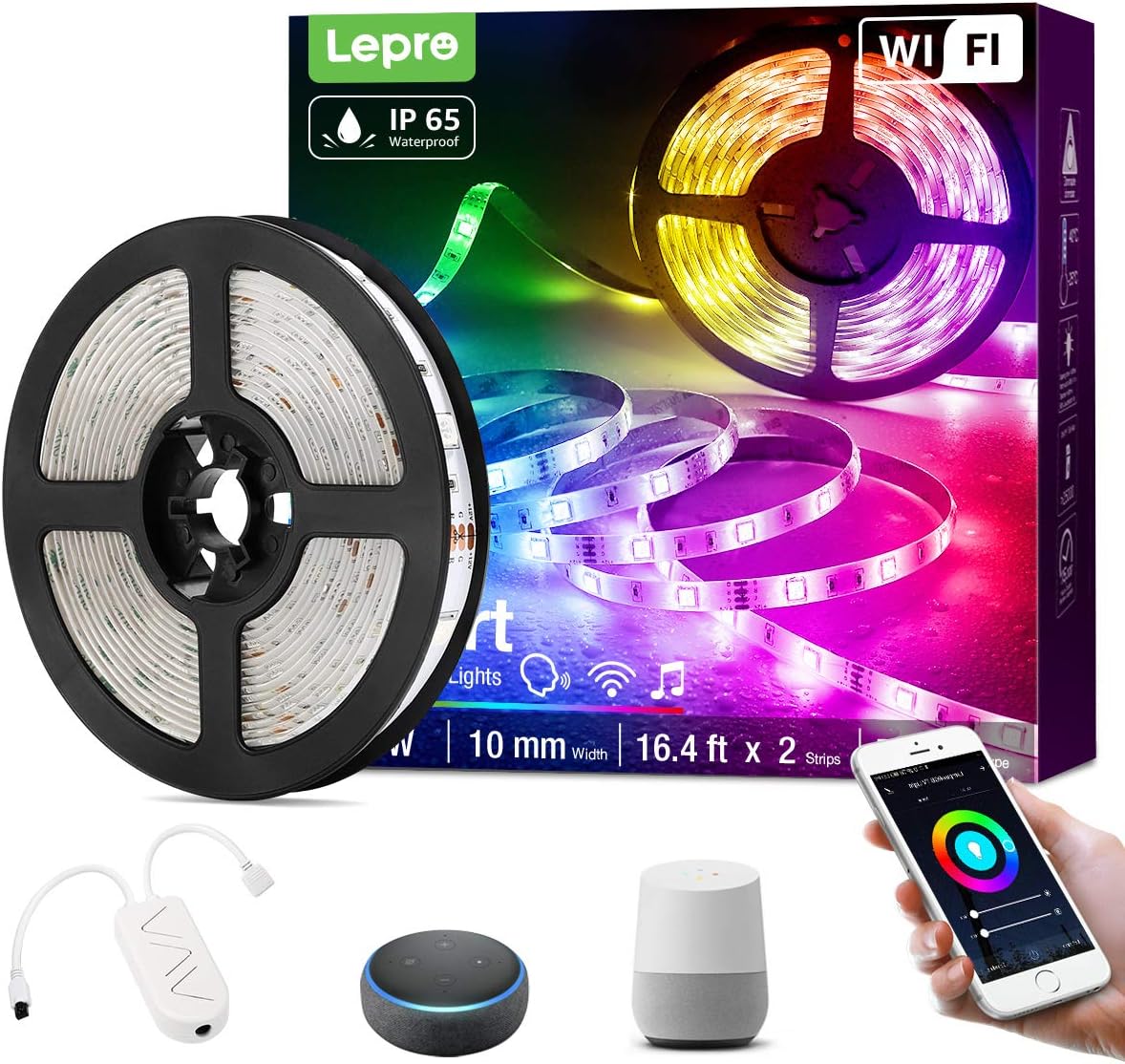
Imej 3.1: Berakhirview of the Lepro Smart LED Strip Light and its included components, such as the LED strip reel, WiFi controller, and power adapter.
4. Ciri-ciri Produk
- Kawalan Pintar: Connects via WiFi (2.4 GHz only) for stable control.
- Kawalan Suara: Compatible with Amazon Alexa and Google Assistant, no additional hub required.
- Fungsi Apl: Features include countdown, automatic execution, timer function for preset scenarios, and various scene modes.
- Dimmable RGB: Offers a wide range of colors and adjustable brightness.
- IP65 Kalis Air: Designed for versatile indoor and outdoor decoration.
- Kecerahan yang tinggi: Equipped with 30 LEDs per meter for enhanced illumination.
- Selamat untuk Disentuh: Operates at a low 12V, ensuring minimal heat and safety.

Imej 4.1: The IP65 waterproof LED strip installed in an outdoor setting, demonstrating its suitability for various environments.

Imej 4.2: Top image shows a hand safely holding the illuminated LED strip. Bottom image provides a close-up view of the IP65 waterproof coating on the LED strip.
5. Panduan Pemasangan
- Bersihkan Permukaan: Pastikan permukaan pemasangan bersih, kering dan licin.
- Ukur dan Potong (Pilihan): If necessary, measure the desired length and cut the LED strip only at the designated cutting marks (usually indicated by a scissor icon or copper pads).
- Kupas dan Tongkat: Remove the adhesive backing from the LED strip and firmly press it onto the desired surface.
- Sambungkan Komponen: Connect the LED strip to the WiFi controller, and then connect the controller to the power adapter.
- Pasangkan: Palamkan penyesuai kuasa ke soket elektrik standard.
6. Arahan Operasi
6.1 Basic Control with Controller Button
After plugging in the strip, you can use the physical button on the controller to:
- Turn the lights ON/OFF.
- Cycle through different scene modes.
- Reset the device (usually by holding the button for several seconds).
6.2 Smart Control via Lepro LampUX App
For full functionality, download the "Lepro LampUX" app from your smartphone's app store.
- Muat turun Aplikasi: Cari untuk "Lepro LampUX" and install it.
- Daftar/Log Masuk: Buat akaun atau log masuk.
- Tambah Peranti: Follow the in-app instructions to add your LED strip light. Ensure your phone is connected to a 2.4 GHz WiFi network during setup.
- Kawalan: Once connected, you can control power, color, brightness, set timers, schedules, and customize scene modes directly from the app.

Imej 6.1: A smartphone screen showing the Lepro LampUX app interface, including a color wheel for light customization and options for smart control. The image also depicts a modern home with LED strip lighting.

Imej 6.2: A collage of smartphone screens illustrating various features of the Lepro LampUX app, such as timer settings, scheduling, color options, smart modes, scene modes, and DIY customization.
6.3 Voice Control with Alexa/Google Assistant
To enable voice control, link your Lepro LampUX account with Amazon Alexa or Google Assistant:
- Open Smart Assistant App: Open the Amazon Alexa or Google Home app on your smartphone.
- Dayakan Kemahiran/Tindakan: Cari untuk the "LE Lampux" skill (for Alexa) or action (for Google Assistant) and enable it.
- Pautkan Akaun: Follow the prompts to link your Lepro LampUX account.
- Cari Peranti: Setelah dipautkan, minta pembantu pintar anda untuk menemui peranti baharu.
- Perintah Suara: You can now use voice commands such as "Alexa, turn on the bedroom light" or "Hey Google, change the strip light to purple."

Imej 6.3: A visual guide on a smartphone screen demonstrating the process of linking the Lepro LampUX app with Amazon Alexa, showing the steps to enable the skill and connect accounts.

Imej 6.4: A family enjoying LED strip lighting in their living room, with smart speakers visible, illustrating the convenience of voice control with commands like "Alexa, change the strip light to purple."
7. Penyelenggaraan
- Pembersihan: Gently wipe the LED strip with a soft, dry cloth. Do not use abrasive cleaners or solvents.
- Pemeriksaan: Periksa jalur dan sambungan secara berkala untuk sebarang tanda kerosakan atau haus.
- Storan: If storing the strip for an extended period, ensure it is clean, dry, and coiled loosely to prevent damage.
8. Penyelesaian masalah
| Masalah | Kemungkinan Punca | Penyelesaian |
|---|---|---|
| Jalur LED tidak menyala. | Tiada kuasa, sambungan longgar, penyesuai rosak. | Check power outlet, ensure all connections are secure, try a different outlet. |
| Tidak dapat menyambung ke WiFi. | Incorrect WiFi band (not 2.4 GHz), incorrect password, too far from router. | Ensure your router is broadcasting a 2.4 GHz signal. Verify WiFi password. Move the strip closer to the router. Reset the controller and try again. |
| Kawalan suara tidak berfungsi. | Skill/Action not enabled, account not linked, incorrect commands. | Check if the "LE Lampux" skill/action is enabled and your account is linked in the Alexa/Google Home app. Use precise commands. |
| Colors are inconsistent or incorrect. | Damaged section of the strip, connection issue. | Inspect the strip for physical damage. Ensure connections are firm. |
9. Spesifikasi
| Atribut | Perincian |
|---|---|
| Jenama | Kusta |
| Nombor Model | PR904116-RGB-WP-EU |
| Dimensi Produk | 16.5 x 16.5 x 6.5 cm (berbungkus) |
| Berat Barang | 320 gram |
| Panjang | 5 meter |
| warna | RGB |
| Penilaian Kalis Air | IP65 (Jalur LED sahaja) |
| Voltage | 12 Volt |
| kuasa | 24 Watt |
| Jenis Mentol | LED |
| Ketersambungan | WiFi (2.4 GHz only) |
| Keserasian | Amazon Alexa, Pembantu Google |
| Komponen yang Disertakan | LED Strip, WiFi Controller, Remote Control, Power Adapter |
10. Waranti dan Sokongan
For warranty information or technical support, please refer to the documentation included with your purchase or visit the official Lepro weblaman web. Butiran hubungan untuk khidmat pelanggan biasanya terdapat pada pembungkusan produk atau halaman sokongan dalam talian jenama.


