pengenalan
This manual provides detailed instructions for the installation and care of your Subaru R1/R2 Navigation Audio Installation Panel. This is a new, genuine product designed specifically for Subaru R1 (RJ) and R2 (RC) models, facilitating the installation of 2DIN audio or navigation units. The panel comes complete with necessary brackets and screws for a secure fit.
Persediaan dan Pemasangan
Careful installation ensures proper fitment and functionality of your audio or navigation unit. Please follow these steps:
- Sediakan Kenderaan: Ensure the vehicle's power is off and the existing audio/navigation unit (if any) has been safely removed. Disconnect the car battery's negative terminal as a safety precaution.
- Kenal pasti Komponen: Verify all components are present: the main installation panel, two mounting brackets (one for left, one for right), and a set of screws.
- Attach Brackets to the Panel: Align the left (LH) and right (RH) mounting brackets with the corresponding attachment points on the rear of the installation panel. Secure them firmly using the provided screws.
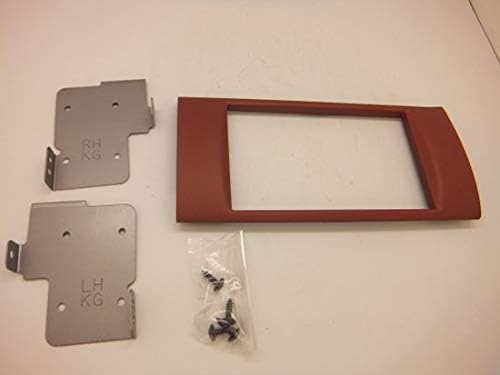
Image: All components included in the package: the red installation panel, two metal mounting brackets (labeled RH and LH), and a small bag of screws.

Imej: Belakang view of the installation panel, showing the clips and screw holes where the metal mounting brackets attach. The brackets are visible on the left.
- Install Audio/Navigation Unit: Mount your 2DIN audio or navigation unit into the opening of the installation panel. The inner dimensions of the panel's window frame are approximately 10cm (height) by 17.4cm (width). Ensure the unit fits snugly.
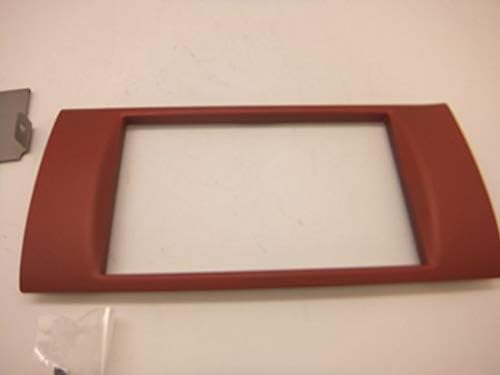
Imej: Depan view of the red installation panel, highlighting the central opening designed for a 2DIN audio or navigation unit.
- Secure Assembly in Dashboard: Carefully slide the assembled panel with the audio/navigation unit into the vehicle's dashboard opening. Use the mounting brackets to secure the entire assembly to the vehicle's frame using appropriate screws (not necessarily included with this panel, but typically with the audio unit or vehicle).
- Sambung semula Bateri: Once the installation is complete and secure, reconnect the car battery's negative terminal.
Pertimbangan Operasi
This installation panel serves as a bezel and mounting frame for your 2DIN audio or navigation system. Its primary function is to provide a seamless and secure fit for your aftermarket unit within the Subaru R1/R2 dashboard. Once installed, the panel itself does not require operation; its function is passive, supporting the installed device.
- Ensure the installed audio/navigation unit's controls and display are fully accessible and not obstructed by the panel.
- Verify that all connections to the audio/navigation unit are secure and functioning correctly after installation.
Penyelenggaraan
To maintain the appearance and integrity of your installation panel:
- Pembersihan: Gunakan yang lembut, damp cloth to wipe the surface of the panel. Avoid abrasive cleaners or solvents, as these can damage the finish.
- Perlindungan: Protect the panel from direct prolonged exposure to sunlight and extreme temperatures, which can cause discoloration or warping over time.
- Pemeriksaan: Periodically check the panel and the installed unit for any signs of looseness or damage. Tighten screws if necessary.
Menyelesaikan masalah
Jika anda menghadapi masalah semasa atau selepas pemasangan, pertimbangkan perkara berikut:
- Panel Does Not Fit:
- Ensure your vehicle is a Subaru R1 (RJ) or R2 (RC) model. This panel is specifically designed for these models.
- Verify that the audio/navigation unit you are installing is a standard 2DIN size. The panel's inner window frame dimensions are approximately 10cm x 17.4cm.
- Check for any obstructions in the dashboard opening or misaligned wiring that might prevent the panel from seating correctly.
- Unit Feels Loose After Installation:
- Ensure the mounting brackets are securely attached to both the panel and the vehicle's dashboard frame.
- Confirm that the audio/navigation unit is properly secured within the panel's opening.
- Komponen yang Hilang:
- If any parts (panel, brackets, screws) are missing upon receipt, please contact your retailer for assistance.
Spesifikasi
| Ciri | Perincian |
|---|---|
| Jenis Produk | Navigation Audio Installation Panel |
| Jenama | SUBARU |
| Nombor Model | H6247 |
| Keserasian | Subaru R1 (RJ), R2 (RC) models; for 2DIN audio/navigation units |
| Inner Window Frame Dimensions | Approximately 10cm (Height) x 17.4cm (Width) |
| Komponen yang Disertakan | Installation Panel, Mounting Brackets (LH/RH), Screws |
Waranti dan Sokongan
Information regarding specific warranty terms or direct manufacturer support for this product is not available in the provided details. For warranty claims or technical assistance, please refer to the documentation provided with your purchase or contact the retailer from whom you acquired this product.


