pengenalan
The Nitecore LR70 is a versatile device designed for multiple applications, combining the functions of a high-performance flashlight, a diffused area lantern, and a portable power bank. This manual provides detailed instructions for its proper use, maintenance, and troubleshooting.

Image: The Nitecore LR70, illustrating its compact design with the flashlight at one end and the translucent lantern body.
Ciri-ciri Utama
- Flashlight mode with up to 3000 lumens output and a 300-meter beam distance.
- Lantern mode providing up to 400 lumens with red light options.
- Integrated backup power source with USB-C for QC/PD fast charging.
- Long runtime, up to 600 hours on a single charge.
- Airline-approved under UN38.3 Standard.
- IP67 water-resistant rating and 1-meter impact resistance.

Image: A visual representation highlighting the LR70's capabilities as a flashlight, power bank, lantern, and warning light.
Persediaan
Pengecasan Awal
Before first use, fully charge the Nitecore LR70. Connect the included USB-C cable to the device's USB-C port and to a compatible USB power adapter (not included). The power indicator will show charging status. A full charge ensures optimal performance for all functions.
Penunjuk Kuasa
The power indicator provides information on the remaining battery level. Refer to the device's specific indicator patterns for detailed battery status.
Arahan Operasi
The LR70 features a single button for controlling all functions. The button is located on the side of the device, labeled "LR70" with a power symbol.

Image: A close-up of the LR70's front, highlighting the main control button and the dual flashlight lenses.
Mod Lampu Suluh
- Hidupkan/Matikan: Press and hold the control button for approximately 1 second to turn the flashlight on or off.
- Pelarasan Kecerahan: While the flashlight is on, short press the control button to cycle through brightness levels (Low, Mid, High, Higher, Turbo).

Image: The LR70 in flashlight mode, demonstrating its long-range coverage of 300 meters, illuminating a distant area.
Mod Tanglung
- Hidupkan/Matikan: Double-press the control button to turn the lantern on or off.
- Pelarasan Kecerahan: While the lantern is on, short press the control button to cycle through brightness levels (Low, Mid, High).

Image: The LR70 functioning as a lantern, providing ambient white light in a dark outdoor setting.
Red Light Modes (Lantern)
- Activate Red Light: From lantern mode, continue short pressing the control button after the highest white light setting to access Red Low, Red High, Red SOS, and Red Beacon modes.
- SOS Merah: This mode emits a flashing red light signal for emergencies.
- Red Beacon: This mode emits a steady flashing red light for signaling or location marking.

Image: The LR70 in Red Beacon mode, providing enhanced safety and visibility in low-light conditions.

Image: The LR70 providing red light illumination, suitable for activities like map viewing or night photography to preserve night vision.
Fungsi Power Bank
The LR70 can charge external devices via its USB-C port. Connect your device to the LR70 using a compatible USB-C cable. The LR70 supports QC/PD fast charging for various electronic devices, including smartphones and tablets. It also features a low-current mode suitable for charging smaller devices like smartwatches or earphones.

Image: A graphic detailing the LR70's power bank features, including its 10,000mAh capacity, 18W QC/PD fast charging, and USB-C input/output.
Placement and Carrying
The LR70 is designed for versatile placement. It can stand upright on flat surfaces, be hung using its integrated loop, or carried by hand. This flexibility makes it suitable for various outdoor and indoor scenarios.
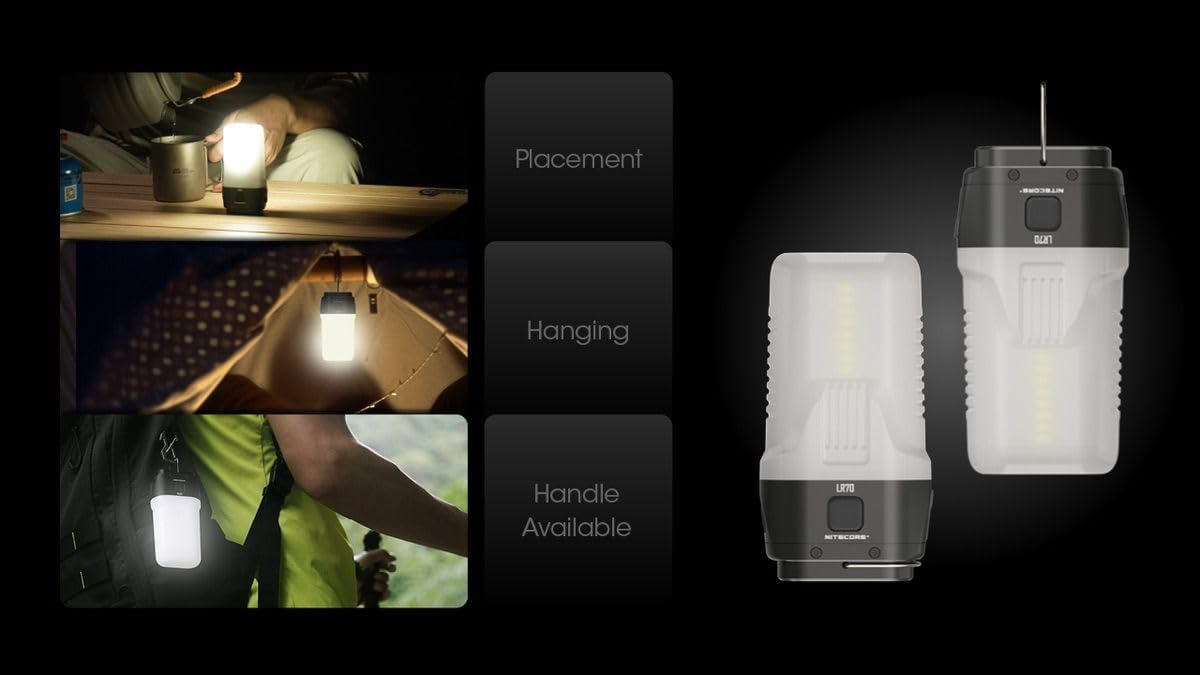
Imej: Cthamples of the LR70's versatile usage, including tabletop placement, hanging inside a tent, and attachment to a backpack.
Penyelenggaraan
- Pembersihan: Lap peranti dengan lembut, damp kain. Elakkan pembersih atau pelarut yang melelas.
- Storan: Store the LR70 in a cool, dry place when not in use. For long-term storage, charge the battery every three months to maintain battery health.
- Tahan Air: The LR70 has an IP67 rating, meaning it is protected from dust and can withstand immersion in water up to 1 meter for 30 minutes. Ensure the USB-C port cover is securely closed to maintain water resistance.
Menyelesaikan masalah
- Peranti Tidak Dihidupkan: Ensure the battery is charged. Connect the device to a power source using the USB-C cable and attempt to turn it on after a few minutes of charging.
- Flashlight/Lantern Not Bright: Check the battery level. Lower brightness settings are used to conserve battery. Recharge if necessary.
- Peranti Luaran Tidak Mengecas: Ensure the LR70 has sufficient battery charge. Verify the USB-C cable is properly connected to both the LR70 and the external device. Some devices may require specific charging protocols; ensure compatibility.
- Kemasukan air: If water enters the device, immediately turn it off and allow it to dry completely before attempting to use it again. Contact customer support if issues persist.
Spesifikasi
The following table provides detailed technical specifications for the Nitecore LR70.

Image: Technical data table detailing performance metrics for the LR70 in both flashlight and lantern modes, including brightness levels, runtimes, and environmental resistances.
| Ciri | Perincian |
|---|---|
| Model | LR70 |
| Max Brightness (Flashlight) | 3000 Lumen |
| Jarak Pancaran Maks | 300 Meter |
| Max Brightness (Lantern) | 400 Lumen |
| Masa Jalanan Maks | 600 Hours (Low Lantern Mode) |
| Jenis Bateri | Built-in Lithium Ion (10000mAh) |
| Port Pengecasan | USB-C (Input & Output, QC/PD Fast Charging) |
| Tahan Air | IP67 |
| Rintangan Kesan | 1 Meter |
| Dimensi | 1.18"D x 2.36"W x 4.33"H |
| Berat badan | 3.53 auns (100 Gram) |
| bahan | logam |
Waranti dan Sokongan
Nitecore products are covered by a warranty. For specific warranty terms and conditions, please refer to the warranty card included with your product or visit the official Nitecore website. For technical support, service, or inquiries, please contact Nitecore customer service directly.
Simpan resit pembelian anda sebagai bukti pembelian untuk tuntutan waranti.


