1. Pengenalan
The Sense-U Pro Baby Monitor is designed to provide parents with real-time information regarding their baby's well-being. This device clips onto your baby's diaper and monitors abdominal movement, body temperature, and sleep position. It integrates with the Sense-U Baby app to deliver alerts and detailed sleep analysis directly to your smartphone.
This manual provides essential instructions for the proper setup, operation, and maintenance of your Sense-U Pro Baby Monitor. Please read it thoroughly before use to ensure safe and effective monitoring.
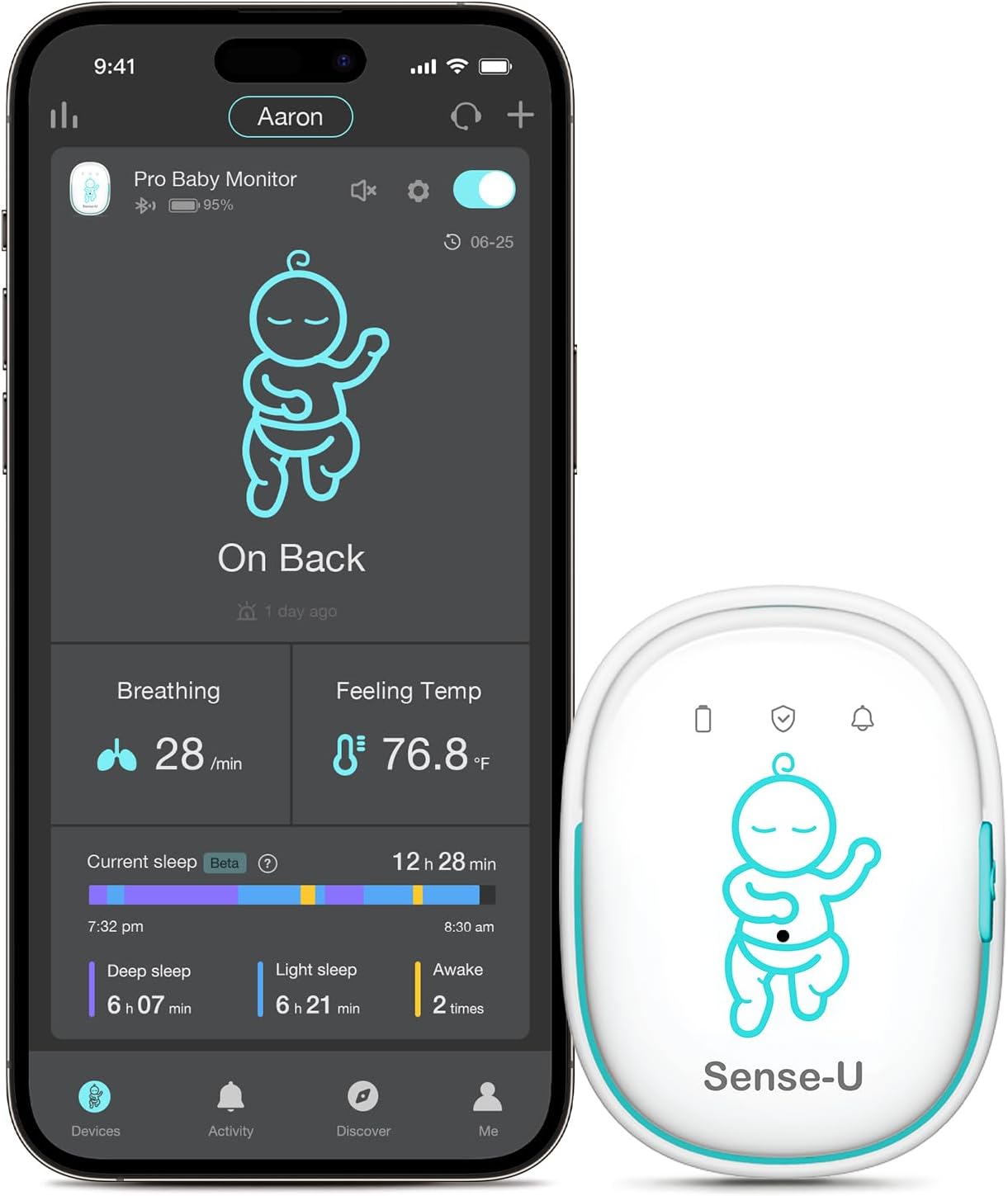
Image: Sense-U Pro Baby Monitor and its accompanying smartphone application interface.
2. Maklumat Keselamatan Penting
DISCLAIMER: The Sense-U Pro smart baby monitor is NOT a medical device and is NOT intended for use in the diagnosis of disease or other conditions, or in the cure, mitigation, treatment, or prevention of disease. This product is meant for use with healthy children up to 18 months of age. If your child has a pre-existing medical condition, consult your doctor before use.
- Always ensure the monitor is securely clipped to the diaper or clothing to prevent choking hazards.
- Do not allow the baby to play with the monitor.
- Keep the monitor and charging cable out of reach of children.
- The device uses Bluetooth Low Energy (BLE 4.0+), which has a negligible radiation level (1/1000 of a smartphone).
- For optimal wireless connection, it is recommended to stay in the same room as the baby.
3. Panduan Persediaan
3.1 Kandungan Pakej
Before starting, verify that all components are present:
- Sense-U Pro Baby Monitor device
- Kabel Pengecas USB
- Manual Pengguna (dokumen ini)
3.2 Mengecas Peranti
Before first use, fully charge the Sense-U Pro Baby Monitor. Connect the provided USB charging cable to the monitor's charging port and a standard USB power adapter (not included). The indicator light will show charging status.

Image: Sense-U Pro Baby Monitor charging via USB cable.
3.3 Downloading the Sense-U Baby App
The Sense-U Pro Baby Monitor operates with the Sense-U Baby app. Download the app from your smartphone's app store:
- Untuk peranti iOS: Cari untuk "Sense-U Baby" on the Apple App Store.
- Untuk peranti Android: Cari untuk "Sense-U Baby" on the Google Play Store.
Image: Sense-U Baby App download options.
3.4 Pairing the Monitor with Your Smartphone
- Pastikan Bluetooth didayakan pada telefon pintar anda.
- Open the Sense-U Baby app and follow the on-screen instructions to create an account or log in.
- Select "Add Device" and choose the Sense-U Pro Baby Monitor.
- Press and hold the power button on the Sense-U Pro monitor until the indicator light flashes, indicating it's in pairing mode.
- Confirm pairing within the app.
Image: Sense-U Pro Baby Monitor connected to a smartphone via Bluetooth.
4. Arahan Operasi
4.1 Memasang Monitor
Securely clip the Sense-U Pro Baby Monitor onto your baby's diaper or snug-fitting sleepwear. Ensure the monitor is positioned near the baby's abdomen for accurate movement detection. The device should be worn snugly but not too tightly.
Image: Correct attachment of the Sense-U Pro Baby Monitor.
4.2 Monitoring Features
- Abdominal Movement: The monitor tracks subtle abdominal movements. If no movement is detected for 15 seconds, the device will gently vibrate to rouse the baby. If movement is still not detected, an audible alarm will sound, and a notification will be sent to your smartphone.
- Rollover Detection: Alerts you if your baby rolls onto their stomach, which may be an unsafe sleep position.
- Pemantauan Suhu: Detects if your baby's body temperature is too warm or too cold, sending alerts to your app.
- Analisis Tidur: The Sense-U Baby app provides detailed sleep reports, including deep and light sleep stages, awake times, and overall sleep quality.

Image: Arousal vibration and audible alarm feature in action.
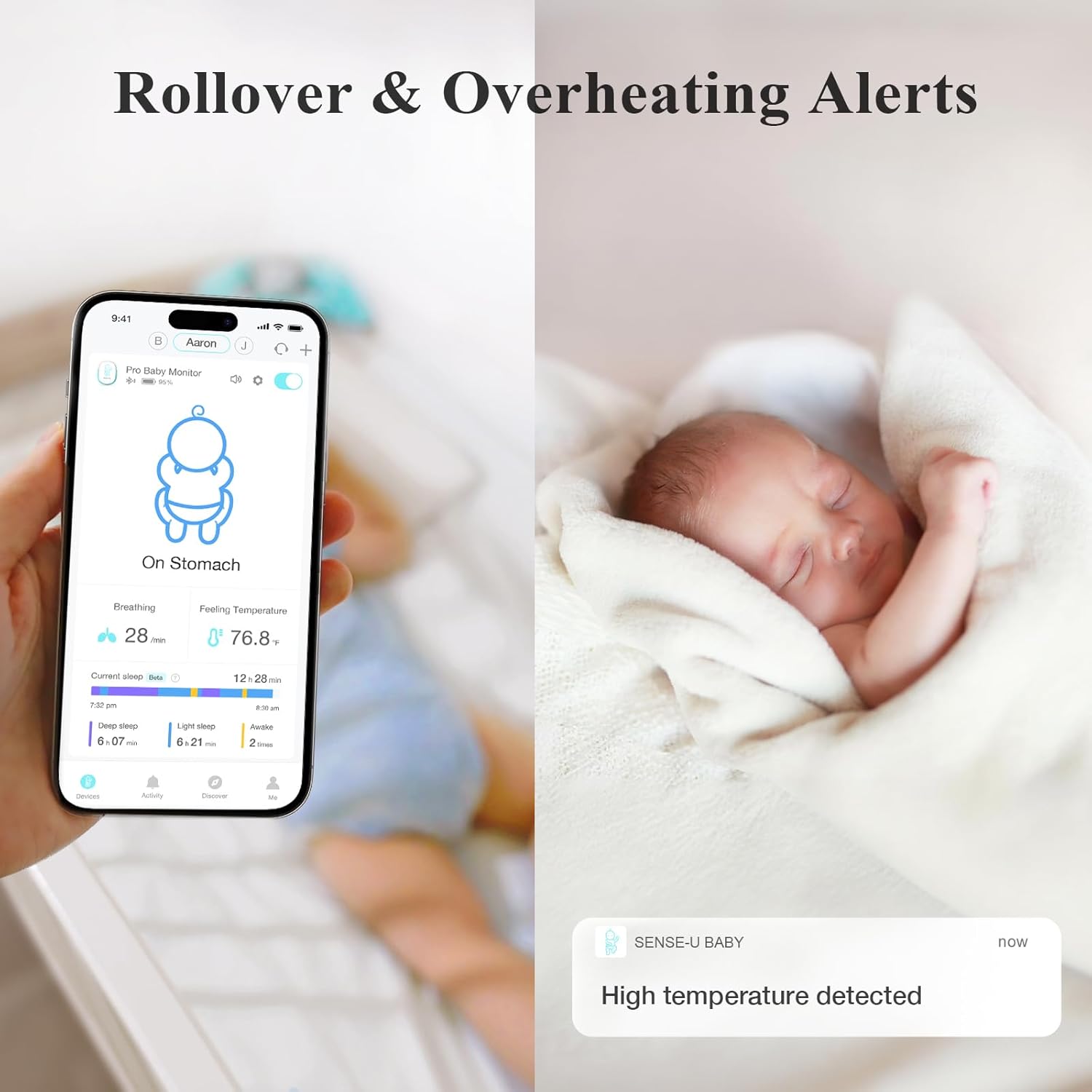
Image: Rollover and overheating alerts displayed on the Sense-U app.
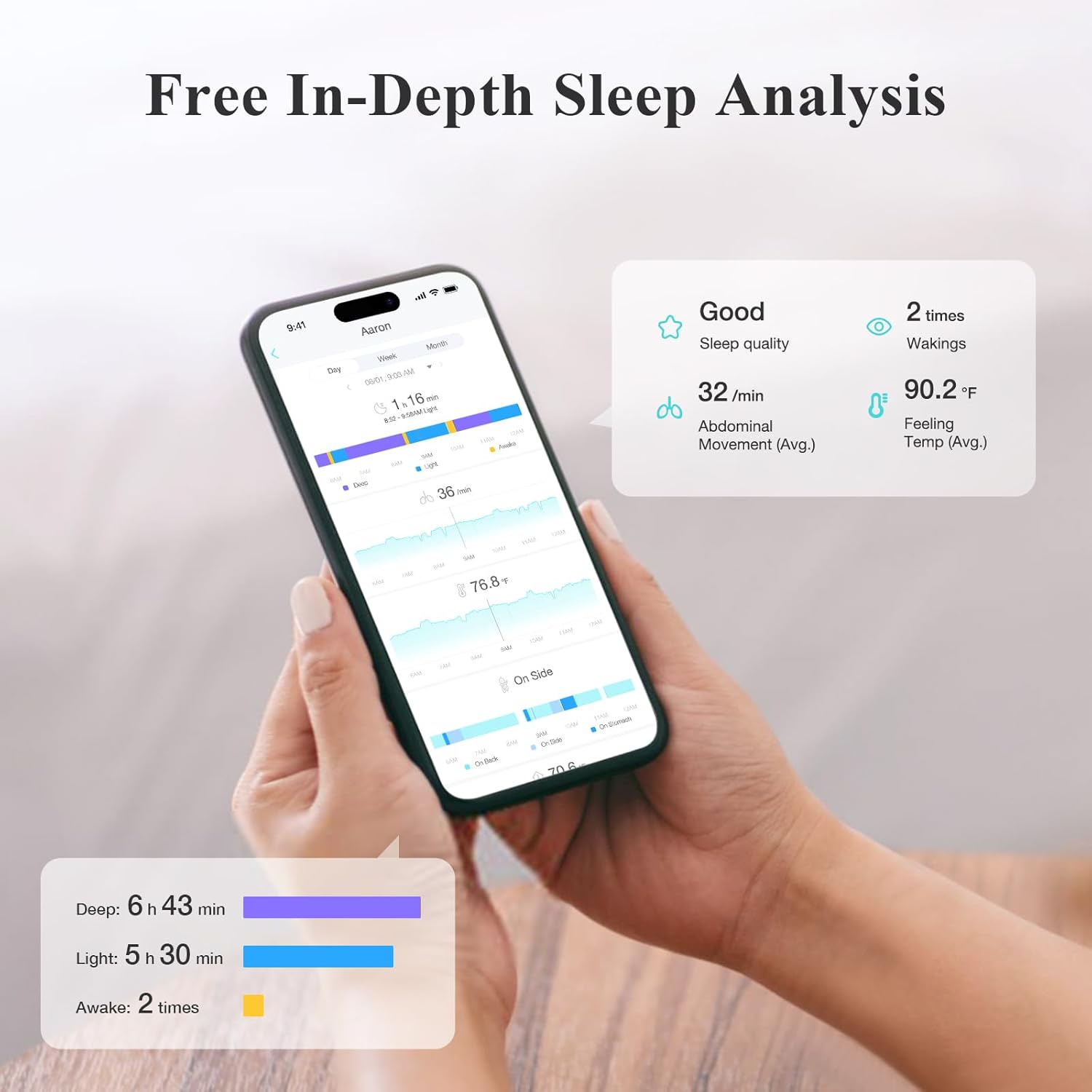
Image: In-depth sleep analysis available through the Sense-U app.
4.3 Device Indicator Lights
The Sense-U Pro monitor has indicator lights to provide quick status updates:
- Lampu Hijau: Indicates normal operation and that your baby is okay.
- Lampu Merah: Indicates a warning or alert, prompting you to check your baby.
- Cahaya Berkelip: May indicate pairing mode or a specific alert condition. Refer to the app for details.
Imej: Selesaiview of Sense-U Pro Baby Monitor components and indicator light meanings.
5. Penyelenggaraan
5.1 Pembersihan
Wipe the monitor with a soft, dry cloth. Do not use harsh chemicals or abrasive cleaners. Ensure the device is completely dry before use or charging.
5.2 Hayat Bateri dan Pengecasan
The Sense-U Pro Baby Monitor features a rechargeable Lithium-Ion battery. A full charge provides approximately 7+ days of monitoring when used 8 hours per day. Recharge the device using the provided USB cable when the battery is low.
Image: Sense-U Pro Baby Monitor charging.
6. Penyelesaian masalah
| Masalah | Kemungkinan Punca | Penyelesaian |
|---|---|---|
| No data in app / Device disconnected | Bluetooth out of range, device off, low battery, app not running. | Ensure smartphone is within 50 feet (open space) of the monitor. Check device power and battery. Restart app. |
| False alarms for movement | Monitor not securely attached, baby in a moving object (swing, car seat). | Re-attach monitor snugly to diaper/clothing. Do not use in moving environments. |
| Bacaan suhu tidak tepat | Monitor not in proper contact with baby's skin/clothing. | Ensure the monitor is positioned correctly and snugly against the baby. |
| Peranti tidak dicas | Faulty cable, power adapter, or charging port. | Try a different USB cable and power adapter. Clean the charging port gently. Contact support if issue persists. |
7. Spesifikasi
- Jenama: Sense-U
- Nombor Model: SU-N3DT-US
- Bahan: Akrilonitril Butadiena Stirena (ABS)
- warna: hijau
- Peranti Serasi: Telefon pintar (iOS dan Android)
- Jenis Bateri: Litium-Ion (boleh dicas semula)
- Hayat Bateri: 7+ days (based on 8 hours/day usage)
- Jenis Sensor: Temperature, Movement
- Ketersambungan: Bluetooth Low Energy (BLE 4.0+)
- Julat Tanpa Wayar: Sehingga 50 kaki di kawasan lapang
- Dimensi Produk: 1.57 x 0.71 x 2.16 inci
- Berat Barang: 3.52 auns
- UPC: 631112864855
8. Waranti dan Sokongan
8.1 Maklumat Waranti
For specific warranty details, please refer to the warranty card included with your product or visit the official Sense-U webtapak. Pelan perlindungan juga mungkin tersedia untuk perlindungan lanjutan.
8.2 Sokongan Pelanggan
If you encounter any issues or have questions not covered in this manual, please contact Sense-U customer support through their official website or the Sense-U Baby app. Provide your product model number (SU-N3DT-US) and a detailed description of the issue for faster assistance.
Sumber Dalam Talian:


