pengenalan
This manual provides essential instructions for the safe and efficient operation of your Topp Pro TPM6250MKII Professional Expandable Mixer. Please read this manual thoroughly before using the device to ensure proper setup, operation, and maintenance. Retain this manual for future reference.
Maklumat Keselamatan
- Sumber Kuasa: Only connect the mixer to a power source specified in the specifications section. Ensure the voltage sepadan dengan kawasan anda.
- Pengudaraan: Jangan sekat bukaan pengudaraan. Pastikan aliran udara yang mencukupi di sekeliling unit untuk mengelakkan terlalu panas.
- Kelembapan: Do not expose the unit to rain or moisture. Avoid placing liquid-filled objects on the mixer.
- Servis: Rujuk semua servis kepada kakitangan perkhidmatan yang berkelayakan. Jangan cuba servis produk ini sendiri.
- Pembersihan: Putuskan kuasa sebelum membersihkan. Gunakan kain kering sahaja.
Persediaan
1. Membongkar
Carefully remove the mixer from its packaging. Inspect the unit for any signs of damage that may have occurred during transit. Retain the packaging for future transport or storage.
2. Kuasa Penyambung
Connect the provided power cord to the AC inlet on the rear panel of the mixer. Plug the other end into a suitable electrical outlet. Ensure the mixer's power switch is in the OFF position before connecting to power.

Penerangan Imej: This image displays the rear panel of the Topp Pro TPM6250MKII mixer. Visible components include the AC power inlet, ventilation grilles, and output jacks, along with regulatory labels. This view is crucial for understanding power connections and overall unit ventilation.
3. Connecting Audio Inputs
The TPM6250MKII features multiple input channels. Each channel typically includes XLR inputs for microphones and 1/4" TRS inputs for line-level sources. Connect your microphones, instruments, or other audio devices to the appropriate input jacks.
- Input Mikrofon (XLR): Use balanced XLR cables for microphones.
- Line Inputs (1/4" TRS): Use 1/4" TRS cables for line-level devices such as keyboards, drum machines, or other mixers.
- Input RCA: Dedicated RCA inputs are available for connecting consumer audio devices like CD players or media players.
4. Menyambung Output Audio
Sambungkan pembesar suara utama atau kuasa anda amplifier to the main output jacks. The mixer typically provides XLR outputs for balanced connections to professional audio equipment.
- Output Utama (XLR): Connect to your main PA system or powered speakers using balanced XLR cables.
- Output Pantau: If available, connect to stagmonitor atau fon kepala untuk tujuan pemantauan.
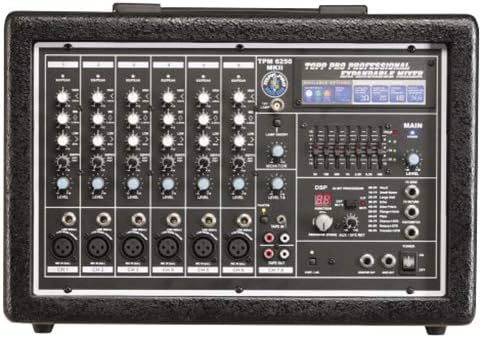
Penerangan Imej: This image shows the front control panel of the Topp Pro TPM6250MKII mixer. It highlights the various input channels with their respective gain, EQ, and level controls, along with the master section, DSP effects, and main output controls. This view is essential for understanding the mixer's operational layout.
5. Kuasa Awal Hidup
Once all connections are secure, switch the mixer's power to the ON position. Observe the power indicator light. Ensure all volume controls are set to their minimum level before playing any audio.
Arahan Operasi
1. Kawalan Saluran
- DAPATKAN: Melaraskan kepekaan input untuk setiap saluran. Tetapkan ini untuk mencapai isyarat yang kuat tanpa pemotongan (herotan).
- EQ (Penyamaan): Typically includes HIGH, MID, and LOW controls to shape the tone of each input.
- TINGKAT: Mengawal kelantangan output saluran individu ke campuran utama.
2. Output Utama
The MAIN LEVEL fader or knob controls the overall output volume of the mixer. Adjust this to the desired listening level for your main speakers.
3. Kesan DSP
The TPM6250MKII features a Digital Signal Processor (DSP) for effects. Use the DSP controls to select and apply various effects such as reverb, delay, or chorus to your audio. Refer to the display and dedicated controls for effect selection and parameter adjustment.
4. Pemantauan
Use the MONITOR controls to adjust the level of the mix sent to your headphones or stage monitors. This allows performers to hear themselves and other instruments clearly.
Penyelenggaraan
1. Pembersihan
Before cleaning, ensure the mixer is powered off and disconnected from the power source. Use a soft, dry cloth to wipe down the exterior. Do not use liquid cleaners, abrasive materials, or solvents, as these can damage the finish and internal components.
2. Penyimpanan
When not in use for extended periods, store the mixer in a cool, dry place, away from direct sunlight and extreme temperatures. If possible, use the original packaging or a protective case to prevent dust accumulation and physical damage.
3. Pengudaraan
Regularly check that the ventilation grilles on the unit are free from dust and debris to ensure proper heat dissipation.
Menyelesaikan masalah
| Masalah | Kemungkinan Punca | Penyelesaian |
|---|---|---|
| Tiada kuasa | Power cord disconnected; power switch off; faulty outlet. | Periksa sambungan kord kuasa; pastikan suis kuasa HIDUP; uji soket dengan peranti lain. |
| Tiada keluaran bunyi | Main level down; channel level down; faulty cables; speakers off/disconnected. | Increase MAIN LEVEL; increase individual channel LEVEL; check all audio cables; ensure speakers are powered and connected. |
| Bunyi herot | Input GAIN too high; output level too high; faulty cable/device. | Reduce input GAIN; reduce MAIN LEVEL; test with different cables/devices. |
| Tiada kesan bunyi | DSP effect level set to zero; effect not selected. | Increase DSP effect level; ensure an effect is selected and applied to the desired channel. |
Spesifikasi
| Ciri | Perincian |
|---|---|
| Jenama | Topp Pro |
| Nombor Model | TPM6250MKII |
| Jenis Peralatan | Pengadun Audio |
| Respons Kekerapan | 20Hz hingga 22kHz, +/-3dB |
| Keuntungan | 50 dB |
| Input Talian | Seimbang secara elektronik |
| Impedans Input Mikrofon | 1.5 k ohm |
| Kuasa Keluaran | 300W RMS at 1kHz, THD=1%, Load=4Ohm |
| Berat Bersih | 9.70 Kg (21.38 paun) |
| Sumber Kuasa | Elektrik Bertali |
| Teknologi Ketersambungan | XLR, TRS |
| Jenis Penyambung Output | XLR |
| Input Audio | Analog XLR, 1/4" or RCA jacks |
Waranti dan Sokongan
For warranty information and technical support, please refer to the documentation provided with your purchase or visit the official Topp Pro webtapak. Simpan bukti pembelian anda untuk tuntutan waranti.
For further assistance, contact Topp Pro customer service.


