1. Pengenalan
Terima kasih kerana membeliasing the SANGEAN WR-301 FM Radio and Bluetooth Speaker. This compact and stylish device combines classic aesthetics with modern functionality, offering both FM radio reception and seamless Bluetooth audio streaming. Its wooden cabinet design provides a rich audio experience, and the built-in rechargeable battery ensures portability with up to 36 hours of playback.
2. Maklumat Keselamatan
- Baca semua arahan dengan teliti sebelum digunakan.
- Jangan dedahkan unit kepada hujan, kelembapan atau suhu yang melampau.
- Elakkan meletakkan unit berhampiran sumber haba atau di bawah cahaya matahari langsung.
- Gunakan hanya kabel pengecasan dan penyesuai kuasa yang ditentukan.
- Jangan cuba membuka atau mengubah suai unit. Rujuk semua servis kepada kakitangan yang berkelayakan.
- Jauhkan daripada kanak-kanak.
3. Kandungan Pakej
Sila pastikan semua item ada:
- SANGEAN WR-301 FM Radio and Bluetooth Speaker Unit
- External Antenna Cable
- Kabel Pengecas USB
4. Produk Lebihview
Familiarize yourself with the various parts and controls of your SANGEAN WR-301.
Depan View
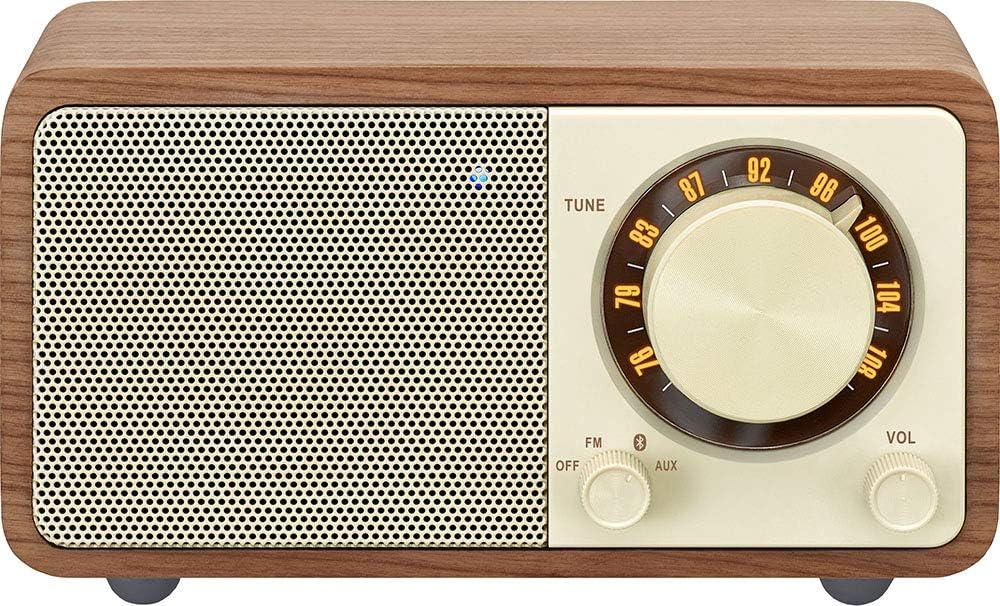
Imej: Depan view of the SANGEAN WR-301, showing the speaker grille, tuning dial, mode switch, and volume knob.
- Gril Pembesar Suara: Output audio.
- Dail Penalaan: Used to select FM radio frequencies.
- Mode Switch (FM/OFF/AUX): Selects between FM radio, powers off the unit, or selects AUX input.
- Tombol Kelantangan: Melaraskan tahap output audio.
belakang View

Imej: Belakang view of the SANGEAN WR-301, showing the external antenna port, AUX IN port, and DC IN (USB) port.
- EXT-ANT Port: Connects the external FM antenna for improved reception.
- Port AUX IN: Connects external audio devices via a 3.5mm audio cable.
- DC IN (USB) Port: For charging the internal battery using the provided USB cable.
5. Persediaan
5.1 Mengecas Bateri
The SANGEAN WR-301 features a built-in rechargeable Lithium-ion battery. Before first use, or when the battery is low, charge the unit:
- Connect the supplied USB charging cable to the DC IN (USB) port on the back of the unit.
- Sambungkan hujung kabel USB yang satu lagi ke penyesuai kuasa USB yang serasi (tidak disertakan) atau port USB komputer.
- Lampu penunjuk pengecasan akan menyala semasa pengecasan dan padam apabila dicas sepenuhnya.
5.2 Connecting the External Antenna
For optimal FM radio reception, connect the external antenna:
- Locate the EXT-ANT port on the back of the unit.
- Plug the external antenna cable into this port.
- Extend the antenna fully and position it for the best possible signal reception.
6. Arahan Operasi
6.1 Hidupkan/Mati Kuasa
To power the unit on or off, use the mode switch:
- To turn on, slide the mode switch to either 'FM' or 'AUX'.
- To turn off, slide the mode switch to 'OFF'.
6.2 Operasi Radio FM
Enjoy your favorite FM radio stations:
- Slide the mode switch to 'FM'.
- Rotate the Tuning Dial to search for radio stations.
- Laraskan Tombol Kelantangan pada tahap pendengaran yang anda inginkan.
6.3 Berpasangan Bluetooth
Connect your smartphone or other Bluetooth-enabled device to the WR-301 for wireless audio streaming.

Image: Bluetooth logo indicating wireless connectivity, shown with the rear panel of the SANGEAN WR-301.
- Slide the mode switch to 'AUX'. The unit will automatically enter Bluetooth pairing mode, indicated by a flashing Bluetooth indicator light (usually blue).
- Pada peranti Bluetooth anda, dayakan Bluetooth dan cari peranti yang tersedia.
- Select 'SANGEAN WR-301' from the list.
- Once paired, the Bluetooth indicator light will become solid, and you can play audio from your device through the WR-301.
6.4 Input AUX
Connect external audio sources using the AUX IN port:
- Slide the mode switch to 'AUX'.
- Connect one end of a 3.5mm audio cable (not included) to the AUX IN port on the back of the WR-301.
- Sambungkan hujung kabel audio yang satu lagi ke bicu fon kepala atau output audio peranti luaran anda.
- Play audio from your external device. Adjust the volume on both the WR-301 and your external device as needed.
7. Penyelenggaraan
- Pembersihan: Lap unit dengan kain lembut dan kering. Jangan gunakan pembersih atau pelarut yang melelas.
- Storan: Apabila tidak digunakan untuk tempoh yang lama, simpan unit ini di tempat yang sejuk dan kering.
- Penjagaan Bateri: To prolong battery life, avoid fully discharging the battery frequently. Charge the unit regularly, even if not in use.
8. Penyelesaian masalah
| Masalah | Kemungkinan Punca | Penyelesaian |
|---|---|---|
| Tiada kuasa | Battery is depleted; Unit is switched off. | Charge the battery; Slide the mode switch to 'FM' or 'AUX'. |
| Penerimaan FM yang lemah | Antenna not connected or poorly positioned; Weak signal. | Connect the external antenna and adjust its position; Try moving the unit to a different location. |
| Bluetooth tidak bersambung | Unit not in pairing mode; Device too far; Already connected to another device. | Ensure mode switch is on 'AUX' and indicator is flashing; Move device closer; Disconnect from other devices. |
| Tiada bunyi daripada AUX | Mode switch not on 'AUX'; Cable not fully inserted; Volume too low on unit or external device. | Slide mode switch to 'AUX'; Ensure cable is securely connected; Increase volume on both devices. |
9. Spesifikasi

Image: Diagram showing the dimensions of the SANGEAN WR-301.
- Nombor Model: WR-301
- Jenama: Sangean
- Dimensi (L x W x H): 11.6 cm x 7.4 cm x 6.5 cm
- Sumber Kuasa: Battery Powered (Internal Rechargeable Lithium-ion)
- Teknologi Ketersambungan: Bluetooth
- Teknologi Penala: FM
- Komponen yang Disertakan: External Antenna Cable, USB Charging Cable
10. Waranti dan Sokongan
For warranty information and customer support, please refer to the warranty card included with your product or visit the official Sangean webtapak. Simpan bukti pembelian anda untuk sebarang tuntutan waranti.


