1. Pengenalan
The Alecto BC-100 Monkey Educational Alarm Clock is designed to assist children in developing a healthy sleep routine and understanding time. This device functions as both a sleep trainer and a conventional alarm clock, utilizing visual cues to indicate wake-up and sleep times. It aims to provide a more restful night for both children and parents.
2. Produk Lebihview
The BC-100 Monkey Alarm Clock features a friendly monkey design with an integrated digital display. Its primary function is to visually communicate sleep and wake times through color-changing lights.
- Sleep Trainer Function: Uses blue light to indicate sleep time and orange light for wake-up time.
- Lampu Malam Boleh Laras: The intensity of the night light can be adjusted through 7 settings, with an option to turn it off completely.
- Standard Alarm Clock: Can be used as a regular digital alarm clock with an audible alarm.
- Tanpa Wayar dan Boleh dicas semula: Equipped with an internal battery for portability, rechargeable via the included micro USB cable.
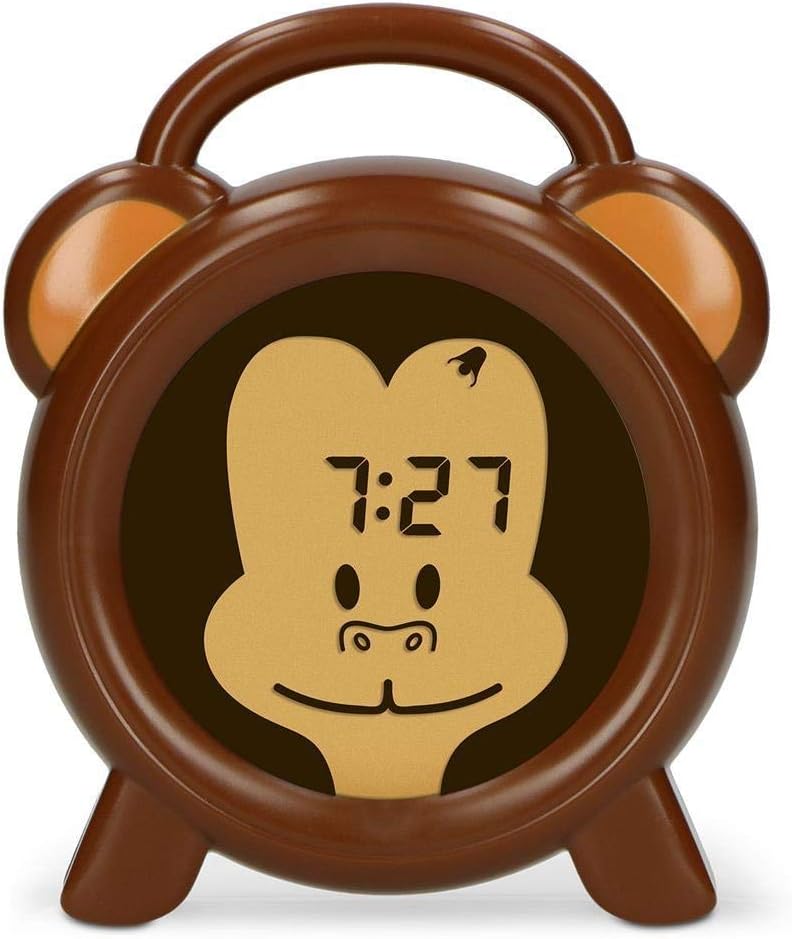
Rajah 2.1: Depan view of the Alecto BC-100 Monkey Educational Alarm Clock, showing the digital display within the monkey face.

Rajah 2.2: Belakang view of the Alecto BC-100, displaying the control buttons (MODE, SET, +, -, ON/OFF) and the charging port.
3. Persediaan dan Penggunaan Awal
3.1 Mengecas Peranti
Before first use, fully charge the Alecto BC-100. Connect the included micro USB cable to the charging port on the back of the device and plug the other end into a compatible USB power adapter (not included) or a computer USB port. The charging indicator will show the charging status.
3.2 Menetapkan Masa Semasa
- Tekan ke MODE butang untuk memasuki mod tetapan masa.
- Gunakan + dan - butang untuk melaraskan jam.
- Tekan SET to confirm the hours and move to minutes.
- Gunakan + dan - butang untuk melaraskan minit.
- Tekan SET again to save the time and exit setting mode.
4. Operating the Sleep Trainer and Alarm Functions
4.1 Setting Sleep and Wake-Up Times (Sleep Trainer)
The sleep trainer function uses light cues to signal when it's time to sleep and when it's time to wake up.
- Tekan ke MODE button repeatedly until the sleep trainer setting appears (often indicated by a moon icon or specific time display).
- guna + dan - to set the desired sleep time (when the blue light will activate).
- Tekan SET untuk mengesahkan.
- guna + dan - to set the desired wake-up time (when the orange light will activate).
- Tekan SET untuk menyimpan tetapan.

Figure 4.1: The clock displaying a blue light, indicating it is time for sleep.

Figure 4.2: The clock displaying an orange light, indicating it is time to wake up.
4.2 Adjusting Night Light Intensity
To adjust the brightness of the night light (both blue and orange), press the HIDUP/MATI button repeatedly while the light is active. There are 7 intensity settings, plus an option to turn the light off.
4.3 Using as a Standard Alarm Clock
The BC-100 can also function as a traditional alarm clock with an audible alarm.
- Tekan ke MODE button until the alarm setting appears (often indicated by an alarm icon).
- Gunakan + dan - butang untuk menetapkan jam penggera yang diingini.
- Tekan SET untuk mengesahkan dan beralih kepada minit.
- Gunakan + dan - butang untuk melaraskan minit penggera.
- Tekan SET untuk menjimatkan masa penggera.
- Untuk mengaktifkan atau menyahaktifkan penggera, tekan HIDUP/MATI button while in alarm setting mode. An indicator on the display will show if the alarm is active.
5. Penyelenggaraan dan Penjagaan
To ensure the longevity and proper functioning of your Alecto BC-100, follow these maintenance guidelines:
- Pembersihan: Wipe the device with a soft, dry cloth. Do not use abrasive cleaners or solvents, as these may damage the surface.
- mengecas: Recharge the device when the battery indicator shows low power. While it is rechargeable, prolonged periods without charging may affect battery life.
- Storan: If storing the device for an extended period, ensure it is fully charged and then turn it off. Store in a cool, dry place away from direct sunlight.
- Pendedahan Air: Peranti ini tidak kalis air. Elakkan pendedahan kepada air atau kelembapan yang tinggi.
6. Penyelesaian masalah
If you encounter issues with your Alecto BC-100, please refer to the following common problems and solutions:
| Masalah | Kemungkinan Punca | Penyelesaian |
|---|---|---|
| Peranti tidak dihidupkan. | Bateri habis. | Connect the device to a power source using the micro USB cable and allow it to charge for at least 30 minutes before attempting to turn it on. |
| Paparan malap atau berkelip. | Bateri rendah atau tetapan kecerahan yang salah. | Recharge the device. Press the HIDUP/MATI button to cycle through brightness settings. |
| Sleep trainer light is not changing color. | Incorrect sleep/wake-up time settings or function is not activated. | Verify that the sleep and wake-up times are correctly set. Ensure the sleep trainer function is enabled. |
| Penggera tidak berbunyi. | Penggera tidak diaktifkan atau kelantangan terlalu rendah. | Check if the alarm icon is displayed, indicating it is active. Ensure the volume is set to an audible level (if adjustable, though not specified for this model). |
| Butang tidak bertindak balas. | Gangguan perisian sementara. | Perform a soft reset by pressing and holding the HIDUP/MATI button for 10 seconds, or if available, use the reset pinhole (refer to Figure 2.2 for location). |
7. Spesifikasi
| Ciri | Perincian |
|---|---|
| Nombor Model | BC-100 MONYET |
| Jenama | Alecto |
| Dimensi Produk (H x W x D) | 14 cm x 11.8 cm x 3.6 cm |
| Berat Barang | 232 Gram |
| Bekalan Kuasa | Rechargeable (1 Lithium Polymer battery required) |
| Jenis Paparan | digital |
| warna | Braun |
| Ciri Khas | Colour changing (sleep trainer) |

Figure 7.1: Dimensions of the Alecto BC-100 Monkey Educational Alarm Clock.


