1. Pengenalan
Thank you for choosing the STRONG SRT 24HC3023 24-inch TV. This television is designed for versatile use, offering a triple tuner for DVB-T2 HD, DVB-C, and DVB-S2 reception, making it suitable for both home entertainment and mobile applications such as motorhomes, caravans, or boats, thanks to its 12 Volt compatibility. This manual provides essential information for setting up, operating, and maintaining your new television. Please read it thoroughly before use to ensure proper functionality and safety.

Figure 1.1: STRONG SRT 24HC3023 24-inch TV
2. Maklumat Keselamatan
Untuk memastikan operasi yang selamat dan mengelakkan kerosakan, sila patuhi langkah berjaga-jaga keselamatan berikut:
- Jangan dedahkan TV kepada hujan atau lembapan untuk mengelakkan kebakaran atau kejutan elektrik.
- Jangan sekat bukaan pengudaraan. Pastikan ruang yang mencukupi di sekeliling TV untuk aliran udara yang betul.
- Use only the power adapter supplied with the TV. For 12V operation, ensure the power source is stable and within the specified voltagjulat e.
- Lindungi kord kuasa daripada berjalan atau tersepit, terutamanya pada palam, bekas kemudahan dan tempat keluar dari radas.
- Jangan cuba servis produk ini sendiri. Rujuk semua perkhidmatan kepada pegawai perkhidmatan yang berkelayakan.
- Clean the TV only with a dry cloth. Do not use liquid cleaners or aerosol cleaners.
- Keep batteries for the remote control out of reach of children.
3. Kandungan Pakej
Carefully unpack your TV and check that all items listed below are included and undamaged. If any items are missing or damaged, contact your retailer.
- TV LED SRT 24HC3023 KUAT
- Alat Kawalan Jauh (termasuk 2x Bateri AAA)
- Stand (Base and Screws)
- Power Adapter (Standard Euro; 12V power cable not included)
- Manual Pengguna

Rajah 3.1: Pembungkusan Produk

Rajah 3.2: Alat Kawalan Jauh
4. Persediaan
4.1 Memasang Stand
- Place the TV face down on a soft, clean surface to prevent scratching the screen.
- Jajarkan dirian dengan lubang pelekap di bahagian bawah TV.
- Selamatkan dirian menggunakan skru yang disediakan. Jangan terlalu ketat.
4.2 Menyambung Peranti
Your TV offers a variety of connection ports for different devices.
- Antena/Satelit: Connect your DVB-T/T2 antenna to the "ANT In" port or your satellite dish to the "SAT In" port.
- HDMI: For high-definition devices like Blu-ray players, game consoles, or streaming sticks.
- SCART: For older devices like DVD players or VCRs.
- USB: Untuk main balik media daripada pemacu USB.
- AV In / Mini YPbPr: For analog video and audio sources.
- Fon kepala: Untuk mendengar secara peribadi.
- S/PDIF: For digital audio output to external sound systems.
- Slot CI: For CI+ modules (e.g., for freenet-TV).
- Kuasa 12V: This TV is 12V compatible, ideal for mobile use. A 12V power cable is not included and must be purchased separately.

Figure 4.1: TV Dimensions
4.3 Kuasa Awal Hidup dan Imbasan Saluran
- Connect the TV to a power source (either the supplied AC adapter or a compatible 12V source).
- Tekan butang kuasa pada TV atau alat kawalan jauh.
- Follow the on-screen instructions for initial setup, including language selection and channel scanning. The triple tuner allows you to scan for DVB-T/T2, DVB-C, and DVB-S2 channels.
5. Arahan Operasi
5.1 Fungsi Asas
- Hidupkan/Mati Kuasa: Tekan ke kuasa butang pada alat kawalan jauh.
- Pemilihan Saluran: Gunakan CH +/- butang untuk menukar saluran secara berurutan atau memasukkan nombor saluran secara terus menggunakan pad kekunci berangka.
- Kawalan Kelantangan: Gunakan VOL +/- butang untuk melaraskan kelantangan.
- Pemilihan Sumber: Tekan ke SUMBER button to switch between input sources (HDMI, SCART, TV, etc.).
5.2 Triple Tuner Operation
The integrated triple tuner supports DVB-T/T2 (terrestrial), DVB-C (cable), and DVB-S2 (satellite) reception. During the initial setup, you will be prompted to select your preferred reception type and perform a channel scan. You can switch between these modes via the input source menu.
5.3 Panduan Program Elektronik (EPG)
Tekan ke EPG button on the remote control to access the Electronic Program Guide. This displays program schedules for upcoming broadcasts and allows you to set timers for recording or viewing.
5.4 Main Semula USB
Insert a USB storage device into the USB port. The TV will typically detect the device and prompt you to access its media content (photos, music, videos). Navigate through the files menggunakan alat kawalan jauh.
5.5 CI+ Slot
The CI+ slot allows you to insert a Conditional Access Module (CAM) and a smart card (e.g., for freenet-TV in Germany) to decrypt encrypted channels. Follow the instructions provided with your CI+ module for installation and activation.
Video 5.1: Tayangan video produk rasmicasing the STRONG 24HC3023 TV's features, including its 12V compatibility for mobile use in settings like camping or motorhomes.

Figure 5.1: STRONG TV in a mobile setting, highlighting 12V compatibility.
6. Penyelenggaraan
Proper maintenance helps extend the life of your TV.
- Membersihkan Skrin: Lap skrin perlahan-lahan dengan kain lembut yang tidak berbulu. Untuk kesan degil, gunakan penyelesaian pembersihan khusus skrin yang digunakan pada kain, bukan terus pada skrin.
- Membersihkan Kabinet: Gunakan kain lembut dan kering untuk mengelap kabinet TV. Jangan gunakan pembersih atau pelarut yang melelas.
- Pengudaraan: Ensure the ventilation openings are clear of dust and debris. Do not place the TV in an enclosed space without adequate airflow.
- Matikan: Sentiasa cabut plag TV daripada salur keluar kuasa sebelum membersihkan atau apabila tidak digunakan untuk tempoh yang lama.
7. Penyelesaian masalah
If you encounter problems with your TV, refer to the following common issues and solutions.
| Masalah | Kemungkinan Punca | Penyelesaian |
|---|---|---|
| Tiada kuasa | Kord kuasa tidak disambungkan; tiada kuasa dari alur keluar. | Periksa sambungan kord kuasa. Uji soket dengan peranti lain. |
| Tiada gambar, tetapi bunyi hadir | Sumber input yang dipilih salah; kabel video longgar. | Press SOURCE button to select correct input. Check video cable connections. |
| Tiada bunyi, tetapi ada gambar | Volume too low or muted; incorrect audio output setting. | Increase volume or unmute. Check audio settings in the menu. |
| Kualiti gambar yang buruk | Weak signal; antenna/cable issue; picture settings. | Check antenna/cable connection. Adjust picture settings (brightness, contrast). |
| Alat kawalan jauh tidak berfungsi | Bateri mati atau dimasukkan dengan salah; halangan. | Replace batteries. Ensure no obstruction between remote and TV. |
Jika masalah berterusan selepas mencuba penyelesaian ini, sila hubungi kakitangan servis yang berkelayakan.
8. Spesifikasi
| Ciri | Perincian |
|---|---|
| Nombor Model | SRT24HC3023 |
| Saiz Skrin | 24 inci (61 cm) |
| Teknologi Paparan | LED |
| Resolusi | 720p (1366 x 768 piksel) |
| Kadar Segar Semula | 60 Hz |
| Penala | DVB-T2 HD, DVB-C, DVB-S2 (Triple Tuner) |
| Ketersambungan | HDMI, SCART, USB, AV In, Mini YPbPr, Headphone, S/PDIF, PC Audio In, ANT In, SAT In, CI Slot |
| Bekalan Kuasa | AC 220-240V, 50/60Hz; 12V DC compatible |
| Penggunaan Kuasa (Mod dalam) | 25 watt |
| Kelas Kecekapan Tenaga | F |
| Dimensi (W x D x H) | 55.07 x 16.1 x 36.73 cm (dengan dirian) |
| Berat badan | 2.66 kg |
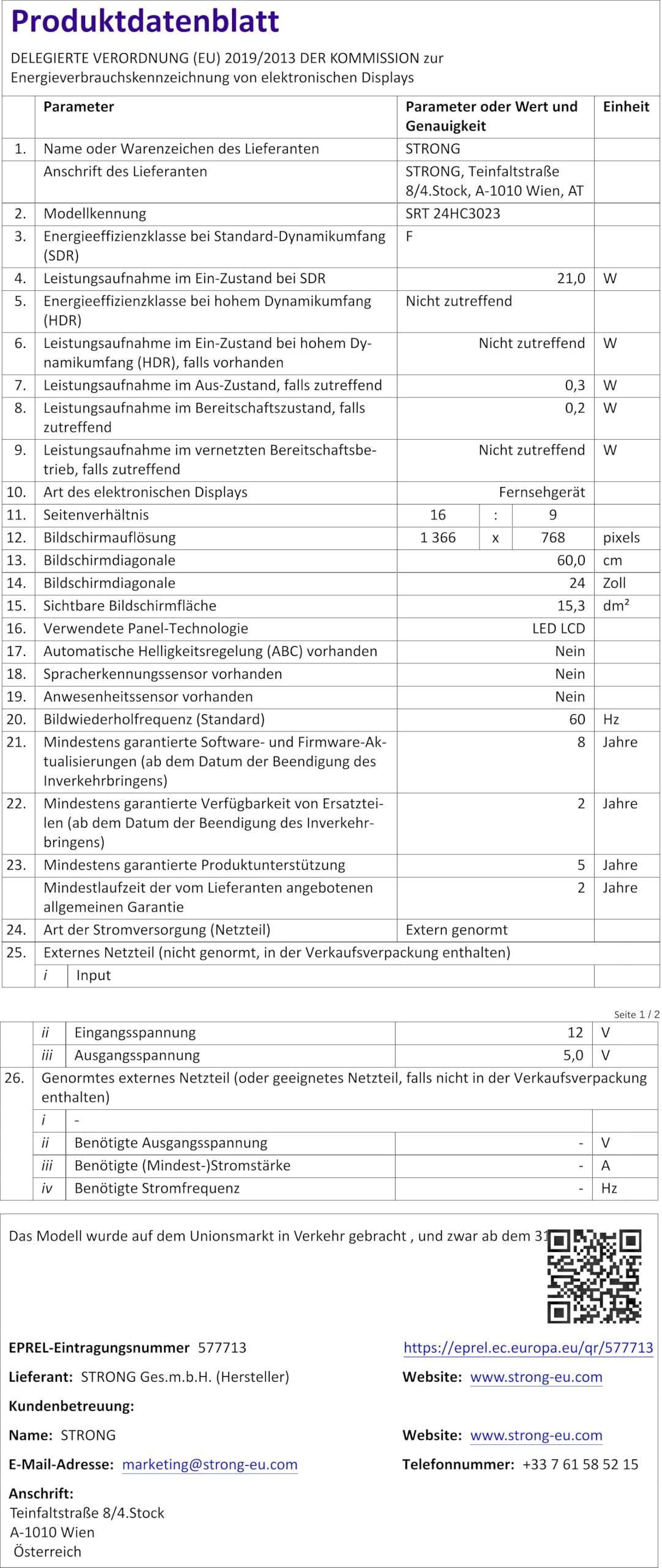
Figure 8.1: Product Fiche (Energy Label Information)
For more detailed energy information, please refer to the Pangkalan data EPREL (pautan kod QR).

Rajah 8.2: Label Kecekapan Tenaga
9. Waranti dan Sokongan
Your STRONG SRT 24HC3023 TV comes with a standard manufacturer's warranty. Please refer to the warranty card included in your package for specific terms and conditions. For technical support, troubleshooting assistance beyond this manual, or warranty claims, please contact STRONG customer service or your local retailer.
You can find more information and support on the official STRONG webtapak: www.strong.tv