1. Pengenalan
This manual provides essential information for the safe and efficient use of your Lenovo IdeaPad Flex 5 14ARE05 2-in-1 Notebook Computer. Please read this manual thoroughly before operating your device to ensure proper setup, operation, and maintenance. Keep this manual for future reference.
2. Produk Lebihview
The Lenovo IdeaPad Flex 5 14ARE05 is a versatile 14-inch Full HD touchscreen 2-in-1 notebook computer designed for flexibility and performance. It features an AMD Ryzen 7 4700U processor, 8GB of RAM, and a 512GB SSD, running on Windows 10 Home. Its 2-in-1 design allows it to function as a traditional laptop, a tablet, or in tent and stand modes.

Figure 2.1: Lenovo IdeaPad Flex 5 in standard laptop configuration.

Figure 2.2: The device configured in tablet mode, demonstrating touchscreen and digital pen functionality.

Figure 2.3: The device in stand mode, ideal for media consumption or presentations.
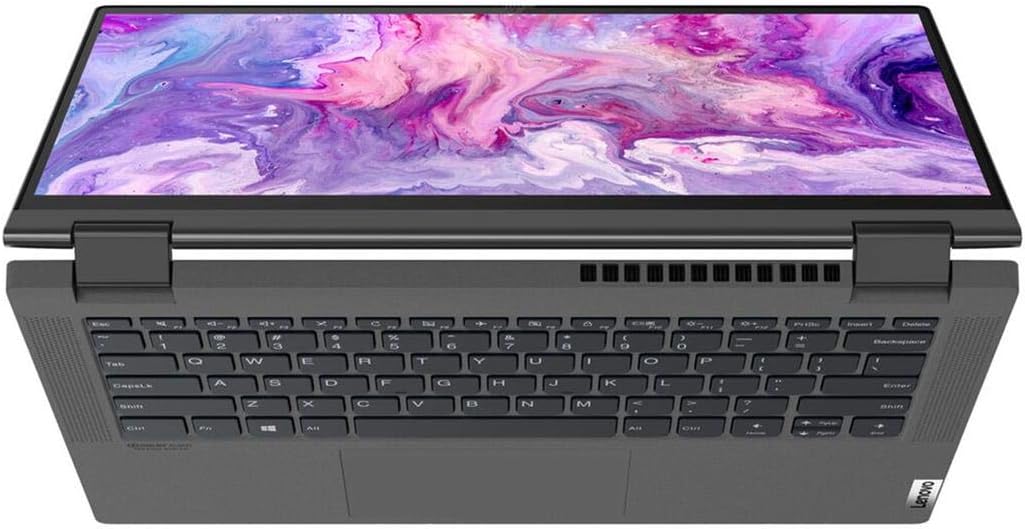
Rajah 2.4: Atas-bawah view highlighting the keyboard and touchpad layout.
3. Persediaan
3.1 Membongkar
Carefully remove the notebook and all accessories from the packaging. Verify that all components listed in the packing list are present.
3.2 Menyambungkan Penyesuai Kuasa
- Connect the power adapter to the power connector on the side of the notebook.
- Palamkan kord kuasa ke salur keluar elektrik.
- Benarkan bateri mengecas sekurang-kurangnya 30 minit sebelum penggunaan awal, atau sehingga penunjuk bateri menunjukkan pengecasan yang mencukupi.
3.3 Kuasa Hidupkan Awal dan Persediaan Windows
- Tekan butang kuasa untuk menghidupkan buku nota.
- Ikut arahan pada skrin untuk menyelesaikan proses persediaan Windows 10 Home. Ini termasuk memilih wilayah anda, bahasa, menyambung ke rangkaian Wi-Fi dan membuat akaun pengguna.
3.4 Menyambung Peranti
The IdeaPad Flex 5 14ARE05 includes various ports for connecting external devices:
- Port USB: Sambungkan peranti USB seperti tetikus, papan kekunci atau pemacu storan luaran.
- Port HDMI: Connect an external monitor or projector.
- Port USB-C: For data transfer, display output, or charging (with compatible adapters).
- Jack fon kepala: Sambungkan fon kepala atau pembesar suara luaran.
- Pembaca Kad SD: Masukkan kad SD untuk pemindahan data.
For wireless connections, enable Bluetooth in Windows settings to pair with Bluetooth-enabled devices.
4. Arahan Operasi
4.1 Navigasi Asas
- papan kekunci: Use for typing and executing commands. The keyboard features backlighting, which can be toggled on/off.
- Pad sentuh: Use for cursor control and multi-touch gestures.
- Skrin sentuh: Interact directly with the display using your fingers or a compatible digital pen.
4.2 Menggunakan Mod 2-dalam-1
The IdeaPad Flex 5 can be used in four primary modes:
- Mod Komputer Riba: Standard notebook configuration for typing and productivity.
- Mod Khemah: Fold the display back to form an inverted 'V' shape, ideal for watching videos or presentations in confined spaces.
- Mod Berdiri: Fold the display back further, with the keyboard facing down, to use the screen for media viewinteraksi antara sentuhan atau sentuhan.
- Mod Tablet: Fold the display completely back against the base, converting the notebook into a tablet for touch-first interaction. Windows will automatically prompt to switch to Tablet Mode for an optimized experience.
4.3 Pengurusan Bateri
- To maximize battery life, adjust screen brightness, close unused applications, and enable power-saving modes in Windows settings.
- Elakkan menyahcas sepenuhnya bateri dengan kerap.
- Simpan peranti dengan cas separa (kira-kira 50%) jika tidak digunakan untuk tempoh yang lama.
5. Penyelenggaraan
5.1 Membersihkan Peranti
- Skrin: Gunakan kain lembut yang tidak berbulu dampdiisi dengan air atau pembersih skrin. Jangan sembur cecair terus ke skrin.
- Casis dan Papan Kekunci: Gunakan kain lembut dan kering. Untuk kotoran degil, sedikit damp kain boleh digunakan. Elakkan bahan kimia yang keras atau bahan yang melelas.
- Pelabuhan: Gunakan udara termampat untuk membersihkan habuk dari port secara perlahan.
5.2 Kemas Kini Perisian
Kemas kini sistem pengendalian dan pemacu peranti Windows anda secara berkala untuk memastikan prestasi, keselamatan dan keserasian yang optimum. Kemas Kini Windows boleh diakses melalui menu Tetapan.
5.3 Pengurusan Storan
Semula secara berkalaview dan padam yang tidak perlu files to free up storage space on the 512GB SSD. Utilize cloud storage or external drives for large files untuk mengekalkan prestasi sistem.
6. Penyelesaian masalah
This section addresses common issues you might encounter with your Lenovo IdeaPad Flex 5.
6.1 Isu Kuasa
- Peranti tidak dihidupkan: Pastikan penyesuai kuasa disambungkan dengan selamat dan alur keluar berfungsi. Cuba tekan dan tahan butang kuasa selama 10-15 saat.
- Bateri tidak dicas: Verify the power adapter and cable are not damaged. Try a different outlet. Check the charging indicator light on the device.
6.2 Isu Paparan
- No display or black screen: Connect an external monitor to check if the issue is with the internal display. Restart the device.
- Skrin sentuh tidak bertindak balas: Restart the device. Ensure display drivers are up to date.
6.3 Keyboard/Touchpad Issues
- Keyboard or touchpad not responding: Restart the device. Check for any physical obstructions. Ensure drivers are updated. For specific key sections not working, a hardware issue may be present.
6.4 Isu Prestasi
- Prestasi perlahan: Close unnecessary applications. Check Task Manager for high CPU/RAM usage. Ensure sufficient free storage space. Run a virus scan.
6.5 Menghubungi Sokongan
If troubleshooting steps do not resolve the issue, please refer to the Warranty and Support section for information on contacting Lenovo customer service.
7. Spesifikasi
| Nama Model | Lenovo IdeaPad Flex 5 14ARE05 |
| Saiz Skrin | 14 Inci |
| Resolusi Skrin | 1920 x 1080 piksel (HD Penuh) |
| Pemproses | AMD Ryzen 7 4700U (2 GHz base, 8 cores) |
| RAM | 8 GB DDR4 |
| Penyimpanan | 512 GB SSD |
| Pemproses bersama Grafik | Radeon (Integrated) |
| Sistem Operasi | Windows 10 Home |
| Jenis Wayarles | Bluetooth |
| Purata Hayat Bateri | 6 Hours (approximate) |
| Berat Barang | 5.06 paun |
| Dimensi Produk | 19 x 11 x 3 inci |
| warna | Kelabu Grafit |
| Ciri Khas | Papan Kekunci Berlampu Belakang |
8. Waranti dan Sokongan
8.1 Waranti Produk
Your Lenovo IdeaPad Flex 5 14ARE05 typically comes with a standard manufacturer's warranty, which usually covers defects in materials and workmanship for a period of one year from the date of purchase. Please refer to the warranty card included with your product or visit the official Lenovo support weblaman web untuk terma dan syarat khusus yang terpakai di rantau anda.
8.2 Sokongan Teknikal
Untuk bantuan teknikal, muat turun pemandu atau permintaan perkhidmatan, sila lawati Sokongan Lenovo rasmi website. You will need your product's serial number, which can usually be found on a sticker on the bottom of the device or within the system information in Windows.
Sokongan Lenovo Webtapak: https://support.lenovo.com/