1. Pengenalan
Thank you for choosing the Mistral MSF041R 16-inch Stand Fan. This manual provides important information regarding the assembly, operation, maintenance, and safety of your new fan. Please read it thoroughly before use and retain it for future reference.
Ciri-ciri Utama:
- 16-inch fan blade for effective air circulation
- 3-speed selection for customized airflow
- 8-hour programmed timer for convenience
- Left and right oscillation for wider coverage
- Multi-function remote control for easy operation
- LED display for clear status indication
- Convertible height adjustment
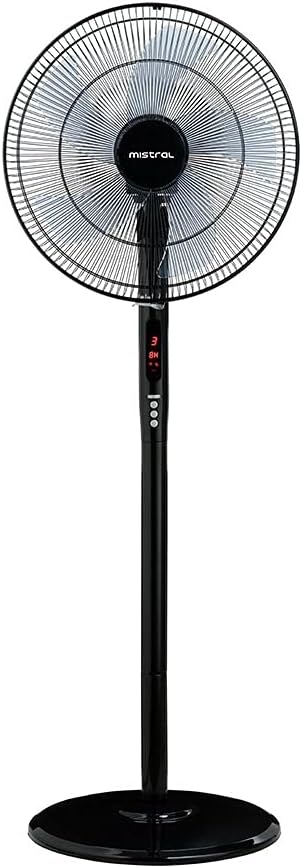
Figure 1: Mistral MSF041R 16-inch Stand Fan, fully assembled, showcasing kemasan hitam dan panel kawalannya.
2. Arahan Keselamatan Penting
Untuk mengurangkan risiko kebakaran, renjatan elektrik atau kecederaan, sentiasa ikuti langkah berjaga-jaga keselamatan asas apabila menggunakan peralatan elektrik.
- Baca semua arahan sebelum menggunakan kipas ini.
- Always unplug the fan before moving, cleaning, or whenever the fan is not in use.
- Pastikan palam dimasukkan sepenuhnya ke dalam alur keluar.
- Jangan kendalikan mana-mana kipas dengan kord atau palam yang rosak.
- Do not run the power cord under carpeting or cover it with throw rugs, runners, or similar coverings.
- Avoid placing the fan in areas where it may be easily tipped over.
- Do not insert fingers or foreign objects into any grille opening.
- Perkakas ini tidak dimaksudkan untuk digunakan oleh orang (termasuk kanak-kanak) yang kurang keupayaan fizikal, deria, atau mental, atau kurang pengalaman dan pengetahuan, melainkan mereka telah diberi pengawasan atau arahan mengenai penggunaan perkakas oleh orang yang bertanggungjawab untuk keselamatan mereka .
- Kanak-kanak harus diawasi untuk memastikan bahawa mereka tidak bermain dengan perkakas.
3. Kandungan Pakej
Setelah membuka bungkusan, sila sahkan bahawa semua komponen ada dan tidak rosak:
- 1 x Mistral MSF041R Stand Fan Unit (includes fan head, stand pole, and base)
- 1 x Multi-function Remote Control
- 1 x Manual Pengguna (dokumen ini)
4. Arahan Perhimpunan
The Mistral MSF041R Stand Fan requires minimal assembly. Follow these steps to set up your fan:
- Perhimpunan asas: Place the stand pole into the base. Secure it firmly using the provided locking mechanism or screw from underneath the base.
- Lampiran Kepala Kipas: Carefully attach the fan head unit to the top of the stand pole. Ensure it clicks into place or is securely fastened with any provided screws or knobs.
- Pelarasan Ketinggian: Adjust the fan's height to your desired level by loosening the height adjustment knob on the stand pole, extending or retracting the pole, and then tightening the knob securely.
- Sambungan Kuasa: Once assembled, place the fan on a stable, flat surface and plug the power cord into a suitable electrical outlet.
5. Arahan Operasi
Your Mistral MSF041R Stand Fan can be operated using the control panel on the fan unit or the multi-function remote control.
Panel Kawalan / Fungsi Kawalan Jauh:
- Butang Kuasa: Tekan untuk menghidupkan atau mematikan kipas.
- Butang Kelajuan: Press repeatedly to cycle through the 3 available fan speeds (Low, Medium, High). The current speed will be indicated on the LED display.
- Butang ayunan: Press to activate or deactivate the left and right oscillation function. When active, the fan head will sweep from side to side.
- Butang Pemasa: Press to set the programmed timer. Each press will increase the timer setting in increments (e.g., 1 hour, 2 hours, up to 8 hours). The set time will be shown on the LED display. The fan will automatically turn off once the set time expires.
Paparan led:
The integrated LED display shows the current fan speed and the remaining time if the timer function is active.
Pelarasan Ketinggian:
To adjust the fan's height, loosen the adjustment knob on the stand pole, raise or lower the fan head to the desired position, and then firmly tighten the knob to secure it.
6. Penyelenggaraan dan Pembersihan
Pembersihan dan penyelenggaraan yang kerap akan memastikan prestasi optimum dan memanjangkan jangka hayat kipas anda.
- Sentiasa cabut plag kipas dari soket kuasa sebelum membersihkan atau melakukan sebarang penyelenggaraan.
- Gunakan yang lembut, damp kain untuk mengelap permukaan luar kipas. Jangan gunakan pembersih atau pelarut yang melelas.
- To clean the fan blades, carefully remove the front grille (refer to assembly instructions in reverse if necessary). Wipe the blades with a soft, damp cloth. Ensure blades are completely dry before reattaching the grille.
- Jangan rendam kipas di dalam air atau biarkan air menitis ke dalam perumahan motor.
- Simpan kipas di tempat yang sejuk dan kering apabila tidak digunakan.
7. Penyelesaian masalah
If you encounter issues with your Mistral MSF041R Stand Fan, refer to the following common problems and solutions:
| Masalah | Kemungkinan Punca | Penyelesaian |
|---|---|---|
| Kipas tidak dihidupkan. | Tiada bekalan kuasa. Butang kuasa tidak ditekan. | Pastikan kipas dipasang pada soket yang berfungsi. Press the power button on the fan or remote. |
| Fan operates but no oscillation. | Fungsi ayunan dimatikan. | Press the oscillation button on the fan or remote to activate. |
| Alat kawalan jauh tidak berfungsi. | Bateri habis atau salah dimasukkan. Halangan antara alat kawalan jauh dan kipas. | Replace remote control batteries (if applicable, check battery type). Ensure a clear line of sight to the fan's receiver. |
| Kipas membuat bunyi yang luar biasa. | Loose parts or debris in fan blades. | Unplug the fan and check for any obstructions or loose components. Clean blades if necessary. |
Jika masalah berterusan selepas mencuba penyelesaian ini, sila hubungi sokongan pelanggan.
8. Spesifikasi
| Jenama | MISTRAL |
| Model | MSF041R |
| Reka Bentuk Kipas Elektrik | Kipas lantai |
| Jenis Pemasangan | Kipas Berdiri |
| Jenis Pengawal | Alat Kawalan Jauh |
| Sumber Kuasa | Elektrik Bertali |
| Dimensi Produk | 15.7D x 17.7W x 51.6H sentimeter |
| Berat Barang | 6.85 Kilogram |
| Ciri Khas | Oscillating, 3 Speed Selection, 8-Hour Timer, LED Display, Convertible Height |
| Perhimpunan Diperlukan | Tidak (Persediaan minimum) |
| Bateri Diperlukan | No (for fan unit) |
9. Waranti dan Sokongan
This Mistral MSF041R Stand Fan comes with a Jaminan 2 tahun dari tarikh pembelian. Sila simpan bukti pembelian anda untuk tuntutan waranti.
For technical support, warranty inquiries, or service requests, please refer to the contact information provided with your purchase documentation or visit the official Mistral webtapak.


