1. Pengenalan
This manual provides detailed instructions for the proper use, setup, and maintenance of your boAt Airdopes 131 Bluetooth Truly Wireless Earbuds. Please read this manual thoroughly before using the product to ensure optimal performance and longevity.

Image 1.1: The boAt Airdopes 131 Truly Wireless Earbuds in Midnight Blue, shown with their charging case.
2. Apa yang ada di dalam Kotak
Sahkan bahawa semua item yang disenaraikan di bawah terdapat dalam pembungkusan produk anda:
- 1 x boAt Airdopes 131 Truly Wireless Earbuds (Left and Right)
- 1 x Kes Pengecasan
- 1 x Kabel Pengecas USB Jenis-C
- 1 x Manual Pengguna
- 2 x Additional Ear Tips (various sizes)
3. Produk Lebihview
The boAt Airdopes 131 are designed for a seamless audio experience. Key features include:
- Reka Bentuk Benar-benar Tanpa Wayar: Freedom from cables for unrestricted movement.
- Bluetooth v5.0: Sambungan tanpa wayar yang stabil dan cekap.
- IWP™ Technology: Instant Wake N' Pair for automatic connection upon opening the case.
- Pemacu Dinamik 13mm: For immersive sound quality.
- Multifunction Button Control: Easy management of music, calls, and voice assistant.
- Mikrofon terbina dalam: For clear stereo calling.
- Port Pengecasan Jenis-C: For convenient charging of the case.
- Sokongan Pembantu Suara: Quick access to your device's voice assistant.

Image 3.1: An illustration of the boAt Airdopes 131 charging case with an earbud, highlighting features like IWP Technology, Bluetooth V5.0, 650mAh battery, Type-C charging, Instant Voice Assistant, and Multifunction Controls.
4. Persediaan
4.1 Mengecas Peranti
Before initial use, ensure both the charging case and earbuds are fully charged.
4.1.1 Mengecas Kes
- Sambungkan kabel pengecas USB Jenis-C ke port pengecasan pada bekas.
- Sambungkan hujung kabel yang satu lagi ke penyesuai kuasa USB (tidak disertakan) atau port USB komputer.
- Penunjuk LED pada bekas akan menunjukkan status pengecasan. Cas penuh biasanya mengambil masa kira-kira 1.5 jam.
4.1.2 Mengecas Fon telinga
- Letakkan fon telinga ke dalam slot masing-masing dalam bekas pengecasan.
- Ensure the case has sufficient charge or is connected to a power source.
- The earbuds will begin charging automatically. The LED indicators on the earbuds will confirm charging status.

Image 4.1: The boAt Airdopes 131 earbuds illustrating the ASAP Charge feature, providing 90 minutes of playback from a 5-minute charge.
The Airdopes 131 offer up to 3 hours of playback per earbud charge and an additional 12 hours with the charging case. With ASAP™ Charge, 5 minutes of charging can provide up to 90 minutes of playback.
4.2 Initial Pairing (IWP™ Technology)
The Airdopes 131 feature Instant Wake N' Pair (IWP™) Technology for quick and effortless connection.
- Ensure the earbuds are inside the charging case and the case is charged.
- Buka penutup bekas pengecas. Fon telinga akan dihidupkan secara automatik dan memasuki mod berpasangan.
- On your smartphone or Bluetooth-enabled device, open the Bluetooth settings.
- Cari untuk "Airdopes 131" in the list of available devices and select it to connect.
- Once connected, you will hear an audio prompt, and the LED indicators on the earbuds will change.

Image 4.2: A visual representation of the IWP Technology, showing a smartphone displaying a pairing notification for "Airdopes 131" as the charging case lid is opened.
4.3 Connecting to a New Device
To connect to a different device, first disconnect from the currently paired device. Then, follow the initial pairing steps (Section 4.2) to connect to the new device.
5. Arahan Operasi
The Airdopes 131 feature intuitive multifunction button controls on each earbud.
5.1 Hidupkan/Mati Kuasa
- Hidupkan kuasa: Open the charging case lid (IWP™ Technology) or long-press the Multifunction Button on both earbuds for 3 seconds.
- Matikan: Place the earbuds back into the charging case and close the lid, or long-press the Multifunction Button on both earbuds for 5 seconds.
5.2 Kawalan Muzik
- Main/Jeda: Single tap the Multifunction Button on either earbud.
- Lagu Seterusnya: Double tap the Multifunction Button on the right earbud.
- Trek Sebelumnya: Double tap the Multifunction Button on the left earbud.
5.3 Kawalan Panggilan
- Jawab/Tamatkan Panggilan: Single tap the Multifunction Button on either earbud.
- Tolak Panggilan: Long press the Multifunction Button on either earbud for 2 seconds.
5.4 Pembantu Suara
Activate your device's voice assistant (e.g., Google Assistant, Siri) with a single press.
- Aktifkan Pembantu Suara: Single press the Multifunction Button on either earbud.
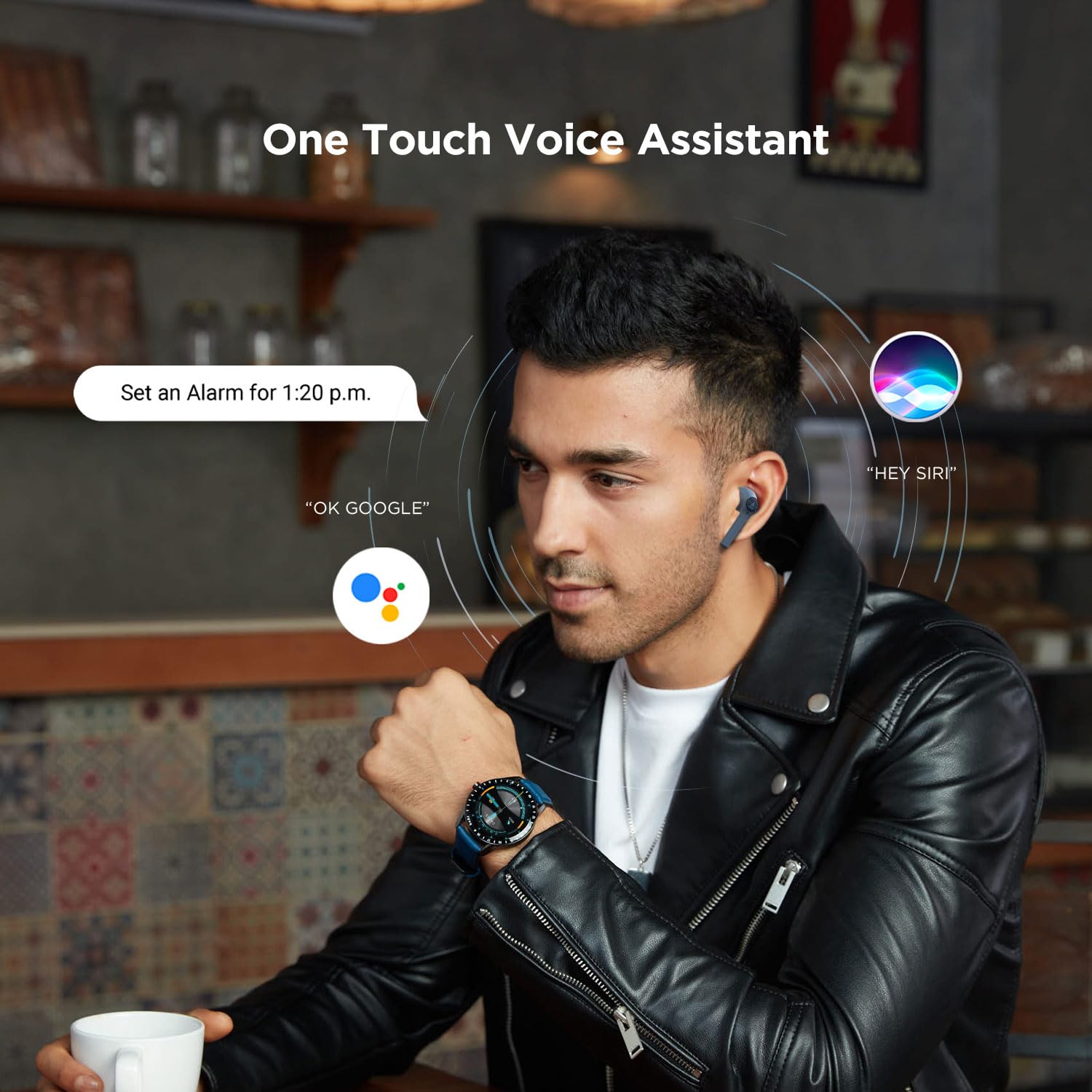
Image 5.1: A user interacting with a voice assistant via the boAt Airdopes 131 earbuds, demonstrating the "One Touch Voice Assistant" feature.
6. Penyelenggaraan
Proper maintenance ensures the longevity and optimal performance of your Airdopes 131.
6.1 Pembersihan
- Gunakan kain lembut, kering dan tidak berbulu untuk membersihkan fon telinga dan bekas pengecas.
- Jangan gunakan bahan kimia yang keras, pelarut pembersih atau detergen yang kuat.
- Elakkan mendapatkan kelembapan ke dalam mana-mana bukaan.
6.2 Penyimpanan
- Apabila tidak digunakan, simpan fon telinga dalam bekas pengecasnya untuk melindunginya dan memastikan ia dicas.
- Simpan peranti di tempat yang sejuk dan kering, jauh dari suhu yang melampau dan cahaya matahari langsung.
6.3 Penjagaan Bateri
- To preserve battery life, charge the device regularly, even if not in frequent use.
- Elakkan menyahcas sepenuhnya bateri dengan kerap.
7. Penyelesaian masalah
If you encounter issues with your Airdopes 131, refer to the following common solutions:
| Masalah | Penyelesaian |
|---|---|
| Fon telinga tidak berpasangan dengan peranti. |
|
| Hanya satu fon telinga berfungsi. |
|
| Kes pengecas tidak dicas. |
|
| Kelantangan rendah atau kualiti bunyi yang lemah. |
|
8. Spesifikasi
| Ciri | Perincian |
|---|---|
| Nama Model | Airdopes 131 |
| Teknologi Ketersambungan | Bluetooth |
| Teknologi Komunikasi Tanpa Wayar | Benar-benar Tanpa Wayar |
| Versi Bluetooth | 5.0 |
| Julat Bluetooth | 10 Meter |
| Jenis Pemacu Audio | Pemacu Dinamik (13mm) |
| Julat Kekerapan | 20Hz-20kHz |
| Hayat Bateri Earbud | Sehingga 3 Jam setiap cas |
| Jumlah Masa Main (dengan kes) | Sehingga 12 Jam |
| Masa Pengecasan (Kes) | Lebih kurang 1.5 Jam |
| Port Pengecasan | USB Jenis-C |
| Format Mikrofon | Terbina Dalam |
| Jenis Kawalan | Multifunction Button, Voice Control |
| Tahap Ketahanan Air | Tahan Air |
| Berat Barang | 7 Gram (fon telinga) |
| Dimensi Produk | 5.3 x 2.5 x 2.5 cm |
| bahan | plastik |
| Peranti Serasi | iOS, Android, Windows |
9. Waranti dan Sokongan
For warranty information and customer support, please refer to the official boAt webtapak atau hubungi perkhidmatan pelanggan mereka secara langsung.
- rasmi Webtapak: Lawati Kedai boAt di Amazon untuk maklumat dan sokongan produk.
- Perkhidmatan Pelanggan: Contact boAt customer support for technical assistance, warranty claims, or service inquiries.

Image 9.1: A smartphone displaying the boAt Hearables App with a QR code for scanning and exploring. The app offers features like streaming music, listening to audiobooks, and accessing user help guides. Scan the QR code to access the app: https://l.ead.me/bdAX6k


