1. Pengenalan
Thank you for choosing the EnginStar R300 Portable Power Station. This device is a versatile and reliable power solution designed to provide electricity for various applications, including outdoor camping, emergency backup, and mobile work. Featuring a 296Wh capacity and 110V Pure Sine Wave AC output, the R300 ensures stable and safe power for your electronic devices. Please read this manual carefully before using the product to ensure proper operation and maximize its lifespan.
2. Arahan Keselamatan
- Jangan membongkar, memperbaiki atau mengubah unit.
- Keep the unit away from fire or high temperatures.
- Elakkan pendedahan kepada air atau lembapan.
- Jangan gunakan atau simpan unit dalam cahaya matahari langsung atau dalam persekitaran yang panas.
- Pastikan pengudaraan yang betul semasa digunakan untuk mengelakkan terlalu panas.
- Jauhkan daripada kanak-kanak dan haiwan peliharaan.
- Buang produk mengikut peraturan tempatan.
3. Kandungan Pakej
Sila pastikan semua item disertakan dalam pakej anda:
- EnginStar R300 Portable Power Station
- Penyesuai Kuasa AC
- Kabel Pengecas Kereta
- Manual Pengguna
4. Produk Lebihview
Familiarize yourself with the various ports and features of your EnginStar R300 Portable Power Station.
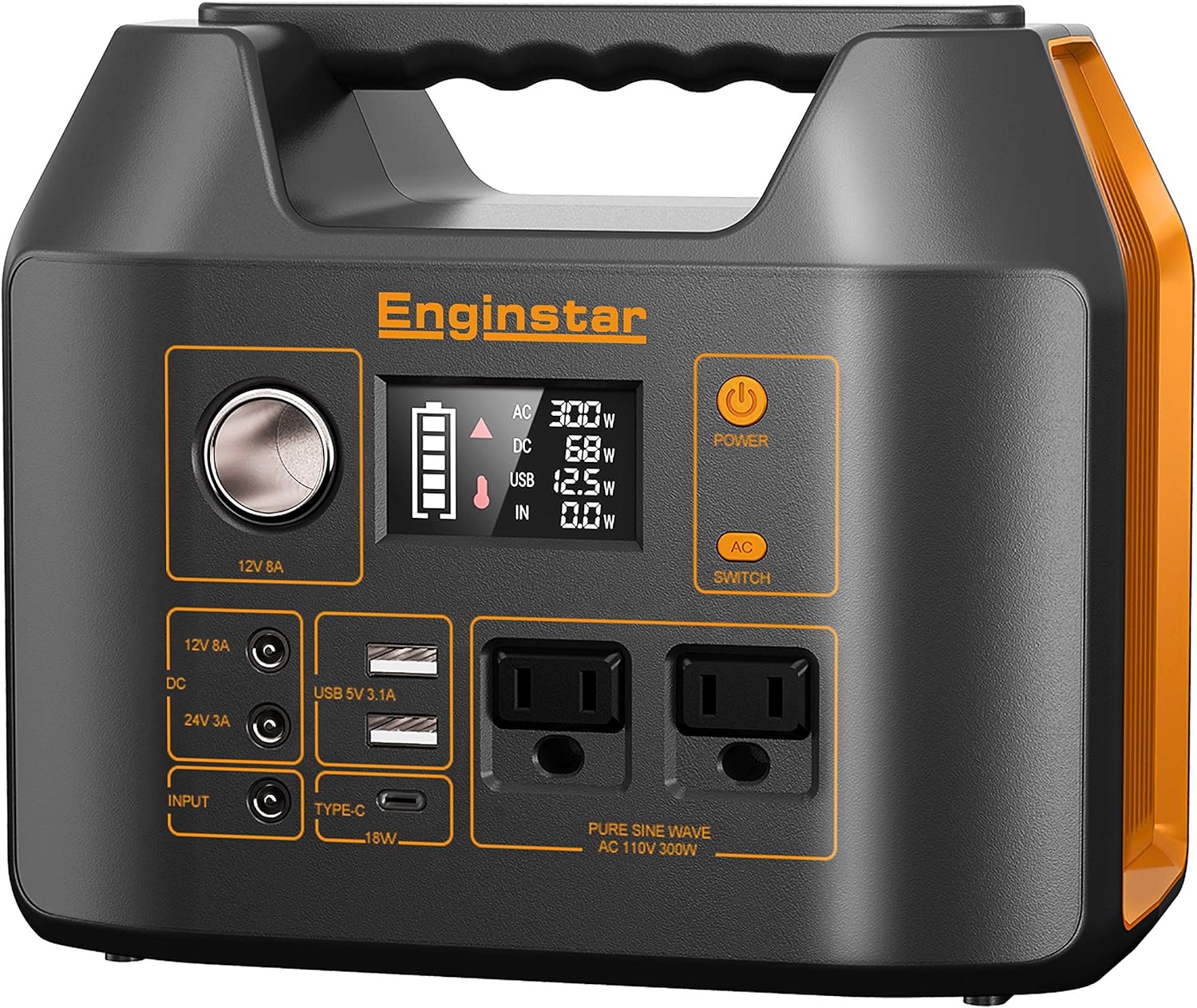
Rajah 4.1: Front panel of the EnginStar R300 Portable Power Station, showing the main display, AC outlets, DC ports, USB ports, and power buttons.
- Butang Kuasa: Menghidupkan / mematikan unit.
- Paparan LCD: Menunjukkan paras bateri, wat input/outputtage, dan penunjuk status.
- Soket Output AC: Two 110V Pure Sine Wave AC outlets.
- Port Output DC: 12V 8A car port and 24V 3A DC ports.
- Port Output USB: USB 5V 3.1A and Type-C 18W ports.
- Port Input DC: For charging the power station via AC adapter or solar panel.
5. Persediaan
5.1 Pengecasan Awal
Before first use, fully charge your EnginStar R300. Connect the provided AC power adapter to the DC Input Port on the power station and plug the adapter into a wall outlet. The LCD display will show the charging status. Charging time varies depending on the power source.
5.2 Pengecasan Suria
To charge using solar power, connect a compatible solar panel (not included) to the DC Input Port. Ensure the solar panel is placed in direct sunlight for optimal charging efficiency. The LCD display will indicate solar input wattage.
6. Arahan Operasi
6.1 Menghidupkan/Mematikan
Press and hold the main Power Button for 3 seconds to turn the unit on or off. The LCD display will illuminate when the unit is on.
6.2 Menggunakan Output AC
Press the 'AC Switch' button to activate the AC outlets. The AC indicator on the display will light up. Plug your 110V devices into the AC sockets. Press the 'AC Switch' again to turn off AC output when not in use.
6.3 Menggunakan Output DC
The DC output ports (12V car port and 24V DC ports) are typically active when the unit is powered on. Plug your 12V or 24V DC devices into the appropriate ports. Ensure your device's voltage matches the port's output.
6.4 Using USB Output
The USB-A and Type-C ports are active when the unit is powered on. Connect your USB-powered devices for charging. The Type-C port supports 18W fast charging.
6.5 Memahami Paparan
Paparan LCD memberikan maklumat masa nyata:
- Penunjuk Tahap Bateri: Menunjukkan baki kapasiti bateri.
- Input Wattage: Displays the power being drawn into the unit (e.g., from AC adapter or solar panel).
- Output Wattage: Shows the power being consumed by connected devices from AC, DC, and USB outputs.
- Ikon Status: Indicators for AC, DC, USB active, and warning symbols.
7. Penyelenggaraan
7.1 Pembersihan
Wipe the unit with a dry, soft cloth. Do not use abrasive cleaners or solvents. Ensure all ports are free from dust and debris.
7.2 Penyimpanan
Store the power station in a cool, dry place, away from direct sunlight and extreme temperatures. For long-term storage, charge the unit to 50-80% every 3-6 months to maintain battery health.
7.3 Penjagaan Bateri
To prolong battery life, avoid fully discharging the unit frequently. It is recommended to recharge the unit when the battery level drops below 20%.
8. Penyelesaian masalah
- Unit tidak dihidupkan: Pastikan bateri dicas. Jika tidak, sambungkan kepada sumber kuasa.
- Tiada output daripada port: Check if the specific output (AC, DC) is activated. Ensure the device connected is within the power station's wattage had.
- Amaran terlebih beban: Disconnect some devices to reduce the load. The unit will automatically shut down if overloaded to prevent damage.
- Mengecas perlahan: Verify the charging adapter or solar panel is functioning correctly and providing sufficient power. Ensure solar panels are in direct sunlight.
9. Spesifikasi
| Ciri | Perincian |
|---|---|
| Jenama | EnginStar |
| Model | R300 |
| Wattage | 300 watts (Starting) |
| Jenis Bahan Api | suria |
| Sumber Kuasa | Berkuasa Suria |
| Dimensi Produk | 9.5"L x 7.5"W x 9.5"H |
| Berat Barang | 12.8 auns |
| UPC | 703063608458 |
| Output AC | 110V Pure Sine Wave |
| Kapasiti Bateri | 296Wj / 80000mAh |
10. Waranti & Sokongan
The EnginStar R300 Portable Power Station comes with a 10-day warranty from the date of purchase. This warranty covers manufacturing defects under normal use. It does not cover damage caused by misuse, accidents, or unauthorized modifications.
For technical support, warranty claims, or any questions regarding your product, please refer to the contact information provided on the EnginStar official weblaman web atau platform pembelian anda. Sila sediakan nombor model dan butiran pembelian anda semasa menghubungi sokongan.


