pengenalan
Thank you for choosing the ErGear Single Monitor Arm, Model EGCM4. This manual provides essential information for the safe and efficient installation, operation, and maintenance of your monitor arm. Please read these instructions carefully before assembly and retain them for future reference.

A black single monitor arm with a desk clamp base and a VESA mounting plate, designed for desktop use.
Maklumat Keselamatan
- Pastikan semua komponen ada dan tidak rosak sebelum dipasang. Jangan gunakan jika ada bahagian yang hilang atau rosak.
- This monitor arm is designed for monitors between 13 and 32 inches, weighing up to 8 kg (17.6 lbs). Do not exceed the maximum weight capacity.
- Verify your monitor's VESA mounting pattern is 75x75mm or 100x100mm.
- Untuk C-clamp installation, ensure your desk thickness is between 10-80mm. For grommet installation, ensure your desk thickness is between 20-80mm.
- Always tighten all screws securely. Loose screws can cause the monitor arm to fall, resulting in damage or injury.
- Jauhkan kanak-kanak dan haiwan peliharaan semasa pemasangan. Bahagian kecil mungkin boleh menyebabkan tercekik.
- If you have any doubts about installation, consult a qualified professional.
Kandungan Pakej
Please check that all parts are included in your package:
- Perhimpunan Lengan Monitor
- Meja Clamp Pangkalan
- Grommet Mount Components
- Plat VESA
- Mounting Hardware (screws, washers, spacers)
- Kekunci Hex untuk Pelarasan
- Klip Pengurusan Kabel
Spesifikasi
| Ciri | Spesifikasi |
|---|---|
| Nombor Model | EGCM4 |
| Saiz Monitor yang Serasi | 13 - 32 inci |
| Kapasiti Beban Maksimum | 8 kg (17.6 lbs) |
| Keserasian VESA | 75x75mm, 100x100mm |
| bahan | Keluli Aloi |
| Jenis Pemasangan | C-Clamp atau Grommet |
| C-Clamp Ketebalan Meja | 10 - 80 mm |
| Ketebalan Meja Grommet | 20 - 80 mm |
| Julat Kecondongan | Up/Down ±90° |
| Julat Putar | Left/Right ±180° |
| Putaran | 360° |
| Pelarasan Ketinggian | Sehingga 41 cm |
| Dimensi Produk | 44.4 x 16 x 8.7 cm (berbungkus) |
| Berat Produk | 2.16 kg |
| UPC | 619191840540 |

An image illustrating the compatible monitor specifications for the arm, including screen size (13-32 inches), maximum weight (8kg), and VESA mounting patterns (75x75mm and 100x100mm).

A checklist image for users to verify compatibility before purchase, covering monitor size (13-32 inches), weight (up to 8kg), VESA standards (75x75mm/100x100mm), and desk thickness for C-clamp (10-80mm) and grommet (20-80mm) mounts.
Persediaan dan Pemasangan
The ErGear Single Monitor Arm offers two installation methods: C-clamp dan pelekap Grommet. Pilih kaedah yang sesuai untuk meja anda.
Semakan Pra-Pemasangan
- Ensure your monitor meets the size and weight requirements (13-32 inches, max 8kg).
- Confirm your monitor has VESA 75x75mm or 100x100mm mounting holes.
- Measure your desk thickness to ensure compatibility with the chosen mounting method.
Langkah Pemasangan
- Lampirkan Pangkalan: Selamatkan C-clamp or grommet base to your desk. Ensure it is firmly tightened to prevent movement.
- Connect Arm to Pole: Slide the monitor arm onto the pole of the base. Tighten the connecting screws on the arm to secure it to the pole.
- Lampirkan Plat VESA ke Monitor: Attach the VESA plate to the back of your monitor using the appropriate screws (M4x12mm, M4x16mm, M6x12mm, M6x16mm).
- Pasangkan Monitor ke Lengan: Slide the monitor (with VESA plate attached) onto the arm's mounting head. Ensure it clicks securely into place.

A visual guide detailing the three main steps for installing the monitor arm: securing the base, attaching the arm to the pole, and mounting the VESA plate to the arm.

A detailed image showing the two installation methods: C-clamp for desk thicknesses of 10-80mm and grommet mount for desk thicknesses of 20-80mm.
Arahan Pengendalian (Pelarasan)
The ErGear Single Monitor Arm allows for flexible adjustments to achieve an ergonomic viewpengalaman dalam.
Ciri boleh laras:
- Pelarasan Ketinggian: The monitor arm can be adjusted vertically along the pole by loosening and tightening the collar. This allows for up to 41cm of height adjustment to align your monitor with your eye level.
- Condong: The monitor can be tilted up or down by ±90° to reduce glare and optimize viewsudut-sudut.
- Pusing: The arm allows for ±180° swivel, enabling you to share your screen with colleagues or adjust for different tasks.
- Putaran: The monitor can be rotated 360° from landscape to portrait orientation.

A visual representation of the monitor arm's extensive adjustability, detailing 360-degree rotation, +/-180-degree swivel, and +/-90-degree tilt capabilities.
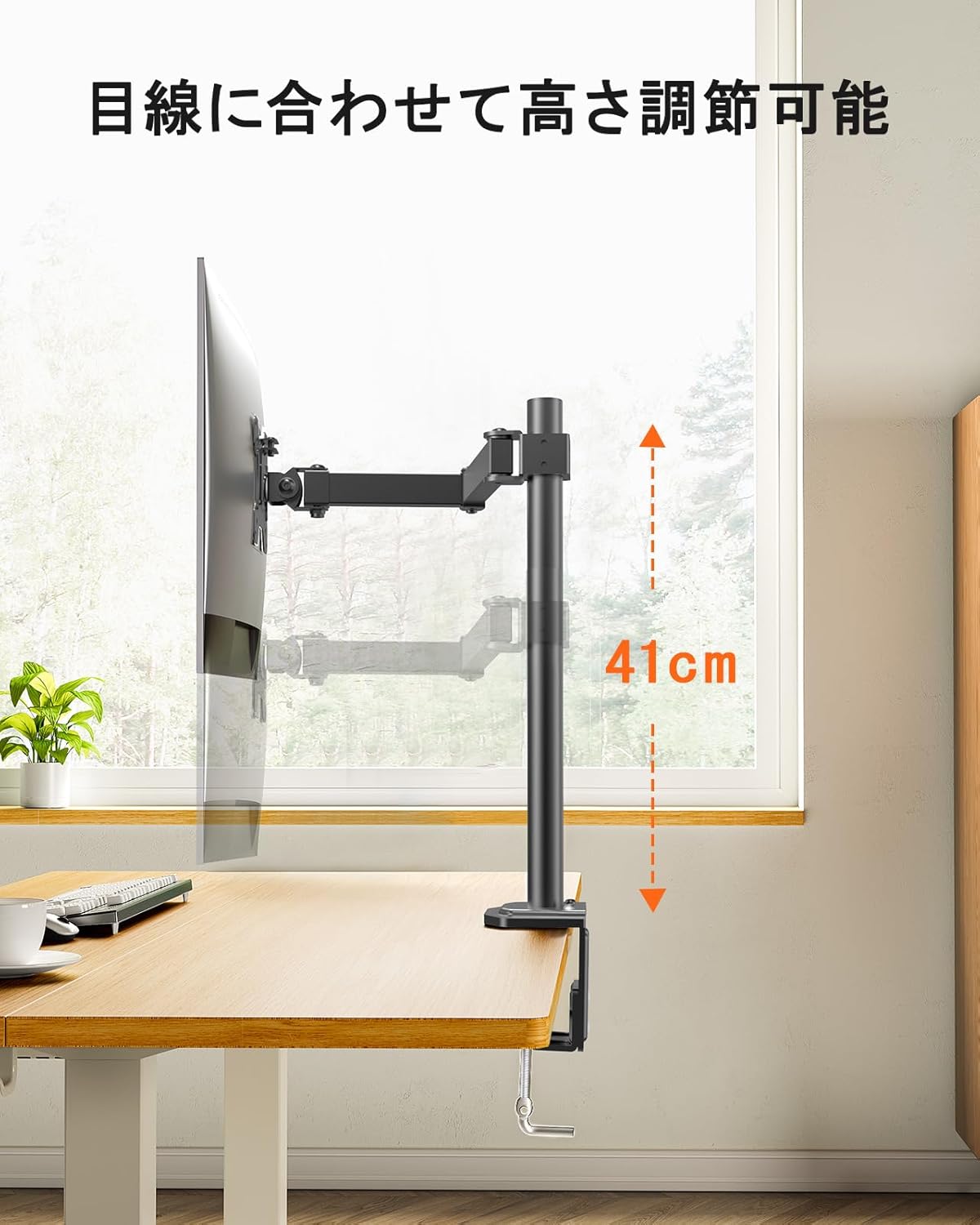
An image highlighting the monitor arm's vertical adjustment capability, allowing for a height range of 41cm to align the monitor with eye level.

A side-by-side comparison demonstrating the ergonomic benefits of using an adjustable monitor arm, showing improved posture compared to a fixed monitor stand.

Satu overhed view of a person working at a desk, demonstrating how the monitor arm allows for flexible monitor positioning to achieve a comfortable and ergonomic workspace.
Penyelenggaraan
- Periksa semua skru dan sambungan secara berkala untuk memastikan ia kekal ketat. Ketatkan semula jika perlu.
- Bersihkan lengan monitor dengan kain lembut,amp kain. Elakkan pembersih atau pelarut yang melelas yang boleh merosakkan kemasan.
- Ensure cables are properly routed through the cable management clips to prevent strain or damage.

A view of a desk setup where the monitor arm's integrated cable management system keeps monitor cables organized and out of sight, contributing to a clean workspace.

An image showing a yellow cable neatly routed along the monitor arm using the integrated cable clips, illustrating effective cable management.
Menyelesaikan masalah
- Monitor is unstable or sags:
- Ensure all mounting screws (VESA plate to monitor, arm to pole, base to desk) are securely tightened.
- Verify that your monitor's weight does not exceed the 8kg capacity. - Difficulty adjusting arm movement:
- Check if any adjustment screws are overtightened. Loosen slightly if necessary.
- Ensure the arm is not obstructed by other objects on the desk. - Arm does not hold position:
- This model is a pole-mounted arm with fixed position adjustments, not a gas spring arm. Ensure all tightening points are secure after positioning. - Bahagian yang hilang atau komponen yang rosak:
- Refer to the Warranty and Support section for assistance.
Waranti dan Sokongan
ErGear provides a Jaminan kualiti 5 tahun from the date of purchase for this product. This warranty covers manufacturing defects and ensures product quality.
In the event of any issues with your product, such as defects, malfunctions, or missing accessories, please contact our customer service team. We are committed to providing a full refund or free exchange to ensure your satisfaction.
For support, please refer to the contact information provided with your purchase or visit the official ErGear webtapak.


