pengenalan
Thank you for choosing the ZZLWAN Bluetooth Karaoke Microphone. This versatile device combines a microphone, Bluetooth speaker, and loudspeaker into one portable unit, perfect for various occasions. Designed for both kids and adults, it features dynamic LED lights and advanced audio technology for a clear and enjoyable singing experience. Please read this manual thoroughly to ensure proper use and maintenance.
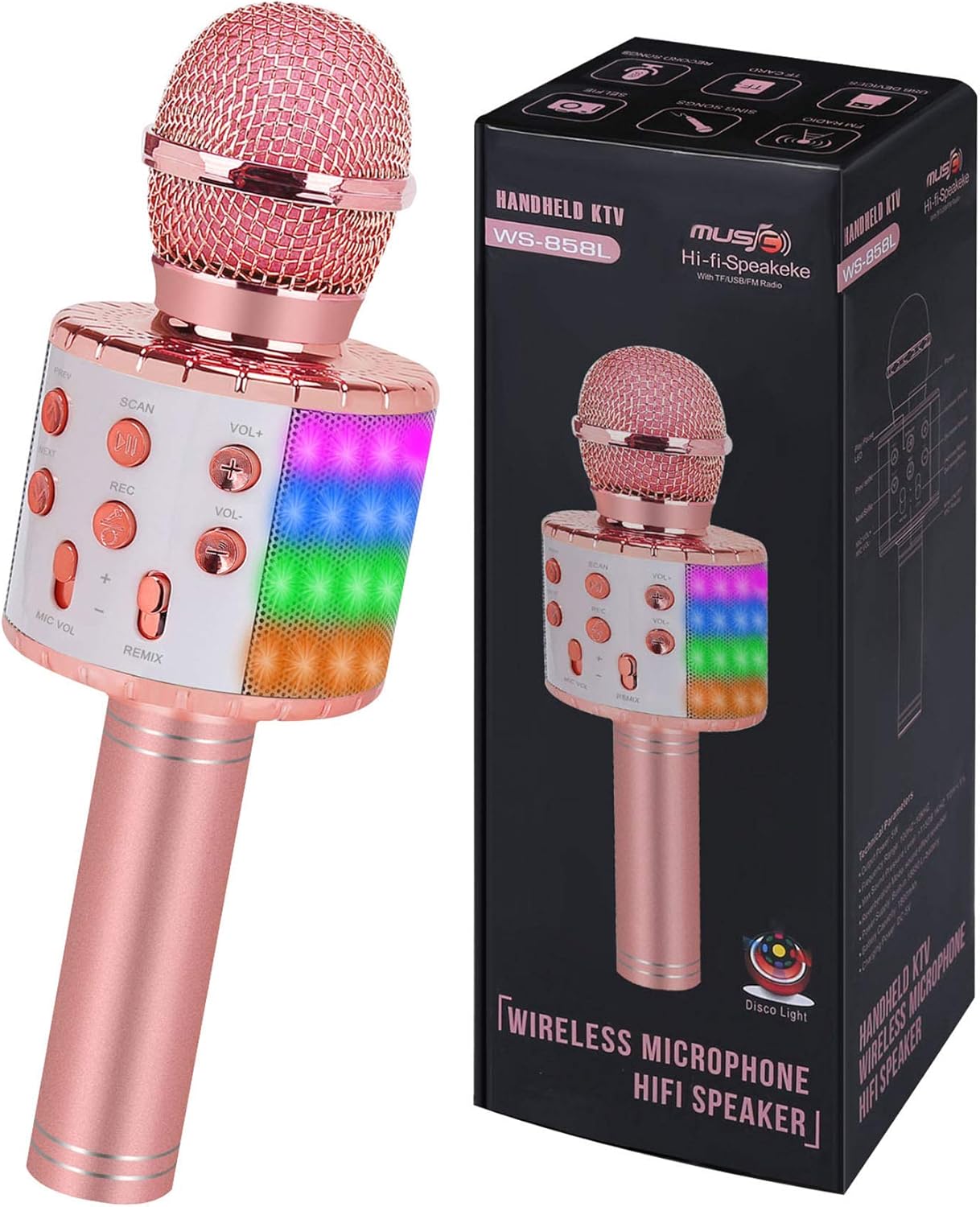
Image: The ZZLWAN Bluetooth Karaoke Microphone, showcasing its elegant champagne color and integrated LED lights.
Maklumat Keselamatan
The ZZLWAN Bluetooth Karaoke Microphone is constructed from durable aluminum alloy material designed to withstand falls and impacts. It features a UL Certified battery to ensure user safety during charging and operation. This wireless microphone also meets US Official CPC toy safety standards, guaranteeing it is harmless for users of all ages. Always supervise young children during use.
Persediaan
1. Mengecas Mikrofon
Before first use, fully charge the microphone using the provided charging cable. The charging port is located at the bottom of the microphone handle. A full charge ensures optimal performance and battery life.

Image: Close-up of the microphone's base, highlighting the charging port and other connectivity options.
2. Menghidupkan/Mematikan
Press and hold the power button (usually located on the control panel) for a few seconds to turn the microphone on or off. You will hear an audible prompt indicating the power status.
3. Berpasangan Bluetooth
- Turn on the microphone. It will automatically enter Bluetooth pairing mode, indicated by a voice prompt.
- Dayakan Bluetooth pada telefon pintar atau tablet anda.
- Cari untuk "NBT-HT-C3" or "ZZLWAN Microphone" in your device's Bluetooth list.
- Select the microphone to connect. A successful connection will be confirmed by a voice prompt.

Image: The microphone demonstrating its wide compatibility with smartphones, tablets, and other Bluetooth-enabled devices.
Arahan Operasi
Panel Kawalan Terlaluview

Imej: Terperinci view of the microphone's control panel, showing various buttons for playback, volume, and recording.
- Butang Kuasa: Tekan dan tahan untuk menghidupkan/mematikan.
- PREV / SETERUSNYA: Short press to switch to the previous or next song.
- SCAN/LED: Short press to scan for FM radio (if supported). Long press to turn LED lights on/off.
- REKAM: Short press to record your singing (requires a compatible app or storage).
- VOL +/-: Adjusts the music volume.
- MIC VOL+/-: Adjusts the microphone's voice volume.
- REMIX: Adjusts the echo/reverb effect.
Ciri & Penggunaan Utama
- Penggunaan pelbagai fungsi: This device functions as a wireless microphone, a portable Bluetooth speaker, and a loudspeaker. Connect it to your smartphone or tablet to play music and sing along.
- Powerful Sound Quality: Equipped with advanced audio technology and multi-layer noise reduction, the microphone delivers clear sound. The built-in 360° Hi-Fi speaker provides rich echo and reverberation effects for an immersive karaoke experience.

Image: An illustration highlighting the microphone's 360-degree Hi-Fi speaker for powerful sound output.
- Lampu LED Dinamik: The microphone features colorful LED lights that can synchronize with your music and singing, creating a vibrant atmosphere. Long press the "SCAN/LED" button to toggle these lights on or off.

Image: The microphone displaying its dynamic LED lights, enhancing the singing experience.
- Fungsi Rakaman: Use the REC button to record your performances. This feature typically requires a compatible karaoke or recording application on your connected device.
Penyelenggaraan
- Pembersihan: Wipe the microphone with a soft, dry cloth. Do not use abrasive cleaners or immerse the device in water.
- Storan: Simpan mikrofon di tempat yang sejuk dan kering jauh dari cahaya matahari langsung dan suhu yang melampau.
- Penjagaan Bateri: Untuk memanjangkan hayat bateri, elakkan daripada menyahcas sepenuhnya bateri dengan kerap. Mengecasnya dengan kerap, walaupun tidak digunakan untuk tempoh yang lama.
Menyelesaikan masalah
| Masalah | Penyelesaian |
|---|---|
| Microphone won't turn on. | Pastikan bateri dicas. Sambungkan ke sumber kuasa dan cuba lagi. |
| Tidak dapat menyambung melalui Bluetooth. | Make sure the microphone is in pairing mode. Turn off and on your device's Bluetooth. Ensure no other devices are connected to the microphone. |
| Tiada bunyi dari mikrofon. | Check microphone volume (MIC VOL) and music volume (VOL+/-). Ensure the microphone is properly connected to your device. |
| Bunyi herot atau tidak jelas. | Adjust the MIC VOL and REMIX (echo) settings. Ensure you are not too close to the microphone or speaking too loudly. Check for interference from other electronic devices. |
| Lampu LED tidak berfungsi. | Long press the SCAN/LED button to toggle the lights. Ensure the microphone has sufficient battery power. |
Spesifikasi
| Ciri | Perincian |
|---|---|
| Dimensi Produk | 3.31 x 3.46 x 9.76 inci |
| Berat Barang | 12.9 auns |
| Nombor Model | NBT-HT-C3 |
| Jenama | ZZLWAN |
| Bateri | 1 bateri Lithium Ion diperlukan (termasuk) |
| Umur Disyorkan | 3 tahun dan ke atas |
| Komponen yang Disertakan | Mikrofon |
| Penggunaan yang Disyorkan | Untuk Telefon Pintar atau Tablet |
| Negara Asal | China |
Waranti dan Sokongan
For warranty information or technical support, please refer to the product packaging or contact ZZLWAN customer service directly. Keep your purchase receipt as proof of purchase for any warranty claims.


