pengenalan
This manual provides detailed instructions for the MageGee K1 RGB Gaming Keyboard and Mouse combo. Please read this manual carefully before using the product to ensure proper setup and operation. This product is designed for use with personal computers and laptops, offering a full-size keyboard with RGB backlighting and a high-resolution gaming mouse.

Image: The MageGee K1 RGB Gaming Keyboard and Mouse set, featuring a pink keyboard with RGB backlighting and a matching pink mouse.
Kandungan Pakej
Pastikan semua item ada dalam pakej:
- MageGee K1 RGB Gaming Keyboard
- MageGee K1 Gaming Mouse
- Manual Pengguna (dokumen ini)
Persediaan
Menyambung Peranti
- Locate an available USB 2.0 port on your computer or laptop.
- Pasangkan penyambung USB Papan Kekunci MageGee K1 ke dalam port USB.
- Pasangkan penyambung USB Tetikus MageGee K1 ke port USB lain yang tersedia.
- The keyboard and mouse are plug-and-play devices. Your operating system should automatically detect and install the necessary drivers. No additional software or drivers are typically required.
Keserasian
The MageGee K1 RGB Gaming Keyboard and Mouse are compatible with the following operating systems:
- Windows XP
- Windows Vista
- Windows 7
- Windows 8
- Windows 10
- Mac OS
- Linux
Operating the Keyboard and Mouse
Ciri Papan Kekunci
The K1 keyboard features a full-size 104-key layout with ergonomic design for comfortable use. It includes a numeric keypad and function keys.

Image: Illustration of the ergonomic design of the MageGee K1 keyboard, showing the keycap profile untuk menaip dengan selesa.
Kawalan Lampu Latar RGB
The keyboard features RGB backlighting with multiple customization options:
- Warna terang: 8 distinct colors.
- Mod Pencahayaan: 5 different lighting effects.
- Tahap Kecerahan: Adjustable to suit your preference.
- Kawalan Kelajuan: Laraskan kelajuan kesan pencahayaan dinamik.
Untuk mengawal lampu latar:
- Refer to the keyboard's dedicated backlight control keys or FN key combinations for specific adjustments.
- The backlight can be turned on or off as needed.

Image: Diagram illustrating the RGB backlight features of the MageGee K1 keyboard, including 5 light modes, 8 light colors, adjustable speed/brightness, and light on/off functionality.
Fungsi Multimedia
The keyboard includes multimedia shortcut keys accessible via the FN kunci:
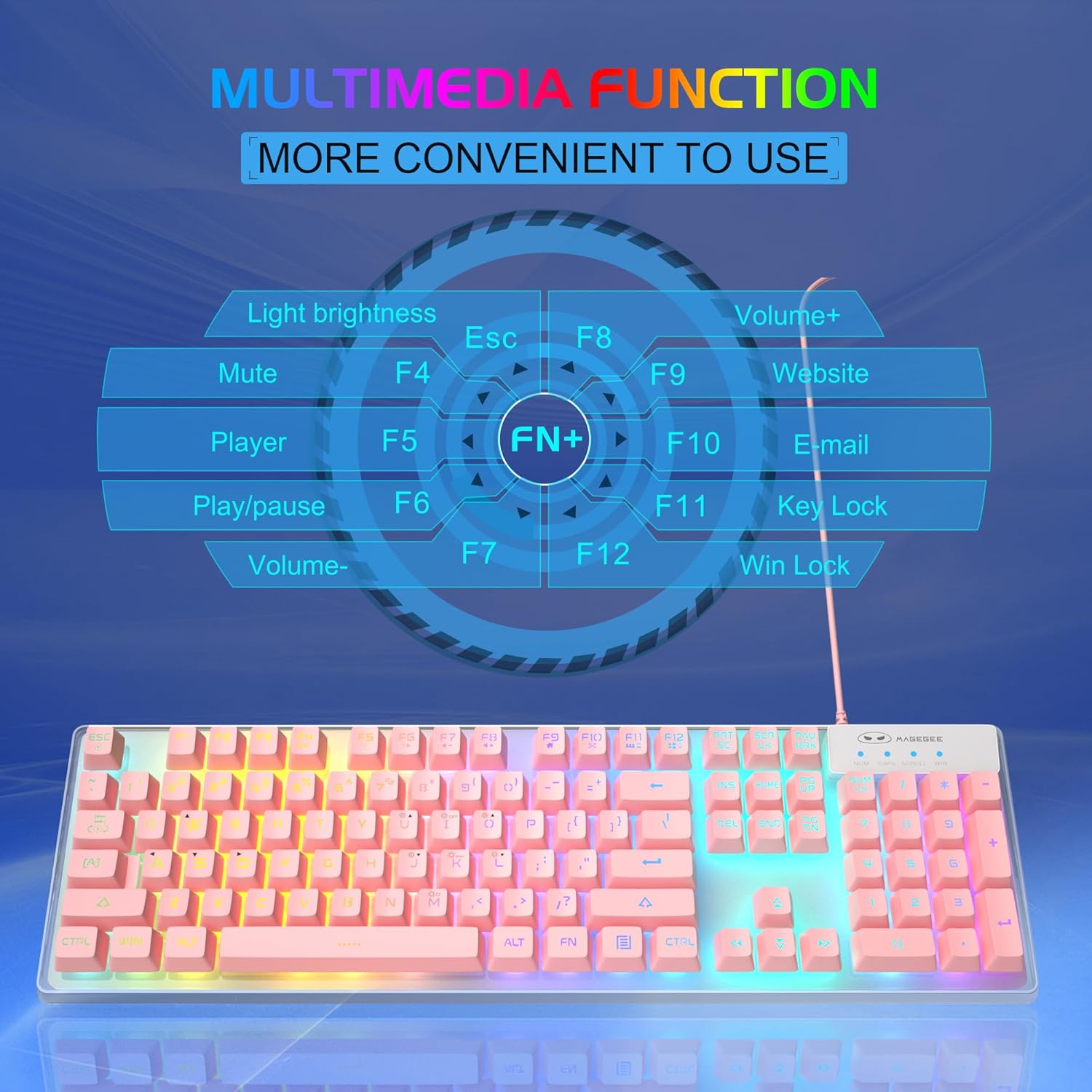
Image: A visual guide to the multimedia functions of the MageGee K1 keyboard, showing FN key combinations for mute, volume control, media playback, website, email, and key lock.
- FN+F1: bisu
- FN+F2: Kelantangan Kurang
- FN+F3: Kelantangan Naik
- FN+F4: Pemain
- FN+F5: Main/Jeda
- FN+F6: Trek Sebelumnya
- FN+F7: Trek Seterusnya
- FN+F8: Berhenti
- FN+F9: E-mel
- FN+F10: Web pelayar
- FN+F11: Kunci Kekunci
- FN+F12: Win Lock (disables Windows key)
Ciri Tetikus
The K1 mouse offers high resolution and responsive tracking for gaming and general computing.
Pelarasan DPI
The mouse features 6 adjustable DPI (Dots Per Inch) levels to match your precision and speed requirements:
- Tahap DPI: 600 / 800 / 1200 / 1600 / 2400 / 3200
To change DPI, press the dedicated DPI button on the mouse. Each press cycles through the available DPI settings.

Image: Diagram showing the MageGee K1 mouse with its 6 DPI levels (600-3200) and instructions for changing and locking the 7-color LED backlight.
LED Backlight Control (Mouse)
The mouse features a 7-color LED backlight with a breathing effect. To lock the mouse LED backlight to a specific color:
- While the mouse cycles through colors, press the butang sisi (forward button) and the butang tengah (scroll wheel click) simultaneously. This will lock the current color.

Image: Display of the MageGee K1 mouse showing its 7-color cycled breathing LED lights in green, yellow, purple, cyan, red, and white.
Penyelenggaraan
Pembersihan
To maintain the performance and appearance of your MageGee K1 keyboard and mouse:
- Putuskan sambungan peranti daripada komputer anda sebelum membersihkannya.
- Gunakan kain lembut dan tidak berbulu sedikit dampdisapu dengan air atau larutan pembersih lembut.
- Avoid using harsh chemicals, abrasive cleaners, or solvents, as these can damage the surface and keycap legends.
- Untuk papan kekunci, anda boleh menggunakan udara termampat untuk mengeluarkan habuk dan serpihan dari antara kekunci.
- For the mouse, gently wipe the surface and the optical sensor area.
Penjagaan Am
- Elakkan mendedahkan peranti kepada suhu yang melampau, cahaya matahari langsung atau kelembapan yang tinggi.
- Do not drop or subject the devices to strong impacts.
- Keep liquids away from the keyboard and mouse. While the keyboard has some water-resistant features, it is not fully waterproof.
Menyelesaikan masalah
If you encounter issues with your MageGee K1 keyboard and mouse, refer to the following common solutions:
| Masalah | Penyelesaian yang Mungkin |
|---|---|
| Papan kekunci/Tetikus tidak bertindak balas |
|
| Backlight not working (Keyboard) |
|
| Isu penjejakan tetikus |
|
| Kekunci multimedia tidak berfungsi |
|
Spesifikasi
Below are the technical specifications for the MageGee K1 RGB Gaming Keyboard and Mouse:

Image: Detailed dimensions of the MageGee K1 keyboard (438mm x 137mm x 35mm) and mouse (123mm x 63mm x 39mm).
| Ciri | Perincian |
|---|---|
| Jenama | MageGee |
| Nombor Model | K1 |
| warna | K1 Pink |
| Teknologi Ketersambungan | Wired USB 2.0 (Gold-plated interface, Anti-interference magnetic ring) |
| Susun atur papan kekunci | Full-size 104 keys |
| Lampu latar keyboard | RGB (8 colors, 5 modes, adjustable brightness/speed) |
| Jenis Keycap | Double-shot injection molded, Membrane style |
| Special Keyboard Features | Ergonomic, Backlit, Shortcut and Multimedia keys, Anti-ghosting (19 keys) |
| Teknologi Penderia Tetikus | Optik |
| Tahap DPI Tetikus | 600/800/1200/1600/2400/3200 |
| Lampu Latar Tetikus | 7-color cycled breathing LED |
| Sistem Operasi yang Serasi | Windows XP/Vista/7/8/10, Mac, Linux |
| bahan | Plastik Kejuruteraan ABS |
| Sumber Kuasa | Dikuasakan USB (Tiada bateri diperlukan) |
Waranti dan Sokongan
Information regarding specific warranty terms and customer support contact details for the MageGee K1 RGB Gaming Keyboard and Mouse is not available in this document. Please refer to the product packaging or the official MageGee webtapak untuk maklumat waranti dan hubungan perkhidmatan pelanggan.


