pengenalan
This manual provides detailed instructions for the safe installation, operation, and maintenance of your Hinkley Marquis 52-Inch 5-Blade Ceiling Fan. Please read all instructions carefully before beginning installation and retain this manual for future reference. Proper installation and operation are essential for optimal performance and safety.
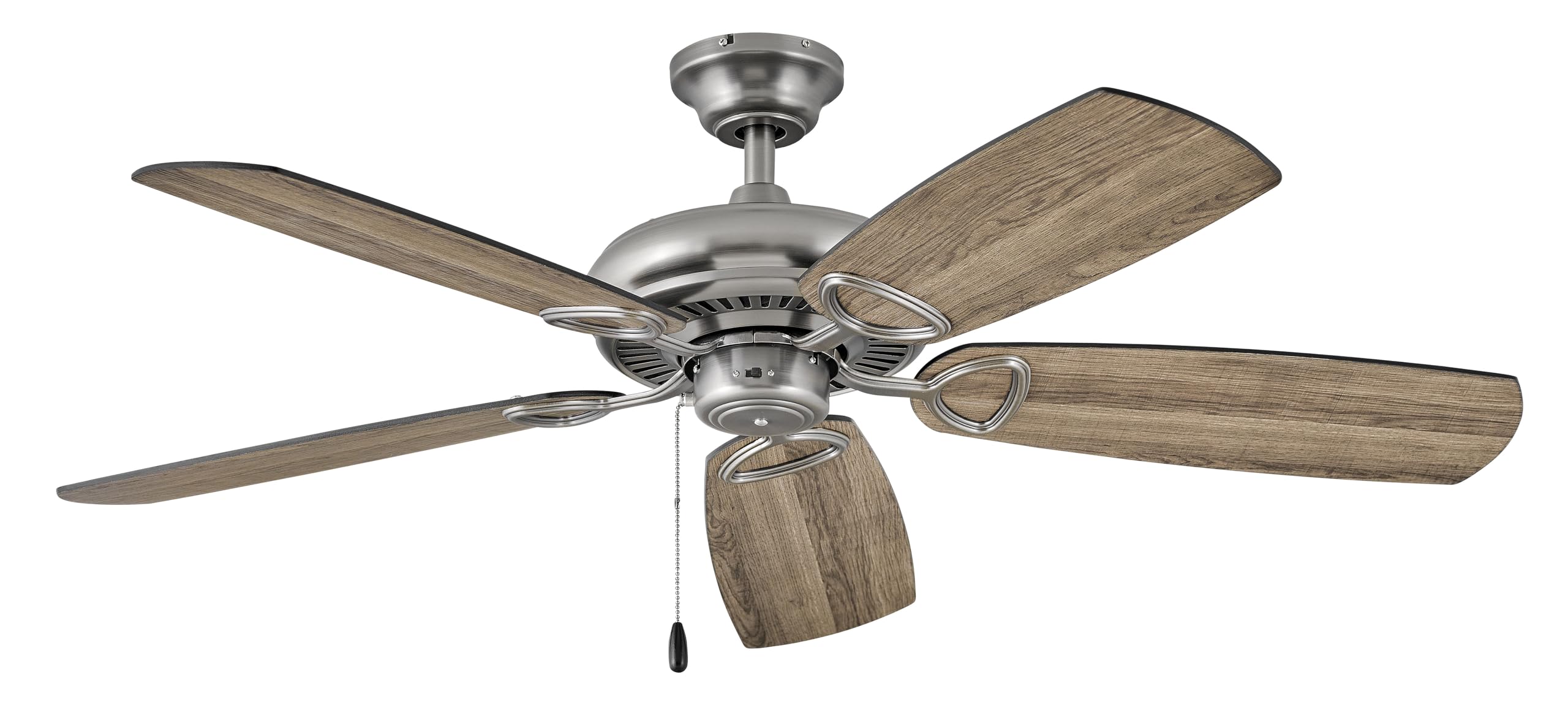
Image: Hinkley Marquis 52-Inch 5-Blade Ceiling Fan in Pewter finish with five wooden-look blades.
Maklumat Keselamatan
WARNING: To reduce the risk of fire, electric shock, or personal injury, always follow these safety guidelines.
- Ensure the electrical supply is disconnected at the circuit breaker or fuse box before installation or servicing.
- All electrical wiring must be performed by a qualified electrician in accordance with national and local electrical codes.
- Struktur pelekap mestilah mampu menyokong berat kipas (kira-kira 18.92 paun).
- Jangan kendalikan kipas dengan bilah atau perumah yang rosak.
- Maintain a minimum clearance of 7 feet from the floor to the bottom edge of the fan blades.
- Avoid placing objects in the path of the rotating blades.
Kandungan Pakej
Sahkan bahawa semua komponen hadir sebelum memulakan pemasangan:
- Pemasangan Kipas Siling
- Bilah Kipas (5)
- Perkakasan Pemasangan
- Alat Kawalan Jauh
- Manual Arahan
Spesifikasi
| Jenama | Hinkley |
| Nombor Model | 901352FPW-NIA |
| warna | Pewter |
| Reka Bentuk Kipas Elektrik | Kipas siling |
| Sumber Kuasa | Elektrik Bertali |
| Jenis Bilik | Dining Room, Bedroom, Living Room |
| Penggunaan yang Disyorkan | Peredaran Udara, Penyejukan |
| Jenis Selesai | Selesai |
| Voltage | 120 Volt |
| Jenis Suis | Pull Chain (Remote Control included) |
| Berat Barang | 18.92 paun |
| Komponen yang Disertakan | Jauh |
| Penggunaan Dalaman/Luar | Luar |
| Kaedah Kawalan | Jauh |
| Dimensi Produk | 52 x 52 x 13.25 inci |
| Ketinggian Berhimpun | 13.25 inci |
| Panjang yang dipasang | 52 inci |
| Lebar Dipasang | 52 inci |
| Bahan Teduh | kaca |
| Arah Cahaya | Lampu bawah |
Maklumat Tenaga
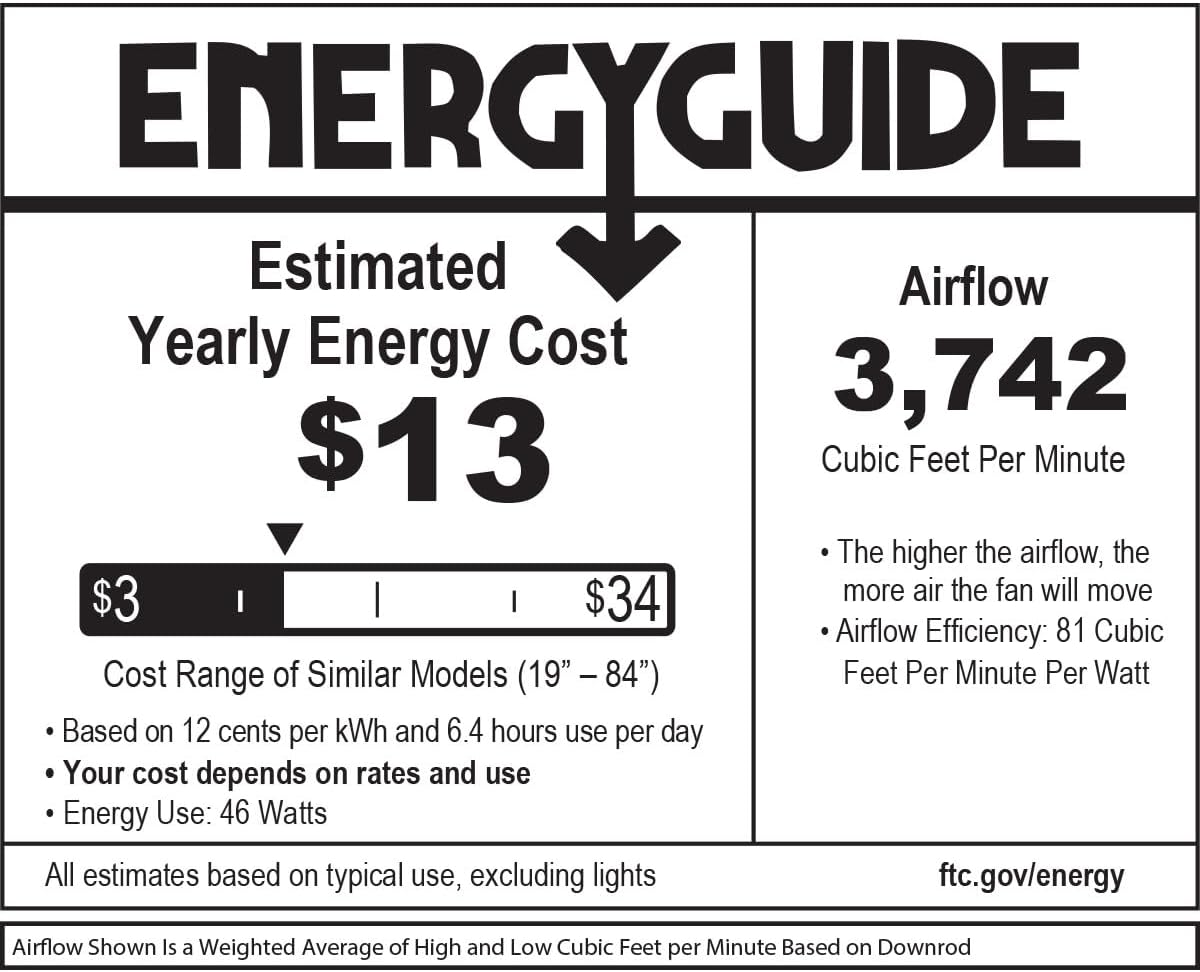
Image: EnergyGuide label indicating an estimated yearly energy cost of $13 and an airflow of 3,742 Cubic Feet Per Minute.
Persediaan dan Pemasangan
Professional installation by a qualified electrician is highly recommended for safety and proper function. Ensure all local electrical codes are followed.
Pemeriksaan Pra-Pemasangan
- Verify that the electrical box is securely mounted and rated for ceiling fan support.
- Confirm that the chosen location allows for proper blade clearance from walls and other obstructions.
Memasang Kipas
- Secure the mounting bracket to the electrical outlet box using the provided screws.
- Angkat pemasangan motor kipas dengan berhati-hati dan gantungkannya dari pendakap pelekap.
Sambungan Pendawaian
Connect the fan's electrical wires to the household wiring according to the wiring diagram provided in the full installation guide (not included in this summary). Ensure all connections are secure and insulated.
Attaching Blades and Canopy
- Attach the fan blades to the motor housing using the blade screws. Ensure all blades are securely fastened.
- Install the canopy over the mounting bracket, securing it with the designated screws.
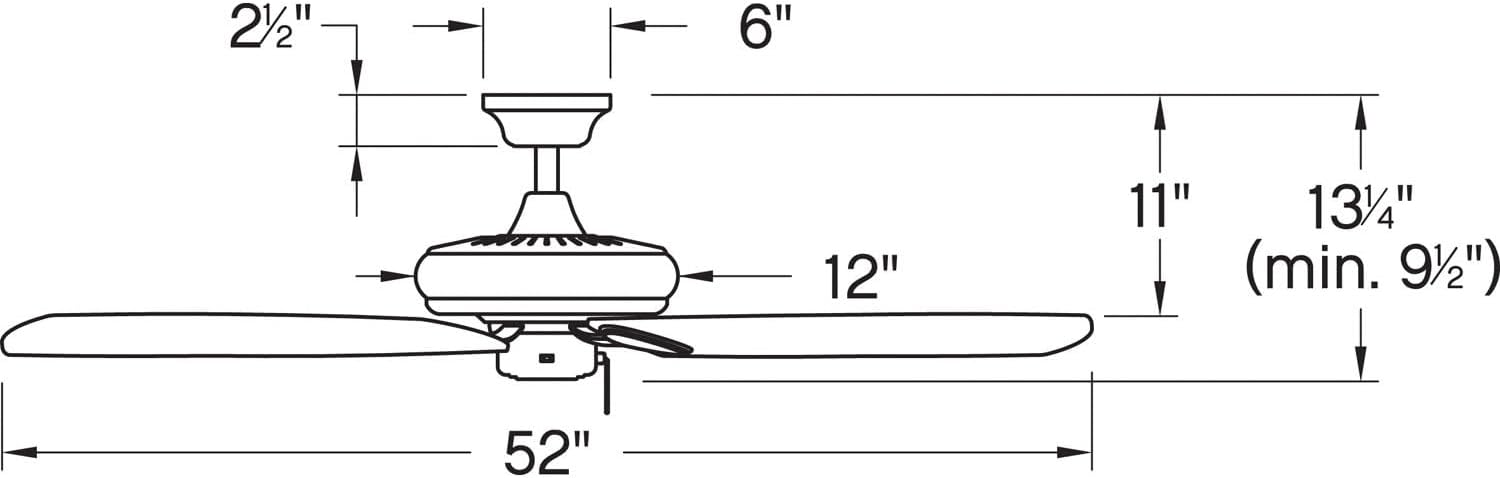
Image: Dimensional diagram of the ceiling fan, illustrating key measurements for installation.
Arahan Operasi
The Hinkley Marquis ceiling fan is operated using the included remote control. It also features smart home compatibility (WiFi accessory sold separately).
Fungsi Kawalan Jauh
- Kelajuan Kipas: Use the speed buttons to adjust the fan's rotation speed (typically low, medium, high).
- Kawalan Cahaya: Press the light button to turn the light on or off. Hold the button to dim or brighten the light (if dimmable).
- Arah Kipas: A button may be present to reverse the fan's direction for seasonal use (downward airflow for cooling, upward for heat circulation).
Keserasian Rumah Pintar
This fan is designed to be smart home compatible. A WiFi accessory, sold separately, is required to enable features such as speed, light, and seasonal mode control via a smart device or voice activation. This allows for setting schedules and preferences for enhanced convenience.

Image: WiFi compatibility features, highlighting smartphone control, voice activation, and scheduling options (requires separate accessory).
Penyelenggaraan
Penyelenggaraan yang kerap memastikan jangka hayat dan operasi kipas siling anda yang cekap.
Pembersihan
- Sentiasa matikan kuasa kipas di pemutus litar sebelum membersihkan.
- Gunakan yang lembut, damp cloth to clean the fan blades and motor housing. Avoid abrasive cleaners that may damage finishes.
- Do not use water directly on the fan motor or electrical components.
Menyemak Sambungan
Periodically check all screws and connections on the fan and mounting hardware to ensure they are secure. Tighten any loose screws as needed.
Menyelesaikan masalah
Jika anda mengalami masalah dengan kipas siling anda, rujuk masalah dan penyelesaian biasa berikut:
| Masalah | Kemungkinan Punca | Penyelesaian |
|---|---|---|
| Kipas tidak bermula | No power to the fan; loose wire connections; remote control battery low. | Check circuit breaker/fuse; ensure all wiring connections are secure; replace remote control battery. |
| Kipas bergoyang | Skru bilah longgar; bilah tidak seimbang; pendakap pelekap longgar. | Tighten all blade screws; ensure blades are balanced (balancing kit may be required); check mounting bracket for secure attachment. |
| Operasi bising | Loose screws; motor not seated properly; fan not broken in. | Check and tighten all screws; ensure motor housing is properly secured; allow for a break-in period (usually 24 hours). |
| Cahaya tidak berfungsi | Bulb needs replacement; loose wire connection; remote control issue. | Replace light bulb; check light kit wiring; ensure remote control battery is functional. |
Waranti dan Sokongan
For specific warranty information and details regarding your Hinkley Marquis ceiling fan, please refer to the warranty card included with your product or visit the official Hinkley website. For technical support or assistance with parts, contact Hinkley customer service directly.
You can find more information and contact details on the official Hinkley webtapak: www.hinkley.com


