1. Pengenalan
This manual provides detailed instructions for the installation, operation, and maintenance of your OJ Microline UTN4-4999 (Model UDG-4999) Non-Programmable Thermostat. This thermostat is designed for electric radiant floor heating systems and features dual sensing (air and floor) and dual voltage capabilities (120V & 240V). It includes a built-in Class A GFCI for enhanced safety.
The OJ Microline UTN4-4999 offers straightforward temperature control without complex programming, making it ideal for users seeking a simple and effective solution for their floor heating needs.

Rajah 1: Depan view of the OJ Microline UTN4-4999 Non-Programmable Thermostat, displaying time and temperature.
2. Maklumat Keselamatan
Arahan Keselamatan Penting:
- Bahaya Elektrik: Installation must be performed by a qualified electrician in accordance with local and national electrical codes. Disconnect power at the circuit breaker before installation or servicing.
- Pengganggu Litar Sesar Tanah (GFCI): This thermostat includes a built-in Class A GFCI, which is required for all underfloor heating systems. Test the GFCI regularly as per local codes and manufacturer recommendations.
- Voltage Keserasian: Pastikan volum termostattage (120V or 240V) matches your heating system's voltage.
- Sensor Lantai: The included floor sensor must be properly installed to prevent overheating and ensure accurate temperature control.
- Jangan rendam the thermostat or sensor in water.
- Jangan beroperasi the thermostat with damaged wiring or if it has been dropped or damaged.

Figure 2: The OJ Microline thermostat installed in a bathroom, highlighting its sleek design and integration.
3. Persediaan & Pemasangan
Installation of the OJ Microline UTN4-4999 thermostat requires adherence to electrical safety standards. It is recommended that a qualified electrician performs the installation.
3.1 Senarai Semak Pra-Pemasangan
- Verify that the power supply to the heating system is disconnected at the main circuit breaker.
- Sahkan voltage of your heating system (120V or 240V) matches the thermostat's capabilities.
- Ensure you have all necessary tools: screwdriver, wire strippers, electrical tape, etc.
- Locate a suitable wall box for mounting the thermostat.
3.2 Gambarajah Pendawaian
Refer to the wiring diagram below for proper connection. All connections must be secure and comply with local electrical codes.
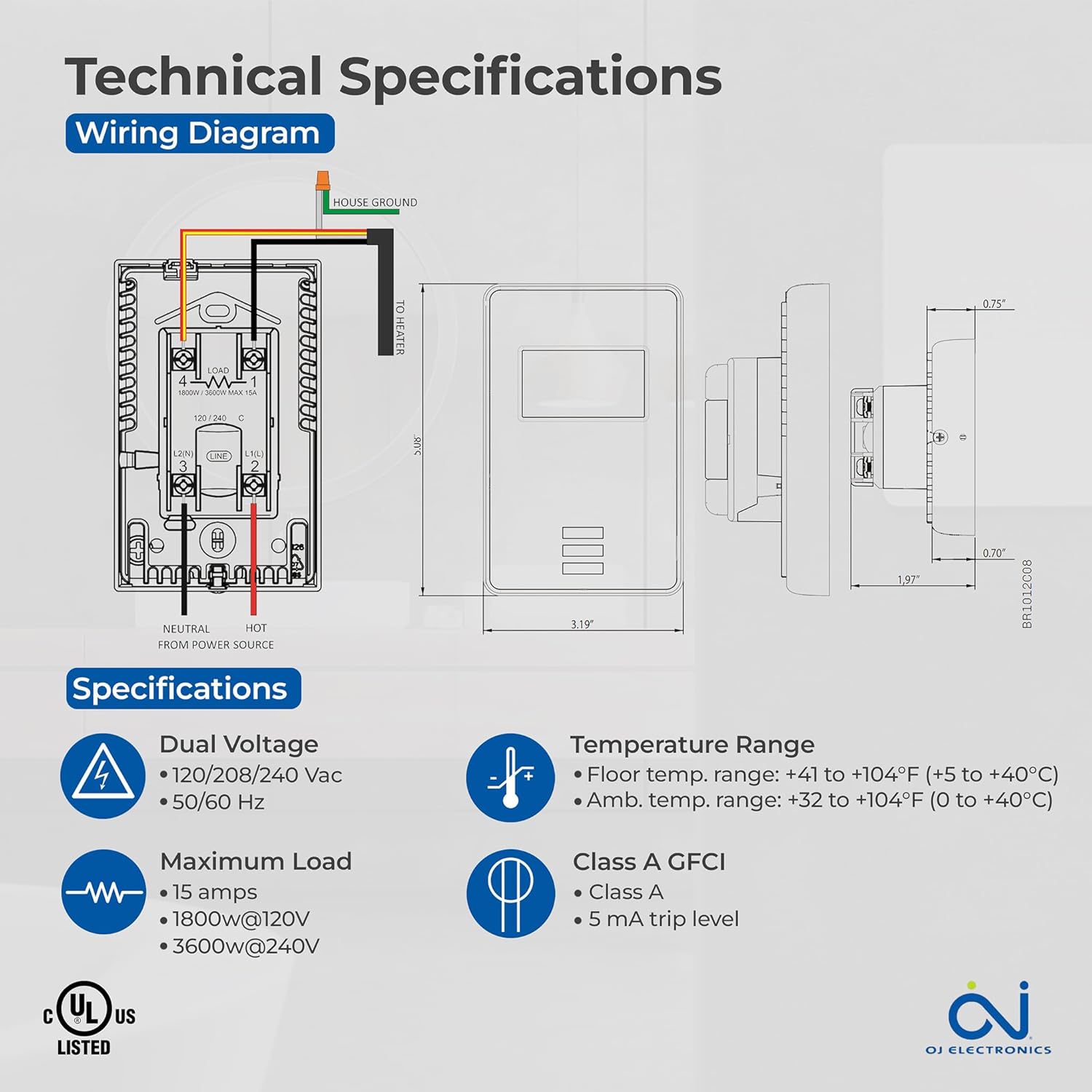
Figure 3: Detailed wiring diagram and technical specifications for the thermostat. Shows connections for House Ground, Neutral, Hot from Power Source, and To Heater.
3.3 Floor Sensor Installation
The 10Kohm floor sensor is included and essential for floor temperature control and protection. Install the sensor cable in a conduit or directly within the floor heating system, ensuring it is positioned centrally between heating elements for accurate readings. Do not cut or splice the sensor cable unless specifically instructed by the heating system manufacturer.

Figure 4: The included OJ Microline floor sensor, a black cable with a small probe at the end.
3.4 Memasang Termostat
- After wiring, carefully push the thermostat into the wall box.
- Secure the thermostat to the wall box using the provided screws.
- Pasangkan plat muka.
- Pulihkan kuasa pada pemutus litar.
4. Operasi
The OJ Microline UTN4-4999 is a non-programmable thermostat designed for simple and direct temperature control.
4.1 Melaraskan Suhu
To adjust the desired temperature (setpoint), use the Up dan Bawah arrow buttons located below the display. The display will show the current temperature and the setpoint. The heating system will activate or deactivate to maintain the setpoint.

Figure 5: A hand interacting with the thermostat's buttons to adjust the temperature setting.
4.2 Mod Kawalan
The thermostat offers three control modes, selectable based on your heating requirements and floor type:
- (A) Ambient temperature with Floor protection: The thermostat controls based on the room's air temperature, but will limit the floor temperature to prevent overheating, especially important for sensitive floor coverings like laminate or engineered wood.
- (B) Floor temperature with Floor protection: The thermostat controls directly based on the floor sensor reading, also with an upper limit for floor protection. This mode is ideal for maintaining a consistent floor surface temperature.
- (C) Ambient temperature without Floor protection: The thermostat controls solely based on the room's air temperature, without an upper limit on floor temperature. Use this mode only if your floor covering can withstand high temperatures.
Consult your heating system installer or the thermostat's advanced settings (if available, refer to the full technical manual for details) to select the appropriate control mode.
5. Penyelenggaraan
The OJ Microline UTN4-4999 thermostat is designed for minimal maintenance.
- Pembersihan: Lap permukaan termostat dengan kain lembut,amp kain. Jangan gunakan pembersih yang kasar, pelarut atau semburan kimia, kerana ini boleh merosakkan paparan atauasing.
- Ujian GFCI: Regularly test the built-in GFCI as per local electrical codes, typically monthly. Press the "TEST" button on the thermostat. The display should indicate a trip, and the heating will turn off. Press the "RESET" button to restore normal operation. If the GFCI does not trip or reset, contact a qualified electrician.
- Pemeriksaan: Periodically inspect the thermostat and wiring for any signs of damage or loose connections. If any issues are found, disconnect power and consult a qualified electrician.
6. Penyelesaian masalah
Jika anda mengalami masalah dengan termostat anda, rujuk masalah dan penyelesaian biasa berikut:
| Masalah | Kemungkinan Punca | Penyelesaian |
|---|---|---|
| Paparan termostat kosong. | Tiada kuasa pada termostat. | Check the circuit breaker. Ensure all wiring connections are secure. |
| Sistem pemanasan tidak dihidupkan. | Setpoint is below ambient/floor temperature; GFCI tripped; wiring issue. | Increase setpoint. Check and reset GFCI. Verify wiring connections. |
| Perjalanan GFCI dengan kerap. | Ground fault in heating cable or wiring. | Immediately disconnect power and consult a qualified electrician to diagnose the ground fault. |
| Bacaan suhu tidak tepat. | Improper sensor placement; sensor damage; air drafts. | Ensure sensor is correctly placed. Inspect sensor for damage. Minimize drafts near the thermostat. |
Jika masalah berterusan selepas mencuba penyelesaian ini, hubungi sokongan pelanggan atau juruelektrik bertauliah.
7. Spesifikasi
| Ciri | Perincian |
|---|---|
| Nombor Model | UDG-4999 |
| Jenama | OJ Electronics |
| Jenis Pengawal | Termostat |
| Gaya | Tidak Boleh Diprogramkan |
| Voltage | 120V, 208V, 240V AC (Dual Voltage) |
| Beban Maksimum | 15A (1800W @ 120V, 3600W @ 240V) |
| Kekerapan | 50/60 Hz |
| GFCI | Built-in Class A (5 mA trip level) |
| Penderia | Built-in Air Sensor, 10Kohm Floor Sensor (included) |
| Floor Limit Range | +41 hingga +104°F (+5 hingga +40°C) |
| Julat Suhu Ambien | +32 hingga +104°F (0 hingga +40°C) |
| Jenis Paparan | Digital dengan Lampu Latar |
| Kaedah Kawalan | Kawalan Butang (Sentuh) |
| Jenis Pemasangan | Lekap di dinding |
| Pematuhan | c UL us Listed for USA and Canada |
| Dimensi | 6 x 3.5 x 2.75 inci (Pakej) |
| Berat Barang | 16 auns (1 paun) |

Figure 6: Key features of the thermostat including energy efficiency, simple operation, dual sensing, and built-in GFCI.
8. Maklumat Waranti
The OJ Microline UTN4-4999 Thermostat comes with a manufacturer's limited Waranti 3 tahun. Waranti ini melindungi kecacatan pada bahan dan mutu kerja di bawah penggunaan dan perkhidmatan biasa. Sila simpan bukti pembelian anda untuk tuntutan waranti.
For detailed warranty terms and conditions, please refer to the documentation included with your product or visit the OJ Electronics official webtapak.
9. Sokongan Pelanggan
For technical assistance, troubleshooting beyond this manual, or warranty inquiries, please contact OJ Electronics customer support.
- Sokongan dalam talian: Visit the official OJ Electronics website for FAQs, additional resources, and contact forms.
- Sokongan E-mel: Rujuk kepada pembungkusan produk anda atau pegawai rasmi website for specific email addresses.
- Sokongan Telefon: Rujuk kepada pembungkusan produk anda atau pegawai rasmi weblaman web untuk nombor telefon khidmat pelanggan.
When contacting support, please have your product model number (UDG-4999) and purchase date available.


