1. Pengenalan
Thank you for choosing the BESTEK 300W Pure Sine Wave Power Inverter. This device converts 12V DC power from your vehicle's battery into 220V AC household power, allowing you to operate various electronic devices on the go. It features a pure sine wave output, which is ideal for sensitive electronics, and includes two USB charging ports and one AC outlet. Please read this manual thoroughly before use to ensure safe and optimal performance.

Image 1.1: BESTEK 300W Pure Sine Wave Power Inverter with accessories.
2. Arahan Keselamatan Penting
Please read and understand all safety warnings and instructions before installing or operating this inverter. Failure to follow these instructions may result in electric shock, fire, serious injury, or property damage.
- JANGAN open the inverter casing. Tiada bahagian yang boleh diservis pengguna di dalamnya.
- JANGAN expose the inverter to rain, moisture, or extreme temperatures.
- JANGAN connect the inverter to 24V DC systems. This inverter is designed for 12V DC ONLY.
- Pastikan pengudaraan yang betul di sekitar inverter. Jangan halang bukaan pengudaraan.
- Jauhkan kanak-kanak daripada penyongsang.
- Always connect the inverter to a battery in a well-ventilated area.
- Avoid connecting appliances that exceed the inverter's 300W continuous power rating.
- Disconnect the inverter from the power source when not in use or before cleaning.
- Gunakan hanya kabel dan aksesori yang disediakan.
- In case of smoke, unusual odors, or abnormal operation, immediately disconnect the inverter from the power source.
3. Kandungan Pakej
Sahkan bahawa semua item terdapat dalam pakej anda:
- BESTEK 300W Pure Sine Wave Power Inverter
- Penyesuai Pemetik Rokok
- Bateri Clamp Cables (Red and Black)
- Manual Pengguna (dokumen ini)
- Spare Fuses (2 included)

Image 3.1: Inverter with included cigarette lighter adapter and battery clamp kabel.
4. Ciri-ciri Produk
- Output Gelombang Sinus Tulen: Provides stable and clean power, suitable for sensitive electronics, reducing electrical noise and interference.
- Kuasa Berterusan 300W: Delivers reliable power for various devices up to 300 watts.
- Dual USB Ports (4.2A): Allows for fast charging of smartphones, tablets, and other USB-powered devices.
- Outlet AC: Standard 220V AC outlet for powering small appliances.
- Intelligent Cooling Fan: Operates quietly and adjusts speed based on temperature and load to prevent overheating.
- Ciri Perlindungan Pelbagai: Includes overload, over-voltage, bawah-voltage, lebih suhu dan perlindungan litar pintas.
- Reka bentuk padat dan tahan lama: Aloi aluminium casing for heat dissipation and durability.
4.1 Pure Sine Wave vs. Modified Sine Wave
This inverter produces a pure sine wave output, which is identical to the AC power supplied by your household utility. This makes it safe for all types of electronics, especially sensitive ones like laptops, medical equipment, and audio systems, which can be damaged by modified sine wave inverters.

Image 4.1: Visual comparison showing the smooth curve of a pure sine wave versus the stepped output of a modified sine wave.
4.2 Keserasian Sejagat
The BESTEK 300W Pure Sine Wave Inverter is compatible with a wide range of devices, including laptops, smartphones, tablets, MP3 players, cameras, and small gaming consoles. It is not suitable for high-power appliances such as hair dryers, irons, coffee makers, or electric kettles.

Image 4.2: The inverter can power devices like notebooks, smartphones, MP3 players, tablets, PSV, and cameras.

Imej 4.3: Cthamples of appliances (hair dryer, iron, straightener, coffee maker) that exceed the inverter's 300W capacity and should not be used.
4.3 Fast & Smart Charging
The inverter features two USB ports with a combined output of 4.2A, capable of intelligently identifying connected devices for optimized charging. The AC outlet provides standard power for other electronics.

Image 4.4: The inverter's AC outlet and dual USB ports providing power to a tablet and smartphone.
4.4 High-Speed Cooling Fan
An integrated intelligent cooling fan dissipates heat quickly, preventing the inverter from overheating during operation. The fan's speed adjusts automatically based on the internal temperature and load, ensuring efficient cooling and quiet operation.
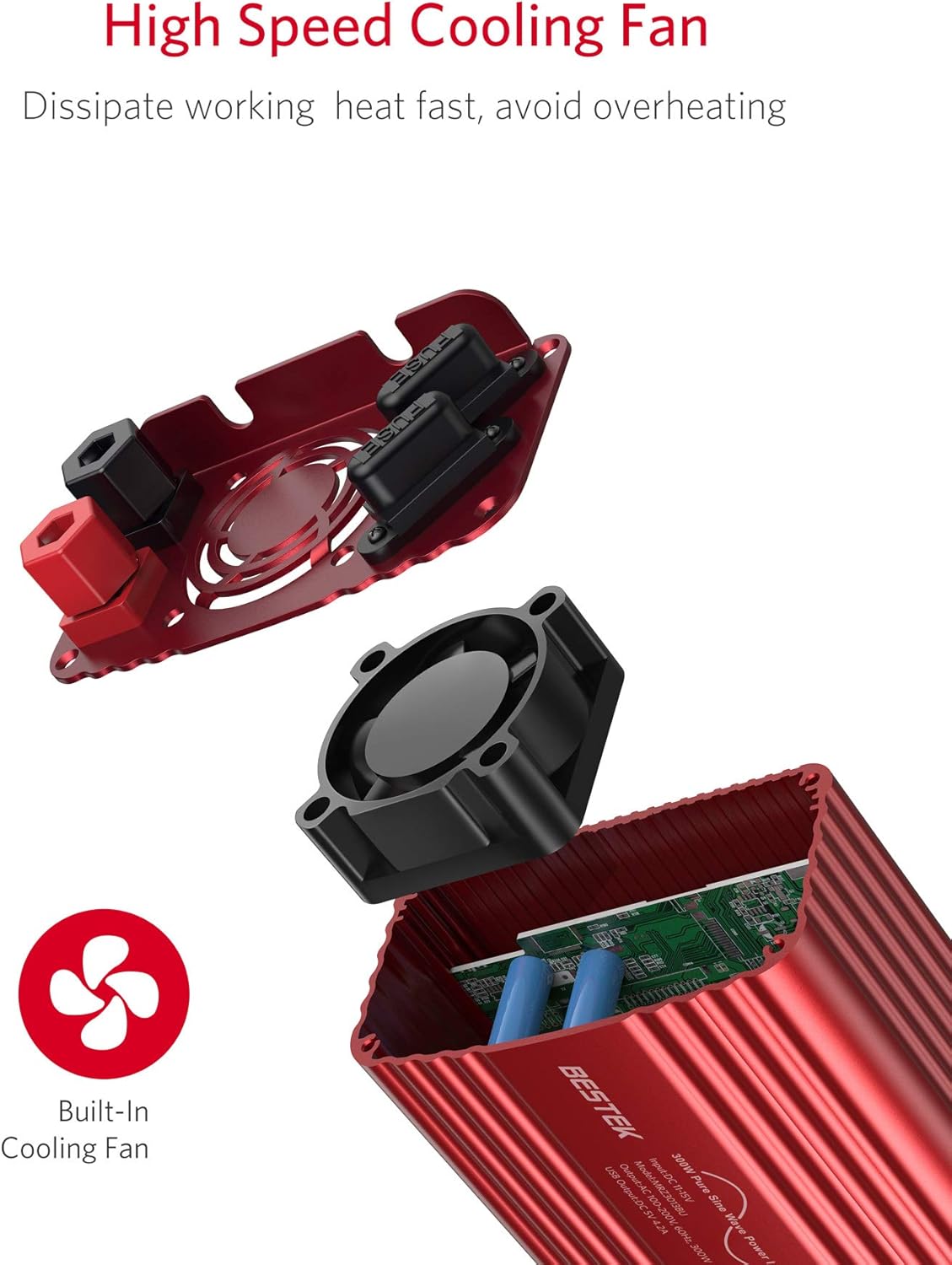
Imej 4.5: Dalaman view highlighting the high-speed cooling fan designed for efficient heat dissipation.
4.5 Isolation Voltage Perlindungan
The inverter incorporates advanced protection circuits to safeguard both the inverter and your connected devices from various electrical issues, including over-voltage, bawah-voltage, overload, short-circuit, and over-temperature conditions.

Image 4.6: Internal components illustrating the intelligent circuit device and overload protection for enhanced safety.
5. Persediaan dan Pemasangan
Before connecting the inverter, ensure your vehicle's engine is off and the inverter's power switch is in the "OFF" position.
5.1 Connecting via Cigarette Lighter Adapter (Up to 150W)
- Insert the cigarette lighter adapter into the inverter's DC input port.
- Plug the cigarette lighter adapter firmly into your vehicle's 12V cigarette lighter socket.
- Ensure the connection is secure. This method is suitable for loads up to 150W.

Image 5.1: The inverter connected to a car's cigarette lighter socket, powering a smartphone.
5.2 Connecting Directly to Battery (Up to 300W)
For loads exceeding 150W or to utilize the full 300W capacity, connect the inverter directly to your vehicle's battery using the provided battery clamp kabel.
- Sambungkan bateri merah clamp cable to the positive (+) terminal of the inverter.
- Sambungkan bateri hitam clamp cable to the negative (-) terminal of the inverter.
- Sambungkan bateri merah clamp to the positive (+) terminal of your vehicle's 12V battery.
- Sambungkan bateri hitam clamp to the negative (-) terminal of your vehicle's 12V battery.
- Pastikan semua sambungan adalah ketat dan selamat.

Image 5.2: The inverter connected to a car battery using the red and black battery clamp kabel.
6. Arahan Operasi
- After connecting the inverter to the 12V DC power source (cigarette lighter or battery), switch the inverter's power button to the "ON" position. The indicator light should illuminate.
- Plug your AC-powered device into the inverter's AC outlet or your USB-powered device into one of the USB ports.
- Hidupkan peranti anda.
- When finished, turn off your device, then switch the inverter's power button to "OFF", and finally disconnect it from the power source.
Pertimbangan Penting:
- Sentiasa pastikan jumlah airtage daripada semua peranti yang disambungkan tidak melebihi 300W.
- For optimal performance and to prevent battery drain, it is recommended to operate the inverter with the vehicle's engine running, especially when powering higher-wattage peranti.
- The inverter may emit a slight humming sound, which is normal. The cooling fan will activate as needed.
7. Penyelenggaraan
- Pastikan inverter bersih dan bebas daripada habuk dan serpihan. Gunakan kain kering untuk mengelap bahagian luar.
- Pastikan bukaan pengudaraan tidak terhalang.
- Periksa semua sambungan secara berkala untuk kesesakan dan kakisan.
- Simpan penyongsang di tempat yang sejuk dan kering apabila tidak digunakan.
- If a fuse blows, replace it with a fuse of the same type and rating (refer to specifications).
8. Penyelesaian masalah
| Masalah | Kemungkinan Punca | Penyelesaian |
|---|---|---|
| Tiada output kuasa / Inverter tidak dihidupkan |
|
|
| Peranti tidak mengecas melalui USB |
|
|
| Inverter kerap dimatikan |
|
|
| Kipas bising |
|
|
9. Spesifikasi
| Ciri | Nilai |
|---|---|
| Nombor Model | MRZ3013BU |
| Jenama | BESTEK |
| Input Voltage | 12V DC |
| Keluaran Voltage | 220V AC |
| Kuasa Berterusan | 300 Watt |
| Output USB | 2 Ports, 4.2A total |
| Bentuk Gelombang Output | Gelombang Sinus Tulen |
| Kecekapan | 42% |
| Berat Barang | 707 Gram |
| Ciri-ciri Perlindungan | Overload, Over-voltage, Bawah voltage, Over-temperature, Short-circuit |
Note: The efficiency value of 42% is taken directly from the provided product specifications. Typical inverter efficiencies are generally higher.
10. Waranti dan Sokongan
BESTEK provides a Waranti 24 bulan for this product from the date of purchase. This warranty covers manufacturing defects and workmanship. It does not cover damage caused by misuse, accidents, unauthorized modifications, or normal wear and tear.
For technical support, warranty claims, or any questions regarding your BESTEK product, please contact our customer service. Refer to the product packaging or BESTEK's official webtapak untuk maklumat hubungan.
We are committed to providing friendly and helpful service.


