1. Pengenalan
This manual provides detailed instructions for the memzuoix 2.4G Portable Wireless Mouse, Model WM-697. Please read this manual carefully before using the product to ensure proper operation and to maximize its lifespan.
Kandungan Pakej
- 1 x memzuoix 2.4G Portable Wireless Mouse (Model WM-697)
- 1 x Penerima Nano USB
- 1 x Manual Pengguna (dokumen ini)

Image 1.1: The memzuoix wireless mouse and its USB nano receiver.
2. Spesifikasi
| Ciri | Perincian |
|---|---|
| Model | WM-697 |
| Ketersambungan | Wayarles 2.4GHz (Penerima USB) |
| DPI | 1400 DPI |
| Butang | 5 (Left, Right, Scroll Wheel, Forward, Backward) |
| Pengesanan Pergerakan | Optik |
| Julat Operasi | Sehingga 43 kaki (13 meter) |
| Sumber Kuasa | 2 x Bateri AAA (tidak termasuk) |
| Mod Tidur | Automatic after 7 minutes of inactivity |
| Dimensi (L x W x H) | 4.19 x 2.63 x 1.50 inci |
| Berat badan | 2.22 auns |
| Keserasian | Windows 7/8/10/XP, Vista 7/8, Mac OS, Linux |

Image 2.1: Physical dimensions of the mouse.
3. Panduan Persediaan
3.1 Pemasangan Bateri
- Cari penutup petak bateri di bahagian bawah tetikus.
- Gently slide the cover open.
- Masukkan dua bateri AAA (tidak disertakan) ke dalam petak, pastikan kekutuban (+/-) yang betul.
- Tutup penutup petak bateri sehingga ia berbunyi klik dengan selamat pada tempatnya.
3.2 USB Receiver Connection
- Locate the USB nano receiver, which is typically stored in a slot within the battery compartment for safekeeping during transport.
- Remove the USB receiver from its storage slot.
- Plug the USB nano receiver into an available USB port on your computer (laptop, PC, desktop, MacBook, etc.).
- Hidupkan tetikus menggunakan suis ON/OFF yang terletak di bahagian bawah.
- Your computer should automatically detect and install the necessary drivers. No manual driver installation is required.

Image 3.1: Underside of the mouse, illustrating battery compartment, USB receiver slot, and power switch.

Image 3.2: Wireless connection setup with a laptop.
4. Arahan Operasi
4.1 Fungsi Asas
- Klik Kiri: Pemilihan dan pengaktifan utama.
- Klik kanan: Mengakses menu kontekstual.
- Roda Tatal: Scrolls content vertically. Can also be clicked for middle-click functionality (application dependent).
4.2 Advanced Functions (5-Button Mouse)
- Butang ke hadapan: Navigasi ke hadapan web pelayar atau file explorers. (Located on the side of the mouse)
- Butang ke belakang: Navigasi ke belakang web pelayar atau file explorers. (Located on the side of the mouse)
Nota: The side buttons (Forward/Backward) are not available for Mac OS. Other functions operate normally.
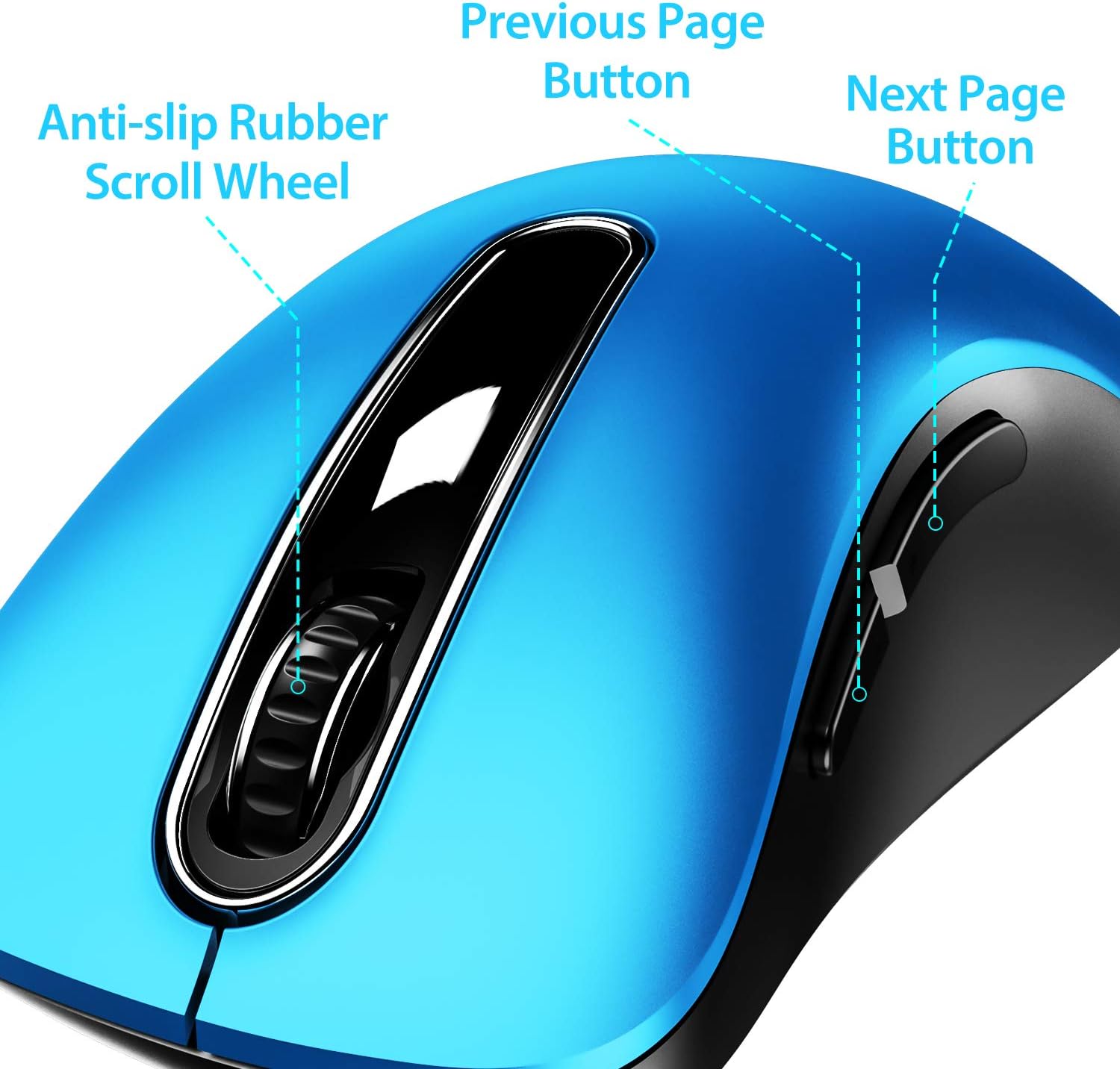
Imej 4.1: Selesaiview of mouse buttons, including the scroll wheel and side navigation buttons.
4.3 Mod Penjimatan Kuasa
The mouse features an automatic power-saving sleep mode. If inactive for 7 minutes, the mouse will enter sleep mode to conserve battery life. To reactivate the mouse, simply click any button.
5. Penyelenggaraan dan Penjagaan
- Pembersihan: Gunakan kain lembut dan kering untuk membersihkan tetikus. Untuk kotoran degil, sedikit damp Kain boleh digunakan, tetapi pastikan tiada kelembapan memasuki komponen dalaman.
- Penggantian Bateri: Replace batteries when the mouse performance degrades or stops responding. Always use fresh AAA batteries.
- Storan: When not in use for extended periods, turn off the mouse using the ON/OFF switch and store the USB receiver in its dedicated slot on the mouse's underside to prevent loss.
- Elakkan Keadaan Melampau: Jangan dedahkan tetikus kepada suhu yang melampau, cahaya matahari langsung atau kelembapan berlebihan.
6. Penyelesaian masalah
| Masalah | Penyelesaian yang Mungkin |
|---|---|
| Tetikus tidak bertindak balas |
|
| Pergerakan kursor tidak menentu atau perlahan |
|
| Side buttons not working on Mac OS | This is a known compatibility limitation. The side buttons are not supported on Mac OS. Other mouse functions should work normally. |
| Tetikus memasuki mod tidur terlalu cepat | The mouse is designed to enter sleep mode after 7 minutes of inactivity to conserve power. This is normal operation. Click any button to wake it up. |
7. Waranti dan Sokongan
The memzuoix 2.4G Portable Wireless Mouse (Model WM-697) comes with a 365-day worry-free warranty from the date of purchase. This warranty covers manufacturing defects and malfunctions under normal use.
For warranty claims, technical support, or any inquiries, please contact memzuoix customer service through the retailer where the product was purchased or visit the official memzuoix webtapak untuk maklumat hubungan.
Sila simpan bukti pembelian anda untuk pengesahan waranti.


