1. Pengenalan
Thank you for choosing the Morris 12L Silent Dehumidifier. This manual provides essential information for the safe and efficient operation, maintenance, and troubleshooting of your appliance. Please read it thoroughly before use and retain it for future reference.
This dehumidifier is designed to reduce excess humidity in indoor environments, helping to prevent issues such as mold growth, condensation, and musty odors. It also features modes to assist with drying laundry.
2. Arahan Keselamatan
- Pastikan bekalan kuasa sepadan dengan voltage dinyatakan pada label penarafan perkakas.
- Jangan kendalikan penyahlembap dengan kord kuasa atau palam yang rosak.
- Sentiasa letakkan unit di atas permukaan yang stabil dan rata untuk mengelakkan tumpahan air.
- Maintain a minimum clearance of 20 cm (8 inches) around the unit for proper airflow.
- Jangan masukkan objek ke dalam saluran masuk atau keluar udara.
- Unplug the unit before cleaning, maintenance, or when not in use for extended periods.
- Keep the appliance out of reach of children. The child lock function should be activated when children are present.
- Jangan gunakan dehumidifier di kawasan di mana gas atau cecair mudah terbakar disimpan.
- Empty the water tank regularly or ensure the continuous drainage hose is properly installed.
3. Produk Lebihview
3.1 Komponen
Biasakan diri anda dengan bahagian utama dehumidifier anda:
- Panel Kawalan (Atas)
- Saluran Udara (Atas)
- Air Inlet (Rear)
- Water Tank (Front/Side)
- Continuous Drainage Port (Rear)
- Castor Wheels (Bottom)
- Washable Air Filter (Behind Air Inlet)

Imej: Depan view of the Morris 12L Silent Dehumidifier, showcasing its compact design and top control panel.
3.2 Ciri-ciri Utama
- Operasi senyap: Operates at a low noise level of 36dB, suitable for bedrooms and quiet environments.
- Kawalan Kelembapan: Adjustable humidity settings (Common Mode) and continuous dehumidification.
- Mod Pengeringan Dobi: Dedicated mode to accelerate clothes drying.
- Mod tidur: Reduces fan speed and dims display for undisturbed rest.
- Matikan Auto: Automatically turns off when the water tank is full.
- Mulakan semula Auto: Restarts with previous settings after a power interruption.
- Paparan led: Clear digital display for settings and current humidity.
- Penapis Udara Boleh Basuh: Easy to clean and maintain for optimal performance.
- Kunci Kanak-kanak: Menghalang perubahan tidak sengaja pada tetapan.
- mudah alih: Equipped with 360° castor wheels and an inset handle for easy movement.
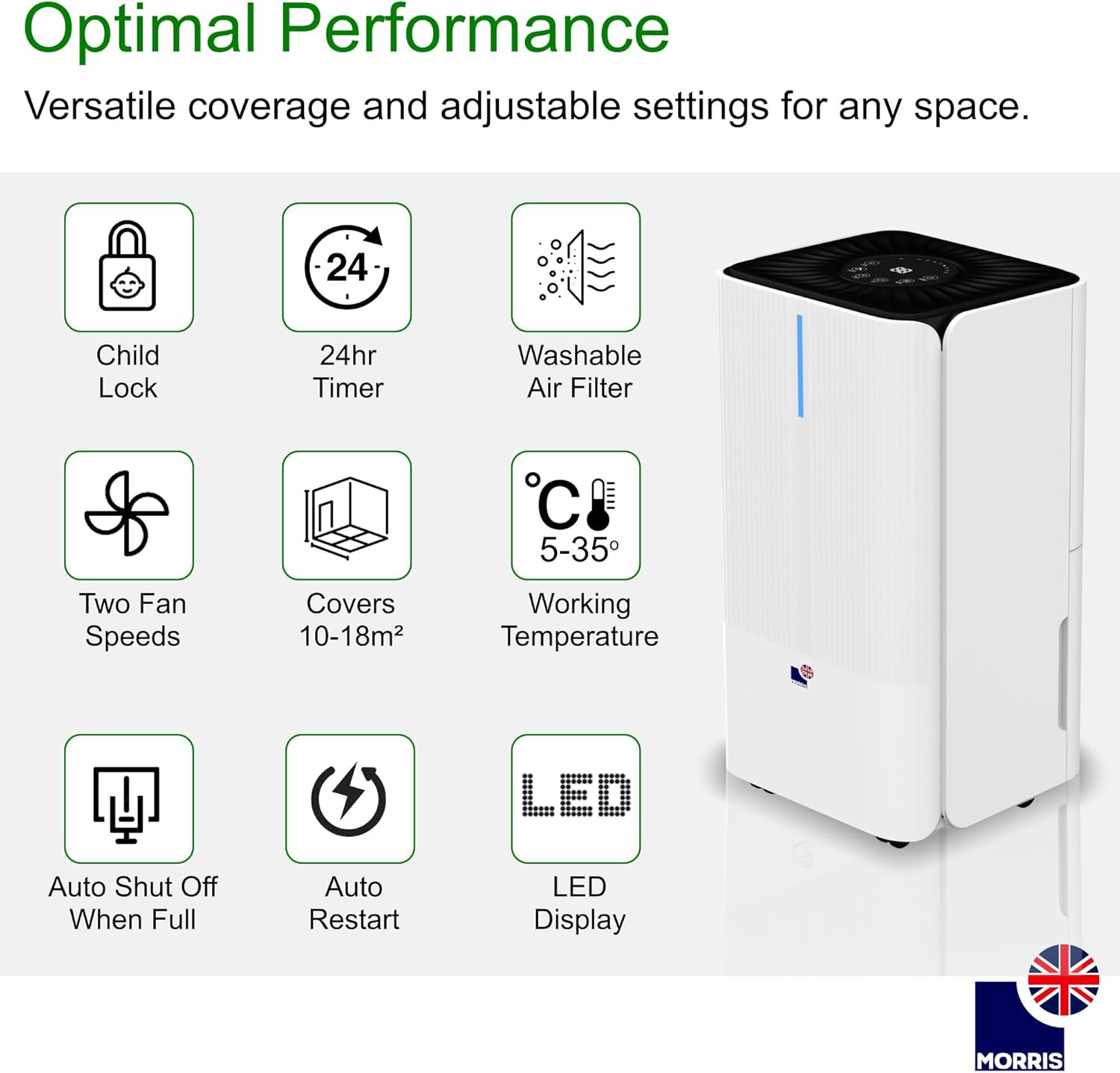
Imej: Visual representation of key features including Child Lock, 24hr Timer, Washable Air Filter, Two Fan Speeds, Coverage Area, Working Temperature, Auto Shut Off When Full, Auto Restart, and LED Display.
4. Persediaan
4.1 Membongkar
Tanggalkan penyahlembap dengan berhati-hati dari pembungkusannya. Periksa unit tersebut untuk sebarang tanda kerosakan. Simpan pembungkusan untuk penyimpanan atau pengangkutan pada masa hadapan.
4.2 Penempatan
Place the dehumidifier on a firm, level surface in the desired room. Ensure there is at least 20 cm (8 inches) of clear space around all sides of the unit to allow for adequate air circulation. Do not block the air inlet or outlet.
4.3 Sambungan Kuasa
Plug the power cord into a grounded electrical outlet. The unit will enter standby mode.
4.4 Persediaan Saliran Berterusan (Pilihan)
For continuous operation without needing to empty the water tank, attach the included drainage hose to the continuous drainage port at the rear of the unit. Ensure the hose is directed downwards to a suitable drain or container, allowing gravity to facilitate water flow.

Imej: Illustration of the continuous drainage hose connected to the dehumidifier for uninterrupted operation.
5. Arahan Operasi
5.1 Panel Kawalan Selesaiview

Imej: Terperinci view of the control panel, showing buttons for various functions and the central digital display.
Panel kawalan mempunyai butang berikut:
- KUASA: Menghidupkan atau mematikan unit.
- ARAHAN: Selects operating modes (Common, Continuous, Laundry, Sleep).
- SET: Adjusts desired humidity level or timer settings.
- PEMASA: Menetapkan pemasa auto hidup atau mati automatik.
- LAJU: Melaraskan kelajuan kipas (Tinggi/Rendah).
- KUNCI: Activates/deactivates the child lock function.
5.2 Hidupkan/Mati Kuasa
Tekan ke KUASA butang untuk menghidupkan atau mematikan dehumidifier.
5.3 Mod Pengendalian
Tekan ke MODE butang untuk melihat mod pengendalian yang tersedia:
- Mod Biasa: In this mode, you can set your desired humidity level. The dehumidifier will operate until the room humidity reaches the set level, then it will automatically turn off. It will restart if the room humidity rises 3% above the set level.
- Mod Penyahlembapan Berterusan: The unit will operate continuously at high fan speed, regardless of the room's humidity level. This mode requires the continuous drainage hose to be connected, as the water tank will fill rapidly. Humidity setting and fan speed adjustment are ineffective in this mode.
- Mod Pengeringan Dobi: Designed to quickly dry clothes. Place the dehumidifier in the room where clothes are drying. The unit will operate at a high fan speed to remove moisture from the air, accelerating the drying process.
- Mod tidur: Activates low fan speed and dims the display for quiet operation during sleep. The dehumidifier will turn off when humidity is below or equal to 57% and restart when humidity is above or equal to 63%. The water tank full alarm will not sound in this mode, but a red light will illuminate to indicate a full tank.
5.4 Setting Humidity (Common Mode)
In Common Mode, press the SET button to adjust the desired humidity level. The humidity can typically be set between 30% and 80% in 5% increments. The unit will maintain the set humidity level.
5.5 Pelarasan Kelajuan Kipas
Tekan ke LAJU button to toggle between high and low fan speeds. This function is available in Common Mode and Laundry Drying Mode.
5.6 Fungsi Pemasa
Tekan ke PEMASA button to set an auto-on or auto-off timer (1-24 hours). Use the SET button to adjust the desired time. The timer indicator will illuminate when active.
5.7 Kunci Kanak-kanak
Tekan dan tahan butang KUNCI button for a few seconds to activate or deactivate the child lock. When activated, all other buttons on the control panel will be unresponsive.
5.8 Smart Humidity Indicators
The unit features color-coded LED lights to indicate current humidity levels:
- merah: High Humidity (>65%)
- hijau: Optimal Levels (45%-65%)
- Biru: Low Humidity (<45%)

Imej: Visual guide to the smart humidity indicators, showing red for high, green for optimal, and blue for low humidity levels.
6. Penyelenggaraan
6.1 Mengosongkan Tangki Air
When the water tank is full, the unit will automatically stop operating, and the 'Tank Full' indicator will illuminate (or a red light in Sleep Mode). Carefully pull out the water tank, empty the collected water, and reinsert the tank firmly until it clicks into place. The unit will resume operation.

Imej: Illustration of how to remove the water tank for emptying.
6.2 Membersihkan Penapis Udara
The washable air filter should be cleaned every two weeks or more frequently depending on usage and air quality. To clean:
- Matikan dan cabut plag penyahlembap.
- Tanggalkan penapis udara dari bahagian belakang unit.
- Basuh penapis dengan air suam dan sabun. Bilas sebersih-bersihnya.
- Benarkan penuras kering sepenuhnya sebelum memasukkannya semula ke dalam unit.
6.3 Membersihkan Bahagian Luar Unit
Lap bahagian luar dehumidifier dengan lembut, damp kain. Jangan gunakan bahan kimia yang keras, pembersih yang kasar atau pelarut, kerana ini boleh merosakkan permukaan.
6.4 Penyimpanan
If storing the unit for an extended period, ensure the water tank is empty and clean, and the air filter is clean and dry. Store the dehumidifier in a cool, dry place, preferably in its original packaging.
7. Penyelesaian masalah
| Masalah | Kemungkinan Punca | Penyelesaian |
|---|---|---|
| Unit tidak dihidupkan | Tiada bekalan kuasa; Kord kuasa tidak dipasang; Kuasa terputustage. | Check power outlet; Ensure power cord is securely plugged in; Check circuit breaker. |
| Tiada air yang dikumpulkan | Room humidity is too low; Temperature is too low; Air filter is clogged; Water tank is full or not properly inserted; Continuous drainage hose is connected. | Increase desired humidity setting; Ensure room temperature is above 5°C; Clean air filter; Empty and reinsert water tank correctly; Disconnect continuous drainage hose if collecting in tank. |
| Unit bising | Unit not on a level surface; Air filter clogged; Fan speed set to high. | Place on a flat, stable surface; Clean air filter; Select low fan speed or Sleep Mode. |
| Kebocoran air dari unit | Water tank not properly inserted; Continuous drainage hose is blocked or improperly installed. | Reinsert water tank correctly; Check continuous drainage hose for blockages or kinks, ensure proper downward slope. |
| Child Lock is active | Butang tidak bertindak balas. | Tekan dan tahan butang KUNCI button for a few seconds to deactivate. |
8. Spesifikasi
| Ciri | Spesifikasi |
|---|---|
| Jenama | Morris |
| Nombor Model | MOR12L-DHE |
| Kapasiti Dehumidifikasi | 12 Liter/hari |
| Isipadu Tangki Air | 2 Liter |
| Penggunaan Kuasa | 200 Watt |
| Tahap Kebisingan | 36 Desibel |
| Dimensi (L x W x H) | 22 x 25 x 44.5 cm |
| Berat badan | 10.69 Kilogram |
| Kawasan Liputan yang Disyorkan | Up to 25 m² (or 10-18 m² as per some feature bullets) |
| Julat Suhu Bekerja | 5°C - 35°C |
| Ciri Khas | Digital Display, Automatic Shut-off, Adjustable Humidity Control, Automatic Defrost, LED Power Indicator, Child Lock, 24hr Timer, Washable Air Filter, 2 Fan Speeds, Auto Restart. |
9. Waranti dan Sokongan
Your Morris 12L Silent Dehumidifier comes with a standard manufacturer's warranty. Please refer to the warranty card included with your purchase for specific terms and conditions. For technical support, spare parts, or service inquiries, please contact Morris customer service through their official webtapak atau peruncit tempat produk itu dibeli.


