1. Pengenalan
Thank you for choosing the Prtukyt 8S Wireless Bluetooth Headset. This manual provides detailed instructions on how to set up, operate, and maintain your new headset. Please read this manual carefully before use to ensure optimal performance and longevity of your device.
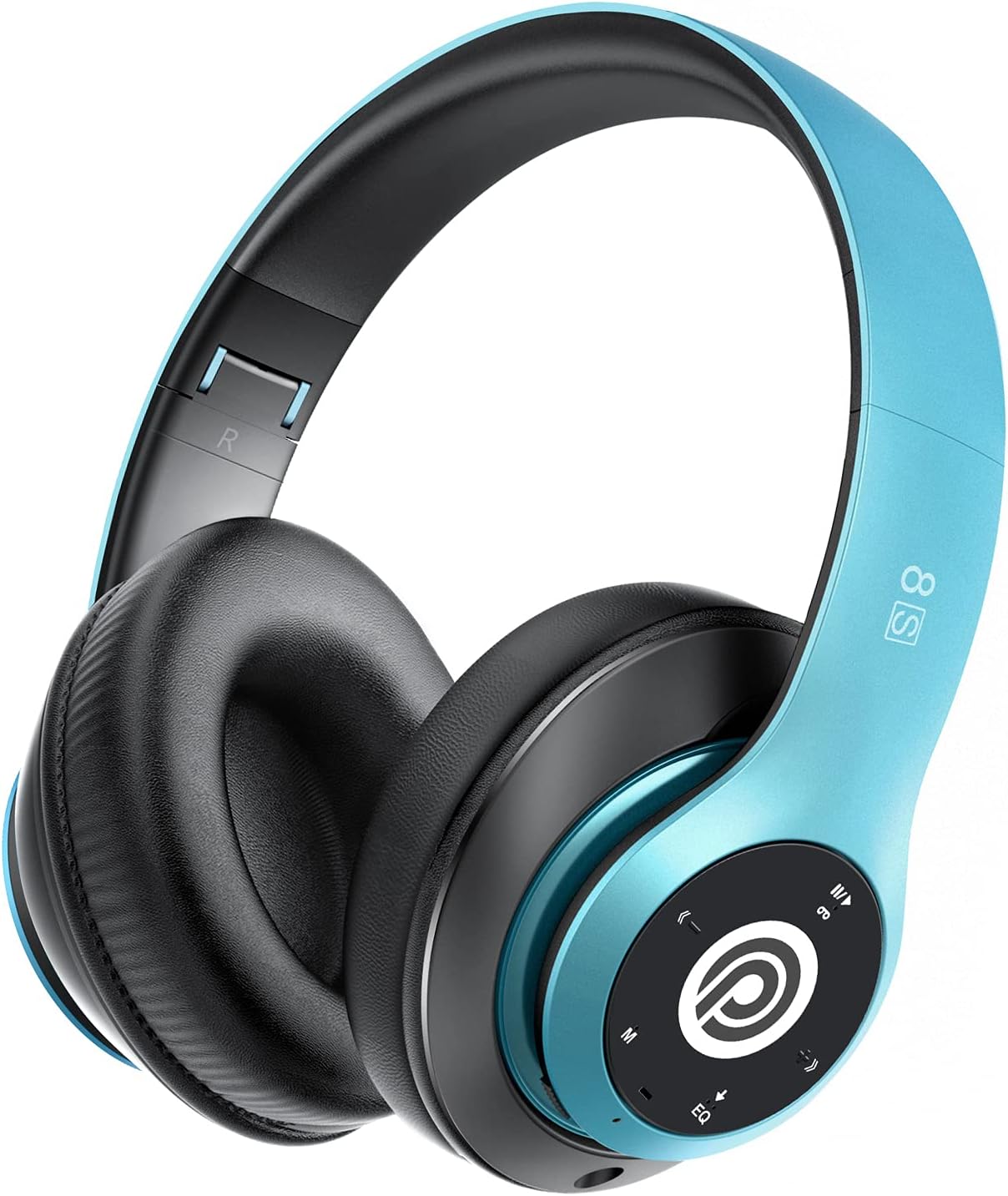
Image: The Prtukyt 8S Wireless Bluetooth Headset in blue, showcasing its sleek design and comfortable earcups.
2. Maklumat Keselamatan
To ensure safe and proper use, please observe the following guidelines:
- Jangan dedahkan alat dengar kepada suhu, kelembapan atau bahan menghakis yang melampau.
- Elakkan daripada menjatuhkan atau meletakkan set kepala kepada kesan yang kuat.
- Do not disassemble or modify the headset. This will void the warranty and may cause damage.
- Keep the headset away from water and liquids as it is not waterproof.
- Mendengar berpanjangan pada tahap kelantangan tinggi boleh menyebabkan kerosakan pendengaran. Laraskan kelantangan ke tahap sederhana.
- Buang produk dan baterinya secara bertanggungjawab mengikut peraturan tempatan.
3. Kandungan Pakej
Sila semak pakej untuk item berikut:
- 1 x Prtukyt 8S Wireless Bluetooth Headset
- 1 x Audio Cable (3.5mm Jack)
- 1 x Kabel Pengecas USB
- 1 x Manual Pengguna
4. Produk Lebihview
Familiarize yourself with the various parts and controls of your Prtukyt 8S headset.
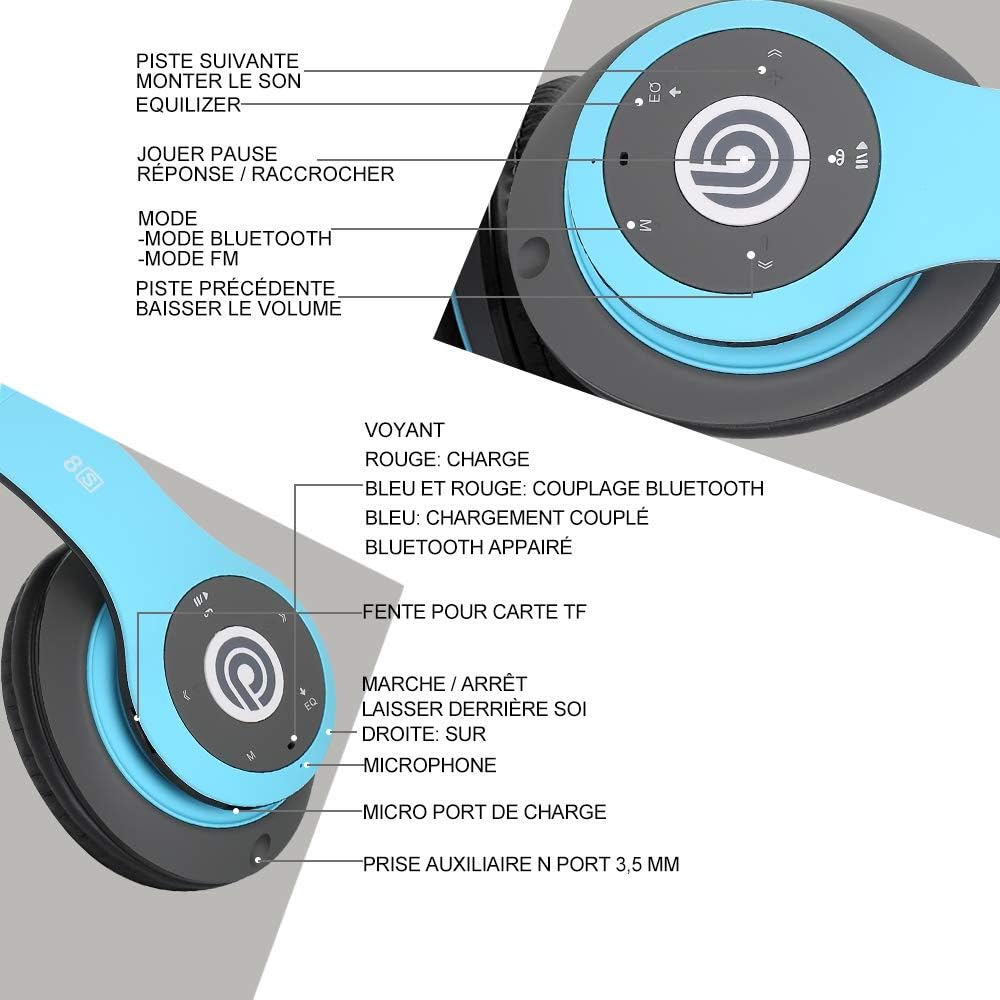
Imej: Terperinci view of the Prtukyt 8S headset's control panel and ports, including buttons, indicator light, TF card slot, microphone, charging port, and 3.5mm AUX port.
Control Panel & Ports:
- 1. Next Track / Volume Up: Tekan sebentar untuk trek seterusnya, tekan lama untuk meningkatkan kelantangan.
- 2. EQ Button: Press to cycle through equalizer sound effects.
- 3. Play / Pause / Answer / Hang Up: Multi-function button for music and calls.
- 4. Butang Mod (M): Short press to switch between Bluetooth, FM Radio, and TF Card modes.
- 5. Previous Track / Volume Down: Tekan sebentar untuk trek sebelumnya, tekan lama untuk mengurangkan kelantangan.
- 6. Lampu Penunjuk: Shows charging status, Bluetooth pairing, and connection status.
- 7. Slot Kad TF: Insert a Micro SD/TF card for direct music playback.
- 8. Suis Hidup/Mati Kuasa: Luncurkan untuk menghidupkan atau mematikan set kepala.
- 9. Mikrofon: Untuk panggilan bebas tangan.
- 10. Port Pengecasan USB Mikro: Connect the USB charging cable here.
- 11. 3.5mm AUX Port: Untuk sambungan berwayar ke peranti audio.
Ciri-ciri Reka Bentuk:
- Reka Bentuk Lipat: The headset features a unique foldable design for easy portability and storage, saving space.

Image: The Prtukyt 8S headset demonstrating its multi-angle rotation and adjustable headband for ultimate comfort.
- Comfortable Earcups: Super soft foam earcups and an adjustable headband ensure a comfortable fit for extended listening sessions.
- Audio yang berkualiti tinggi: Equipped with powerful 57mm stereo drivers and Bluetooth 5.0 chip for deep bass and clear sound.

Imej: Satu dalaman view highlighting the large aperture drivers and Bluetooth 5.0 chip for powerful performance.
5. Persediaan
5.1 Pengecasan Awal
Before first use, fully charge the headset. Connect the USB charging cable to the Micro USB charging port on the headset and the other end to a USB power adapter (not included) or a computer's USB port.
- The indicator light will be MERAH semasa mengecas.
- The indicator light will turn BIRU apabila pengecasan selesai.
- Pengecasan penuh biasanya mengambil masa kira-kira 2-3 jam.

Image: The Prtukyt 8S headset illustrating its impressive 52-hour battery life on a single charge.
6. Arahan Operasi
6.1 Hidupkan/Mati Kuasa
- Hidupkan kuasa: Slide the Power On/Off switch to the "ON" position. The indicator light will flash blue, indicating it's ready for pairing or connecting.
- Matikan: Slide the Power On/Off switch to the "OFF" position. The indicator light will turn off.
6.2 Berpasangan Bluetooth
- Pastikan alat dengar dimatikan.
- Slide the Power On/Off switch to the "ON" position. The headset will enter pairing mode, and the indicator light will flash BIRU dan MERAH silih berganti.
- Enable Bluetooth on your device (smartphone, tablet, PC, etc.).
- Cari untuk "Prtukyt 8S" or "PT-1088" in the list of available Bluetooth devices.
- Select "Prtukyt 8S" to connect. Once successfully paired, the indicator light will flash BIRU perlahan-lahan.
- Jika digesa untuk kata laluan, masukkan "0000".
Note: The headset will automatically attempt to reconnect to the last paired device when powered on.
6.3 Main Semula Muzik (Mod Bluetooth)
- Main/Jeda: Tekan pendek Main/Jeda butang.
- Lagu Seterusnya: Tekan pendek Trek / Kelantangan Seterusnya butang.
- Trek Sebelumnya: Tekan pendek Trek / Kelantangan Sebelumnya butang.
- Kelantangan: Tekan lama Trek / Kelantangan Seterusnya butang.
- Perlahankan suara: Tekan lama Trek / Kelantangan Sebelumnya butang.
6.4 Fungsi Panggilan
- Jawab Panggilan: Tekan pendek Main/Jeda/Jawab/Tutup Telefon butang apabila panggilan masuk berdering.
- Tamatkan Panggilan: Tekan pendek Main/Jeda/Jawab/Tutup Telefon butang semasa panggilan.
- Tolak Panggilan: Tekan lama Main/Jeda/Jawab/Tutup Telefon butang apabila panggilan masuk berdering.
- Dail Semula Nombor Terakhir: Tekan dua kali pada Main/Jeda/Jawab/Tutup Telefon butang.
Mod Radio 6.5 FM
- Hidupkan set kepala.
- Tekan pendek Mod (M) button to switch to FM Radio mode. You will hear a voice prompt indicating the mode change.
- Tekan pendek Main/Jeda butang untuk mengimbas dan menyimpan stesen FM yang tersedia secara automatik.
- Gunakan Trek Seterusnya dan Trek Sebelumnya butang untuk menavigasi antara stesen yang disimpan.
6.6 Mod Kad TF
- Insert a Micro SD/TF card (with MP3 audio files) into the TF Card Slot.
- Turn on the headset. It should automatically switch to TF Card mode and begin playing music. If not, short press the Mod (M) button to select TF Card mode.
- Gunakan Main/Jeda, Trek Seterusnya, Trek Sebelumnya, and volume buttons as in Bluetooth mode.
6.7 Fungsi EQ
The headset features an equalizer function to customize your listening experience.
- Tekan pendek EQ button to cycle through different equalizer presets (e.g., Pop, Rock, Jazz, Classic, Bass, Normal).
6.8 Mod Berwayar (AUX)
You can use the headset with non-Bluetooth devices via the included 3.5mm audio cable.
- Connect one end of the 3.5mm audio cable to the 3.5mm AUX Port on the headset.
- Connect the other end to the audio output jack of your device (e.g., computer, MP3 player).
- In wired mode, the headset's buttons (except volume control on some devices) will not function. Control playback and volume directly from your connected device.
7. Penyelenggaraan
- Bersihkan alat dengar dengan kerap menggunakan kain lembut dan kering. Jangan gunakan pembersih atau pelarut yang kasar.
- Store the headset in a cool, dry place when not in use. The foldable design helps save space.
- Elakkan pendedahan berpanjangan kepada cahaya matahari langsung atau suhu yang melampau.
- Do not expose the headset to water or moisture.
8. Penyelesaian masalah
| Masalah | Kemungkinan Punca | Penyelesaian |
|---|---|---|
| Alat dengar tidak akan dihidupkan. | Bateri lemah atau mati. | Caskan set kepala sepenuhnya. |
| Tidak boleh berpasangan dengan peranti Bluetooth. | Bluetooth is off on device; headset not in pairing mode; too far from device. | Ensure Bluetooth is enabled on your device. Put headset in pairing mode (flashing blue/red). Keep devices within 10 meters. Clear previous pairings on your device. |
| Tiada bunyi atau kelantangan rendah. | Volume too low on headset or device; incorrect mode selected; loose cable in wired mode. | Increase volume on both headset and connected device. Ensure correct mode (Bluetooth, FM, TF, AUX) is selected. Check 3.5mm cable connection. |
| Penerimaan radio FM kurang baik. | Isyarat lemah; gangguan persekitaran. | Try moving to a different location. The audio cable can act as an antenna; ensure it's connected if using FM. |
| Kad TF tidak dimainkan. | Kad tidak dimasukkan dengan betul; tidak disokong file format; kad rosak. | Reinsert TF card firmly. Ensure music files adalah dalam format MP3. Cuba kad TF yang lain. |
9. Spesifikasi
| Nama Model | Prtukyt 8S |
| Nombor Model | PT-1088 |
| Teknologi Ketersambungan | Tanpa Wayar (Bluetooth 5.0), Berwayar (Bicu 3.5mm) |
| Julat Kekerapan | 20 Hz - 20,000 Hz |
| Saiz Pemandu | 57mm Stereo Drivers |
| Ciri-ciri | Integrated Microphone, FM Radio, TF Card Playback, EQ Function, Foldable Design |
| Hayat Bateri (Anggaran) | Up to 52 hours (Music/Talk time) |
| Port Pengecasan | USB mikro |
| Tahan Air | Bukan kalis air |
| warna | Biru |
10. Waranti & Sokongan
Prtukyt is committed to providing an excellent customer experience. If you encounter any quality issues with your product, please contact us immediately. Our customer support team is ready to assist you with any questions or concerns regarding your Prtukyt 8S Wireless Bluetooth Headset.
For support, please refer to the contact information provided on your purchase platform or the official Prtukyt webtapak.