pengenalan
Thank you for choosing the TecTake Ergonomic Office Gaming Chair, Model 800774. This manual provides essential information for the safe assembly, operation, and maintenance of your new chair. Please read these instructions carefully before use and retain them for future reference.
This chair is designed for comfort and support during long periods of sitting, whether for office work or gaming. It features a modern design, robust construction, thick padding, and adjustable functions to ensure an optimal seating experience.

Image: The TecTake Ergonomic Office Gaming Chair, Model 800774, showcased in a contemporary gaming environment.

Image: An infographic highlighting the chair's main features, including thick padding, ergonomic design, and adjustable functions.

Image: Visual representation of the chair's ergonomic benefits, emphasizing spinal support and breathable materials.
Maklumat Keselamatan
AMARAN:
- Always use the gas lift with the safety lock for height adjustment.
- Avoid using the chair on delicate surfaces to prevent damage from the casters.
- Ensure all screws and bolts are securely tightened before and during use. Periodically check and re-tighten if necessary.
- Jangan berdiri di atas kerusi.
- Jangan gunakan kerusi jika ada bahagian yang rosak atau hilang. Hubungi sokongan pelanggan untuk alat ganti.
- Maximum load capacity: 120 kg (264 lbs). Do not exceed this weight limit.
Kandungan Pakej
Before beginning assembly, please ensure all components are present and undamaged. If any parts are missing or damaged, do not proceed with assembly and contact TecTake customer service.
- Racing Office Chair components
- Arahan pemasangan (manual ini)
- Required screws and L-key (usually included in packaging)
Persediaan dan Perhimpunan
Assembly is straightforward and typically takes about 30-50 minutes. It is recommended to assemble the chair on a soft, clean surface to prevent scratching components.
- Buka Pembungkusan Komponen: Carefully remove all parts from the packaging and lay them out. Verify against the package contents list.
- Pasang Kastor ke Pangkalan: Insert the five double casters into the holes on the star-shaped base. Push firmly until they click into place.
- Masukkan Pengangkat Gas: Place the gas lift cylinder into the central hole of the assembled base.
- Lampirkan Mekanisme pada Tempat Duduk: Secure the tilt mechanism to the underside of the seat using the provided screws. Ensure the front of the mechanism faces the front of the seat.
- Pasang tempat letak tangan: Fasten the armrests to both the seat and the backrest using the designated screws. This step often connects the backrest to the seat. Note: Some users find it easier to attach the armrests to the seat first, then align the backrest and secure it through the armrests.
- Letakkan Tempat Duduk pada Lif Gas: Carefully place the assembled seat (with mechanism and backrest attached) onto the gas lift cylinder. The tapered end of the gas lift should fit into the central hole of the mechanism.
- Pemeriksaan Akhir: Sit on the chair to properly seat the gas lift. Test all functions (height adjustment, tilt). Ensure all screws are tight.
Arahan Operasi
Your TecTake chair offers several adjustable features for personalized comfort:
- Pelarasan Ketinggian: To adjust the seat height, pull the lever located under the right side of the seat upwards.
- Untuk menaikkan tempat duduk: Angkat tuil sambil menurunkan berat badan anda dari tempat duduk.
- Untuk menurunkan tempat duduk: Angkat tuil sambil kekal duduk.
- Mekanisme kecondongan: The chair features a rocking mechanism for added comfort.
- To activate the tilt: Pull the same lever (used for height adjustment) outwards.
- To lock the tilt in an upright position: Push the lever inwards.
- Pelarasan Ketegangan Condongkan: A round knob located under the front of the seat allows you to adjust the tension of the tilt mechanism. Turn clockwise to increase tension (making it harder to tilt) or counter-clockwise to decrease tension (making it easier to tilt).
- Pusing 360 Darjah: The chair is designed to swivel freely 360 degrees for easy movement and access to your workspace.

Imej: Terperinci views of the chair's comfort features and the multi-function adjustment lever.

Image: Visual guide to the chair's adjustable recline and height settings.
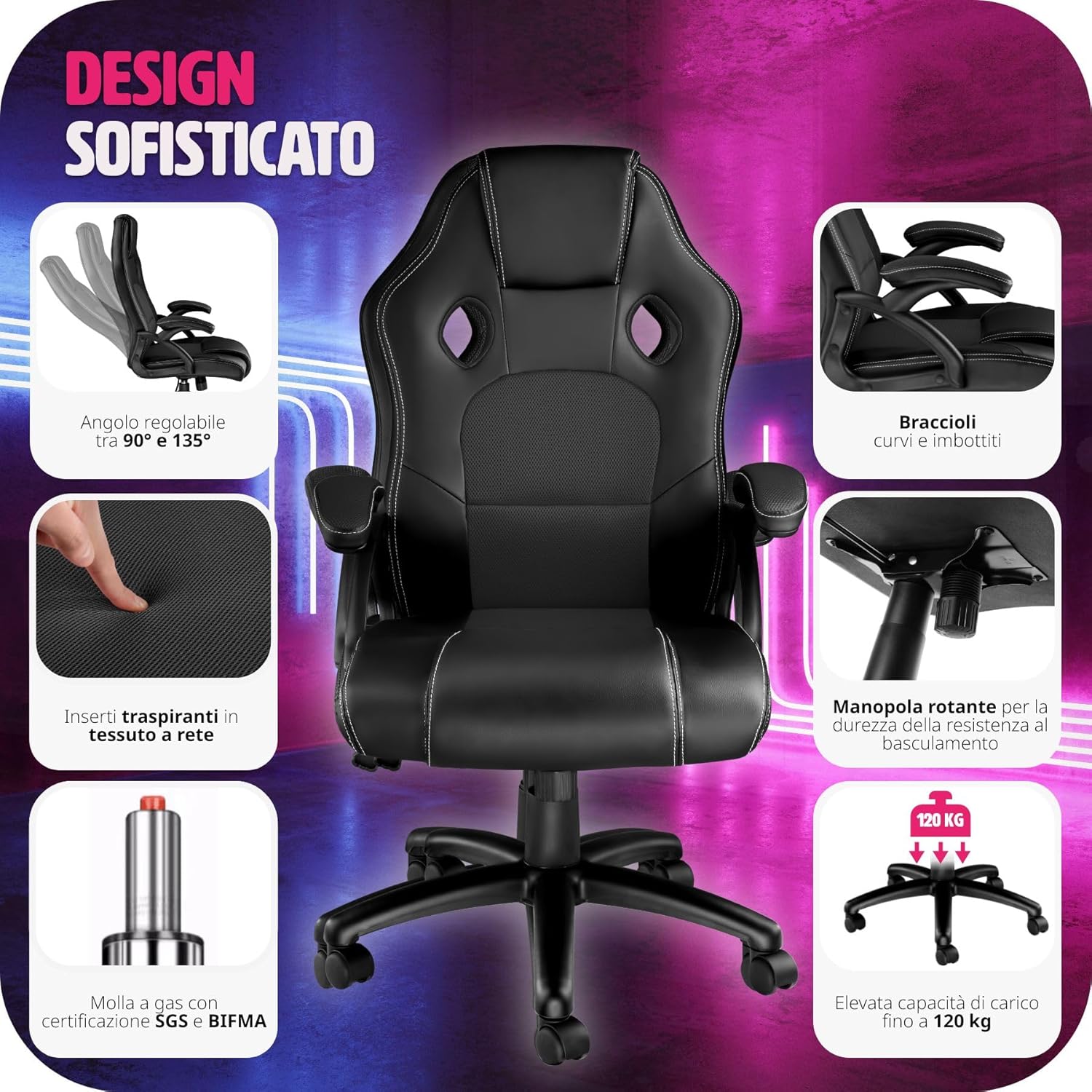
Image: Details on the chair's design, including adjustment controls and structural certifications.
Penyelenggaraan
Regular maintenance will prolong the life and appearance of your chair.
- Pembersihan: Wipe the chair surfaces with a damp cloth. For tougher stains, use a mild soap solution and then wipe with a clean, damp kain. Elakkan bahan kimia yang keras atau pembersih yang kasar.
- Kastor: Periodically check the casters for hair or debris that may hinder their movement. Clean as needed.
- Pengikat: Regularly check all screws and bolts to ensure they are tight. Re-tighten if any feel loose.
- Elakkan Cahaya Matahari Terus: Prolonged exposure to direct sunlight can cause the material to fade or crack.
Menyelesaikan masalah
Jika anda menghadapi sebarang masalah dengan kerusi anda, rujuk kepada masalah dan penyelesaian biasa berikut:
| Masalah | Kemungkinan Punca | Penyelesaian |
|---|---|---|
| Kerusi tidak boleh melaraskan ketinggian. | Gas lift not engaged or faulty; lever not fully pulled. | Ensure the lever is fully pulled. If still not working, the gas lift may be faulty and require replacement. |
| Kerusi goyah atau terasa tidak stabil. | Loose screws; uneven floor; casters not fully inserted. | Check and tighten all assembly screws. Ensure casters are fully seated. Move chair to a level surface. |
| Roda tidak bergolek dengan lancar. | Debris (hair, lint) caught in casters; damaged casters. | Remove any debris from the casters. If damaged, replace the casters. |
| Tilt mechanism is too stiff or too loose. | Tombol ketegangan condong perlu dilaraskan. | Adjust the round tension knob located under the seat. Turn clockwise for more tension, counter-clockwise for less. |
If the problem persists after attempting these solutions, please contact TecTake customer support.
Spesifikasi
Detailed technical specifications for the TecTake Ergonomic Office Gaming Chair, Model 800774:
- Overall Dimensions (Width x Depth x Height): approx. 65 x 66 x 111.5 – 121.5 cm (25.6 x 26 x 43.9 – 47.8 inches)
- Ketinggian tempat duduk: approx. 47 – 57 cm (18.5 – 22.4 inches)
- Seat Surface (Width x Depth): approx. 51 x 50 cm (20.1 x 19.7 inches)
- Padding Thickness: up to 11 cm (4.3 inches)
- Ketinggian Sandaran: approx. 68 cm (26.8 inches)
- Armrests (Width x Depth): approx. 7.5 x 25.5 cm (3 x 10 inches)
- Armrest Height from Floor: approx. 67 – 77 cm (26.4 – 30.3 inches)
- Internal Distance Between Armrests: approx. 49 cm (19.3 inches)
- Diameter asas: approx. 67 cm (26.4 inches)
- Double Caster Diameter/Width: approx. 5 / 5.6 cm (2 / 2.2 inches)
- Kapasiti Beban Maksimum: 120 kg (264 lbs)
- Berat: lebih kurang. 14.7 kg (32.4 paun)
- Bahan: Polyurethane (PU), Polyvinyl Chloride (PVC), Polypropylene (PP), Nylon
- Nombor Model: 800774
- warna: Black-black

Image: Detailed measurements of the chair, illustrating its various dimensions for user reference.
Waranti dan Sokongan
TecTake products are designed for quality and durability. While specific warranty details are not provided in this manual, please retain your proof of purchase for any warranty claims.
For technical assistance, replacement parts, or any questions not covered in this manual, please contact TecTake customer support through their official webtapak atau peruncit tempat produk itu dibeli.
Visit the official TecTake webtapak untuk maklumat lanjut: www.tectake.de


