1. Pengenalan
Thank you for choosing the Livoo Feel Good Moments Bluetooth Earbuds. These True Wireless Stereo (TWS) earbuds offer a seamless audio experience with Bluetooth connectivity, a magnetic charging case, and a built-in microphone for hands-free calls. Please read this manual carefully to ensure proper use and maintenance of your device.
2. Kandungan Pakej
Pastikan semua item ada dalam pakej:
- Livoo Feel Good Moments Bluetooth Earbuds (Left and Right)
- Sarung Pengecasan Magnetik
- Kabel Pengecas USB ke USB Mikro
- Manual Arahan
3. Produk Lebihview
Familiarize yourself with the components of your Livoo Feel Good Moments Bluetooth Earbuds.

Imej 3.1: The Livoo Feel Good Moments Bluetooth Earbuds and their magnetic charging case, shown open on a textured surface next to a smartphone.

Imej 3.2: The charging case is open, with the earbuds removed and placed beside it. This view highlights the design of both the case and the individual earbuds.
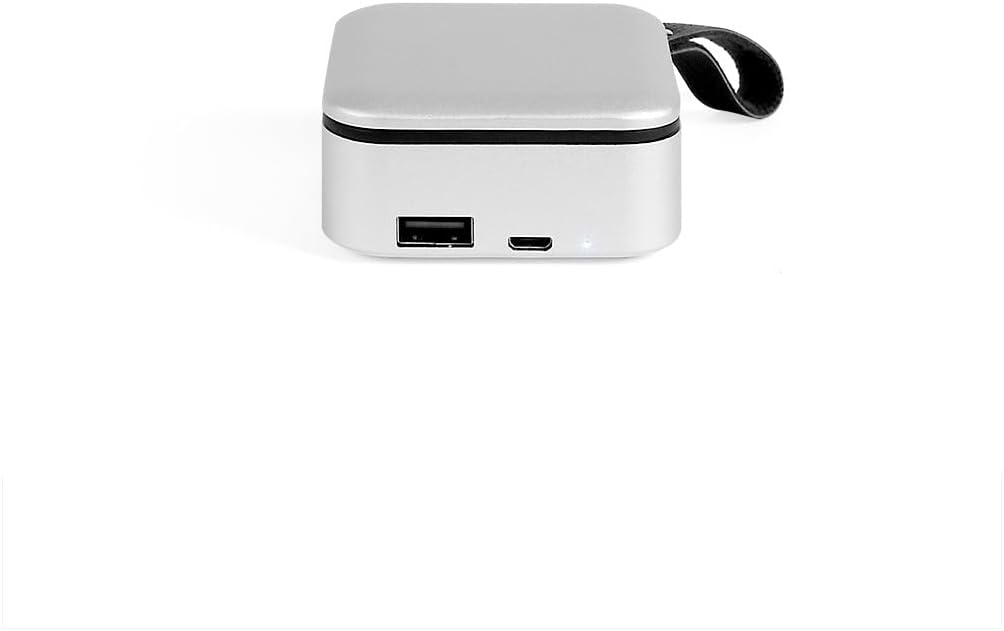
Imej 3.3: Satu jarak dekat view of the bottom of the charging case, showing the USB-A output port (for power bank function) and the Micro USB input port (for charging the case), along with an LED indicator.
4. Persediaan
4.1 Pengecasan Awal
Sebelum penggunaan pertama, cas sepenuhnya kedua-dua fon telinga dan bekas pengecasan.
- Place both earbuds into the charging case. Ensure they are correctly seated in their magnetic slots.
- Connect the provided USB to Micro USB cable to the Micro USB port on the charging case (refer to Image 3.3).
- Sambungkan hujung kabel USB yang satu lagi ke penyesuai kuasa USB (tidak disertakan) atau port USB komputer.
- The LED indicator on the charging case will show charging status. The earbuds will also show a charging indicator (often red light, as seen in Image 4.1) while charging inside the case.
- Once fully charged, the indicators will change or turn off. Disconnect the charging cable.

Imej 4.1: The earbuds are placed inside the charging case, showing red indicator lights, signifying that they are currently charging.
4.2 Berpasangan Bluetooth
Untuk menyambungkan fon telinga anda kepada peranti:
- Pastikan fon telinga dicas.
- Buka bekas pengecasan dan keluarkan kedua-dua fon telinga. Mereka akan dihidupkan secara automatik dan cuba berpasangan antara satu sama lain.
- Pada telefon pintar atau peranti berdaya Bluetooth anda, pergi ke tetapan Bluetooth.
- Cari untuk new devices. You should see "Livoo Feel Good Moments" or a similar name appear in the list of available devices.
- Select the device name to pair. Once paired, you will hear a confirmation tone, and the earbud indicator lights will change (e.g., stop flashing).
- Fon telinga akan menyambung semula secara automatik ke peranti gandingan terakhir apabila dialih keluar daripada sarung, jika Bluetooth didayakan pada peranti.
5. Arahan Operasi
5.1 Hidupkan/Mati Kuasa
- Hidupkan kuasa: Remove the earbuds from the charging case. They will power on automatically. Alternatively, press and hold the multi-function button on each earbud for a few seconds.
- Matikan: Place the earbuds back into the charging case. They will power off automatically and begin charging. Alternatively, press and hold the multi-function button on each earbud for a few seconds until you hear a power-off prompt.
5.2 Main balik Muzik
- Main/Jeda: Ketik sekali sahaja butang berbilang fungsi pada mana-mana fon telinga.
- Lagu Seterusnya: Ketik dua kali butang berbilang fungsi pada fon telinga kanan.
- Trek Sebelumnya: Ketik dua kali butang berbilang fungsi pada fon telinga kiri.
- Kawalan Kelantangan: (Nota: Volume control may need to be adjusted directly on your connected device if not supported by earbud controls.)
5.3 Panggilan Telefon
- Jawab Panggilan: Single tap the multi-function button on either earbud when an incoming call rings.
- Tamatkan Panggilan: Single tap the multi-function button on either earbud during a call.
- Tolak Panggilan: Press and hold the multi-function button on either earbud for 2 seconds when an incoming call rings.
- Pembantu Suara: Triple tap the multi-function button on either earbud to activate your device's voice assistant (e.g., Siri, Google Assistant).
5.4 Charging the Case (Power Bank Function)
The charging case features a 2000 mAh battery, allowing it to also function as a power bank for other small devices.
- To charge an external device, connect it to the USB-A output port on the charging case (refer to Image 3.3) using an appropriate cable.
- The LED indicators on the case will show the remaining battery level.
6. Penyelenggaraan
- Pembersihan: Gunakan kain lembut, kering, bebas serabut untuk membersihkan fon telinga dan bekas pengecas. Jangan gunakan pembersih atau pelarut yang melelas.
- Storan: Apabila tidak digunakan, simpan fon telinga dalam bekas pengecasnya untuk melindunginya dan memastikan ia dicas. Simpan di tempat yang sejuk dan kering jauh dari cahaya matahari langsung dan suhu yang melampau.
- Tahan Air: These earbuds are not waterproof. Avoid exposure to water, moisture, or sweat.
7. Penyelesaian masalah
| Masalah | Penyelesaian yang Mungkin |
|---|---|
| Fon telinga tidak berpasangan dengan peranti. |
|
| Hanya satu fon telinga berfungsi. |
|
| Fon telinga tidak dicas. |
|
| Kualiti audio yang lemah atau terputus sambungan. |
|
8. Spesifikasi
| Ciri | Perincian |
|---|---|
| Nombor Model | TES236 |
| Jenama | Livoo |
| Teknologi Ketersambungan | Wayarles (Bluetooth) |
| Versi Bluetooth | 5.0 |
| Julat Tanpa Wayar | Sehingga 10 meter |
| Kapasiti Bateri Earbud | 40 mAh (setiap earbud) |
| Kapasiti Bateri Kes Pengecasan | 2000 mAh |
| Masa Main Semula | Sehingga 5 jam |
| Mikrofon | Integrated for hands-free calls |
| Port Pengecasan | Micro USB (for case input) |
| Output Bank Kuasa | USB-A (for external device charging) |
| Jenis Kawalan | Call Control, Universal Phone Control |
| Berat Barang | 110 Gram |
| bahan | Akrilonitril Butadiena Stirena (ABS) |
9. Waranti dan Sokongan
Produk ini disertakan dengan a Waranti pengilang selama 2 tahun. For warranty claims or technical support, please contact your retailer or visit the official Livoo webtapak untuk bantuan lanjut.
Sila simpan bukti pembelian anda untuk tujuan waranti.


