pengenalan
Thank you for choosing the Donerton P32 Smartwatch. This manual provides essential information for setting up, operating, maintaining, and troubleshooting your device. Please read it carefully to ensure optimal performance and longevity of your smartwatch.
Apa yang ada dalam Kotak
- Donerton P32 Smartwatch
- Kabel Pengecas USB Magnetik
- Manual Pengguna
Panduan Persediaan
1. Mengecas Jam Pintar
Sebelum penggunaan pertama, cas sepenuhnya jam tangan pintar anda. Sambungkan kabel pengecas magnet ke kenalan pengecas di bahagian belakang jam tangan dan pasangkan hujung USB ke penyesuai kuasa USB standard (tidak disertakan) atau port USB komputer.
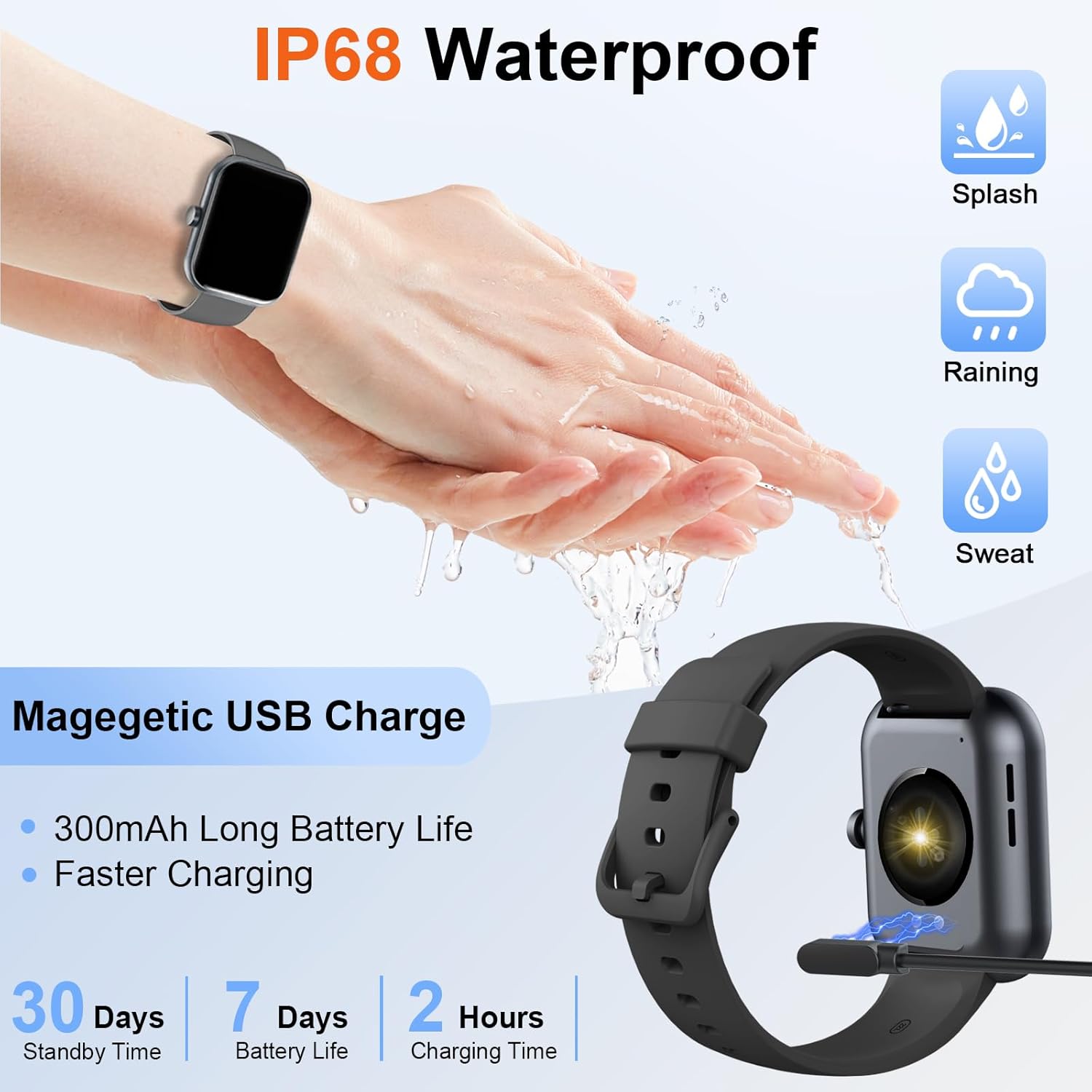
Image: The Donerton P32 Smartwatch connected to its magnetic USB charging cable, illustrating the charging process. Icons for IP68 waterproof rating and battery life are also visible.
A full charge typically takes approximately 1.5 to 2 hours. The battery indicator on the screen will show the charging status.
2. App Installation (Glory Fit)
To unlock all features and synchronize data, download the "Glory Fit" app on your smartphone. You can find it on the App Store (for iOS devices) or Google Play Store (for Android devices).
- Scan the QR code in the manual or on the watch screen (if available) to directly download the app.
- Alternatively, search for "Glory Fit" in your phone's app store.
- Pasang aplikasi dan berikan kebenaran yang diperlukan untuk Bluetooth, pemberitahuan dan perkhidmatan lokasi.
3. Berpasangan Peranti
Pastikan Bluetooth telefon pintar anda didayakan.
- Open the "Glory Fit" app on your smartphone.
- Navigate to the "Device" or "Mine" section within the app.
- Tap "Add Device" or "Bind Device" and select your Donerton P32 Smartwatch from the list of available Bluetooth devices. The watch name usually appears as "P32" or similar.
- Sahkan permintaan pasangan pada telefon dan jam tangan pintar anda.
- Sebaik sahaja dipasangkan, jam tangan akan menyegerakkan masa dan data dengan telefon anda.
Arahan Operasi
Navigasi Asas
- Skrin Sentuh: Leret ke kiri/kanan, atas/bawah untuk menavigasi menu dan fungsi. Ketik untuk memilih.
- Butang Sisi: Press to wake up the screen, return to the previous screen, or go to the main watch face.
- Rasa Pergelangan Tangan: The screen will illuminate automatically when you raise your wrist.

Image: The Donerton P32 Smartwatch showcasing its main features through a series of icons, including alarm, sedentary reminder, stopwatch, calorie tracking, step counting, multiple sports modes, find phone function, and a full touch screen interface.
Ciri-ciri Utama
- Activity Tracking (Pedometer, Distance, Calories): The integrated high-performance motion sensor accurately records your steps, distance covered, and calories burned throughout the day. View detailed statistics in the Glory Fit app.
- Pemantau Kadar Jantung: The smartwatch continuously tracks your heart rate in real-time. This data helps you monitor your cardiovascular health and optimize workout intensity.
- Penjejakan Tidur: Automatically monitors your sleep duration and quality, distinguishing between light, deep, and REM sleep stages. Access comprehensive sleep analysis in the Glory Fit app to understand your sleep patterns.
- 24 Mod Sukan: Select from a variety of sports modes to track specific activities. The watch records relevant data for each mode, such as duration, calories, and heart rate.

Image: A man running outdoors, wearing the Donerton P32 Smartwatch. The image highlights the '100+ Sport Modes Fitness Tracker' feature, displaying activity tracking metrics such as steps, distance, and calories on the watch face and a smartphone screen.
- Pemberitahuan Mesej: Receive alerts for incoming calls, SMS messages, and notifications from social media apps (Facebook, Messenger, Twitter, WhatsApp, Instagram) directly on your wrist.
- Bluetooth Call and Answer: Make and receive calls directly from your smartwatch when connected to your phone via Bluetooth.

Image: A man interacting with the Donerton P32 Smartwatch to manage a Bluetooth call. The watch screen displays options for dialing, an incoming call, call history, and contacts, demonstrating its call management capabilities.
- Ramalan cuaca: After setting your location in the app, view current and upcoming weather conditions directly on your smartwatch.
- Jam loceng: Set alarms through the Glory Fit app to wake you up or remind you of important events.
- Kawalan Muzik: Control music playback on your smartphone (play, pause, skip tracks) directly from your watch.
- Peringatan Sedentari: The watch can remind you to move if you've been inactive for too long, promoting a healthier lifestyle.
- Jam randik & Pemasa: Utilize built-in stopwatch and timer functions for various activities.
- Cari Telefon: If your phone is misplaced, use this feature on your watch to make your phone ring (if within Bluetooth range).
- Kawalan Kamera: Remotely control your smartphone's camera by shaking your wrist while the camera function is active in the app.

Image: The Donerton P32 Smartwatch interface showing a selection of its multifunctional capabilities, including weather forecasts, alarm clock settings, camera remote control, timer, flashlight, and the 'Find Phone' feature.
Penyelenggaraan
Rintangan Air (IP68)
The Donerton P32 Smartwatch is IP68 waterproof, meaning it is resistant to daily moisture such as hand washing, bathing, and swimming. It is not necessary to remove it frequently for these activities.
Nota Penting: Do not use the smartwatch for diving or in hot water environments like hot springs or saunas, as extreme temperatures and high-pressure water can compromise the seal and cause damage.
Pembersihan
- Lap skrin dan tali jam tangan dengan kerap menggunakan kain lembut dan kering.
- Untuk kotoran degil, gunakan sedikit damp kain dan kemudian keringkan dengan teliti.
- Avoid using harsh chemicals or abrasive materials, which can damage the finish.
Penjagaan Bateri
- Elakkan menyahcas sepenuhnya bateri dengan kerap.
- Cas jam tangan apabila tahap bateri rendah.
- Simpan jam tangan di tempat yang sejuk dan kering jika tidak digunakan untuk tempoh yang lama.
Menyelesaikan masalah
| Masalah | Penyelesaian yang Mungkin |
|---|---|
| Tonton tidak dihidupkan | Pastikan jam tangan dicas sepenuhnya. Sambungkannya ke pengecas selama sekurang-kurangnya 10 minit. |
| Tidak dapat berpasangan dengan telefon | 1. Pastikan Bluetooth didayakan pada telefon anda. 2. Make sure the watch is within Bluetooth range. 3. Restart both the watch and your phone. 4. Clear Bluetooth cache on your phone (if applicable). 5. Ensure the "Glory Fit" app has necessary permissions. |
| Pemberitahuan tidak diterima | 1. Check if the watch is successfully paired with the app. 2. Ensure notification permissions are granted to the "Glory Fit" app on your phone. 3. Verify that app notifications are enabled within the "Glory Fit" app settings. 4. Make sure your phone's notification settings allow the app to display alerts. |
| Data kesihatan yang tidak tepat | 1. Pastikan jam tangan dipakai dengan kemas pada pergelangan tangan anda, kira-kira selebar satu jari dari tulang pergelangan tangan. 2. Keep the sensor clean and free from sweat or dirt. 3. Note that smartwatches are not medical devices and data is for reference only. |
| Hayat bateri pendek | 1. Kurangkan kecerahan skrin. 2. Limit frequent screen wake-ups. 3. Turn off unnecessary features if not in use. 4. Ensure the watch is fully charged. |
Spesifikasi
| Ciri | Perincian |
|---|---|
| Jenama | Donerton |
| Nombor Model | P32 |
| Saiz Skrin | 1.69 inches TFT-LCD |
| Sistem Operasi | Proprietary (Compatible with Android, iOS) |
| Ketersambungan | Bluetooth 5.0 |
| Peranti Serasi | Smartphones with iOS 9.0+ / Android 5.0+ |
| Jenis Bateri | Litium-polimer |
| Hayat Bateri (Penggunaan Biasa) | Sehingga 7 hari |
| Masa Tunggu Sedia | Sehingga 30 hari |
| Masa Mengecas | Lebih kurang 1.5 - 2 jam |
| Tahan Air | IP68 |
| Nama Apl | Kemuliaan Fit |
Waranti dan Sokongan
For warranty information and customer support, please refer to the documentation provided with your purchase or contact Donerton customer service directly. Details are typically available on the official Donerton webtapak atau melalui peruncit anda.


