1. Pengenalan
The ANCEL FX1000 is a professional vehicle diagnostic tool designed to read and clear trouble codes, view live data, and perform various special functions for a single-car manufacturer. It supports full OBD service modes and is compatible with vehicles manufactured from 1996 onwards. This manual provides detailed instructions for setting up and operating your device.
2. Ciri-ciri Produk
- Full OBDII Service Modes: Supports 8 OBDII service modes for comprehensive diagnostics.
- Multi-System Diagnostics: Capable of diagnosing all major vehicle systems including Engine, Transmission, SRS (Supplemental Restraint System), SAS (Steering Angle Sensor), TPMS (Tire Pressure Monitoring System), ABS (Anti-lock Braking System), and more.
- Fungsi Khas: Includes advanced functions such as DPF (Diesel Particulate Filter) Regeneration, Battery Replacement, ABS Bleeding, Oil Service Reset, EPB (Electronic Parking Brake) Reset, and Throttle Position Adaption.
- Sokongan Berbilang Bahasa: Supports 7 languages: English, French, Spanish, German, Russian, Polish, and Portuguese.
- Manufacturer-Specific Tool: Designed for a single-car manufacturer, allowing in-depth diagnostics for a specific brand's vehicle series.
- Lifetime Free Online Updates: Ensures your device always has the latest software and vehicle coverage.
3. Kandungan Pakej
Your ANCEL FX1000 package should include the following items:
- ANCEL FX1000 Diagnostic Tool
- OBDII Connection Cable
- Micro USB Cable (for PC connection and updates)
- Panduan Muat Turun
- Kes Pembawa Cangkang Keras
4. Reka Letak Peranti
Familiarize yourself with the buttons and ports on your ANCEL FX1000 device for optimal operation.

Image: ANCEL FX1000 device showing LCD display, Return button, Scroll Left/Right/Up/Down buttons, Fn button, and Ok button. Dimensions are also indicated.
- Paparan LCD: Shows diagnostic information and menu options.
- Butang Kembali: Menavigasi kembali ke skrin atau menu sebelumnya.
- Scroll Buttons (Up/Down/Left/Right): Used to navigate through menus and select options.
- Butang Fn: Function button, may have context-specific uses.
- Butang OK: Mengesahkan pilihan atau memasuki sub-menu.
- Penyambung OBDII: Menyambungkan peranti ke port OBDII kenderaan.
- Port USB: Untuk menyambung ke komputer untuk kemas kini perisian.
5. Persediaan dan Sambungan
Follow these steps to connect your ANCEL FX1000 to your vehicle:
- Locate your vehicle's OBDII port. This is typically found under the dashboard on the driver's side.
- Ensure the vehicle's ignition is ON, but the engine is NOT running. For push-button start vehicles, press the start button until all dashboard lights illuminate without starting the engine.
- Plug the OBDII connector from the ANCEL FX1000 into your vehicle's OBDII port. The device will power on automatically.
- Once powered on, the device is ready for use.
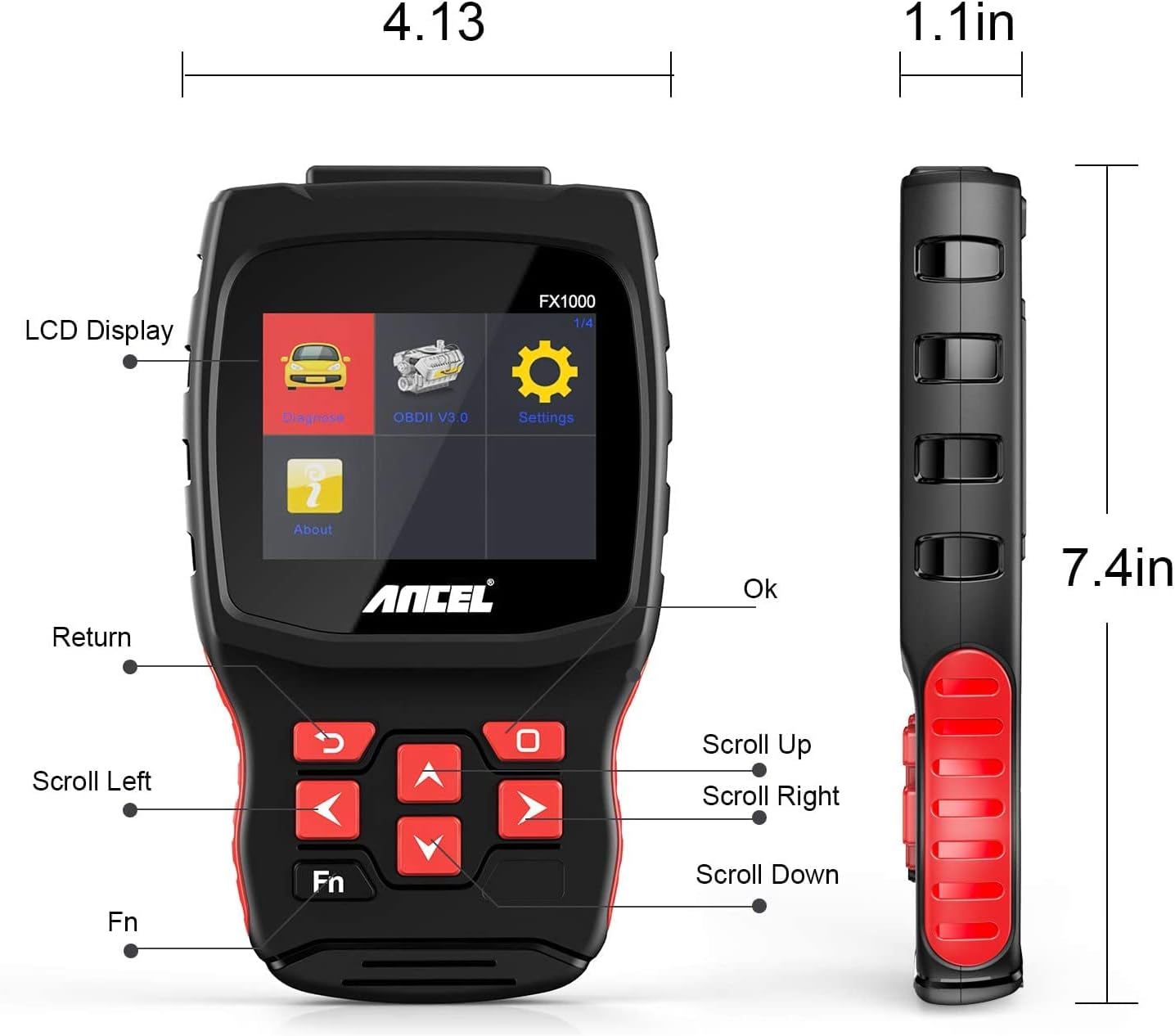
Image: A hand holding the ANCEL FX1000 connected to a vehicle's OBDII port, with the car's dashboard visible.
6. Navigasi dan Tetapan
The ANCEL FX1000 features a user-friendly interface. Use the arrow buttons to navigate and the OK button to select.
- Diagnosis: Access vehicle-specific diagnostic functions.
- OBDII V3.0: Access general OBDII functions for all compatible vehicles.
- tetapan: Configure device preferences.
- Mengenai: View device information such as serial number, firmware version, and software version.
Pilihan Menu Tetapan:
- Bahasa: Tukar bahasa paparan.
- Unit: Tukar antara Celsius dan Fahrenheit untuk bacaan suhu.
- Bunyi: Enable or disable audible feedback.
- Rekod: View recorded diagnostic data.
- Ujian Butang: Test the functionality of the device buttons.
- LCD Test: Test the LCD display.
7. Diagnostik Sistem
The ANCEL FX1000 allows you to perform in-depth diagnostics on various vehicle systems. After selecting 'Diagnose' and your vehicle's manufacturer (e.g., Toyota), you can choose specific systems.
Image: Visual representation of systems diagnosed by FX1000, including Engine, ABS, TPMS, Transmission, Oil Service, Airbag, Battery, Audio, and Headlight Activate.
Fungsi Diagnostik:
- Read Trouble Code: Retrieves current, pending, and history Diagnostic Trouble Codes (DTCs).
- Clear Trouble Code: Erases DTCs from the vehicle's computer.
- Baca Strim Data: Displays real-time data parameters from the vehicle's sensors.
- Ujian Aktif: Allows bidirectional control to test specific components.
- Fungsi Khas: Accesses advanced maintenance and service functions.
8. Fungsi Khas
The ANCEL FX1000 offers several special functions for vehicle maintenance:

Image: Visual representation of special functions including Oil Service Reset, ABS Bleeding, TPMS Reset, and EPB Reset.
- Set Semula Perkhidmatan Minyak: Menetapkan semula lampu servis minyak selepas penukaran minyak.
- Pendarahan ABS: Melakukan fungsi pendarahan untuk Sistem Brek Anti-kunci.
- Tetapan Semula EPB: Resets the Electronic Parking Brake system.
- Throttle Position Adaption: Adapts the throttle position sensor.
- Penjanaan Semula DPF: Initiates the regeneration process for the Diesel Particulate Filter.
- Penggantian Bateri: Mendaftarkan penggantian bateri baharu.
9. OBDII Functions (General)
The 'OBDII V3.0' menu provides general diagnostic functions compatible with all OBDII-compliant vehicles (1996 and newer).
- Read Current Trouble Code: Displays active DTCs.
- Clear Trouble Code: Erases all stored DTCs.
- Read Current Data: View live sensor data.
- Read Pending Trouble Code: Displays DTCs that have not yet fully matured.
- Baca Data Bingkai Beku: Shows a snapshot of vehicle conditions when a DTC was set.
- Readiness Tests: Menyemak status monitor berkaitan pelepasan.
Readiness Test:
The Readiness Test is crucial for emissions inspections. It indicates whether various emission control systems have completed their self-tests. Look for 'Complete' or 'Supported' status for all monitors. If a monitor shows 'Not Complete' or 'Not Supported', it may indicate an issue or that the drive cycle has not been completed.
10. Clearing Trouble Codes
To clear trouble codes, navigate to the 'Clear Trouble Code' option within the relevant diagnostic menu. The device will prompt you to confirm. After clearing, it is recommended to cycle the vehicle's ignition off and on to ensure all related warning lights are reset.
Note: The ANCEL FX1000 can only read and clear SRS error codes; it does NOT support SRS reset functions.
11. Kemas kini Perisian
To ensure your ANCEL FX1000 has the latest vehicle coverage and features, regular software updates are recommended. The device offers lifetime free online updates.
- Connect the device to your computer using the provided Micro USB cable.
- Follow the instructions in the 'Download Guide' included in your package to install the update software on your computer.
- Register your device using the serial number and your email address.
- Select the specific car manufacturer software you need for your device.
- Perform the update as prompted by the software.

Image: ANCEL FX1000 connected via USB cable to a laptop, illustrating the update process.
12. Penyelesaian masalah
If you encounter issues while using your ANCEL FX1000, refer to the following common scenarios:
-
Dokumen Berkaitan - FX1000

Manual Pengguna ANCEL VD500: Panduan Alat Diagnostik OBD2
Manual pengguna yang komprehensif untuk pengimbas diagnostik ANCEL VD500 OBD2. Ketahui tentang langkah berjaga-jaga keselamatan, ciri, operasi, spesifikasi dan maklumat waranti untuk alat diagnostik automotif anda.
Manual Pengguna ANCEL VOD700 - Pengimbas Berbilang Sistem Volvo
Manual pengguna yang komprehensif untuk pengimbas berbilang sistem ANCEL VOD700, yang memberikan arahan terperinci untuk kenderaan Volvo, termasuk diagnostik, fungsi khas, persediaan alat dan kemas kini.
Manual Pengguna ANCEL DS160, DS100, DS200 - Alat Diagnostik Automotif
Manual pengguna untuk alat diagnostik automotif ANCEL DS160, DS100 dan DS200. Meliputi ciri, parameter, penggunaan, fungsi, Soalan Lazim dan jaminan untuk pengimbas OBD2 ini.
Manual Pengguna Pengimbas OBD2 ANCEL BD300
Manual pengguna yang komprehensif untuk pengimbas ANCEL BD300 OBD2. Ketahui cara memuat turun APLIKASI ANCEL, bersambung melalui Bluetooth, melakukan diagnostik kenderaan, mengemas kini perisian dan menggunakan fungsi khas seperti tetapan semula EPB, CBS, ABS dan Beg Udara. Menyokong diagnostik sistem penuh untuk BMW dan kenderaan lain.
Manual Pengguna ANCEL FD500: Panduan Komprehensif untuk Diagnostik Kereta
Temui ANCEL FD500, pengimbas OBD2 berbilang sistem komprehensif dalam Kelabu, direka untuk kenderaan Ford, Lincoln dan Mercury. Manual pengguna ini menyediakan arahan terperinci tentang cirinya, langkah berjaga-jaga keselamatan dan fungsi diagnostik termasuk Enjin, ABS, SRS, Transmisi, sistem 4WD, EPB, Tetapan Semula Minyak dan Pendaftaran Bateri.
ANCEL BD300 User Manual and Quick Start Guide
Comprehensive user manual for the ANCEL BD300 Bluetooth OBD2 diagnostic tool, covering setup, operation, and features for BMW/Mini vehicles. Includes instructions for app connection, system diagnostics, and service resets.