1. Pengenalan
Thank you for choosing the ToLuLu 1080P HD Webcam. This manual provides detailed instructions for the proper setup, operation, and maintenance of your webcam. Designed for professional-quality video calls, recording, conferencing, and gaming, this webcam delivers crisp images and clear video at 30 frames per second. It features automatic light correction, HDR technology, and a built-in noise-reduction microphone to ensure optimal performance in various lighting conditions.
2. Apa yang ada di dalam Kotak
- ToLuLu 1080P HD Webcam
- Manual Pengguna
- Perlindungan Privasi
- Tripod Berdiri
3. Produk Lebihview
The ToLuLu 1080P HD Webcam is equipped with a full HD glass lens and an integrated digital stereo microphone. It features a flexible clip for mounting on various displays and a standard tripod thread for the included tripod stand. A privacy cover is also provided for enhanced security.

Image 3.1: ToLuLu 1080P Webcam with included privacy cover and tripod.

Imej 3.2: Webcam with privacy cover and tripod stand. The privacy cover can be closed when the webcam tidak digunakan.
4. Arahan Persediaan
- Memasang Webcam:
The webcam features an adjustable universal clip. You can place it securely on top of your laptop screen, desktop monitor, or any flat surface. For alternative placement, attach the webcam to the included tripod stand using the standard tripod thread at the bottom of the clip. - Menyambung ke Komputer Anda:
Sambungkan kabel USB daripada webcam to an available USB port on your computer (laptop, desktop, Mac, PC). The webcam is designed for plug-and-play functionality, meaning no additional drivers are typically required for most operating systems. - Pengiktirafan Awal:
Your computer should automatically detect and install the webcam. A notification may appear indicating that the device is ready for use. - Konfigurasi Perisian:
Open your preferred video conferencing or streaming application (e.g., Zoom, Skype, OBS, YouTube, Facetime). Navigate to the video and audio settings within the application and select the "ToLuLu Webcam" sebagai peranti input video anda dan mikrofon bersepadunya sebagai peranti input audio anda.

Image 4.1: Connecting the webcam via USB for plug-and-play setup.
5. Arahan Operasi
- Kualiti Video: The 1080P Full HD glass lens delivers clear video at 30 frames per second. The webcam features automatic light correction and HDR technology, which adjusts color and brightness for natural lighting, even in dim or poorly backlit environments.
- Kualiti Audio: The built-in digital stereo microphone includes automatic noise reduction, ensuring your voice is captured clearly from up to 10 feet away.
- Skrin lebar View: The fixed-focus lens provides a 110-degree wide-angle view, suitable for individual use or group video conferencing.
- Perlindungan Privasi: Use the included privacy cover to physically block the camera lens when not in use. This protects your privacy and prevents unauthorized access to your video feed.

Image 5.1: Comparison illustrating the clarity of the 1080P Full HD webcam.

Imej 5.2: The webcam's 110-degree wide-angle view, suitable for multiple participants.
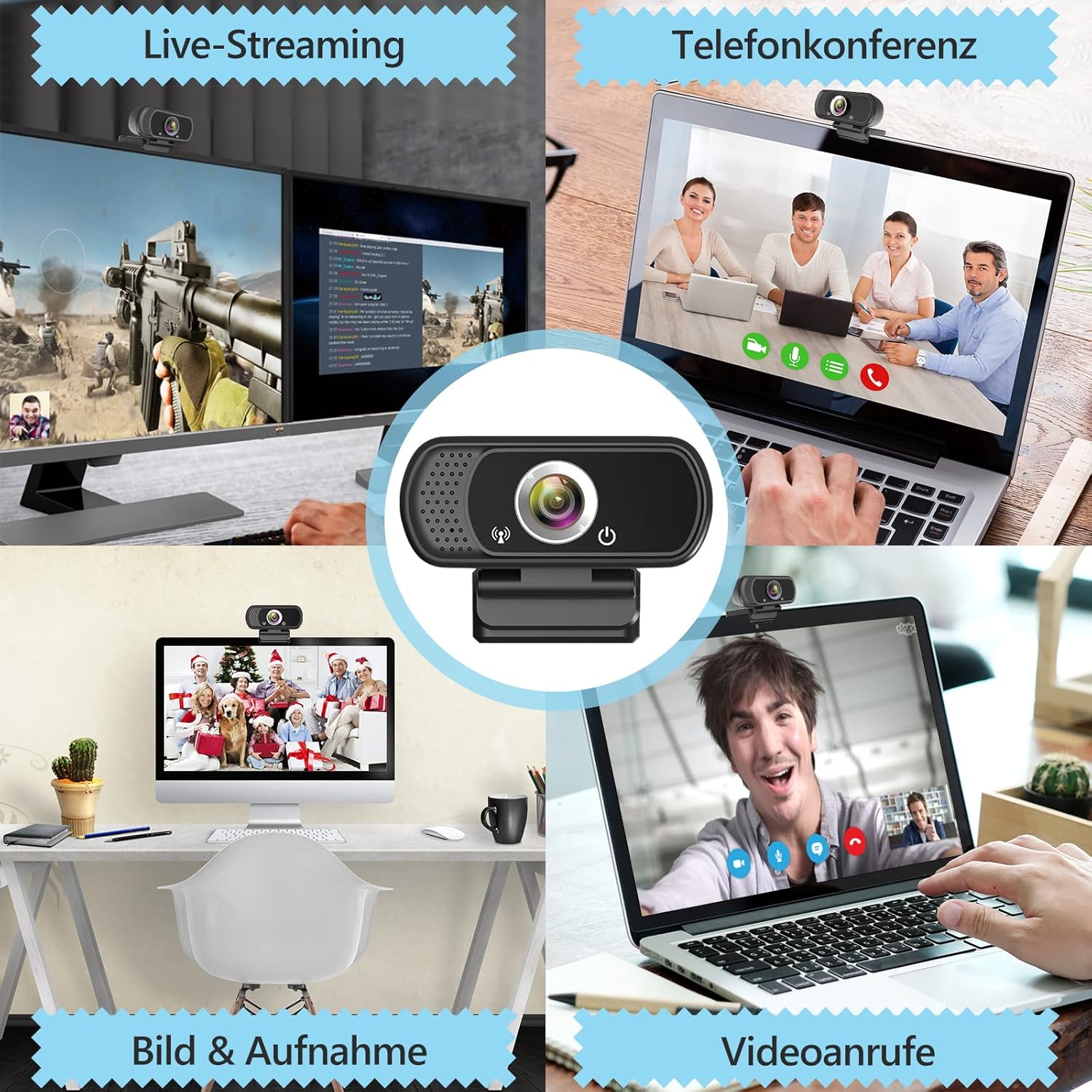
Imej 5.3: Cthamples dari webcam use in live streaming, teleconferencing, and video calls.
6. Keserasian
The ToLuLu 1080P HD Webcam offers broad compatibility with various operating systems and applications:
- Sistem Operasi: Windows 2000, XP, 7, 8, 10 and above; macOS 10.6 and above; Chrome OS 29.0.1547 or above; Android V5.0 or above; Smart TV.
- Platform Perkakasan: Mac, PC, Laptops, Desktops, Smart TVs.
- Aplikasi yang Serasi: Skype, OBS, YouTube, Facebook, Twitch, Facetime, Zoom, Xbox One, Hangouts, and more.

Imej 6.1: The webcam is compatible with multiple operating systems and popular communication platforms.
7. Penyelenggaraan
- Membersihkan Lensa: Gunakan kain lembut dan bebas bulu yang direka khas untuk kanta optik untuk mengelapnya dengan lembut webcam lens. Avoid abrasive materials or harsh chemicals, which can scratch or damage the lens.
- Pembersihan Am: Lap badan itu webcam with a soft, damp cloth. Ensure no moisture enters the device.
- Storan: Apabila tidak digunakan, simpan webSimpan kamera di tempat yang bersih dan kering. Gunakan penutup privasi untuk melindungi kanta daripada habuk dan calar.
- Penjagaan Kabel: Elakkan membengkokkan atau memusingkan kabel USB secara berlebihan untuk mengelakkan kerosakan dalaman.
8. Penyelesaian masalah
| Masalah | Kemungkinan Punca | Penyelesaian |
|---|---|---|
| Webcam not detected / No image | USB connection issue, driver conflict, or incorrect software selection. |
|
| Poor image quality (blurry, dark, grainy) | Insufficient lighting, dirty lens, or software settings. |
|
| Microphone not working / Poor audio quality | Microphone not selected, system audio settings, or environmental noise. |
|
| Intermittent connection issues | Loose USB connection, USB port power issues, or system resource conflicts. |
|
9. Spesifikasi
| Ciri | Perincian |
|---|---|
| Resolusi Tangkapan Video | 1080p Full HD (1920 x 1080) at 30fps |
| Jenis Kanta | Full HD Glass Lens, Fixed Focus |
| Bidang View | 110 Degrees Widescreen |
| Mikrofon | Built-in Digital Stereo Microphone with Automatic Noise Reduction |
| Pembetulan Cahaya | Automatic Light Correction, HDR Technology |
| Ketersambungan | USB Plug & Play (1.8m / 6 feet USB cable) |
| Melekap | Adjustable Universal Clip, Tripod Ready |
| Sistem Operasi | Windows 2000/XP/7/8/10+, macOS, Chrome OS, Android, Smart TV |
| Dimensi (LxWxH) | 3.8 x 3.1 x 2.5 inci |
| Berat Barang | 6.3 auns |
10. Waranti dan Sokongan
ToLuLu is committed to providing quality products and customer satisfaction.
- Polisi Pemulangan: This product is eligible for return within 30 days for an exchange or refund, subject to the retailer's return policy.
- Sokongan Teknikal: ToLuLu offers lifetime professional technical team support for this product.
For further assistance or inquiries, please refer to the contact information provided with your purchase or visit the official ToLuLu support channels.


