pengenalan
This manual provides detailed instructions for the FANTECH USB RGB Gaming Headset (HG11) and its accompanying Headset Stand (AC3001S). This combo is designed for PC gaming, offering 7.1 surround sound, a 50mm driver, and RGB lighting for an immersive audio experience. Please read this manual thoroughly before using the product to ensure proper setup and operation.
Apa yang ada dalam Kotak
Sahkan bahawa semua komponen terdapat dalam pakej:
- Alat dengar Permainan HG11
- AC3001S Headphone Stand
Produk Selesaiview dan Ciri

Image: The FANTECH HG11 Gaming Headset and AC3001S Headset Stand displayed together, showcasing their white and grey design with RGB lighting on the stand base.
Alat dengar Permainan HG11
- 7.1 Bunyi keliling: Experience precise and clear audio with immersive 7.1 Surround-Sound technology, enhancing positional awareness in games.
- Pemacu 50mm: Equipped with 50mm drivers for a wider frequency range, richer sound fields, and high-fidelity audio.
- Comfortable and Ergonomic Design: Features supple faux leather full-coverage earmuffs with high-quality memory foam padding for extended comfort. The ergonomically padded headband reduces fatigue during long gaming sessions.
- Kesambungan USB: Designed for PC use with a USB connection.
- Mikrofon Pembatal Bunyi: Ensures clear communication by filtering ambient noise.
- Inline Audio Control Unit: Convenient controls for volume up/down, microphone on/off, and RGB lighting switch.
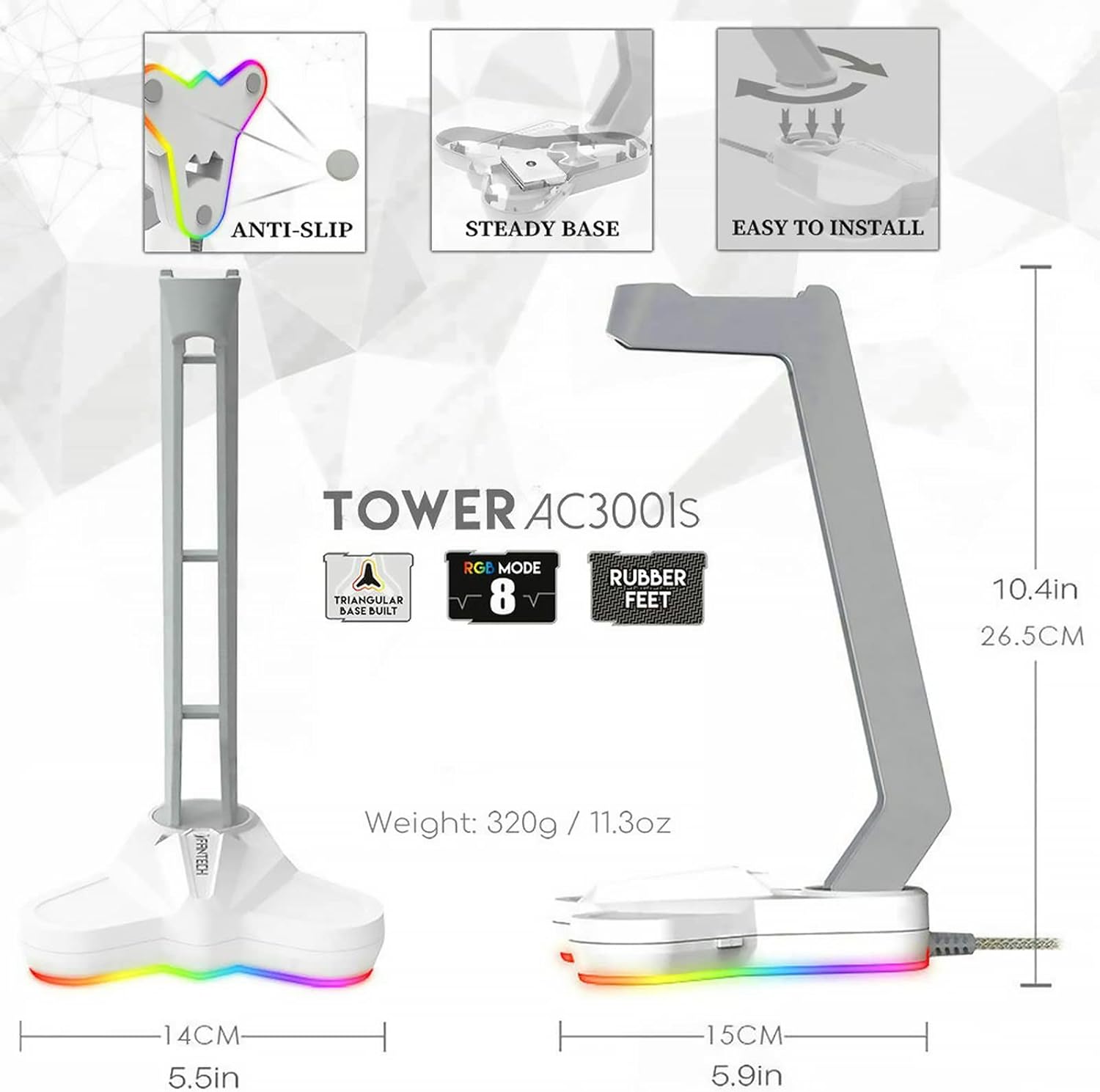
Image: The FANTECH AC3001S RGB Headset Stand, highlighting its stable triangular base and customizable RGB lighting effects.
AC3001S Headset Stand
- Pangkalan Pencahayaan RGB: Features 8 lighting modes, including 1 RGB rolling subtitles light and 7 monochromatic lights, controllable via a backlit button.
- Durable Triangular Base: Provides stability and protection for your desk with anti-slip rubberized feet.
- Pemasangan Mudah: Simple assembly process.
- Berat: Approximately 320g (11.3oz) with added internal weight for enhanced stability.
Persediaan
Connecting the HG11 Gaming Headset
- Cari port USB yang tersedia pada PC anda.
- Plug the USB connector of the HG11 Gaming Headset into the USB port.
- The headset will typically be recognized automatically by your operating system.
- For virtual 7.1 surround sound functionality, ensure you install the necessary drivers from the official FANTECH webtapak. (Note: Virtual 7.1 surround sound is only available on PC and requires drivers.)
Assembling the AC3001S Headset Stand
- Unpack the stand components.
- Align the stand arm with the base and gently push down until it clicks into place.
- Connect the stand's USB cable to an available USB port on your PC or a USB power adapter to activate the RGB lighting.


Image: Left: Close-up of the HG11 headset's USB connector and inline control unit. Right: Diagram illustrating the easy installation steps for the AC3001S headset stand.
Arahan Operasi
Using the HG11 Gaming Headset
- Kawalan Kelantangan: Use the "VOL+" and "VOL-" buttons on the inline control unit to adjust the audio volume.
- Hidup / Mati Mikrofon: Press the microphone button on the inline control unit to mute or unmute the microphone.
- RGB Lighting (Headset): The headset's RGB lighting is typically activated upon connection. Refer to driver software for advanced customization.
Using the AC3001S Headset Stand
- Placing the Headset: Hang your HG11 Gaming Headset on the stand when not in use.
- Kawalan Pencahayaan RGB: Press the backlit button on the stand's base to cycle through the 8 available lighting modes (1 RGB rolling subtitles light, 7 monochromatic lights).

Image: Close-up of the HG11 headset's inline control unit, showing buttons for volume adjustment, microphone toggle, and RGB switch.
Penyelenggaraan
- Pembersihan: Use a soft, dry cloth to wipe down the headset and stand. Avoid abrasive cleaners or solvents.
- Storan: Store the headset on its stand in a cool, dry place away from direct sunlight and extreme temperatures.
- Penjagaan Kabel: Elakkan selekoh tajam atau lekukan pada kabel USB untuk mengelakkan kerosakan.
- penutup telinga: Periodically check earmuffs for wear and tear. While durable, gentle handling will prolong their lifespan.

Image: The FANTECH HG11 Gaming Headset resting on its AC3001S stand, demonstrating proper storage.
Menyelesaikan masalah
- Tiada Bunyi dari Alat dengar:
- Ensure the USB cable is securely plugged into the PC.
- Check the volume level on the inline control unit and your PC's sound settings.
- Verify that the HG11 headset is selected as the default audio output device in your PC's sound settings.
- Reinstall or update the headset drivers.
- Mikrofon Tidak Berfungsi:
- Ensure the microphone is not muted via the inline control unit.
- Check your PC's sound settings to ensure the HG11 microphone is selected as the input device and its volume is not set to zero.
- Confirm that the microphone is positioned correctly near your mouth.
- 7.1 Surround Sound Not Functioning:
- Ensure you have installed the specific drivers for the HG11 headset. Virtual 7.1 surround sound requires these drivers and is only available on PC.
- Check the driver software settings to ensure 7.1 surround sound is enabled.
- RGB Lighting on Stand Not Working:
- Ensure the stand's USB cable is securely connected to a powered USB port.
- Press the backlit button on the stand's base to cycle through lighting modes and ensure it's not turned off.
Spesifikasi Teknikal
| Ciri | Spesifikasi |
|---|---|
| Nama Model | HG11CO |
| Teknologi Ketersambungan | Berwayar (USB) |
| Jack Fon Kepala | USB |
| Unit Pemandu | 50mm |
| Respons Kekerapan | 20 Hz - 20 kHz |
| Sensitiviti Pembesar Suara | 119 dB |
| Impedans Pembesar Suara | 21 Ohm |
| Kepekaan Mikrofon | -42 dB ± 3 dB |
| Arah Mikrofon | Omni-arah |
| Kawalan Bunyi | Pembatalan Bunyi Aktif (Mikrofon) |
| Ciri Kabel | Bebas Kusut |
| warna | putih |
| bahan | ABS, Faux Leather, Stainless Steel |
| Item Weight (Headset) | 11.7 auns (lebih kurang 0.33 kg) |
| Dimensi Produk | 10.5 x 4.5 x 7.5 inci |
| Komponen yang Disertakan | HG11 Gaming Headset, AC3001S Headphone Stand |

Image: A table summarizing the technical specifications of the FANTECH HG11 Gaming Headset and AC3001S Headset Stand.
Waranti dan Sokongan
Untuk maklumat jaminan dan sokongan teknikal, sila rujuk laman web rasmi FANTECH webtapak atau hubungi perkhidmatan pelanggan mereka secara langsung. Simpan resit pembelian anda untuk tuntutan waranti.


