1. Pengenalan
This manual provides detailed instructions for the installation, setup, operation, and maintenance of your Alpine DVR-C310R WiFi Enabled Dash Camera. Please read this manual thoroughly before using the product to ensure proper functionality and to prevent damage.
The Alpine DVR-C310R is a high-definition dash camera system designed to record vehicle activity. It features full HD video recording, high dynamic range (HDR) for clear imaging, and Wi-Fi connectivity for easy file management via a smartphone or PC application. A secondary rear camera is included for comprehensive vehicle monitoring.
2. Maklumat Keselamatan
Patuhi langkah berjaga-jaga keselamatan berikut untuk mengelakkan kecederaan atau kerosakan pada peranti:
- Do not install the dash camera in a location that obstructs the driver's view atau mengganggu operasi kenderaan.
- Ensure all cables are securely routed and do not interfere with airbags or other safety features.
- Elakkan daripada mendedahkan peranti kepada suhu yang melampau, cahaya matahari langsung untuk tempoh yang lama atau kelembapan yang berlebihan.
- Jangan cuba membuka atau mengubah suai peranti. Rujuk semua servis kepada kakitangan yang berkelayakan.
- Use only the specified power adapter and accessories provided with the product.
- Periodically check the mounting of the cameras to ensure they remain securely attached.
3. Kandungan Pakej
Sahkan bahawa semua item terdapat dalam pakej:
- Alpine DVR-C310R Front Dash Camera
- Kamera Belakang
- Mounting Bracket (for front camera)
- Kabel Kuasa
- Kabel Sambungan Kamera Belakang
- GPS Module (if included with your specific package)
- Manual Pengguna (dokumen ini)
4. Produk Lebihview
Familiarize yourself with the main components of the Alpine DVR-C310R system.
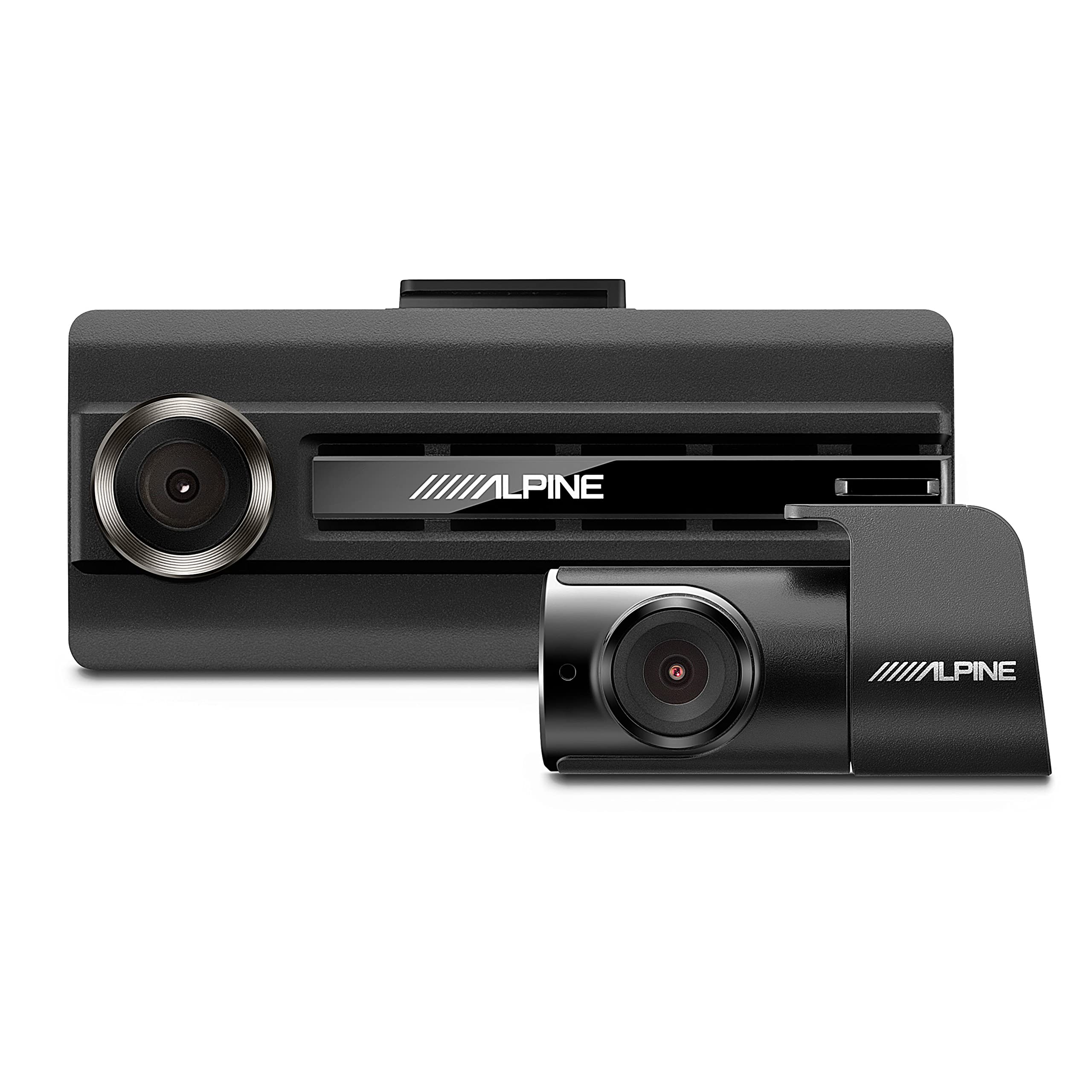
Rajah 4.1: Alpine DVR-C310R Front and Rear Dash Cameras. This image displays both the main front dash camera and the smaller rear camera unit.
4.1 Kamera Papan Pemuka Hadapan
The main unit records the forward view kenderaan anda.

Rajah 4.2: Depan view of the Alpine DVR-C310R dash camera, highlighting the lens and Alpine branding.

Rajah 4.3: belakang view of the Alpine DVR-C310R dash camera, showing the Wi-Fi and REC buttons, status indicators, DC-IN port, and microphone.
- Kanta: Records full HD video.
- Butang REC: Manually initiate or save an event recording.
- Butang Wi-Fi: Activates/deactivates Wi-Fi for smartphone connection.
- LED Status: Indicates recording status and Wi-Fi connection.
- Port DC-IN: Power input for the camera.
- V-OUT Port: Bersambung ke kamera belakang.
- mikrofon: Records in-cabin audio.
- Butang Tetapkan Semula: Resets the device (requires a thin object like a paperclip).
- Slot Kad MicroSD: For video storage.
4.2 Kamera Belakang
The secondary camera records the rear view or internal cabin view, depending on installation.

Rajah 4.4: jarak dekat view of the Alpine DVR-C310R rear camera, showing its compact design and lens.
- Kanta: Records video, typically in HD.
- V-OUT Port: Connects to the front camera.
4.3 Modul GPS
The optional GPS module provides location and speed data for recorded footage.

Rajah 4.5: Alpine GPS module, a small black rectangular unit with a connecting cable, used to add location data to recordings.
5. Pemasangan
Proper installation is crucial for optimal performance and safety. Professional installation is recommended.
5.1 Choosing Mounting Locations
- Kamera Depan: Mount on the windshield, typically behind the rearview mirror, ensuring it does not obstruct the driver's view atau penggunaan beg udara.
- Kamera Belakang: Mount on the rear windshield for external recording, or on the dashboard/headliner for internal cabin recording (e.g., for rideshare drivers). Ensure a clear line of sight.

Rajah 5.1: Atas view of the front camera showing the integrated mounting bracket, which slides into a slot on the camera body.
5.2 Memasang Kamera
- Clean the chosen windshield area thoroughly.
- Attach the mounting bracket to the front camera.
- Remove the protective film from the adhesive pad on the bracket and firmly press the camera onto the windshield. Hold for at least 30 seconds.
- Repeat for the rear camera, ensuring its orientation is correct for the desired recording angle.
5.3 Sambungan Pendawaian
- Insert a compatible MicroSD card into the front camera's card slot.
- Connect the rear camera cable to the V-OUT port on the front camera and the corresponding port on the rear camera. Route the cable neatly along the vehicle's interior trim.
- Connect the power cable to the DC-IN port on the front camera. Route the power cable to a 12V power outlet (cigarette lighter socket) or a hardwire kit (sold separately for continuous recording).
- If using the GPS module, connect it to the designated GPS port on the front camera (if available) or integrate it as per its specific instructions.
- Ensure all cables are tucked away and secured to prevent interference with driving or vehicle components.
6. Persediaan Awal dan Sambungan Wi-Fi
After installation, perform the initial setup and connect to the camera via Wi-Fi.
6.1 Powering On and Initial Recording
- Start your vehicle's engine. The dash camera should power on automatically and begin recording.
- Observe the status LED on the front camera. It should indicate active recording (e.g., blinking red).
6.2 Connecting via Wi-Fi (Smartphone App)
- Download the official Alpine Dash Cam app from your smartphone's app store (iOS or Android).
- Press the Wi-Fi button on the front camera to activate its Wi-Fi hotspot. The Wi-Fi LED should illuminate.
- On your smartphone, go to Wi-Fi settings and connect to the network named "Alpine_DVR-C310R" (or similar). The default password is typically "1234567890" or found in the app/manual.
- Open the Alpine Dash Cam app. The app should automatically detect and connect to the camera.
- Through the app, you can adjust settings, view hidup footage, playback recorded videos, and transfer files ke telefon anda.
Note: Ensure your vehicle's Wi-Fi or other strong Wi-Fi signals do not interfere with the camera's Wi-Fi connection.
7. Arahan Operasi
Understand the various recording modes and functions of your dash camera.
7.1 Rakaman Berterusan
The camera automatically begins continuous loop recording when the vehicle's ignition is turned on. Older files are overwritten by new ones once the MicroSD card is full, ensuring continuous recording without manual intervention.
7.2 Event Recording (Impact Detection)
The built-in G-sensor detects sudden impacts or rapid acceleration/deceleration. When an event is detected, the camera automatically saves the current footage (before, during, and after the event) to a protected folder on the MicroSD card, preventing it from being overwritten.
- Manual Event Recording: Press the REC button on the camera to manually save a segment of footage sebagai satu acara file. This is useful for recording specific incidents you witness.
7.3 Parking Surveillance Mode
If hardwired (requires optional hardwire kit), the camera can monitor your vehicle while parked. It typically uses motion detection or impact detection to record events when the vehicle is off, conserving battery and storage space.
7.4 Video Playback and File Pengurusan
- Via Smartphone App: Connect to the camera via Wi-Fi using the Alpine Dash Cam app. You can view hidup footage, browse recorded files (continuous, event, parking), and download desired videos to your phone.
- Melalui PC Viewer: Remove the MicroSD card from the camera and insert it into a computer's card reader. Install the Alpine PC Viewer software (available for download from the Alpine webtapak) kepada view recordings, GPS data, and manage files.
8. Penyelenggaraan
Regular maintenance ensures the longevity and optimal performance of your dash camera.
- Membersihkan Kanta: Gently wipe the camera lenses with a soft, lint-free cloth. Do not use abrasive cleaners or solvents.
- Pengurusan Kad MicroSD: Periodically format the MicroSD card (at least once a month) using the camera's app or PC viewer. This helps maintain card health and prevents data corruption. Back up important files sebelum memformat.
- Kemas kini Firmware: Semak Alpine website periodically for firmware updates. Updates can improve performance, add features, or fix bugs. Follow the instructions provided with the update carefully.
- Pemeriksaan Kabel: Regularly inspect all cables for signs of wear or damage. Replace damaged cables immediately.
9. Penyelesaian masalah
Rujuk bahagian ini untuk penyelesaian kepada isu biasa.
| Masalah | Kemungkinan Punca | Penyelesaian |
|---|---|---|
| Kamera tidak dihidupkan. | Tiada bekalan kuasa; sambungan longgar; kabel kuasa yang rosak. | Check power cable connection to camera and power source. Ensure vehicle ignition is on. Test with another power source if possible. |
| Rakaman berhenti atau membeku. | MicroSD card error; full MicroSD card; faulty card; firmware issue. | Format the MicroSD card. Try a new, high-quality MicroSD card. Check for firmware updates. |
| Isu sambungan Wi-Fi. | Incorrect password; interference; camera Wi-Fi not activated. | Ensure camera Wi-Fi is enabled. Verify password. Move away from other strong Wi-Fi signals. Restart camera and phone. |
| Kualiti video kurang baik atau kabur. | Dirty lens; protective film still on lens; improper mounting; extreme glare. | Clean the lens. Remove any protective film. Ensure camera is securely mounted and not vibrating. Consider a CPL filter for glare reduction (if compatible). |
| Rear camera image is upside down. | Rear camera installed upside down. | Re-orient the rear camera during installation. Some apps may offer image rotation settings. |
10. Spesifikasi
Key technical specifications for the Alpine DVR-C310R Dash Camera:
| Ciri | Perincian |
|---|---|
| Nama Model | DVR-C310R |
| Resolusi Tangkapan Video | 1080p (HD Penuh) |
| Teknologi Ketersambungan | Wi-Fi |
| Ciri Khas | Built-In WiFi, Impact Recording |
| Jenis Pemasangan | Windshield Mount / Dashboard Mount |
| Kaedah Kawalan | Apl |
| Komponen yang Disertakan | DVR-C310R (Front Camera), Rear Camera |
| Berat Barang | 1.59 paun (lebih kurang) |
| warna | Hitam |
| Pengeluar | Elektronik Alpine |
11. Waranti dan Sokongan
For warranty information and technical support, please refer to the official Alpine Electronics webtapak atau hubungi perkhidmatan pelanggan mereka secara langsung. Simpan resit pembelian anda sebagai bukti pembelian untuk tuntutan waranti.
Official Alpine Webtapak: www.alpine-usa.com


