pengenalan
The NEXX X-Com 2 is a communication system designed for seamless integration with NEXX X.Vilitur and NEXX X.Vilijord helmets. This system allows riders to connect with their technology and communicate with up to 8 other riders over a distance of up to 1.6 kilometers (1.0 mile) in open terrain. It features Bluetooth 4.1, advanced audio distribution, noise cancellation, and an integrated FM radio.
Kandungan Pakej
Before beginning installation, please verify that all components are present:
- 1 x X-Com 2 Main Module
- 1 x Alat Kawalan Jauh
- Mounting Hardware (e.g., clamps, adhesive mounts) - (Assumed)
- Speakers and Microphone Kit - (Assumed)
- USB Charging Cable - (Assumed)
- Manual Pengguna (dokumen ini)
Produk Selesaiview
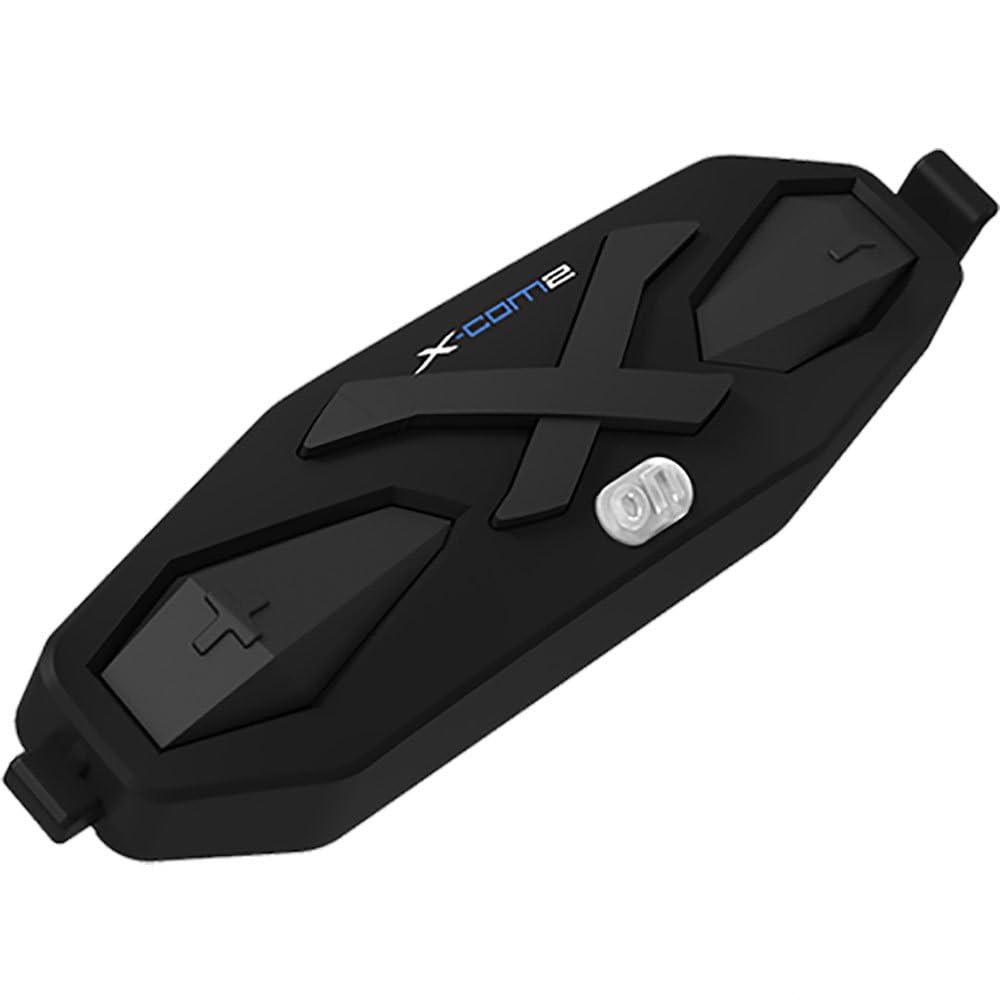
Rajah 1: The NEXX X-Com 2 main module. This black, elongated unit features a prominent 'X' design, the 'X-Com2' logo, and several tactile buttons for operation, including a central power/function button and volume/navigation controls.
Main Module Components:
- Butang Kuasa/Fungsi: Central button for powering on/off, pairing, and accessing main functions.
- Butang Naik Kelantangan/Trek Seterusnya: Typically located on one side, used to increase volume or navigate forward.
- Kelantangan Turun/Butang Trek Sebelumnya: Typically located on the opposite side, used to decrease volume or navigate backward.
- Port Pengecasan: Untuk menyambungkan kabel pengecas USB.
- Port Pembesar Suara/Mikrofon: For connecting the helmet's audio components.
Persediaan dan Pemasangan
1. Mounting the Main Module:
- Identify the designated mounting area on your NEXX X.Vilitur or X.Vilijord helmet, usually on the left side.
- Pilih antara clamp mount or adhesive mount based on your helmet type and preference.
- Securely attach the mounting bracket to the helmet.
- Slide the X-Com 2 main module onto the mounted bracket until it clicks into place.
2. Installing Speakers and Microphone:
- Carefully remove the helmet's interior padding to access the ear pockets.
- Place the speakers into the designated ear pockets, ensuring they are centered over your ears.
- Route the microphone boom towards your mouth, securing it within the helmet's chin bar area.
- Connect the speaker and microphone cables to the corresponding ports on the X-Com 2 main module.
- Reinstall the helmet's interior padding, ensuring cables are neatly tucked away and do not interfere with comfort or safety.
Arahan Operasi
Hidupkan/Mati Kuasa:
- Hidupkan kuasa: Press and hold the Power/Function button for approximately 2 seconds until you hear an audible prompt.
- Matikan: Press and hold the Power/Function button for approximately 5 seconds until you hear an audible prompt.
Pairing Bluetooth:
- With the X-Com 2 powered off, press and hold the Power/Function button for 7 seconds until the LED flashes red and blue, indicating pairing mode.
- On your mobile device, enable Bluetooth and search for "NEXX X-Com 2".
- Pilih peranti untuk dipasangkan. Gesaan suara akan mengesahkan kejayaan pemasangan.
Fungsi Interkom:
- The X-Com 2 supports intercom communication with up to 8 riders.
- Memulakan Interkom: Briefly press the Intercom button (if available, or a specific combination of main buttons) to connect with the last paired intercom.
- Interkom tamat: Briefly press the Intercom button again.
- Refer to the full manual for detailed instructions on multi-rider intercom pairing and group management.
Radio FM:
- Hidupkan/Matikan Radio FM: Double-tap the Power/Function button.
- Stesen Imbasan: Press the Volume Up or Volume Down button to scan for the next available station.
- The unit supports 10 preset station memory.
Kawalan Kelantangan:
- Press the Volume Up button to increase audio volume.
- Press the Volume Down button to decrease audio volume.
Penyelenggaraan
- Pembersihan: Gunakan yang lembut, damp cloth to wipe the main module. Do not use harsh chemicals or abrasive cleaners.
- mengecas: Charge the device using the provided USB cable. A full charge takes approximately 2.5 hours. Avoid overcharging.
- Storan: Store the X-Com 2 in a cool, dry place when not in use. If storing for extended periods, charge the battery every few months to maintain its lifespan.
- Penjagaan Bateri: The unit uses a Lithium Polymer Battery. Do not expose to extreme temperatures.
Menyelesaikan masalah
| Masalah | Kemungkinan Punca | Penyelesaian |
|---|---|---|
| Peranti tidak dihidupkan. | Bateri habis. | Cas peranti selama sekurang-kurangnya 30 minit. |
| Tidak boleh digandingkan dengan telefon. | Device not in pairing mode; Bluetooth on phone is off; too many paired devices. | Ensure device is in pairing mode (flashing red/blue). Turn phone's Bluetooth off and on. Delete old Bluetooth connections on phone. |
| Intercom connection issues. | Out of range; interference; incorrect pairing. | Ensure riders are within 1.6 km (1.0 mile) in open terrain. Move away from sources of strong electromagnetic interference. Re-pair intercom units. |
| Kualiti audio / Bunyi bising yang teruk. | Microphone not positioned correctly; excessive wind noise; Advanced Noise Control not active. | Adjust microphone closer to mouth. Ensure helmet vents are closed if causing excessive wind noise. Verify Advanced Noise Control is enabled (automatic). |
Spesifikasi
- model: 09SEN99200099999X-COM2
- Versi Bluetooth: 4.1
- Bluetooth Profiles: Pro Alat dengarfile (HSP), Pro Bebas Tanganfile (HFP), Pro Pengedaran Audio Lanjutanfile (A2DP), Audio Video Kawalan Jauh Profile (AVRCP)
- Intercom Working Distance: Up to 1.6 kilometers (1.0 mile) in open terrain
- Max Intercom Riders: Supports up to 8 riders
- Pembatalan Bunyi: Kawalan Bunyi Lanjutan
- Codec: Codec SBC terbina dalam
- Frekuensi Radio FM: 76 ~ 108MHz (10 preset station memory)
- Masa Berbual: 10 jam
- Masa Pengecasan: 2.5 jam
- Jenis Bateri: Bateri Polimer Litium
- Suhu Operasi: -10°C ~ 55°C (-14°F ~ 131°F)
- Main Module Weight: 100 g (3.53 oz)
- Dimensi Produk: 8 x 7 x 8 inci
- Berat Barang: 1.01 paun
Waranti dan Sokongan
For specific warranty information and detailed support, please refer to the official NEXX website or contact NEXX customer service directly. Keep your proof of purchase for warranty claims.
NEXX Official Webtapak: www.nexx-helmets.com (Nota: Ini adalah ruang letak URL, please verify the actual official website for NEXX products)
Perkhidmatan Pelanggan: Refer to the contact information provided on the NEXX official webtapak atau dalam pembungkusan produk anda.


