1. Pengenalan
Terima kasih kerana membeliasing the TWS i17 Dual Earbuds. This manual provides essential information for setting up, operating, and maintaining your new wireless earbuds. Please read this manual thoroughly before use to ensure optimal performance and longevity of your device.
2. Maklumat Keselamatan
To prevent damage to your earbuds or injury to yourself or others, please observe the following precautions:
- Jangan dedahkan fon telinga atau bekas pengecasan kepada suhu, kelembapan atau cecair yang melampau.
- Elakkan daripada menjatuhkan, menjejaskan atau membuka peranti.
- Do not use abrasive cleaners or solvents. Clean with a soft, dry cloth.
- Dengar pada tahap kelantangan sederhana untuk mengelakkan kerosakan pendengaran.
- Jauhkan daripada kanak-kanak.
- This product is not water resistant. Avoid exposure to water or excessive moisture.
3. Kandungan Pakej
Sahkan bahawa semua item terdapat dalam pakej anda:
- TWS i17 Dual Earbuds (Left and Right)
- Kes Pengecasan
- Kabel Pengecas USB
- Manual Pengguna

Image: The TWS i17 Dual Earbuds, with one earbud partially removed from its charging case, showcasinreka bentuk hitam yang anggun.
4. Persediaan
4.1 Mengecas Fon telinga dan Sarung
Sebelum penggunaan pertama, cas sepenuhnya fon telinga dan bekas pengecas.
- Letakkan kedua-dua fon telinga ke dalam bekas pengecas. Pastikan ia diletakkan dengan betul.
- Connect the USB charging cable to the charging port on the bottom of the case and the other end to a USB power source (e.g., computer, wall adapter).
- The indicator light on the case will show charging status. It will turn off or change color when fully charged.
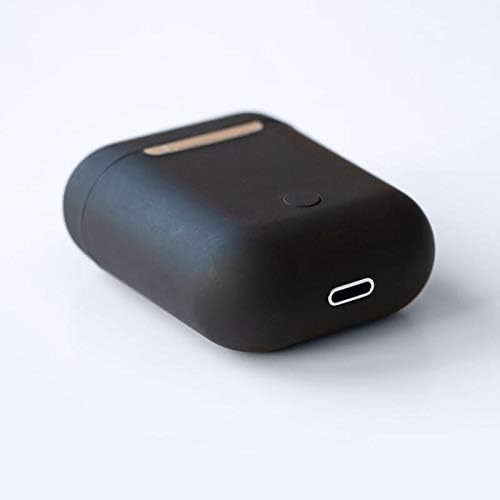
Imej: Dari dekat view of the bottom of the TWS i17 charging case, highlighting the USB charging port and a small button.
4.2 Berpasangan dengan Peranti Anda
The i17 earbuds use Bluetooth for wireless connection.
- Pastikan fon telinga dicas.
- Buka bekas pengecas. Fon telinga akan memasuki mod berpasangan secara automatik (lampu penunjuk akan berkelip).
- On your mobile phone or Bluetooth-enabled device, go to Bluetooth settings and turn Bluetooth on.
- Cari untuk available devices. Select "i17" from the list.
- Once connected, the indicator lights on the earbuds will stop flashing. You are now ready to use your earbuds.

Image: The TWS i17 Dual Earbuds resting inside their open charging case, ready for pairing or use.
5. Arahan Operasi
5.1 Hidupkan/Mati Kuasa
- Hidupkan kuasa: Take the earbuds out of the charging case. They will automatically power on and connect to the last paired device.
- Matikan: Letakkan semula fon telinga ke dalam bekas pengecas. Ia akan dimatikan secara automatik dan mula dicas.
5.2 Main balik Muzik
- Main/Jeda: Ketik mana-mana fon telinga sekali.
- Lagu Seterusnya: Ketik dua kali pada fon telinga kanan.
- Trek Sebelumnya: Ketik dua kali pada fon telinga kiri.
5.3 Pengurusan Panggilan
- Jawab/Tamatkan Panggilan: Ketik mana-mana fon telinga sekali.
- Tolak Panggilan: Tekan dan tahan salah satu fon telinga selama 2 saat.
5.4 Pembantu Suara
- Aktifkan Pembantu Suara (Siri/Google Assistant): Ketik tiga kali sama ada fon telinga.
6. Penyelenggaraan
Proper maintenance ensures the longevity of your earbuds:
- Pembersihan: Use a soft, dry, lint-free cloth to clean the earbuds and charging case. Do not use liquids or sprays.
- Storan: Apabila tidak digunakan, simpan fon telinga dalam bekas pengecasnya untuk melindunginya dan memastikan ia dicas. Simpan di tempat yang sejuk dan kering.
- Penjagaan Bateri: Untuk memanjangkan hayat bateri, elakkan daripada kerap mencas fon telinga sepenuhnya. Caskannya secara berkala.

Image: The TWS i17 Dual Earbuds securely stored within their closed charging case, ready for transport or charging.
7. Penyelesaian masalah
| Masalah | Kemungkinan Punca | Penyelesaian |
|---|---|---|
| Fon telinga tidak berpasangan | Low battery; Out of range; Not in pairing mode; Bluetooth off on device. | Charge earbuds; Move closer to device; Ensure case is open for pairing; Turn on Bluetooth on device. |
| Hanya satu fon telinga berfungsi | One earbud not charged; Earbuds not properly synced. | Ensure both earbuds are charged; Place both earbuds back in case, close, then reopen to re-sync. |
| Tiada bunyi | Volume too low; Not connected; Media paused. | Increase volume on device; Reconnect earbuds; Check media playback status. |
| Kes pengecas tidak dicas | Faulty cable/adapter; Loose connection. | Try a different USB cable or power adapter; Ensure cable is securely plugged in. |
8. Spesifikasi
| Ciri | Perincian |
|---|---|
| Nombor Model | i17 |
| Jenama | TWS |
| Teknologi Ketersambungan | Wayarles (Bluetooth) |
| Faktor Bentuk Fon Kepala | Dalam Telinga |
| Mikrofon Termasuk | ya |
| Pembatalan Bunyi | Tidak |
| Serasi Dengan | Telefon Bimbit |
| warna | Hitam |
| bahan | plastik |
| Ciri Kabel | Cable-free |
| Tahap Ketahanan Air | Bukan Tahan Air |
| Dimensi Penghantaran | 12.6 x 8.8 x 3.6 cm |
| Berat badan | 96 gram |
| Tarikh Tersedia Pertama | 15 Januari 2020 |
9. Waranti dan Sokongan
For warranty information and customer support, please refer to the contact details provided on the product packaging or the official TWS webtapak. Simpan bukti pembelian anda untuk tuntutan waranti.
For further assistance, please contact TWS customer service.


