1. Pengenalan
Terima kasih kerana membeliasing the ICON 12-inch Bluetooth Speaker. This manual provides detailed instructions for the safe and efficient operation of your new speaker. Please read this manual thoroughly before use and retain it for future reference.
2. Kandungan Pakej
- ICON 12-inch Bluetooth Speaker
- Kabel Kuasa
- Mikrofon Tanpa Wayar
- Alat Kawalan Jauh
- Manual Pengguna

Image: The ICON Bluetooth speaker shown with its included wireless microphone and remote control, highlighting the complete package contents.
3. Produk Lebihview
The ICON 12-inch Bluetooth Speaker is a versatile audio system designed for various applications, offering powerful sound output and multiple connectivity options. It features a built-in rechargeable battery for portability and integrated wheels and a retractable handle for easy transport.

Imej: Depan view of the ICON 12-inch Bluetooth Speaker, showcasing its robust design and blue illuminated woofer.

Imej: Belakang view of the ICON 12-inch Bluetooth Speaker, displaying the main control panel and retractable handle.
Ciri-ciri Utama:
- Powerful 6000W PMPO Output
- Bluetooth Connectivity for Wireless Streaming
- USB and SD Card Playback
- Input AUX 3.5mm
- Radio FM terbina dalam
- Mikrofon dan Input Gitar
- Rechargeable Battery for Extended Playtime
- Integrated Equalizer for Sound Customization
- TWS (True Wireless Stereo) Functionality for connecting multiple speakers
- Kesan Cahaya LED

Image: Visual representation of the ICON Bluetooth Speaker's key features, including excellent sound quality, Bluetooth compatibility, AUX input, rechargeable battery, FM radio, and equalizer.
4. Persediaan
4.1 Pengecasan Awal
Before first use, fully charge the speaker's internal battery. Connect the power cable to the AC INPUT port on the rear panel and plug it into a standard wall outlet. The charging indicator will illuminate. Charging time may vary.
4.2 Panel Kawalan Selesaiview
Familiarize yourself with the control panel located on the rear of the speaker.
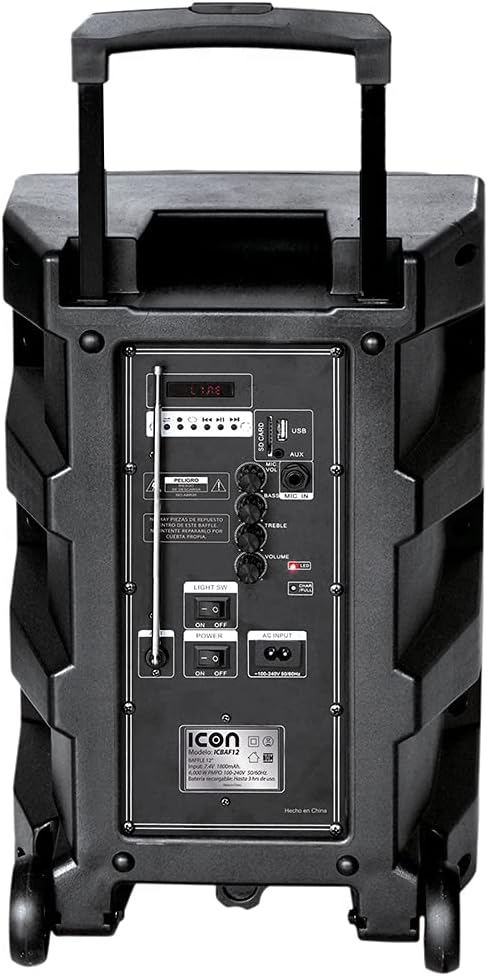
Imej: Terperinci view of the ICON speaker's rear control panel, showing various inputs, volume, treble, and bass controls.
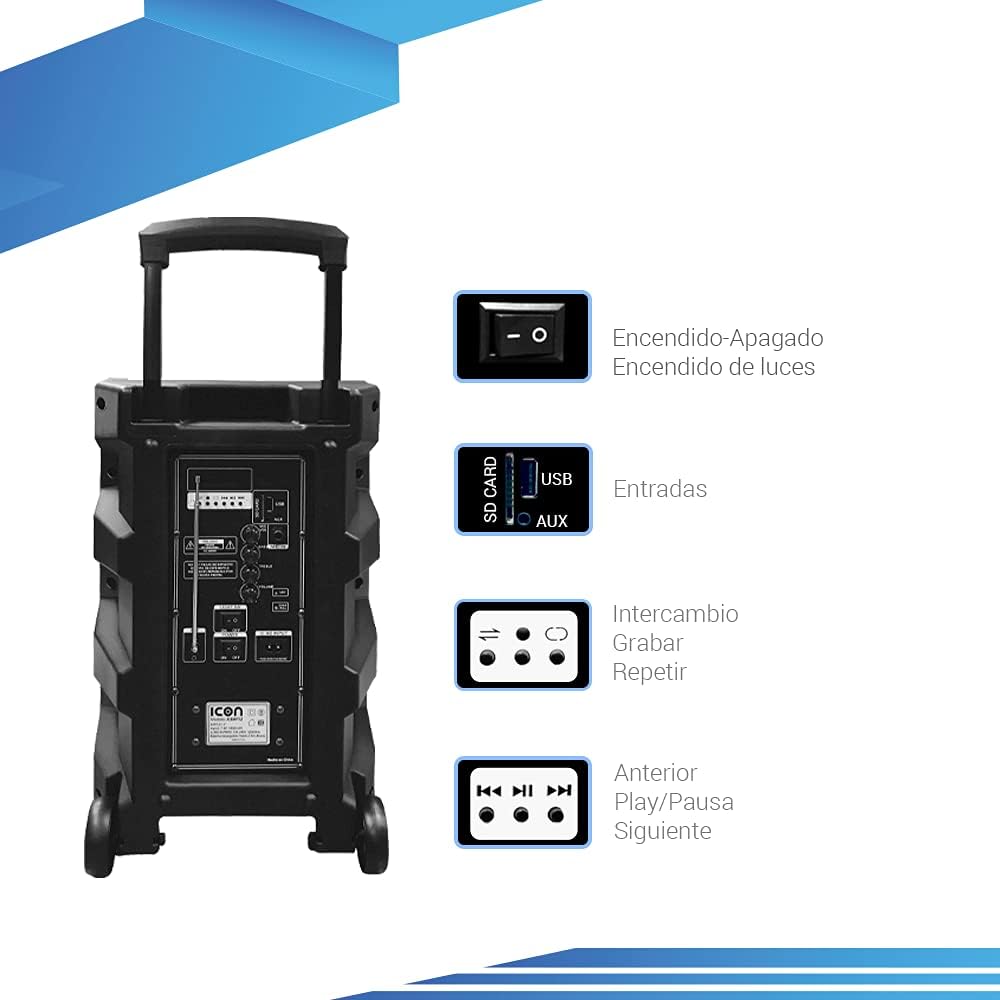
Image: Diagram illustrating key controls on the ICON speaker, including the power switch, light switch, input ports (SD Card, USB, AUX), and playback control buttons (Mode Switch, Record, Repeat, Previous, Play/Pause, Next).
- Suis kuasa: Turns the speaker On or Off.
- CAHAYA SW: Toggles the LED light effects On or Off.
- SD CARD / USB / AUX Inputs: For connecting external media or devices.
- Suis MOD: Cycles through input modes (Bluetooth, USB, SD, AUX, FM).
- Butang REKOD: Initiates recording (e.g., microphone input to USB/SD).
- Butang REPEAT: Mengulang trek atau senarai main semasa.
- PREVIOUS / PLAY/PAUSE / NEXT Buttons: Kawalan main balik media standard.
- Tombol VOLUME: Melaraskan kelantangan induk.
- TREBLE / BASS Knobs: Adjusts high and low frequencies.
- MIC INPUT / GUITAR INPUT: For connecting microphones and guitars.
5. Arahan Operasi
5.1 Menghidupkan/Mematikan
To turn the speaker ON, flip the KUASA switch to the 'ON' position. To turn it OFF, flip the switch to 'OFF'.
5.2 Berpasangan Bluetooth
- Hidupkan pembesar suara. Ia akan memasuki mod berpasangan Bluetooth secara automatik, ditunjukkan oleh ikon Bluetooth yang berkelip pada paparan.
- Pada peranti mudah alih anda (telefon pintar, tablet, komputer riba), dayakan Bluetooth dan cari peranti yang tersedia.
- Select "ICON Speaker" (or similar name) from the list of devices.
- Once paired, the speaker will emit a confirmation sound, and the Bluetooth icon will stop flashing. You can now play audio wirelessly from your device.
5.3 Main Semula USB/Kad SD
- Masukkan pemacu kilat USB atau kad SD (dengan audio MP3 files) into the respective port.
- The speaker will automatically switch to USB/SD mode and begin playing the first compatible track. If not, press the MODE button to select USB/SD mode.
- Gunakan SEBELUMNYA, MAIN/JEDA, dan SETERUSNYA butang untuk mengawal main balik.
5.4 Input AUX
Sambungkan peranti audio luaran (cth., pemain MP3, komputer) ke AUX input using a 3.5mm audio cable. Press the MODE button until AUX mode is selected.
5.5 Operasi Radio FM
- Tekan ke MODE butang untuk bertukar kepada mod Radio FM.
- Tekan dan tahan butang MAIN/JEDA butang untuk mengimbas dan menyimpan stesen FM yang tersedia secara automatik.
- Gunakan SEBELUMNYA dan SETERUSNYA butang untuk menavigasi antara stesen yang disimpan.
5.6 Microphone and Guitar Usage
Plug your microphone or guitar into the respective INPUT MIC or INPUT GUITAR jacks. Adjust the volume using the main JILID knob and any dedicated microphone/guitar volume controls if present.
5.7 Fungsi TWS (Stereo Wayarles Sejati).
The TWS function allows you to connect two ICON speakers wirelessly for a true stereo sound experience.
- Pastikan kedua-dua pembesar suara dihidupkan dan tidak disambungkan ke mana-mana peranti Bluetooth.
- On one speaker (this will be the master), press and hold the TWS button (if available, or a combination of buttons as per specific model instructions, often the 'Mode' button or a dedicated TWS button).
- The speaker will search for another TWS-compatible speaker. Once connected, you will hear a confirmation sound.
- Now, connect your mobile device to the master speaker via Bluetooth as described in section 5.2. Audio will play through both speakers in stereo.
6. Penyelenggaraan
6.1 Pembersihan
Lap bahagian luar pembesar suara dengan kain lembut dan kering. Jangan gunakan pembersih, lilin atau pelarut yang kasar. Pastikan tiada cecair memasuki bukaan pembesar suara.
6.2 Penjagaan Bateri
- Untuk memanjangkan hayat bateri, elakkan daripada menyahcas sepenuhnya bateri dengan kerap.
- Recharge the battery regularly, even if the speaker is not in use for extended periods (e.g., every 3 months).
- Simpan pembesar suara di tempat yang sejuk dan kering apabila tidak digunakan.
6.3 Penyimpanan
When storing the speaker for a long time, ensure it is turned off and disconnected from the power source. Store it in a clean, dry environment away from extreme temperatures and direct sunlight.
7. Penyelesaian masalah
| Masalah | Kemungkinan Punca | Penyelesaian |
|---|---|---|
| Speaker tidak dihidupkan. | Battery is depleted; Power cable not connected; Power switch is OFF. | Charge the speaker; Ensure power cable is securely connected; Flip POWER switch to ON. |
| Tiada bunyi. | Kelantangan terlalu rendah; Mod input salah dipilih; Peranti tidak disambungkan dengan betul. | Increase volume; Press MODE button to select correct input; Reconnect device/re-pair Bluetooth. |
| Sambungan Bluetooth gagal. | Pembesar suara tidak dalam mod berpasangan; Peranti terlalu jauh; Gangguan. | Pastikan pembesar suara berada dalam mod berpasangan; Alihkan peranti lebih dekat; Matikan peranti Bluetooth lain. |
| Bunyi herot. | Volume too high; Audio source quality is poor. | Reduce volume; Try a different audio source. |
| Mikrofon tidak berfungsi. | Microphone not plugged in correctly; Microphone volume too low; Microphone batteries dead (if wireless). | Ensure microphone is fully inserted; Adjust microphone volume; Replace microphone batteries. |
8. Spesifikasi
| Ciri | Spesifikasi |
|---|---|
| Nombor Model | US-ICBAF12 |
| Kuasa Keluaran | 6000 Watt PMPO |
| Saiz Pembesar Suara | 12 inci |
| Teknologi Ketersambungan | Bluetooth, USB, AUX, SD Card |
| Peranti Serasi | Komputer riba, telefon pintar |
| Sumber Kuasa | Rechargeable Battery, AC Input |
| Dimensi Produk (L x W x H) | 38 x 36.5 x 54 cm |
| Berat Produk | 7.62 kg |
| Ciri Khas | Bluetooth, FM Radio, Microphone Input, Guitar Input, TWS Function, LED Lights |

Image: Packaging of the ICON Bluetooth Speaker, displaying key features and product dimensions (37.5 cm x 36 cm x 54 cm).
9. Waranti dan Sokongan
This product is covered by a limited warranty. Please refer to the warranty card included in your package for specific terms and conditions. For technical support, troubleshooting assistance, or warranty claims, please contact your retailer or the manufacturer's customer service department. Keep your purchase receipt as proof of purchase.
For more information, visit the official ICON store on Amazon: ICON Store


