1. Pengenalan
Terima kasih kerana membeliasing the GLIDiC Sound Air TW-5000s True Wireless Earbuds. This manual provides essential information for the safe and effective use of your device. Please read it thoroughly before use and retain it for future reference.
2. Maklumat Keselamatan
- Jangan dedahkan fon telinga atau bekas pengecasan kepada suhu yang melampau, cahaya matahari langsung atau kelembapan yang tinggi.
- Avoid dropping, impacting, or disassembling the device. This may cause damage and void the warranty.
- Keep the device away from water and liquids. While sweatproof, immersion can cause damage.
- Gunakan hanya kabel pengecasan yang disediakan atau setara yang diperakui.
- Mendengar berpanjangan pada tahap kelantangan tinggi boleh menyebabkan kerosakan pendengaran. Laraskan kelantangan ke tahap yang selamat.
- Be aware of your surroundings when using earbuds, especially in traffic or hazardous environments.
3. Kandungan Pakej
Sahkan bahawa semua item terdapat dalam pakej anda:
- GLIDiC Sound Air TW-5000s True Wireless Earbuds (Left and Right)
- Kes Pengecasan
- Kabel Pengecas USB (Jenis-A ke Micro-USB)
- Berbilang saiz hujung telinga (S, M, L)
- Manual Arahan (dokumen ini)
4. Produk Lebihview
Familiarize yourself with the components of your GLIDiC Sound Air TW-5000s earbuds and charging case.

Figure 4.1: GLIDiC Sound Air TW-5000s Earbuds and Charging Case. The image displays the black charging case with the GLIDiC logo on top, positioned next to the two black earbuds.
Komponen Fon Telinga
- Butang pelbagai fungsi: Located on the outer surface of each earbud, used for playback control, call management, and voice assistant activation.
- Penunjuk LED: Provides status information (pairing, charging, power).
- mikrofon: For voice calls and voice assistant commands.
- Mengecas Kenalan: Located on the underside of each earbud, for charging within the case.
- Petua Telinga: Silicone tip for in-ear comfort and sound isolation.
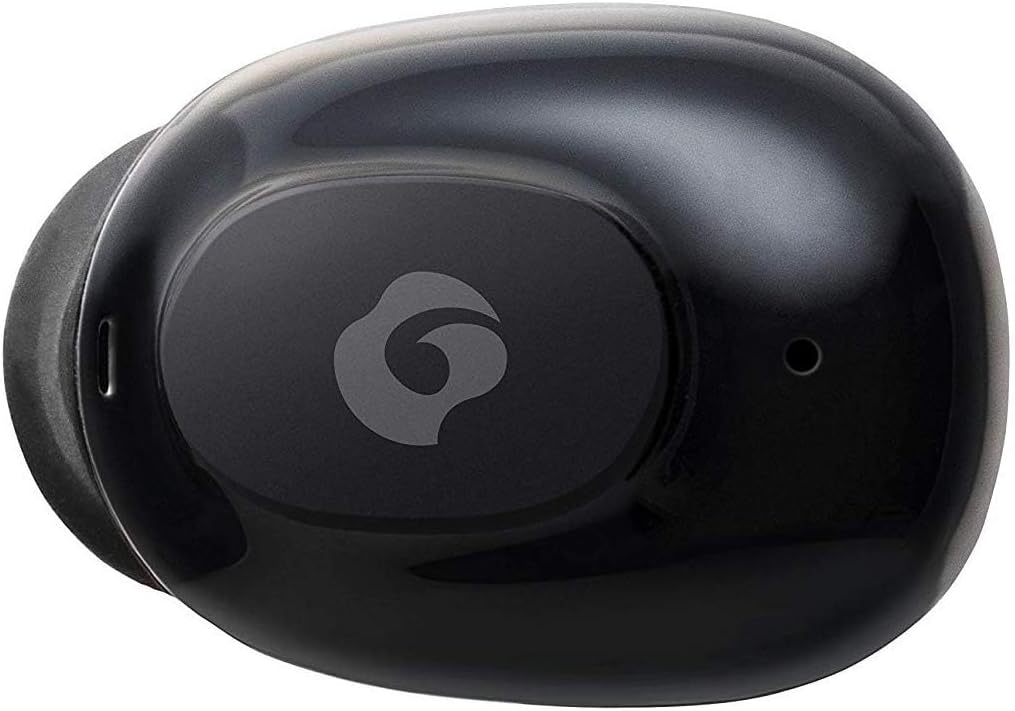
Rajah 4.2: Jarak dekat view of a single GLIDiC earbud, highlighting the multifunction button with the GLIDiC logo and the microphone opening.
Charging Case Components
- Port Pengecasan: Internal contacts for earbuds, external port for case charging.
- Penunjuk LED Kes: Menunjukkan status pengecasan bekas.
- Tudung: Protects earbuds and secures them during charging.
5. Persediaan
5.1 Pengecasan Awal
- Place both earbuds into the charging case. Ensure they are correctly seated, and the LED indicators on the earbuds illuminate.
- Sambungkan kabel pengecas USB ke port pengecasan pada sarung dan palamkan hujung satu lagi ke sumber kuasa USB (cth, komputer, penyesuai dinding).
- The case LED indicator will show charging status. Allow approximately 2 hours for a full charge of both earbuds and the case.
- Once fully charged, disconnect the charging cable. The earbuds offer up to 60 days of standby time when stored in the fully charged case.
5.2 Berpasangan dengan Peranti Bluetooth
- Pastikan fon telinga dicas.
- Buka bekas pengecas. Fon telinga akan memasuki mod berpasangan secara automatik dan penunjuk LEDnya akan berkelip.
- Pada peranti berdaya Bluetooth anda (telefon pintar, tablet, dll.), pergi ke tetapan Bluetooth.
- Cari untuk available devices. Select "GLIDiC TW-5000s" from the list.
- Once connected, the earbud LED indicators will stop flashing and may show a solid light or turn off, depending on the model. A voice prompt may also confirm the connection.
- If pairing fails, place the earbuds back in the case, close the lid, wait a few seconds, and then repeat the steps.
6. Arahan Operasi
6.1 Hidupkan/Mati Kuasa
- Hidupkan kuasa: Open the charging case, or press and hold the multifunction button on each earbud for approximately 3 seconds.
- Matikan: Place the earbuds back into the charging case and close the lid, or press and hold the multifunction button on each earbud for approximately 5 seconds.
6.2 Main balik Muzik
- Main/Jeda: Tekan butang berbilang fungsi sekali pada mana-mana fon telinga.
- Lagu Seterusnya: Tekan dua kali butang berbilang fungsi pada fon telinga kanan.
- Trek Sebelumnya: Tekan dua kali butang berbilang fungsi pada fon telinga kiri.
- Kelantangan: Triple-press the multifunction button on the right earbud.
- Perlahankan suara: Triple-press the multifunction button on the left earbud.
6.3 Pengurusan Panggilan
- Jawab/Tamatkan Panggilan: Tekan butang berbilang fungsi sekali pada mana-mana fon telinga.
- Tolak Panggilan: Press and hold the multifunction button on either earbud for approximately 2 seconds.
6.4 Pembantu Suara
- Aktifkan Pembantu Suara: Press and hold the multifunction button on either earbud for approximately 2 seconds (when not on a call).
6.5 Multi-Communication Mode
The GLIDiC Sound Air TW-5000s features a multi-communication mode that allows select ambient sounds to be heard without compromising audio quality. This enhances user awareness and safety.
- Activate/Deactivate Multi-Communication Mode: Consult the specific instructions provided with your device, as activation methods can vary. Typically, this involves a specific press sequence on the multifunction button or an option within a companion app if available.
7. Penyelenggaraan
7.1 Pembersihan
- Lap fon telinga dan bekas pengecas dengan kain lembut, kering dan tidak berbulu.
- Jangan gunakan pembersih yang melelas, alkohol atau pelarut kimia.
- Gently remove ear tips and clean them with mild soap and water if necessary. Ensure they are completely dry before reattaching.
- Gunakan swab kapas kering untuk membersihkan sesentuh pengecasan dengan teliti pada kedua-dua fon telinga dan sarungnya.
7.2 Penyimpanan
- Apabila tidak digunakan, simpan fon telinga dalam bekas pengecasnya untuk melindunginya dan memastikan ia kekal dicas.
- Simpan peranti di tempat yang sejuk dan kering, jauh dari cahaya matahari langsung dan suhu yang melampau.
8. Penyelesaian masalah
If you encounter issues with your GLIDiC Sound Air TW-5000s, refer to the following common problems and solutions:
| Masalah | Penyelesaian yang Mungkin |
|---|---|
| Fon telinga tidak dihidupkan. | Ensure earbuds are charged. Place them in the charging case and connect the case to a power source. |
| Earbuds do not pair with device. |
|
| Hanya satu fon telinga mempunyai bunyi. |
|
| Kes pengecas tidak dicas. |
|
| Kualiti bunyi kurang baik atau terputus-putus. |
|
9. Spesifikasi
| Ciri | Perincian |
|---|---|
| Nama Model | TW-5000s |
| Teknologi Ketersambungan | Wayarles (Bluetooth) |
| Julat Bluetooth | 10 Meter |
| Julat Kekerapan | 20 Hz - 20,000 Hz |
| Battery Life (Carrying Case Standby) | Sehingga 60 Hari |
| Tahap Ketahanan Air | Kalis Air (Kalis Peluh) |
| Jenis Kawalan | Kawalan Media, Sentuh, Suara |
| Ciri Khas | Microphone Included, Noise Cancellation, Multi-communication mode |
| bahan | Plastic, TPE, and Silicone |
| Dimensi (Fon Telinga) | 0.98 x 0.67 x 0.91 inci (anggaran) |
| Berat Barang | 9.6 auns (jumlah berat pakej) |
| UPC | 811559030024 |
10. Waranti dan Sokongan
GLIDiC products are designed for reliability and performance. For specific warranty details, please refer to the warranty card included with your purchase or visit the official GLIDiC website. If you require technical support or have questions not covered in this manual, please contact GLIDiC customer service through their official channels.
Sila simpan bukti pembelian anda untuk tuntutan waranti.


