pengenalan
Thank you for choosing the TOPTECH Jet-4 Portable Bluetooth Speaker. This manual provides essential information for setting up, operating, and maintaining your speaker to ensure optimal performance and longevity. Please read this manual thoroughly before using the product.

Image: The TOPTECH Jet-4 Bluetooth Speaker, showcasing its compact design and vibrant LED lighting.
Maklumat Keselamatan
To prevent fire or shock hazards, always follow basic safety precautions when using this product:
- Jangan dedahkan pembesar suara kepada hujan atau lembapan.
- Do not disassemble or modify the speaker. Refer all servicing to qualified personnel.
- Keep the speaker away from direct sunlight, heat sources, and extreme temperatures.
- Elakkan daripada menjatuhkan atau menundukkan pembesar suara kepada impak yang kuat.
- Gunakan hanya kabel pengecasan dan penyesuai kuasa yang ditentukan.
Kandungan Pakej
- TOPTECH Jet-4 Bluetooth Speaker
- Kabel Pengecas USB
- Manual Pengguna
Produk Selesaiview
Kawalan dan Pelabuhan
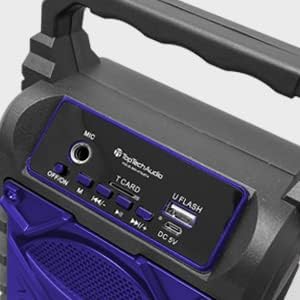
Imej: Terperinci view of the speaker's top control panel, showing various buttons and input ports.
- Input MIC: Connect an external microphone for karaoke.
- Suis MATI/HIDUP: Power the speaker on or off.
- Butang M (Mod): Switch between Bluetooth, AUX, USB, and TF Card modes.
- Previous / Volume Down Button: Tekan sebentar untuk trek sebelumnya, tekan lama untuk mengurangkan kelantangan.
- Butang Main / Jeda: Mainkan atau jeda main balik audio.
- Next / Volume Up Button: Tekan sebentar untuk trek seterusnya, tekan lama untuk meningkatkan kelantangan.
- T CARD Slot: Masukkan kad TF (MicroSD) untuk main balik audio secara langsung.
- U FLASH (USB) Port: Masukkan pemacu kilat USB untuk main balik audio secara langsung.
- Port 5V DC: Connect the USB charging cable to power and charge the speaker.
Ciri-ciri Utama

Image: An infographic showing the TOPTECH Jet-4 speaker with icons representing its key features: easy portability, mic port, mode karaoke, disco light, TF card port, and USB port.
- Bunyi Kuat: Dual-driver stereo output delivers crisp highs and deep bass for a premium audio experience.
- Main Balik Berbilang Mod: Supports Bluetooth, AUX, USB, and TF card input for versatile music streaming.
- Sedia Karaoke: Built-in karaoke mode with light effects and mic support makes any party more fun.
- TWS Pairing Support: Connect two speakers wirelessly for immersive, room-filling sound.
- Hayat Bateri yang Panjang: Enjoy up to 6 hours of playtime with a rechargeable battery, perfect for all-day events.
Persediaan
Caj Permulaan
Before first use, fully charge the speaker. Connect the provided USB charging cable to the DC 5V port on the speaker and the other end to a USB power adapter (not included) or a computer USB port.

Image: A visual representation of a fully charged battery, symbolizing the speaker's long battery life.
The charging indicator light will illuminate during charging and turn off or change color when fully charged. A full charge typically takes a few hours.
Arahan Operasi
Berpasangan Bluetooth
- Turn on the speaker by sliding the OFF/ON switch to the 'ON' position. The speaker will enter Bluetooth pairing mode automatically, indicated by a flashing LED light and an audible prompt.
- Dayakan Bluetooth pada telefon pintar, tablet anda atau peranti lain yang didayakan Bluetooth.
- Cari untuk available Bluetooth devices and select "JET-4" from the list.
- Once connected, the speaker will provide an audible confirmation, and the LED light will stop flashing.
- Anda kini boleh memainkan audio daripada peranti anda melalui pembesar suara.
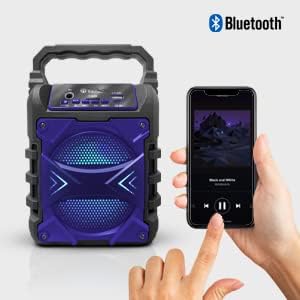
Image: The TOPTECH Jet-4 speaker positioned next to a smartphone, illustrating the seamless Bluetooth connection process.
Playback Modes (AUX, USB, TF Card)
Press the 'M' (Mode) button to cycle through available playback modes:
- Mod AUX: Connect an external audio device using a 3.5mm audio cable (not included) to the AUX input.
- Mod USB: Insert a USB flash drive into the 'U FLASH' port. The speaker will automatically detect and play compatible audio files.
- Mod Kad TF: Insert a TF (MicroSD) card into the 'T CARD' slot. The speaker will automatically detect and play compatible audio files.
Mod Karaoke
To use the karaoke function, connect a microphone (not included) to the 'MIC' input port. Adjust the microphone volume as needed. The speaker's built-in light effects will enhance the karaoke experience.
TWS Pairing (True Wireless Stereo)
For an enhanced stereo sound experience, you can pair two TOPTECH Jet-4 speakers together:
- Ensure both Jet-4 speakers are powered on and not connected to any Bluetooth device.
- On one speaker (this will be the primary speaker), long press the 'M' (Mode) button until you hear a pairing tone.
- Kedua-dua pembesar suara akan bersambung secara automatik antara satu sama lain. Sebaik sahaja disambungkan, anda akan mendengar nada pengesahan.
- Now, connect your Bluetooth device to the primary speaker as described in the 'Bluetooth Pairing' section. Audio will play through both speakers in stereo.

Image: Two TOPTECH Jet-4 speakers wirelessly connected to a smartphone, demonstrating the True Wireless Stereo (TWS) pairing feature for expanded sound.
Penyelenggaraan
- Bersihkan pembesar suara dengan kain lembut dan kering. Jangan gunakan pembersih atau pelarut yang melelas.
- Simpan pembesar suara di tempat yang sejuk dan kering apabila tidak digunakan.
- Avoid prolonged exposure to extreme temperatures or humidity.
Menyelesaikan masalah
| Masalah | Penyelesaian |
|---|---|
| Speaker tidak dihidupkan. | Pastikan bateri dicas. Sambungkan pembesar suara ke sumber kuasa menggunakan kabel USB. |
| Tiada suara dari pembesar suara. | Check the volume level on both the speaker and your connected device. Ensure the correct playback mode is selected. |
| Gandingan Bluetooth gagal. | Ensure the speaker is in pairing mode. Turn off Bluetooth on your device and turn it back on. Try restarting both the speaker and your device. Make sure no other devices are connected to the speaker. |
| Kualiti bunyi yang buruk. | Move the speaker closer to your Bluetooth device to reduce interference. Ensure the audio source is of good quality. |
Spesifikasi
| Ciri | Perincian |
|---|---|
| Jenama | TOPTECH |
| Nombor Model | JET-4-BLUE |
| Sumber Kuasa | Dikuasakan Bateri |
| Teknologi Ketersambungan | Bluetooth, USB |
| Input Audio | Guitar Input, Karaoke Input, USB |
| Bilangan Saluran | 2 |
| bahan | Plastik, Logam |
| Berat Barang | 1.54 paun |
| Dimensi Pakej | 9.29 x 6.38 x 4.17 inci |
| UPC | 689259338593 |
Waranti dan Sokongan
For warranty information and customer support, please refer to the contact details provided on the product packaging or visit the official TOPTECH webtapak. Simpan resit pembelian anda sebagai bukti pembelian untuk sebarang tuntutan waranti.


