pengenalan
This manual provides detailed instructions for the setup, operation, and maintenance of your Tomshine Floor Lamp. Designed for versatile lighting, this LED floor lamp features stepless dimming, four color temperature settings, and convenient control via both a touch sensor and a remote control. Its flexible gooseneck allows for precise light positioning, making it ideal for living rooms, bedrooms, offices, and reading areas.
Arahan Keselamatan
- Pastikan bekalan kuasa voltage sepadan dengan lamp's requirements before plugging in.
- Jangan buka atau ubah suai lampRujuk semua servis kepada kakitangan yang berkelayakan.
- Simpan lamp jauh dari air atau damp environments. This product is designed for indoor use only.
- Elakkan pendedahan mata secara langsung kepada sumber cahaya LED untuk tempoh yang lama.
- Letakkan lamp on a stable, flat surface to prevent tipping. The sturdy iron base is designed for stability, but caution is advised around children and pets.
- Cabut plag lamp dari soket kuasa sebelum membersihkan atau melakukan sebarang penyelenggaraan.
Kandungan Pakej
Sahkan bahawa semua komponen hadir sebelum pemasangan:
- Lantai LED Lamp (Gooseneck head, multiple pole sections, base)
- Alat Kawalan Jauh
- Penyesuai AC

Rajah 1: Lamp Komponen dan Aksesori
Persediaan dan Perhimpunan
Follow these steps to assemble your floor lamp:
- Connect the power cable from the lamp base to the AC adapter.
- Carefully thread the power cable through the pole sections.
- Screw the pole sections together clockwise, ensuring a secure connection. Start from the base and work your way up to the gooseneck section.
- Once all sections are securely connected, plug the AC adapter into a standard wall outlet.
Video 1: Product Features and Assembly Guide. This video demonstrates the lamp's various lighting modes and provides a step-by-step guide for assembling the lamp components, including connecting the power cable and screwing the pole sections together.
Arahan Operasi
Kawalan Penderia Sentuh
Lamp features a touch control panel located on the stand below the gooseneck:
- Akhbar Ringkas: Tap the power icon to turn the lamp ON/OFF. Short press the sun icon to cycle through the 4 color temperatures (3000K, 4000K, 5000K, 6000K).
- Tekan lama: Slide your finger across the touch surface or long press the sun icon to adjust the brightness steplessly (20%-100%).
Alat Kawalan Jauh
The included remote control offers comprehensive control over the lamp's functions. The remote can be conveniently adsorbed onto the lamp post via its magnetic feature.
- Butang Kuasa: Pusingkan lamp HIDUP/MATI.
- Pelarasan Suhu Warna: Butang untuk peningkatanasing atau decreasing color temperature.
- Pelarasan Kecerahan: Butang untuk peningkatanasing atau decreasing kecerahan.
- Mod Pratetap: Dedicated buttons for various lighting scenes:
- Mod Riadah
- Mod Bacaan
- Mod Pejabat
- Mod Penyusuan
- Mod Hiburan
- Mod Tidur
- 100% Kecerahan: Instantly set the lamp kepada kecerahan penuh.
- Sleeping Timer: Set a 1-hour timer for automatic shut-off.

Figure 2: Remote Control and Touch Panel
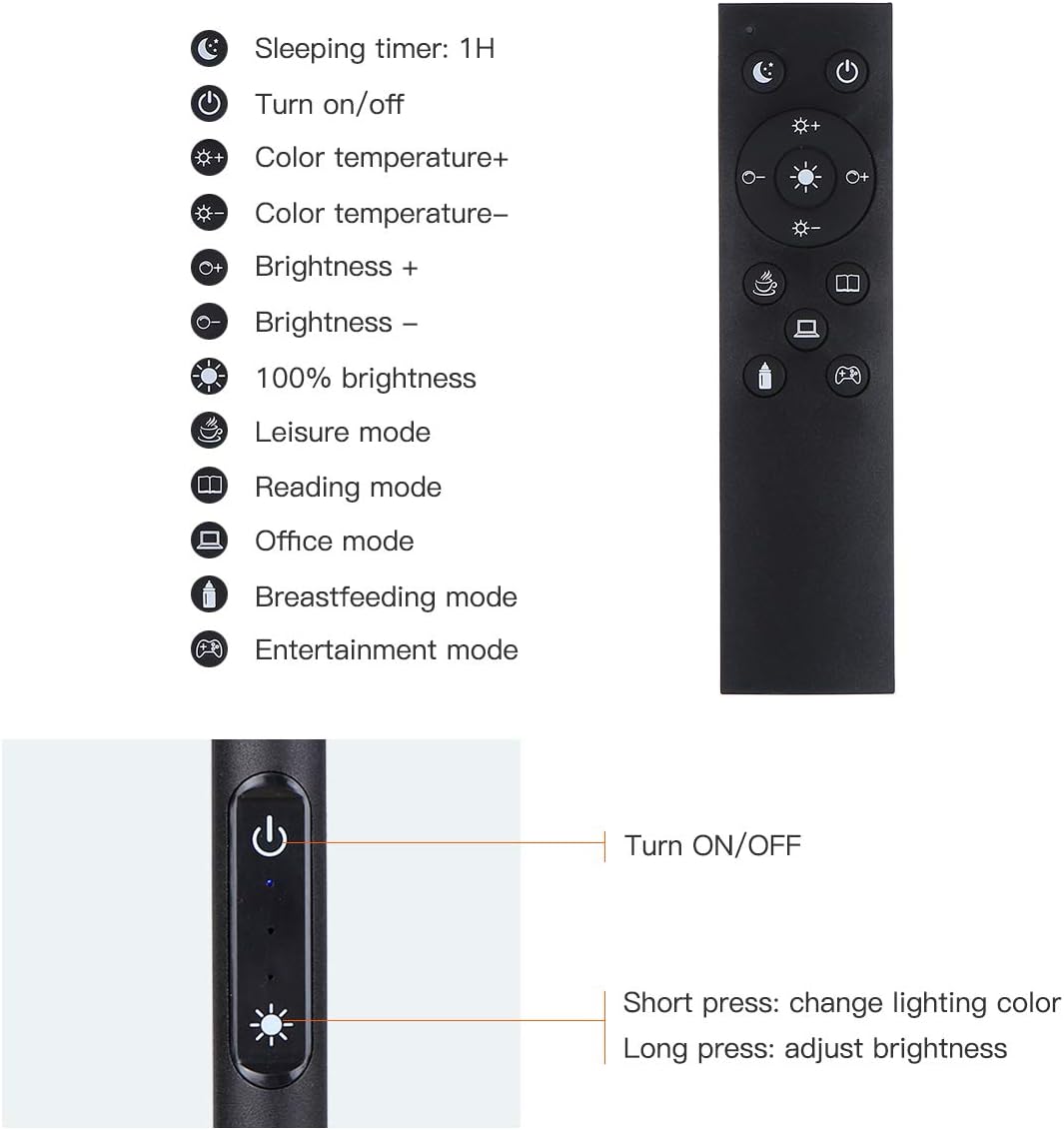
Figure 3: Remote and Touch Control Functions

Figure 4: Color Temperature and Brightness Options
Gooseneck boleh laras
Lamp features a flexible gooseneck and a 360° swivel head, allowing you to direct light precisely where needed. The gooseneck maintains its position once adjusted, preventing drift or drooping.

Figure 5: Flexible Gooseneck and Dimensions
Penyelenggaraan
- Pembersihan: Putuskan sambungan kuasa sebelum membersihkan. Gunakan kain lembut dan kering untuk mengelapamp. Jangan gunakan pembersih atau pelarut yang melelas.
- Sumber Lampu LED: Lamp is equipped with integrated LED bulbs that are designed for long life and are not user-replaceable.
- Storan: Jika menyimpan lamp untuk tempoh yang lama, buka kuncinya dan simpan di dalam pembungkusan asalnya di tempat yang kering dan sejuk.
Menyelesaikan masalah
| Masalah | Kemungkinan Punca | Penyelesaian |
|---|---|---|
| Lamp tidak menyala. | Tiada bekalan kuasa; sambungan longgar; penyesuai rosak. | Check if the power plug is securely inserted into the outlet and the lamp. Ensure the adapter is functioning. Try a different outlet. |
| Alat kawalan jauh tidak berfungsi. | Remote battery low or dead; remote out of range; obstruction. | Gantikan bateri kawalan jauh. Pastikan tiada halangan antara alat kawalan jauh dan lamp. Move closer to the lamp. |
| Brightness/Color temperature not adjusting. | Incorrect button pressed; lamp in a fixed mode. | Refer to the operating instructions for correct button functions. If in a preset mode, try switching to manual adjustment. |
| Lamp berkelip atau malap tanpa diduga. | Bekalan kuasa tidak stabil; sambungan longgar. | Pastikan sambungan kuasa stabil. Cuba pasangkan ke soket lain. Jika masalah berterusan, hubungi khidmat pelanggan. |
Spesifikasi
| Ciri | Perincian |
|---|---|
| Jenama | Tomshine |
| Nombor Model | 93d6461d-17a8-45d0-bfc9-82643fae0e7c |
| Lamp taip | Tingkat Lamp |
| Jenis Sumber Cahaya | LED |
| Kecerahan | 1500 Lumen |
| Wattage | 10 watt |
| Suhu Warna | 3000K, 4000K, 5000K, 6000K (4 modes) |
| Peredupan | Stepless (20%-100%) |
| Kaedah Kawalan | Sentuh, Kawalan Jauh |
| Dimensi Produk | 63.78"D x 7.87"W x 63.6"H |
| Berat Barang | 2.76 paun |
| Bahan Asas | besi |
| Bahan Teduh | logam |
| Sumber Kuasa | Pemalam |
| Penggunaan Dalaman/Luar | Dalaman |
Waranti dan Sokongan
Tomshine products are manufactured to the highest quality standards. For any questions, technical support, or warranty claims, please contact Tomshine customer service through the retailer's platform or visit the official Tomshine store online. Please retain your proof of purchase for warranty purposes.
Untuk maklumat lanjut, lawati Tomshine Store.


