1. Pengenalan
The TicPods 2 Pro are advanced true wireless earbuds designed for a seamless audio experience and intuitive control. Featuring Bluetooth 5.0, dual-mic noise cancellation, and smart gesture controls, they offer high-quality sound and convenience for various activities. This manual provides detailed instructions for setup, operation, maintenance, and troubleshooting to ensure optimal use of your earbuds.

Image: TicPods 2 Pro Ice earbuds and their charging case.
2. Apa yang ada di dalam Kotak
- 1 x TicPods 2 Pro Ice Earbuds
- 1 x Dok Pengecasan
- 1 x Panduan Pengguna

Image: The package contents, including earbuds, charging dock, and user guide.
3. Panduan Persediaan
3.1 Pengecasan Awal
Before first use, fully charge your TicPods 2 Pro. Place the earbuds into the charging case. Connect the charging case to a power source using the provided Type-C cable. A 5-minute charge provides 1 hour of playing time, and a full charge offers 4 hours of playback, extending to 23 hours with the charging case.
3.2 Berpasangan dengan Peranti Anda
The TicPods 2 Pro feature quick pairing via Bluetooth 5.0 for a stable connection within 10 meters. Simply open the charging case, and the earbuds will enter pairing mode. Select 'TicPods 2 Pro' from your device's Bluetooth settings.
Video: Demonstrates quick pairing and Bluetooth 5.0 connectivity.
3.3 Mobvoi App Installation
For enhanced features and to ensure optimal performance, install the Mobvoi app on your smartphone. The app allows for OTA updates, smart control customization, and battery life monitoring.

Image: Screenshot of the Mobvoi app interface, showing device connection and features.
4. Arahan Operasi
4.1 Kawalan Pintar
The TicPods 2 Pro offer various intuitive control methods:
- Tickle Feature: Control playback and calls without taking out your smartphone.
- Klik dua kali: Play the next song or hang up a call.
- Tekan dan Tahan (2 saat): Wake up voice assistant or reject a call.
- Luncur ke Atas/Bawah: Tambah atau kurangkan volum.
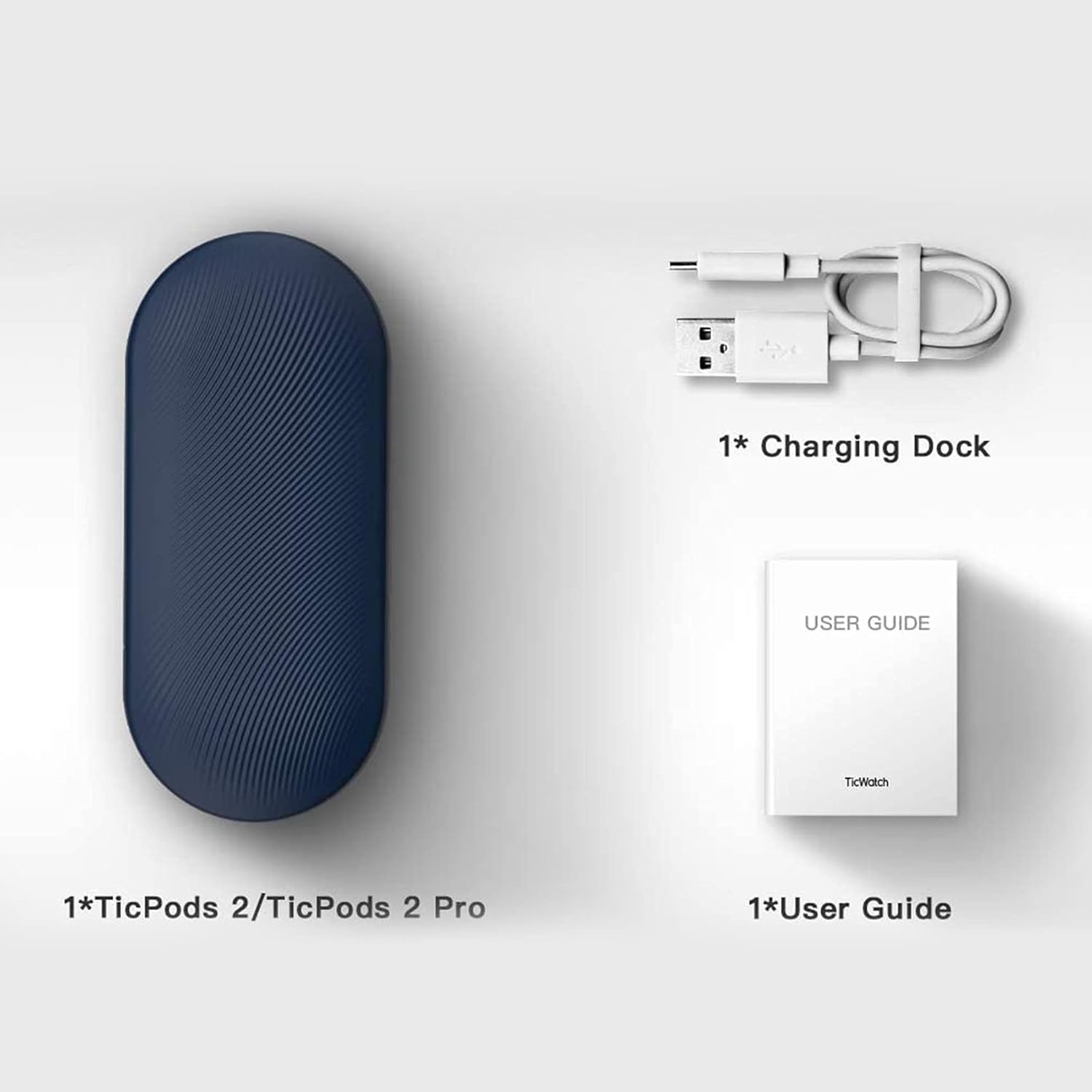
Image: A person demonstrating interaction with the earbuds, highlighting AI human-machine interaction.
4.2 Head Gesture Controls
Answer or reject calls with simple head movements:
- Nod Twice: Pick up an incoming call.
- Shake Head: Tolak panggilan masuk.
4.3 Quick Commands
Use voice commands for common actions without a wake word:
- Say "Play music" to start playback.
- Say "Hey Tico" to activate your default voice assistant.
4.4 Pengesanan Dalam Telinga
High-precision sensors automatically play or pause music the moment you wear or remove the earbuds.
4.5 Kualiti Audio
Experience superior sound with 13mm moving coils. The earbuds support Hi-Fi protocols such as aptX and AAC, delivering an audio sensitivity of 132dB@1kHZ for an immersive listening experience.

Image: Diagram illustrating the dual-mic system for noise cancellation.
4.6 Tahan Air
The TicPods 2 Pro are IPX4 rated, providing protection against splashes and sweat, making them suitable for workouts and outdoor activities.
5. Penyelenggaraan
To ensure the longevity and optimal performance of your TicPods 2 Pro, follow these maintenance guidelines:
- Pembersihan: Lapkan fon telinga dan bekas pengecas dengan kerap menggunakan kain lembut, kering dan tidak berbulu. Elakkan menggunakan bahan yang melelas atau bahan kimia yang keras.
- Storan: Apabila tidak digunakan, simpan fon telinga di dalam bekas pengecas untuk melindunginya daripada habuk dan kerosakan. Simpan di tempat yang sejuk dan kering, jauh daripada suhu yang melampau.
- Mengecas Kenalan: Periodically check and gently clean the charging contacts on both the earbuds and inside the case to ensure a proper connection.
6. Penyelesaian masalah
If you encounter issues with your TicPods 2 Pro, refer to the following common solutions:
- Fon telinga tidak berpasangan: Ensure both earbuds are in the charging case, then open the lid to activate pairing mode. Check your device's Bluetooth settings and forget previous connections if necessary.
- Tiada bunyi dari satu fon telinga: Letakkan kedua-dua fon telinga kembali ke dalam bekas pengecas, tutup penutup, tunggu beberapa saat, kemudian buka semula. Ini sering menyegerakkan semula mereka.
- Isu pengecasan: Verify that the charging cable and adapter are working correctly. Clean the charging contacts on the earbuds and case to remove any debris.
- Kawalan tidak bertindak balas: Ensure the earbuds are properly seated in your ears. Try restarting the earbuds by placing them in the case and taking them out again.
- Kemas Kini Perisian: Regularly check for and install the latest firmware updates via the Mobvoi app to resolve potential bugs and improve performance.
For persistent issues, please contact Ticwatch customer support.
7. Spesifikasi
| Ciri | Spesifikasi |
|---|---|
| Nama Model | TicPods 2 Pro Ice |
| Teknologi Ketersambungan | Wayarles (Bluetooth 5.0) |
| Julat Bluetooth | 10 Meter |
| Tahap Ketahanan Air | IPX4 (kalis air) |
| Hayat Bateri (Caj Tunggal) | 4 Jam |
| Hayat Bateri (dengan Sarung Pengecasan) | 23 Jam |
| Saiz Pemacu Audio | 13 Milimeter |
| Sensitiviti | 132 dB |
| Jenis Kawalan | Touch, Voice Assistant |
| Berat Barang | 6.4 auns |
| Dimensi Produk | 2.8 x 1.26 x 0.94 inci |

Image: Diagram illustrating key technical specifications of the TicPods 2 Pro.
8. Waranti dan Sokongan
Ticwatch offers a replacement for quality-related issues for 12 bulan from the date of your purchase. You can extend this by an additional 6 months (total 18 months) by joining the Mobvoi membership program at mobvoi.com/membership.
For further assistance or to report issues, please visit the official Ticwatch support webtapak atau hubungi perkhidmatan pelanggan mereka.


