1. Pengenalan
This manual provides detailed instructions for the safe and effective use of the BSIDE ADMS7 Smart Digital Multimeter and the accompanying AVD06 Voltage Detector. The ADMS7 is a compact, auto-identifying digital multimeter designed for various electrical measurements, featuring a large 3-line LCD display and an analog bargraph. The AVD06 is a non-contact voltage detector for identifying live and neutral wires.
2. Maklumat Keselamatan
AMARAN: Untuk mengelakkan kemungkinan renjatan elektrik, kebakaran atau kecederaan diri, sila baca semua maklumat keselamatan sebelum menggunakan produk ini.
- Sentiasa mematuhi kod keselamatan tempatan dan nasional.
- Do not use the device if it appears damaged or if the test leads are damaged.
- Jangan gunakan lebih daripada vol yang dinilaitage, seperti yang ditandakan pada meter, antara terminal atau antara mana-mana terminal dan tanah bumi.
- Berhati-hati apabila bekerja dengan voltagadalah melebihi 30V AC RMS, puncak 42V atau 60V DC. Ini voltagia menimbulkan bahaya kejutan.
- Pastikan jari berada di belakang pelindung jari pada prob ujian semasa penggunaan.
- Gantikan bateri dengan segera apabila penunjuk bateri lemah muncul untuk memastikan bacaan yang tepat.
- Jangan kendalikan meter dalam persekitaran gas meletup, wap atau habuk.
3. Ciri-ciri Produk

This image displays the BSIDE ADMS7 Smart Digital Multimeter on the right, featuring its large LCD screen, function buttons, and test lead inputs. To the left is the AVD06 Voltage Detector, showing its sensitivity dial and LED indicators. Both devices are presented alongside their respective test leads, highlighting the complete kit.
- Phone Size Design: Super-thin body and pocket-size design for portability and ease of use in various settings.
- Large Screen 3-Line Display: The large LCD screen can simultaneously display up to three test results, such as voltage, frequency, and an analog bar graph, for comprehensive readings.
- Automatic Identification Design: Automatically detects and measures AC/DC voltage, frequency (Hz), continuity, and resistance without requiring manual mode switching.
- Flashlight Design: Integrated flashlight for improved visibility in dimly lit work areas.
- Hang Hole Design: Allows for convenient storage and portability.
- Reka bentuk Unibody: Eliminates the need to plug and unplug probes, saving time and preventing incorrect connections that could damage the multimeter.
4. Komponen dan Kandungan Pakej
Pakej biasanya termasuk:
- BSIDE ADMS7 Smart Digital Multimeter
- AVD06 Voltage Pengesan
- Petunjuk Ujian (Merah dan Hitam)
- Manual Pengguna (dokumen ini)
- Carrying Pouch (may vary by package)
5. Persediaan
5.1 Battery Installation (ADMS7 Multimeter)
The ADMS7 Multimeter is powered by internal batteries. If the low battery indicator appears on the display, replace the batteries. Refer to the maintenance section for battery replacement instructions.
5.2 Connecting Test Leads (ADMS7 Multimeter)
- Ensure the multimeter is powered off before connecting or disconnecting test leads.
- The ADMS7 features a unibody design with integrated test leads. Ensure they are securely attached to the meter.
- For most measurements, the red lead is for the positive (+) connection and the black lead is for the negative (-) or common connection.
5.3 Battery Installation (AVD06 Voltage Detector)
The AVD06 Voltage Detector requires batteries for operation. Open the battery compartment (usually at the rear or base) and insert the specified battery type, observing polarity. Close the compartment securely.
6. Operating Instructions (BSIDE ADMS7 Multimeter)
6.1 Hidupkan/Mati Kuasa
Tekan butang kuasa (⏻) to turn the multimeter on or off. The device features an auto-power-off function to conserve battery life.
6.2 Automatic Identification Mode
The ADMS7 automatically identifies the measurement type (AC/DC voltage, resistance, continuity, frequency) when the test leads are connected to a circuit. No manual range or function selection is typically required for these basic measurements.
6.3 AC Jldtage dan Pengukuran Kekerapan

This image shows the BSIDE ADMS7 Multimeter displaying an AC voltage reading of "228.8 V" and a frequency reading of "50.0 Hz". The multimeter is held by a gloved hand, with its test leads connected to electrical wiring, demonstrating its capability to automatically identify and display both voltage and frequency simultaneously in AC mode.
- Pastikan petunjuk ujian disambungkan dengan betul.
- Touch the red test lead to the live terminal and the black test lead to the neutral terminal of the AC circuit.
- The multimeter will automatically display the AC voltage and frequency on the screen.
6.4 DC Jldtage Pengukuran
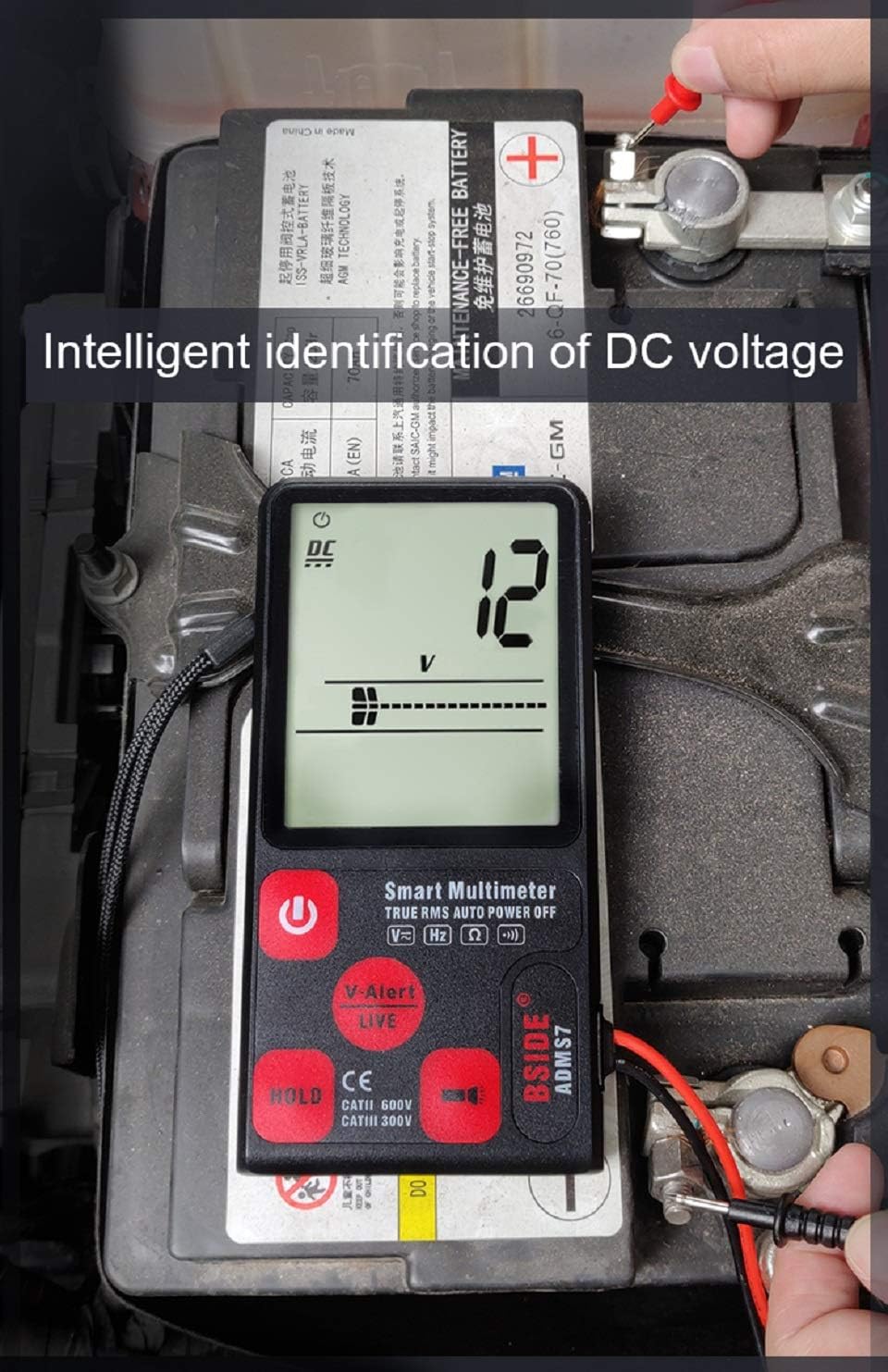
This image illustrates the BSIDE ADMS7 Multimeter measuring DC voltage. The display shows "12 V", indicating a 12-volt DC reading. The multimeter's test leads are connected to the terminals of a car battery, demonstrating its automatic identification and measurement of DC voltage.
- Connect the red test lead to the positive (+) terminal and the black test lead to the negative (-) terminal of the DC source.
- The multimeter will automatically display the DC voltage.
6.5 Pengukuran Rintangan

This image shows the BSIDE ADMS7 Multimeter performing a resistance test. The display reads "88 Ω", indicating a resistance value of 88 ohms. The multimeter's test leads are placed on components of a circuit board, demonstrating its ability to automatically measure resistance.
- Pastikan litar atau komponen dinyahtenagakan sebelum mengukur rintangan.
- Sambungkan wayar ujian merentasi komponen atau litar tempat rintangan hendak diukur.
- The multimeter will automatically display the resistance value in Ohms (Ω).
6.6 V-Alert (Non-Contact Voltage Pengesanan)

This image highlights the V-Alert function of the BSIDE ADMS7 Multimeter. The multimeter's screen displays "V-Alert Live", indicating the detection of live voltage without direct contact. A table is included, explaining the different alert ranges: "Low range" (L area, slow alarm), "Mid-range" (M area, quick alarm), and "High-range" (H area, very loud alarm), corresponding to the intensity of the detected voltage medan.
The V-Alert function allows for non-contact detection of AC voltage. This is useful for quickly identifying live wires without direct contact.
- Activate the V-Alert mode (if not automatically engaged).
- Bring the top end of the multimeter close to the wire or outlet you wish to test.
- The display will show "V-Alert" and an analog bar graph will indicate the strength of the detected voltage. An audible alarm will also sound, with intensity varying based on voltage strength (as per the table in the image).
6.7 Fungsi HOLD
Tekan butang "TAHAN" untuk membekukan bacaan semasa pada paparan. Tekan sekali lagi untuk melepaskan penahan dan menyambung semula bacaan langsung.
7. Operating Instructions (AVD06 Voltage Detector)

This image displays the AVD06 Voltage Detector, showcasing its ergonomic design, sensitivity adjustment dial, and LED indicator lights. The device is designed for non-contact voltage detection, providing a safe way to identify live electrical circuits.

This image demonstrates the AVD06 Voltage Detector's capability to distinguish between live and neutral wires within complex electrical wiring. Two panels show the detector's LED indicators: on the left, it indicates a "Neutral Wire" with fewer lit LEDs, and on the right, it indicates a "Live Wire" with more lit LEDs and a stronger alert, providing clear visual feedback for wire identification.
The AVD06 is a non-contact voltage detector used to quickly check for the presence of AC voltage in wires, cables, circuit breakers, lighting fixtures, switches, outlets, and more.
- Hidupkan kuasa: Turn the rotary switch to the "ON" position. The indicator lights will briefly flash, and a beep may sound, indicating it's ready.
- Pelarasan Sensitiviti: Use the sensitivity dial to adjust the detection range. Higher sensitivity allows detection from a greater distance, while lower sensitivity requires closer proximity.
- Pengesanan: Bring the tip of the detector close to the object to be tested.
- Petunjuk: Sekiranya AC voltage is detected, the LED indicators will light up, and an audible alarm will sound. The number of lit LEDs and the frequency of the beep typically increase with the strength of the detected voltage.
- Distinguishing Live/Neutral: When testing a live wire, more LEDs will illuminate, and the alarm will be more frequent/louder. For a neutral wire, fewer LEDs may light up, or the alarm may be less intense, or no detection may occur depending on the circuit.
- Matikan: Turn the rotary switch to the "OFF" position when finished.
8. Penyelenggaraan
8.1 Pembersihan
Lap kes dengan iklanamp kain dan detergen lembut. Jangan gunakan bahan kasar atau pelarut. Pastikan petunjuk ujian bersih dan bebas daripada serpihan.
8.2 Battery Replacement (ADMS7 Multimeter)
When the low battery indicator appears on the display, replace the batteries. Open the battery compartment cover on the back of the multimeter, remove the old batteries, and insert new ones of the specified type, observing polarity. Securely close the compartment.
8.3 Penyimpanan
If the device is not used for a long period, remove the batteries to prevent leakage. Store the multimeter and detector in a cool, dry place, away from direct sunlight and extreme temperatures.
9. Penyelesaian masalah
- Tiada Paparan/Kuasa Hidup: Periksa pemasangan bateri dan pastikan bateri tidak habis. Gantikan jika perlu.
- Bacaan Tidak Tepat: Ensure test leads are properly connected. Check battery level. Ensure you are using the correct measurement technique for the circuit.
- No V-Alert Detection: Ensure the V-Alert function is active. Adjust sensitivity if applicable. Ensure the device is close enough to the voltage sumber.
- Multimeter Does Not Respond: Try turning the device off and on again. If issues persist, contact customer support.
10. Spesifikasi
| Atribut | Nilai |
|---|---|
| Jenama | Tidak diketahui |
| Nombor Model | BSIDE ADMS7 Smart Digital Multimeter |
| Sumber Kuasa | Dikuasakan Bateri |
| Gaya | digital |
| Jenis Pengukuran | Multimeter, Voltmeter |
| UPC | 630282713765 |
| Pengeluar | China |
| Pertama Tersedia | 26 November 2019 |
11. Waranti dan Sokongan
For warranty information or technical support, please refer to the product packaging or contact the retailer from whom the product was purchased. Keep your purchase receipt as proof of purchase.


