1. Pengenalan
Terima kasih kerana membeliasing the Unic UC68 Multimedia Home Theatre LED Projector. This manual provides essential information for setting up, operating, and maintaining your projector to ensure optimal performance and longevity. Please read this manual thoroughly before using the product and keep it for future reference.
2. Maklumat Keselamatan
Untuk memastikan operasi yang selamat dan mengelakkan kerosakan, sila patuhi langkah berjaga-jaga keselamatan berikut:
- Jangan lihat terus ke dalam kanta projektor apabila lamp is on, as the strong light can cause eye damage.
- Ensure adequate ventilation around the projector. Do not block any ventilation openings.
- Letakkan projektor di atas permukaan yang stabil dan rata untuk mengelakkannya daripada jatuh.
- Use only the power adapter supplied with the projector. Using an incorrect adapter may cause damage or fire.
- Keep the projector away from water, moisture, and other liquids. Do not operate in wet environments.
- Do not attempt to open or repair the projector yourself. Refer all servicing to qualified service personnel.
- Cabut palam projektor daripada soket kuasa semasa ribut petir atau apabila tidak digunakan untuk jangka masa yang lama.
3. Kandungan Pakej
Sila pastikan semua item yang disenaraikan di bawah disertakan dalam pakej anda:
- Unic UC68 Projector Host
- Alat Kawalan Jauh
- Kabel Kuasa
- AV kabel
- Manual Arahan
- Cap Lens
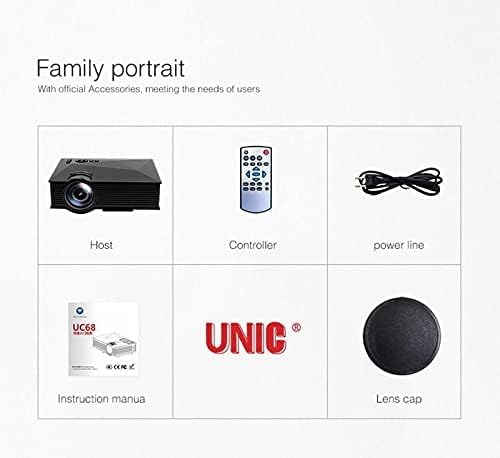
Image: The Unic UC68 projector package contents, showing the main unit, remote control, power cord, instruction manual, and lens cap.
4. Produk Lebihview
Familiarize yourself with the various parts and ports of your Unic UC68 projector.

Imej: A terperinci view of the Unic UC68 projector, highlighting its lens, control buttons on top, and various input/output ports on the side.
Port Input/Output

Image: A visual representation of the Unic UC68 projector's rear and side panels, indicating ports for HDMI, USB, SD card, AV, VGA, and audio out, along with examples of devices that can be connected.
| Pelabuhan | Penerangan |
|---|---|
| HDMI | Connect to devices like laptops, Blu-ray players, game consoles. |
| USB 2.0 (x2) | Connect USB flash drives for media playback or power external devices (5Vout-500mA). |
| Slot Kad SD | Insert SD cards for direct media playback. |
| VGA | Sambungkan ke komputer atau komputer riba yang lebih lama. |
| AV | Connect to devices with composite video and stereo audio output (e.g., DVD players). |
| Headphone Port (3.5mm) | Sambungkan pembesar suara atau fon kepala luaran. |
5. Persediaan
Ikuti langkah-langkah ini untuk persediaan awal projektor anda:
- penempatan: Place the projector on a stable, flat surface. Ensure there is enough space around the projector for proper ventilation. The ideal projection distance is between 1.07m and 3.8m.
- Sambungan Kuasa: Sambungkan kabel kuasa ke input kuasa projektor dan kemudian pasangkannya ke soket dinding.
- Sambungkan Sumber Input: Connect your desired input device (e.g., laptop, game console, USB drive) to the appropriate port on the projector (HDMI, VGA, USB, AV, SD card).
- Hidupkan kuasa: Press the power button on the projector or the remote control to turn on the projector. The LED indicator will light up.
- Pelarasan Fokus: Once an image is displayed, rotate the focus ring on the projector lens until the image appears clear and sharp.
- Pembetulan Keystone: If the projected image appears trapezoidal, adjust the keystone correction (if available on your model, typically a manual slider near the lens) to square the image.
6. Arahan Operasi
Hidupkan/Mati Kuasa
- Untuk Menghidupkan: Tekan butang kuasa pada projektor atau alat kawalan jauh.
- Untuk Mematikan: Press the power button again. Wait for the fan to stop completely before unplugging the power cable.
Pemilihan Sumber Input
Use the 'Source' button on the remote control or the projector's control panel to cycle through available input sources (HDMI, VGA, AV, USB, SD).
Navigasi Menu
Use the arrow keys on the remote or projector to navigate through the on-screen menu. Press 'OK' or 'Enter' to confirm selections. Adjust settings such as picture mode, aspect ratio, and sound.
Media Playback (USB/SD)
Insert a USB flash drive or SD card into the respective port. The projector will typically prompt you to select the media type (Movie, Music, Photo, Text). Navigate to your desired file and press 'OK' to play.
7. Penyelenggaraan
Penyelenggaraan yang betul memastikan jangka hayat dan prestasi projektor anda:
- Pembersihan Kanta: Gunakan kain lembut dan tidak berbulu yang direka khas untuk kanta optik. Jangan gunakan pembersih yang kasar atau daya yang berlebihan.
- Pembersihan Penapis Habuk: Regularly check and clean the dust filter (if accessible) to maintain proper airflow and prevent overheating. Refer to the specific location in your manual if applicable.
- Pembersihan Luaran: Lap bahagian luar projektor dengan kain lembut dan kering. Untuk tanda degil, sedikit damp kain boleh digunakan, tetapi pastikan tiada kelembapan memasuki peranti.
- Storan: When not in use for extended periods, store the projector in a cool, dry, dust-free environment. Use the lens cap to protect the lens.
8. Penyelesaian masalah
Jika anda menghadapi masalah dengan projektor anda, sila rujuk masalah dan penyelesaian biasa berikut:
| Masalah | Kemungkinan Punca | Penyelesaian |
|---|---|---|
| Tiada Kuasa | Power cable not connected; Power outlet faulty; Projector in standby mode. | Check power cable connection; Try a different outlet; Press power button. |
| Tiada Imej | Incorrect input source selected; Input device not connected properly; Lens cap on. | Select correct input source; Reconnect input cable; Remove lens cap. |
| Imej adalah Kabur | Focus not adjusted; Projection distance too far/close. | Adjust focus ring; Adjust projection distance. |
| Tiada Bunyi | Volume too low; Muted; External speakers not connected/configured. | Increase volume; Unmute; Check external speaker connection. |
| Alat Kawalan Jauh Tidak Berfungsi | Bateri mati/dimasukkan dengan salah; Halangan antara alat kawalan jauh dan projektor. | Gantikan bateri; Pastikan garis penglihatan yang jelas kepada penerima IR. |
| Projector Overheating | Ventilation blocked; Dusty filters. | Ensure clear ventilation; Clean dust filters. |
9. Spesifikasi
| Ciri | Spesifikasi |
|---|---|
| Nombor Model | UC68 |
| Kecerahan | 1800 Lumens (80 ANSI) |
| Resolusi Asli | 800 x 480 RGB |
| Sokongan Resolusi | Up to 1920 x 1080 pixels (1080p) |
| Nisbah Aspek | 4:3 / 16:9 |
| LCD Contrast Ratio | 800:1 |
| LED Lamp kehidupan | Lebih daripada 20,000 jam |
| Lensa | F=125 |
| ViewJarak | 1.07 - 3.8 meter |
| Saiz Unjuran | 34 - 130 inci |
| Pengurusan | Manual |
| Penggunaan Kuasa | Maksimum 55 W |
| Output USB | 5 Vout-500 mA |
| Bekalan Kuasa | 100 V - 240 V / 0.9A (50/60Hz) |
| Port Input/Output | 1 AV, 1 Headphone (3.5mm), 2 USB 2.0, 1 SD Card Slot, 1 HDMI, 1 VGA |
| warna | Hitam |
| Berat Barang | 1.34 Kilogram |
| Dimensi Pakej | 30 x 19.3 x 10.6 cm |
10. Waranti dan Sokongan
This product comes with a standard manufacturer's warranty. For warranty claims, technical support, or service inquiries, please refer to the contact information provided with your purchase documentation or visit the official UNIC webtapak. Jangan cuba membaiki peranti ini sendiri, kerana ini boleh membatalkan jaminan anda.


