1. Pengenalan
Thank you for choosing the Impex THUNDER T4 Stereo System. This 2.1 channel speaker system is designed to provide high-quality audio for your entertainment needs. It features multiple connectivity options including USB, MMC, FM radio, and Bluetooth, along with karaoke functionality. This manual provides essential information for the safe and efficient operation of your device.
2. Arahan Keselamatan
- Read all instructions carefully before operating the system.
- Simpan manual untuk rujukan masa hadapan.
- Jangan dedahkan unit kepada hujan atau lembapan untuk mengelakkan kebakaran atau kejutan elektrik.
- Pastikan pengudaraan yang betul; jangan sekat sebarang bukaan pengudaraan.
- Letakkan unit pada permukaan yang stabil dan rata.
- Jangan buka casing. Rujuk semua servis kepada kakitangan yang berkelayakan.
- Cabut palam unit semasa ribut petir atau apabila tidak digunakan untuk tempoh yang lama.
- Elakkan meletakkan unit berhampiran sumber haba seperti radiator, daftar haba, dapur, atau radas lain (termasuk amppenghidup) yang menghasilkan haba.
3. Kandungan Pakej
Sila pastikan item berikut disertakan dalam pakej anda:
- Impex THUNDER T4 Main Speaker Unit
- Pembesar Suara Satelit (2 unit)
- Remote Control (if applicable, not explicitly mentioned but common for stereo systems)
- Kabel Sambungan Audio
- Manual Pengguna (dokumen ini)
- Microphone Set (for Karaoke)
4. Produk Lebihview
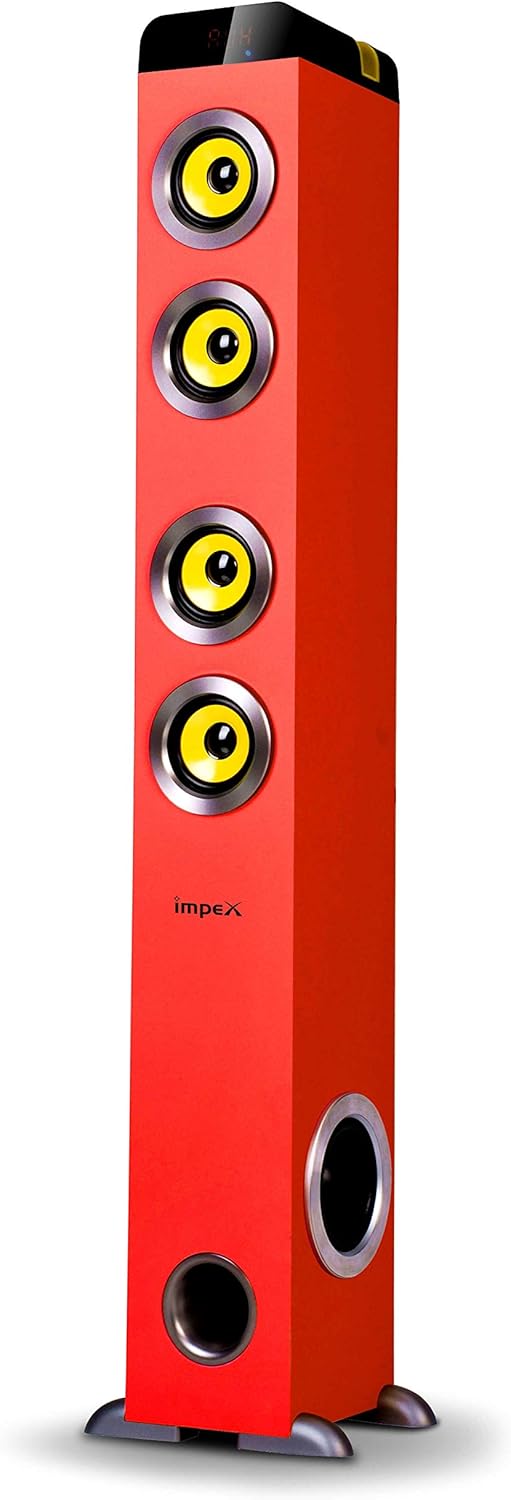
Rajah 1: Impex THUNDER T4 Main Speaker Unit. This image displays the Impex THUNDER T4 stereo system, a tall, red tower speaker. It features four prominent yellow speaker cones arranged vertically on the front panel. Towards the bottom, there is a circular bass port. The 'Impex' logo is visible on the front. The speaker stands on a dark base with small feet.
The Impex THUNDER T4 is a 2.1 channel speaker system. The main unit (subwoofer and primary speakers) is a tower design, complemented by two satellite speakers (wooden satellite, speaker unit: 4"+3"*2+1"*2). The system integrates various input options and controls for a versatile audio experience.
5. Persediaan
- penempatan: Position the main speaker unit and satellite speakers in your desired location. For optimal sound, ensure the main unit is on a stable surface.
- Sambungkan Pembesar Suara Satelit: Connect the satellite speakers to the main unit using the provided audio cables. Ensure connections are secure.
- Sambungan Kuasa: Plug the power cord into the main speaker unit and then into a suitable wall outlet.
- Kuasa Awal Hidup: Press the Power button on the main unit or remote control to turn on the system.
- Sambungan Sumber Audio: Connect your desired audio source (e.g., TV, smartphone, computer) using the appropriate input method (Bluetooth, USB, AUX).
6. Arahan Operasi
6.1. Operasi Asas
- Hidupkan/Mati Kuasa: Use the Power button on the unit or remote.
- Kawalan Kelantangan: Adjust the master volume using the dedicated knob on the unit or volume buttons on the remote.
- Pemilihan Mod: Press the "Mode" button to cycle through available input sources: Bluetooth, FM, USB, MMC, AUX.
6.2. Mod Bluetooth
- Switch the system to Bluetooth mode. The display will indicate "BT".
- Dayakan Bluetooth pada peranti mudah alih atau komputer anda.
- Cari untuk "THUNDER T4" in your device's Bluetooth settings and pair.
- Once connected, you can play audio from your device through the stereo system.
6.3. Mod Radio FM
- Switch the system to FM mode.
- Press the "Scan" button (if available) to automatically search and save available radio stations.
- Use the "Previous" and "Next" buttons to navigate through saved stations.
6.4. USB/MMC Mode
- Insert a USB flash drive or MMC card into the respective slot.
- The system will automatically switch to USB/MMC mode and begin playing audio files.
- Use the play/pause, previous, and next buttons to control playback.
6.5. Fungsi Karaoke
- Connect the microphone to the designated microphone input jack.
- Adjust the microphone volume and echo effects (if available) using the controls on the unit or remote.
- Play your desired karaoke track from any input source.
7. Penyelenggaraan
- Pembersihan: Gunakan kain lembut dan kering untuk membersihkan bahagian luar unit. Jangan gunakan pembersih cecair atau aerosol.
- Pengudaraan: Ensure that the ventilation openings are not blocked by dust or debris.
- Storan: Jika menyimpan unit untuk tempoh yang lama, cabut palamnya dari salur keluar kuasa dan simpan di tempat yang sejuk dan kering.
8. Penyelesaian masalah
| Masalah | Kemungkinan Punca | Penyelesaian |
|---|---|---|
| Tiada kuasa | Kord kuasa tidak disambungkan; Salur keluar kuasa rosak | Periksa sambungan kord kuasa; Cuba outlet lain |
| Tiada bunyi | Volume too low; Incorrect input mode; Audio cables loose | Increase volume; Select correct input mode; Check audio cable connections |
| Kegagalan berpasangan Bluetooth | Device too far; Bluetooth not enabled on source; Incorrect pairing procedure | Move device closer; Enable Bluetooth; Refer to Bluetooth pairing instructions |
| USB/MMC not playing | Tidak disokong file format; USB/MMC card faulty; Card not inserted correctly | pastikan files are compatible; Try a different USB/MMC card; Reinsert card |
9. Spesifikasi
| Jenama | Impex |
| Nombor Model | THUNDER T4 |
| taip | Stereo System (2.1 Channel) |
| Kuasa Keluaran | 60 Watt |
| Respons Kekerapan | 40-20,000 Hz (Assumed from 40-20Hz in description, typically 20kHz) |
| Speaker Unit Configuration | Main: 4" Woofer; Satellites: 3" x 2 + 1" x 2 |
| Teknologi Ketersambungan | USB, Bluetooth |
| Ciri Khas | FM Tuner, MMC Card Slot, Karaoke Function (with Mic set) |
| Mod Keluaran Audio | Stereo |
| Pengeluar | Impex |
| Nombor Model Item | THUNDER T4 Red |
| ASIN | B081TNH5SM |
| Dimensi Pakej | 6.97 x 5.33 x 3.01 cm; 1.1 g (Note: This dimension may refer to a component or packaging detail, not the full system.) |
Nota: Spesifikasi tertakluk kepada perubahan tanpa notis terlebih dahulu.
10. Waranti dan Sokongan
For warranty information and customer support, please refer to the warranty card included with your product or visit the official Impex webtapak. Simpan resit pembelian anda sebagai bukti pembelian.


