1. Pengenalan
The Zoom LiveTrak L-8 is a portable 8-channel digital mixer and multitrack recorder designed for podcasting, music production, and live streaming. It offers a compact solution with intuitive controls, allowing users to record and mix audio with ease. This manual provides essential information for setting up, operating, maintaining, and troubleshooting your LiveTrak L-8.

Figure 1.1: Zoom LiveTrak L-8 Digital Mixer/Recorder. This image shows the top-down view of the L-8 mixer, highlighting its faders, knobs, and display screen.
2. Produk Lebihview
Ciri-ciri Utama:
- Portable Podcasting/Music Studio functionality.
- 10 Faders for precise audio level control.
- 6 XLR-1/4" Mic/Line Inputs with +48V phantom power.
- Multitrack Recording via SD Card and USB.
- Ability to track song demos with multiple musicians.
- Four independent headphone outputs for monitoring.
- Phone tap for call-in interviews.
- Six customizable sound pads.
- Battery or USB power supply operation.
Apa yang ada di dalam Kotak:
- Zoom LiveTrak L-8 Portable 8-Channel Digital Mixer and Multitrack Recorder
- AKG K 240 Studio Professional Semi-Open Stereo Headphones
- 20' XLR-XLR Cable
- Kabel TRRS 3.5mm
- Kabel USB
- Zoom AD-17 AC Adapter
- Gold-Plated 1/4" Adapter (for headphones)
- Detachable Cable (for headphones)

Figure 2.1: AKG K 240 Studio Professional Semi-Open Stereo Headphones. These headphones feature a black and gold design with a self-adjusting headband and thick ear cushions.

Figure 2.2: 20-foot XLR-XLR Cable. This image displays a coiled black XLR cable with silver connectors, packaged for retail.
3. Persediaan
3.1 Powering the LiveTrak L-8
The LiveTrak L-8 can be powered in two ways:
- Penyesuai AC: Connect the included Zoom AD-17 AC adapter to the DC 5V port on the rear panel and plug it into a wall outlet.
- Bateri: For portable use, insert four AA batteries into the battery compartment on the underside of the unit. Ensure correct polarity. The unit will power off if left idle when running on batteries.

Figure 3.1: The underside of the Zoom LiveTrak L-8, showing the battery compartment. This image illustrates where to insert AA batteries for portable operation.
3.2 Menyambungkan Mikrofon dan Instrumen
The L-8 features 6 XLR-1/4" combo inputs (channels 1-6) and 2 additional line inputs (channels 7/8). Use XLR cables for microphones and 1/4" cables for instruments or line-level devices.
- Connect microphones to the XLR inputs. For condenser microphones, activate +48V phantom power via the menu.
- Connect instruments (e.g., guitar, bass) to the 1/4" inputs. Channels 1 and 2 support Hi-Z input for direct instrument connection.
- Channels 7/8 can be used for stereo line input or for connecting a phone via the 3.5mm TRRS cable for call-in interviews.
3.3 Menyambung Fon Kepala
The L-8 provides four independent headphone outputs (Monitor A, B, C, D). Connect your AKG K 240 Studio headphones or other monitoring headphones to these outputs. Each output has its own level control.
3.4 Penyisipan Kad SD
Insert a compatible SD card (up to 512GB) into the SD card slot for multitrack recording. Ensure the card is formatted correctly by the L-8 before use.
3.5 Sambungan USB
Connect the L-8 to a computer via the USB cable to use it as an 8-in/4-out audio interface or for data transfer to and from the SD card.
4. Arahan Operasi
4.1 Basic Mixing Controls
- Tombol Pengganda: Adjust the input level for each channel. Monitor the level meters to avoid clipping.
- Fader: Control the volume of each channel in the main mix.
- Butang SEL: Press to select a channel for adjusting EQ, pan, and effects send.
- EQ Knobs (HIGH, MID, LOW): Adjust the equalization for the selected channel.
- Tombol PAN: Adjust the stereo position of the selected channel.
- Butang Bisukan: Mutes the selected channel.
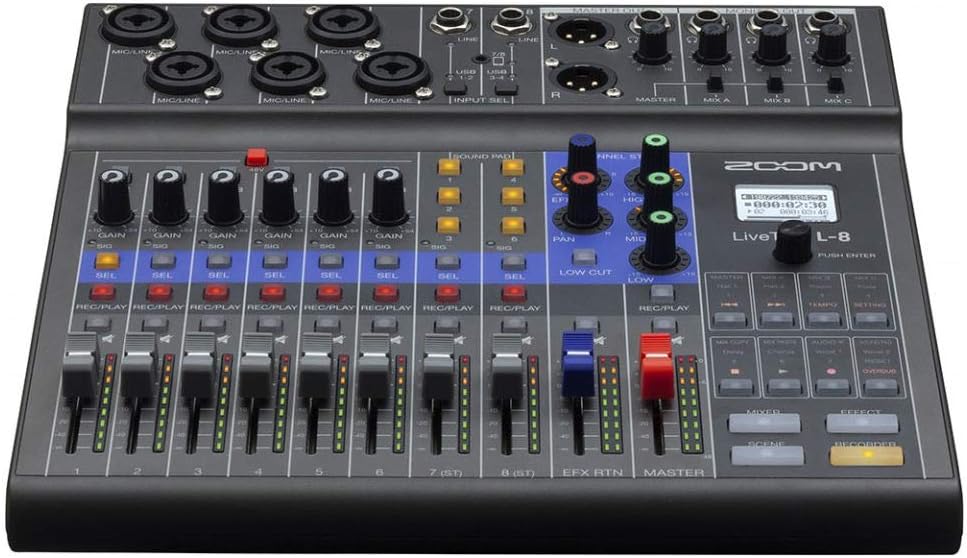
Rajah 4.1: Atas view of the Zoom LiveTrak L-8, showing the layout of input jacks, gain knobs, and main controls.
4.2 Recording to SD Card
- Tekan ke REC/MAIN butang pada setiap saluran yang anda ingin rakam. Butang akan menyala merah.
- Tekan utama PENCATAT butang untuk mula merakam.
- Tekan ke BERMAIN button to playback recorded tracks.
- The L-8 records up to 12 tracks simultaneously (10 discrete inputs + stereo mix).
4.3 Using Sound Pads
The six sound pads can be used to trigger sound effects, jingles, or music during podcasts or live performances. Load audio files onto the SD card and assign them to the pads via the menu.
4.4 Pemantauan
Use the individual headphone outputs to provide custom mixes for each performer or guest. Adjust the monitor mix levels using the dedicated knobs.
4.5 Using as an Audio Interface
When connected to a computer via USB, the L-8 functions as an audio interface. Select the L-8 as your audio input/output device in your Digital Audio Workstation (DAW) or system settings. This allows for streaming and recording directly to your computer.
5. Penyelenggaraan
- Pembersihan: Wipe the unit with a soft, dry cloth. Avoid using abrasive cleaners or solvents.
- Penjagaan Bateri: Tanggalkan bateri jika unit tidak akan digunakan untuk tempoh yang lama untuk mengelakkan kebocoran.
- Kemas kini Firmware: Periksa Zoom secara berkala website for firmware updates to ensure optimal performance and access to new features. Follow the instructions provided by Zoom for updating firmware.
- Storan: Simpan unit di tempat yang sejuk dan kering jauh dari cahaya matahari langsung dan suhu yang melampau.
6. Penyelesaian masalah
- Tiada Keluaran Bunyi:
- Periksa semua sambungan kabel (input, output, fon kepala).
- Ensure faders and gain knobs are set appropriately.
- Sahkan bahawa saluran tidak disenyapkan.
- Check headphone volume levels.
- Isu Rakaman:
- Ensure an SD card is inserted and properly formatted.
- Check available space on the SD card.
- Sahkan bahawa REC/MAIN button is active (red) for desired channels.
- Unit Tidak Dihidupkan:
- If using AC adapter, ensure it is securely connected and the outlet is functional.
- If using batteries, check battery levels and ensure they are inserted with correct polarity.
- Audio Herot:
- Reduce input gain to prevent clipping (indicated by red peak lights).
- Periksa integriti kabel.
For further assistance, please refer to the official Zoom support resources or contact customer service.
7. Spesifikasi
| Ciri | Spesifikasi |
|---|---|
| Jenama | Zum |
| Bilangan Saluran | 8 (12-track recording) |
| Teknologi Ketersambungan | USB |
| Jenis Penyambung Output | TRS, USB |
| Sumber Kuasa | Elektrik Bertali, Berkuasa Bateri |
| Dimensi Pakej | 5.8 x 4.8 x 1 inci |
| Tarikh Mula-mula Tersedia | 17 Disember 2019 |
8. Waranti dan Sokongan
Maklumat Waranti:
- Zoom LiveTrak L-8: Waranti 1 Tahun Terhad.
- AKG K 240 Studio Headphones: Waranti 2 Tahun.
Please retain your proof of purchase for warranty claims. Warranty terms and conditions may vary by region. Refer to the official warranty documentation included with your product or visit the manufacturer's webtapak untuk butiran lengkap.
Sokongan Pelanggan:
For technical support, service, or additional information regarding your Zoom LiveTrak L-8 or bundled accessories, please visit the official Zoom weblaman web atau hubungi jabatan sokongan pelanggan mereka. Maklumat hubungan biasanya boleh didapati di laman web pengilang webtapak atau dalam pembungkusan produk.


