1. Pengenalan
Welcome to the user manual for your BenQ MX525A DLP Video Projector. This document provides essential information for the safe and efficient operation, setup, and maintenance of your projector. Please read this manual thoroughly before using the device.
The BenQ MX525A is designed for clear and vibrant presentations, featuring a bright 3300 ANSI lumens display, XGA (1024 x 768) resolution, and a remarkable 13,000:1 contrast ratio. It is also 3D-Ready and offers versatile connectivity with HDMI and VGA inputs.
2. Arahan Keselamatan
To ensure safe operation and prevent damage to the projector, please observe the following safety guidelines:
- Bekalan Kuasa: Use only the power cord and adapter supplied with the projector. Ensure the power outlet meets the specified voltage keperluan.
- Pengudaraan: Jangan halang bukaan pengudaraan. Pastikan ruang yang mencukupi di sekeliling projektor untuk aliran udara yang betul bagi mengelakkan terlalu panas.
- penempatan: Place the projector on a stable, level surface. Avoid placing it in direct sunlight, near heat sources, or in environments with high humidity or excessive dust.
- Pengendalian: Do not drop or subject the projector to strong impacts. Avoid looking directly into the lens when the lamp sedang dihidupkan, kerana cahaya terang boleh menyebabkan kerosakan mata.
- Pembersihan: Putuskan sambungan kord kuasa sebelum membersihkan. Gunakan kain lembut dan kering. Jangan gunakan cecair atau pembersih aerosol.
- Servis: Jangan cuba menservis projektor sendiri. Rujuk semua servis kepada kakitangan servis yang berkelayakan.
3. Produk Lebihview
Familiarize yourself with the main components of your BenQ MX525A projector.
3.1 Front and Angled View
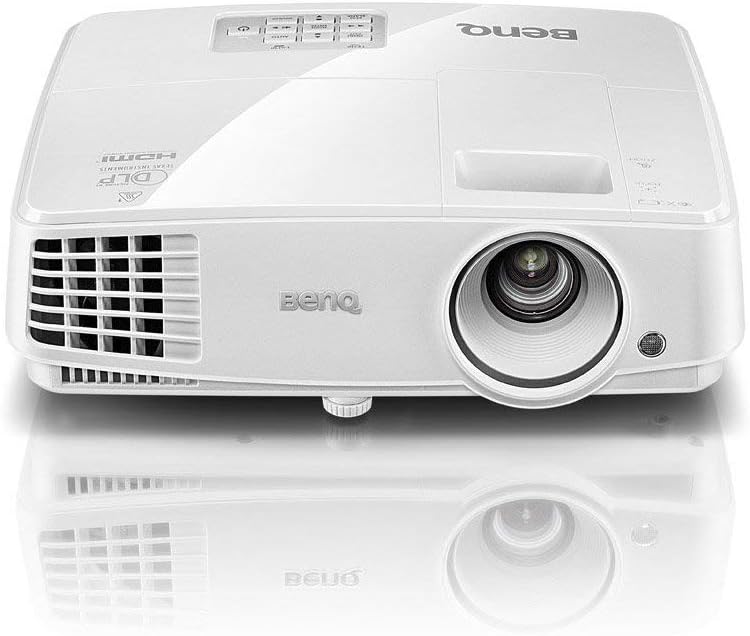
Figure 1: Front-top angled view of the BenQ MX525A DLP Projector. This image shows the projector's lens, front ventilation, and the BenQ logo on the top casing.
3.2 Bahagian View dengan Pengudaraan
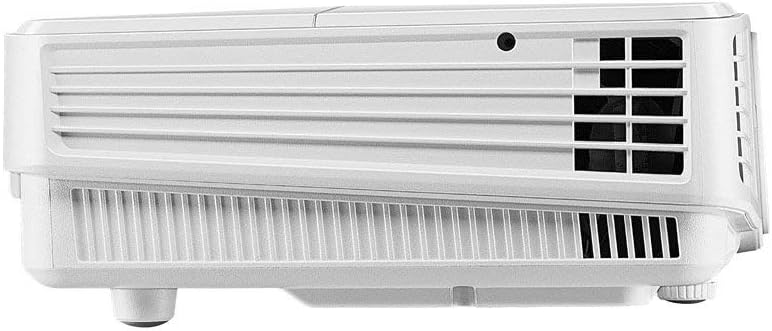
Rajah 2: Sisi view of the BenQ MX525A DLP Projector, highlighting the ventilation grilles essential for heat dissipation.
3.3 Atas View dengan Panel Kawalan

Rajah 3: Atas view of the BenQ MX525A DLP Projector, displaying the integrated control panel buttons for navigation and settings, along with the focus and zoom rings.
4. Persediaan
4.1 Membongkar
Carefully remove the projector and all accessories from the packaging. Retain the original packaging for future transport or storage.
4.2 Penempatan
Position the projector on a flat, stable surface. Ensure the projection path is clear of obstructions. Adjust the projector's height and angle using the adjustable feet to achieve the desired image position on your screen or wall.
4.3 Kuasa Penyambung
- Sambungkan kord kuasa ke salur masuk kuasa projektor.
- Palamkan hujung kord kuasa yang lain ke dalam salur keluar elektrik yang dibumikan.
4.4 Menghubungkan Sumber Video
The BenQ MX525A supports multiple input sources:
- HDMI: For high-definition digital video and audio. Connect an HDMI cable from your source device (e.g., laptop, Blu-ray player) to the HDMI port on the projector.
- VGA (x2): For analog video input. Connect a VGA cable from your computer to one of the VGA ports on the projector.
5. Mengendalikan Projektor
5.1 Menghidupkan/Mematikan
- Untuk Menghidupkan: Press the power button on the projector's control panel or remote control. The power indicator light will turn green.
- Untuk Mematikan: Press the power button again. A confirmation message may appear. Press the power button a second time to confirm shutdown. The power indicator will turn red.
5.2 Adjusting Focus and Zoom
Use the focus and zoom rings located around the lens (refer to Figure 3) to adjust the image clarity and size:
- Cincin Zum: Rotate to increase or decrease the image size.
- Cincin Fokus: Rotate until the projected image appears sharp and clear.
5.3 Memilih Sumber Input
Press the 'Source' button on the control panel or remote control to cycle through available input sources (HDMI, VGA1, VGA2). Alternatively, use the menu to select the desired input.
5.4 Pelarasan Gambar
Access the projector's OSD (On-Screen Display) menu to fine-tune picture settings:
- Kecerahan: Laraskan kecerahan atau kegelapan keseluruhan imej.
- Kontras: Controls the difference between the lightest and darkest parts of the image.
- warna: Melaraskan keamatan warna.
- Nisbah Aspek: Select the appropriate aspect ratio (e.g., 4:3, 16:9) to match your content.
5.5 Fungsi 3D
The BenQ MX525A is 3D-Ready. To enjoy 3D content, you will need compatible 3D glasses and a 3D-enabled source device. Refer to your 3D source device's manual for specific setup instructions.
5.6 SmartEco Power Saving Technology
The projector features SmartEco technology, which dynamically adjusts lamp power to conserve energy and extend lamp life up to 10,000 hours. This mode is automatically engaged to optimize power consumption based on content brightness.
6. Penyelenggaraan
Regular maintenance helps ensure optimal performance and extends the lifespan of your projector.
6.1 Membersihkan Lensa
Gunakan kain lembut dan tidak berbulu yang direka khas untuk kanta optik untuk mengelap kanta projektor dengan lembut. Elakkan penggunaan bahan kasar atau bahan kimia yang keras.
6.2 Lamp Penggantian
Projektor lamp mempunyai jangka hayat sehingga 10,000 jam. Apabila lamp mencapai akhir hayatnya, mesej amaran akan muncul, dan lamp indicator light may flash. Refer to the full service manual for detailed lamp replacement instructions or contact qualified service personnel.
6.3 Pembersihan Penapis
Periodically check and clean the air filter to prevent dust buildup, which can affect performance and cause overheating. Consult the full service manual for instructions on accessing and cleaning the air filter.
7. Penyelesaian masalah
Jika anda menghadapi masalah dengan projektor anda, rujuk kepada masalah dan penyelesaian biasa berikut:
| Masalah | Kemungkinan Punca | Penyelesaian |
|---|---|---|
| Tiada gambar di skrin | Power cord disconnected, incorrect input source, lamp isu | Check power connection, select correct input source, check lamp penunjuk status |
| Dim or blurry image | Out of focus, low brightness setting, dirty lens | Adjust focus/zoom rings, increase brightness in OSD, clean the lens |
| Projektor terlalu panas | Blocked ventilation, dirty air filter | Ensure clear space around vents, clean air filter |
| Tiada bunyi | Volume too low, incorrect audio input, mute enabled | Adjust volume, check audio cable connection, disable mute function |
8. Spesifikasi
Detailed technical specifications for the BenQ MX525A DLP Video Projector:
- Teknologi Paparan: DLP
- Resolusi Asli: XGA (1024 x 768)
- Kecerahan: 3300 ANSI Lumen
- Nisbah Kontras: 13,000:1
- Lamp kehidupan: Up to 10,000 hours (SmartEco Mode)
- Ketersambungan: HDMI, VGA (x2)
- Ciri Khas: 3D-Ready, Portable, SmartEco Power Saving Technology
- Dimensi Produk: 8.7 x 3.7 x 11.1 inci
- Berat Barang: 6.29 paun
- Tarikh Mula-mula Tersedia: 13 November 2019
9. Waranti dan Sokongan
The BenQ MX525A DLP Video Projector comes with a Waranti 1 tahun untuk alat ganti dan buruh. Waranti ini meliputi kecacatan pembuatan dan memastikan produk anda berfungsi seperti yang dimaksudkan di bawah penggunaan biasa.
For technical support, warranty claims, or further assistance, please visit the official BenQ support website or contact their customer service department. Refer to your product packaging or the BenQ webtapak untuk maklumat hubungan terkini.


