1. Produk Lebihview
The 1Mii Wireless Microphone Headset M4 is a 2.4G wireless audio system designed for clear voice transmission. It features a headset microphone and a compact receiver, offering flexibility for various applications such as teaching, public speaking, and fitness instruction.

Kandungan Pakej
- 2.4G Wireless Microphone Headset (1 unit)
- 2.4G Wireless Receiver (1 unit)
- 6.35mm Converter (1 unit)
- 2-in-1 USB Charging Cable (1 unit)
- Manual Pengguna (1 unit)
- Sponge Cover (2 units)

2. Arahan Persediaan
Follow these steps to set up your 1Mii Wireless Microphone Headset M4.
2.1 Pengecasan Awal
Before first use, ensure both the wireless headset microphone and the receiver are fully charged. Use the provided 2-in-1 USB charging cable. Turn off the devices while charging to optimize battery life.

2.2 Menyambungkan Penerima
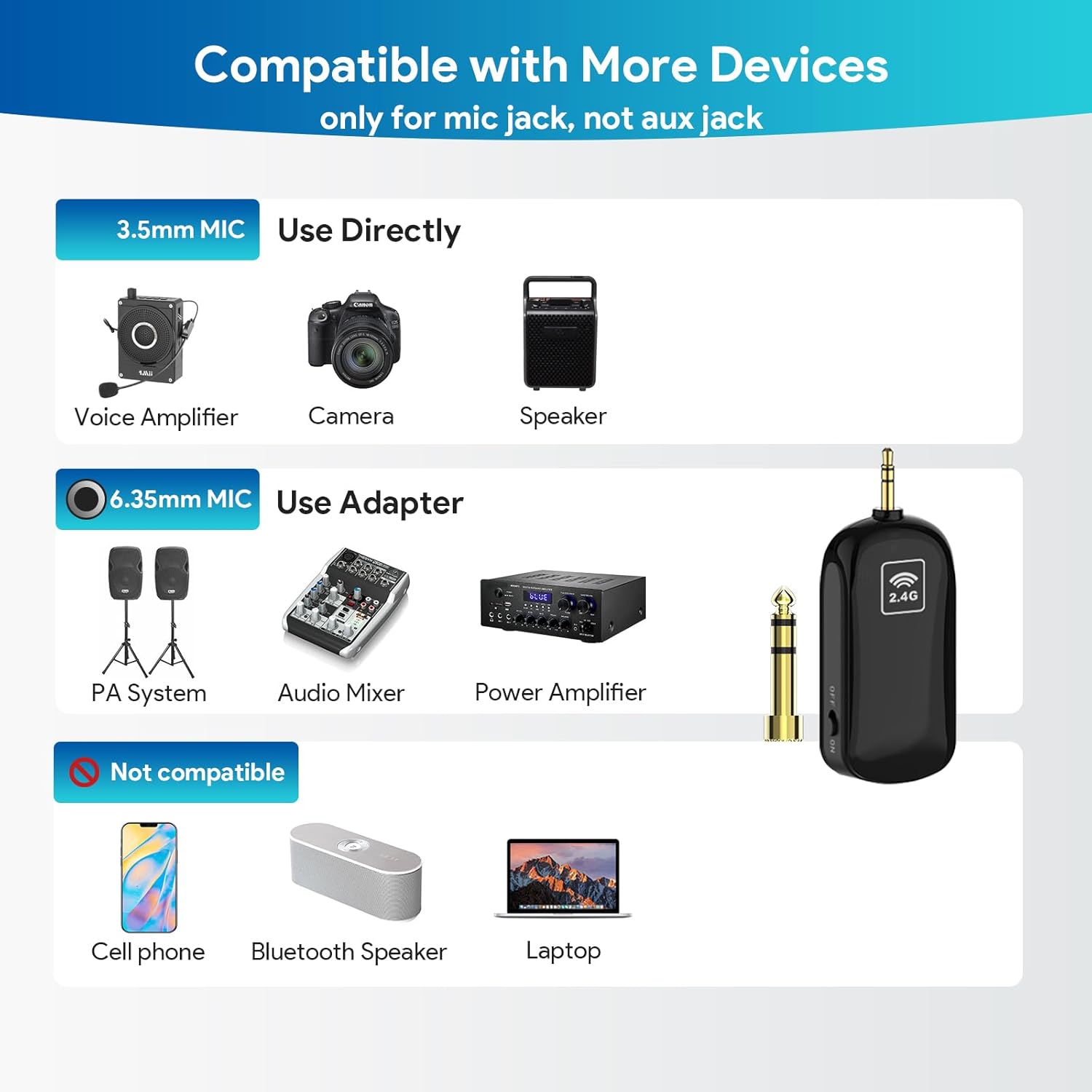
The receiver features a 3.5mm plug. It can be directly connected to devices with a 3.5mm microphone input jack. For devices with a 6.35mm microphone input jack, use the included 6.35mm converter.
- Identify the microphone input port on your speaker, voice amplifier, PA system, audio mixer, or camera.
- If the port is 3.5mm, plug the receiver directly into it.
- If the port is 6.35mm, attach the 6.35mm converter to the receiver, then plug the assembly into the port.
Nota Penting:
- This is a 2.4G wireless microphone system, not Bluetooth.
- It is not compatible with PCs, iPhones, iPads, Macs, or other smartphones.
- Ensure you are plugging into a microphone (MIC) jack, not an auxiliary (AUX) jack.
2.3 Memakai Alat dengar
The headset microphone can be used as a traditional headset or converted into a handheld microphone.
- To use as a headset, pick up the handheld microphone unit.
- Plug the head bracket into the designated slot on the microphone unit.
- Push down the head bracket until you hear a "click" sound, indicating it is securely installed.

3. Arahan Operasi
3.1 Powering On and Automatic Connection
Once the receiver is connected to your audio system, power on both the wireless headset microphone and the receiver. The devices are engineered with advanced 2.4G wireless technology and will automatically connect upon power-up. A blue indicator light on both units typically signifies a successful connection.
3.2 Senario Penggunaan
The 1Mii Wireless Microphone Headset M4 is suitable for various applications:
- Class Teaching: Provides clear audio for students.
- Yoga Teaching: Allows instructors to move freely while speaking.
- Pemandu Pelancongan: Ensures clear communication with groups.
- Lectures: Facilitates hands-free presentation.

3.3 Wireless Range and Performance
The system utilizes Class 1 2.4G technology, offering a reliable connection:
- Julat Luar: Up to 164 feet (50 meters) line-of-sight in open air.
- Julat Dalaman: Up to 50-70 feet (20-30 meters) indoors without significant obstacles.
The microphone provides high signal stability, fast transmission, and short audio delay, ensuring loud, clear, and high-fidelity sound with low radiation and interference.

4. Penyelenggaraan
4.1 Pengurusan Bateri
The microphone headset and receiver are equipped with large capacity lithium-ion batteries, providing up to 6 hours of continuous use on a full charge. Charging typically takes 1.5 to 2 hours.
- Always fully charge both units before use.
- Turn off the transmitter and receiver after each use to conserve battery life.
- Use the provided 2-in-1 USB charging cable for optimal charging.
4.2 Pembersihan dan Penyimpanan
- Lap peranti dengan kain lembut dan kering. Elakkan menggunakan bahan kimia yang keras atau pembersih yang kasar.
- Store the microphone and receiver in a cool, dry place away from direct sunlight and extreme temperatures.
- Replace the sponge cover on the microphone periodically for hygiene and optimal sound quality.
5. Penyelesaian masalah
If you encounter issues with your 1Mii Wireless Microphone Headset M4, refer to the following common problems and solutions:
| Masalah | Kemungkinan Punca | Penyelesaian |
|---|---|---|
| Tiada suara atau kelantangan rendah | Low battery on headset or receiver Sambungan ke sistem audio yang salah Volume too low on audio system Receiver not paired with headset | Charge both units fully Ensure receiver is plugged into a MIC jack (not AUX) and connections are secure Increase volume on the connected speaker/amplebih hidup Power cycle both units to re-establish automatic connection |
| Intermittent signal or static | Di luar jangkauan Obstructions between headset and receiver Sambungan penyesuai longgar | Bergerak lebih dekat dengan penerima Ensure clear line-of-sight; avoid placing large objects between units Check that the 6.35mm adapter (if used) is securely fitted and not loose |
| Audio delay or echo | Mikrofon terlalu dekat dengan pembesar suara Audio system settings | Adjust microphone position relative to the speaker Check audio system settings for any delay or echo effects |
| Picks up breathing or unwanted noise | Microphone positioned too close to mouth High gain/volume setting | Adjust microphone position slightly away from the mouth Reduce the volume or gain on the microphone or connected audio system |
| Not working with PC/Smartphone | Incompatible device type | The 1Mii M4 is a 2.4G wireless system, not designed for direct connection to computers, phones, or tablets. It requires a dedicated microphone input on compatible audio systems. |
6. Spesifikasi
| Ciri | Perincian |
|---|---|
| Nama Model | M4 |
| Jenama | 1Mii |
| Faktor Bentuk Mikrofon | Alat dengar |
| Teknologi Ketersambungan | 2.4G Wayarles |
| Jenis Penyambung | 3.5 mm Jack, 6.35 mm Jack (with adapter) |
| Peranti Serasi | Amplifier, Audio Mixer, Camera, PA System, Speaker |
| Sumber Kuasa | Dikuasakan Bateri (termasuk 2 bateri Lithium Ion) |
| Hayat Bateri | Up to 6-7 hours continuous use |
| Masa Mengecas | 1.5-2 jam |
| Julat Tanpa Wayar | Up to 164 ft (50m) line-of-sight |
| Nisbah Isyarat-ke-Bunyi | 80 dB |
| Kepekaan Audio | 35 Desibel |
| Corak Kutub | Satu arah |
| Dimensi Item (L x W x H) | 5.71 x 1.38 x 6.1 inci |
| Berat Barang | 5.6 auns |
| bahan | Akrilonitril Butadiena Stirena |
| Ciri Khas | Battery Indicator Light, Headset and Handheld 2-in-1, Volume Control |
7. Waranti dan Sokongan
Warranty information for the 1Mii Wireless Microphone Headset M4 is not provided in the available product data. For specific warranty details or technical support, please refer to the official 1Mii webtapak atau hubungi perkhidmatan pelanggan mereka secara langsung.


