1. Maklumat Keselamatan Penting
Before operating the Propel FitnessOne HT55 Treadmill, please read and understand all safety instructions. Retain this manual for future reference.
- Always attach the safety key to your clothing before starting a workout. In case of an emergency, pulling the safety key will immediately stop the treadmill.
- Pastikan treadmill diletakkan di atas permukaan yang rata dan stabil dengan kelegaan yang mencukupi di sekelilingnya.
- Jauhkan kanak-kanak dan haiwan peliharaan dari treadmill semasa operasi.
- Rujuk doktor sebelum memulakan sebarang program senaman baharu.
- Jangan kendalikan treadmill jika ia rosak atau tidak berfungsi.
- Kapasiti berat pengguna maksimum ialah 100 kg.
2. Kandungan Pakej
Sahkan bahawa semua komponen terdapat dalam kotak:
- 1 x Treadmill Set (Main Unit)
- 1 x Assembly Kit (Screws, bolts, washers, Allen key, wrench)
- 1 x Safety Key
- 1 x Manual Pengguna (Dokumen ini)
- 1 x Kad Waranti
3. Persediaan dan Pemasangan
The Propel FitnessOne HT55 Treadmill is designed for easy setup. Follow these steps for assembly:
3.1 Nyahbox dan Persediaan Awal
Carefully open the package and remove the treadmill and all accessories. Place the treadmill on a flat surface.

Figure 3.1: Propel FitnessOne HT55 Treadmill in its operational state.
3.2 Assembling the Upright Posts and Console
The treadmill comes largely pre-assembled. You will need to lift the console and secure it.
- Lift the treadmill stem vertically until it locks into place.
- Unpack the provided screws, bolts, and nuts from the assembly kit.
- Fix the upright posts using the provided screws and bolt nuts. Tighten them securely with the Allen key.
- Attach the protective guard to the base of the treadmill and secure it with the appropriate screws.
Video 3.2: Installation guide for the Propel FitnessOne HT55 Treadmill, demonstrating the assembly process.
Video 3.3: Detailed installation steps for the Propel FitnessOne HT55 Treadmill, including securing components.
3.3 Connecting Power and Safety Key
- Palamkan kord kuasa ke salur keluar elektrik yang sesuai.
- Insert the safety key into its designated slot on the console. The treadmill will not operate without the safety key in place.
4. Arahan Operasi
Familiarize yourself with the control console and features of your HT55 Treadmill.
4.1 Control Console Overview

Figure 4.1: The control console of the HT55 Treadmill.
The 5-inch blue backlit LCD display shows key workout metrics:
- Masa: Tempoh senaman anda.
- Kelajuan: Current running speed (0.8 to 12 km/hr).
- Jarak: Jumlah jarak yang dilalui.
- Kalori: Anggaran kalori yang dibakar.
- nadi: Heart rate detected by hand sensors.
- Langkah-langkah: Bilangan langkah yang diambil.
The console also features an MP3 interface with AUX input and built-in speakers for audio playback.

Figure 4.2: Close-up of the LCD display and console features.
4.2 Memulakan Senaman
- Pastikan kunci keselamatan diletakkan dengan betul pada konsol dan diklipkan pada pakaian anda.
- Tekan ke MULAKAN butang untuk bermula. Treadmill biasanya akan bermula pada kelajuan rendah.
- Laraskan kelajuan menggunakan LAJU +/- buttons on the console or the quick-speed keys (2, 4, 6, 8, 10, 12 km/hr). Speed controls are also available on the handrails.
- Untuk berhenti, tekan butang BERHENTI button or pull the safety key.
4.3 Program Senaman
The HT55 Treadmill includes 15 pre-set programs and 3 user-defined programs. Select a program using the MODE button or dedicated program buttons on the console.
4.4 Manual Incline Adjustment
The treadmill features a 3-level manual incline. To adjust the incline, you must manually lift or lower the rear of the running deck and secure it at the desired level before starting your workout.
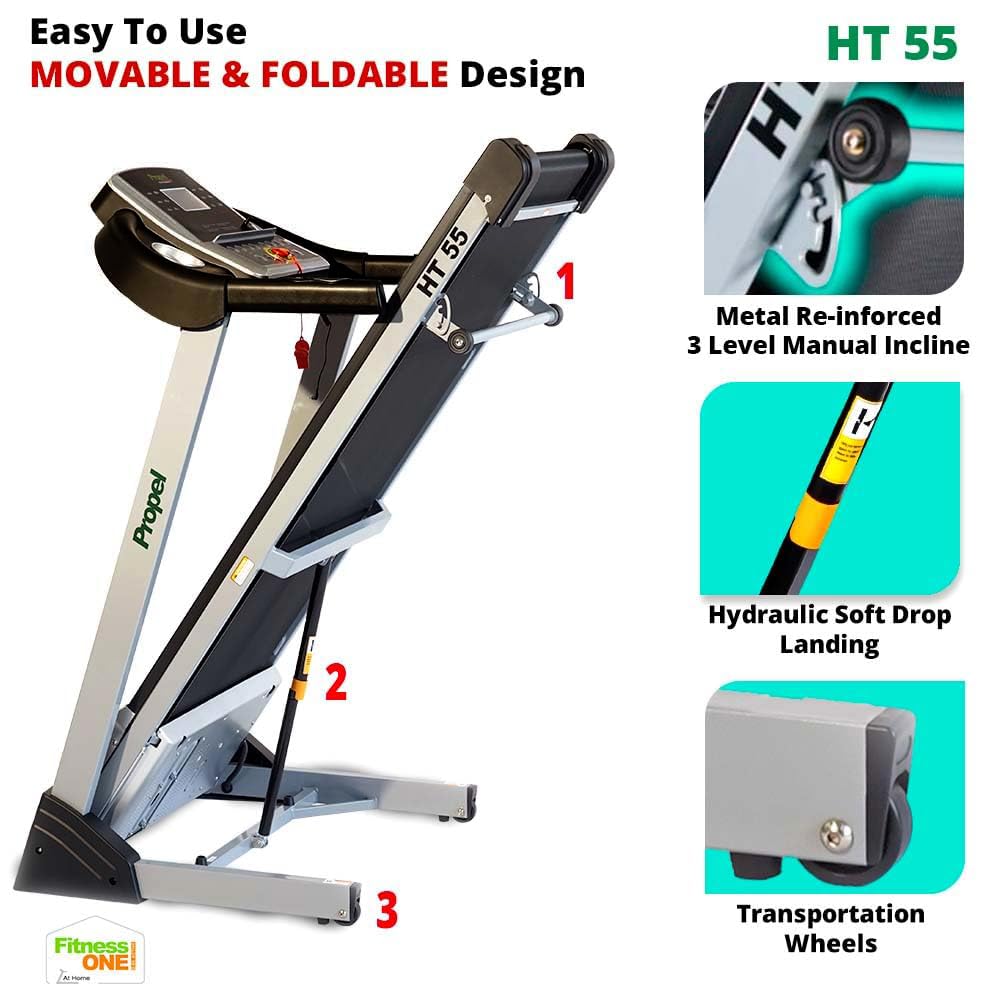
Figure 4.3: Manual incline adjustment mechanism.
4.5 Hand Sensors and Audio
- Grip the hand sensors on the handlebars to monitor your pulse.
- Connect your MP3 device to the AUX input to play music through the built-in speakers.
5. Penyelenggaraan
Penyelenggaraan tetap memastikan umur panjang dan prestasi optimum treadmill anda.
- Pembersihan: Lap treadmill selepas setiap penggunaan dengan iklanamp kain untuk mengeluarkan peluh dan habuk. Elakkan pembersih yang kasar.
- Pelinciran: Periodically lubricate the running belt as per the instructions in the full user manual to reduce friction and wear.
- Pelarasan Tali Pinggang: Check the running belt tension and alignment regularly. Adjust if necessary to prevent slipping or uneven wear.
- Kawasan Motor: Keep the motor cover area clean and free from dust and debris to ensure proper ventilation.
6. Penyelesaian masalah
Jika anda menghadapi masalah dengan treadmill anda, rujuk penyelesaian biasa berikut:
- Treadmill tidak bermula: Ensure the power cord is securely plugged in and the safety key is correctly placed. Check the power switch.
- Tali pinggang tergelincir: The running belt may need tensioning or lubrication. Refer to the detailed maintenance section in the full user manual.
- Bunyi luar biasa: Stop the treadmill immediately. Check for loose parts or foreign objects under the belt. If the noise persists, contact customer support.
- Bacaan kadar denyutan jantung yang tidak tepat: Ensure your hands are firmly placed on the pulse sensors. Dry hands or excessive movement can affect accuracy.
For more complex issues, contact Propel customer support.
7. Spesifikasi
Key technical specifications for the Propel FitnessOne HT55 Treadmill:
| Ciri | Spesifikasi |
|---|---|
| Jenama | dorong |
| Nama Model | HT55 |
| Kuasa Motor | Motor DC Puncak 3 HP |
| Kelajuan Maksimum | 12 km/j |
| Tahap Kecondongan | Condong Manual 3 Aras |
| Surface Running | 48 x 17 inci (1220 x 430 mm) |
| Berat Pengguna Maksimum | 100 kg |
| Jenis Paparan | 5-inch Blue Backlit LCD |
| Program yang telah ditetapkan | 15 |
| Ketersambungan | MP3, AUX input |
| Reka Bentuk Boleh Dilipat | Yes, with Hydraulic Soft Drop Landing |
| Berat Barang | 44 Kilogram |
| Product Dimensions (Operational) | 152D x 75.2W x 118H Sentimeter |

Figure 7.1: Operational dimensions of the HT55 Treadmill.

Figure 7.2: Running surface dimensions.

Figure 7.3: The 3HP Peak DC Motor.
8. Waranti dan Sokongan
Propel FitnessOne provides comprehensive warranty coverage and support for your HT55 Treadmill:
- Bingkai: Waranti 5 tahun.
- Motor: Waranti 1 tahun.
- bahagian: Waranti 1 tahun.
For installation assistance, video-guided support is available. In-person assembly support can be arranged for a nominal fee. Refer to your warranty card for detailed terms and conditions or contact Propel customer care at 96000 09010 or visit www.fitnessone.in.


