1. Pengenalan
The MARATHON Night Owl '86 Projection Clock is designed to provide clear time display and alarm functions with the added convenience of time projection onto a ceiling or wall. This manual provides detailed instructions for setting up and operating your clock.
Ciri-ciri utama termasuk:
- 180-degree adjustable time projection with adjustable brightness.
- Alarm clock with two volume settings and a Weekend Mode.
- Large display with adjustable backlight.
- Displays time, date, day of week, and indoor temperature (Celsius or Fahrenheit).
- Dual power options: AC adapter or AAA batteries.

Image 1.1: The MARATHON Night Owl '86 Projection Clock in operation, showing its main display and time projection feature.
2. Persediaan
2.1 Menghidupkan Jam
The clock can be powered by either an AC adapter or 3 AAA batteries. For continuous projection and optimal display brightness, AC power is recommended.
2.1.1 Pemasangan Bateri
- Open the battery compartment cover located on the rear of the clock.
- Masukkan 3 bateri AAA, pastikan kekutuban (+/-) betul.
- Tutup penutup petak bateri dengan selamat.
Note: When operating on battery power alone, the projection feature will only activate for approximately 10 seconds when a button is pressed to conserve energy.
Sambungan Kuasa 2.1.2 AC
- Connect the micro USB cable to the clock's micro USB port on the rear.
- Connect the other end of the micro USB cable to the provided wall adapter.
- Pasangkan penyesuai dinding ke soket elektrik standard.
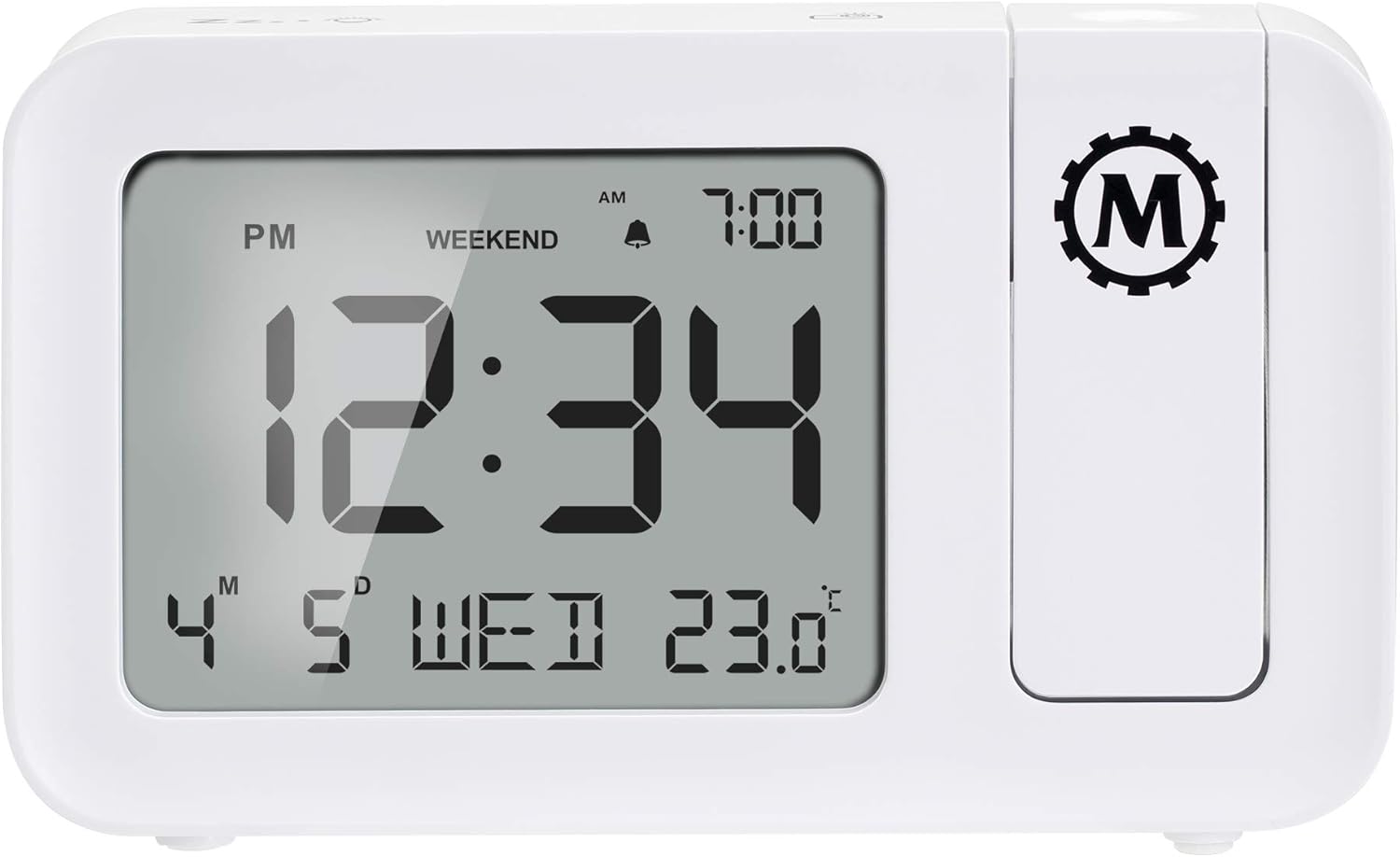
Image 2.1: Rear panel of the clock, illustrating the battery compartment and micro USB power input.
3. Arahan Operasi
3.1 Menetapkan Masa dan Tarikh
Refer to the buttons on the clock (typically located on the top or back) for 'SET' or 'MODE' functions. Press and hold the 'SET' button to enter time setting mode. Use '+' or '-' buttons to adjust hours, minutes, year, month, and day. Press 'SET' again to confirm each setting.
3.2 Menetapkan Penggera
- Tekan butang 'ALARM' untuk view masa penggera semasa.
- Tekan dan tahan 'ALARM' untuk memasuki mod tetapan penggera.
- Use '+' or '-' to adjust the alarm hour and minute.
- Press 'ALARM' to confirm.
- Toggle alarm ON/OFF using the dedicated alarm switch or button.
3.2.1 Kelantangan Penggera
The clock offers two alarm volume settings: High and Low. Use the 'VOLUME' button or switch to select your preferred level.
3.2.2 Weekend Mode
Activate 'Weekend Mode' to disable the alarm on Saturdays and Sundays. This feature allows for uninterrupted sleep during weekends without manually turning off the alarm. Refer to the 'WEEKEND' button or setting in the alarm menu.
3.2.3 Fungsi Tunda
When the alarm sounds, press the 'SNOOZE' button (often a large button on top) to temporarily silence the alarm for approximately 9 minutes. The alarm will sound again after this period.
3.3 Time Projection
The integrated projector can display the time onto a ceiling or wall. The projection can be rotated 180 degrees for optimal viewsudut ing.
- Laraskan kanta projektor untuk memfokuskan masa yang diunjurkan.
- Rotate the projector arm to direct the time display to your desired surface.
- Use the 'PROJECTION BRIGHTNESS' button or switch to adjust the intensity of the projected light.
3.4 Paparan Lampu Belakang
The main display features an adjustable backlight. Use the 'BACKLIGHT' button or dimmer switch to cycle through different brightness levels or turn it off.
3.5 Paparan Suhu
The clock displays the indoor temperature. Press the '°C/°F' button to switch between Celsius and Fahrenheit units.

Imej 3.1: Depan view of the clock, highlighting the large digital display with time, date, and temperature.
4. Penyelenggaraan
To ensure the longevity and proper functioning of your MARATHON Night Owl '86 Projection Clock, follow these maintenance guidelines:
- Pembersihan: Wipe the clock's surface with a soft, dry cloth. Avoid using abrasive cleaners, solvents, or chemical sprays, as these can damage the finish or internal components.
- Penggantian Bateri: If using batteries, replace all three AAA batteries simultaneously when the display dims or functions become erratic. Do not mix old and new batteries.
- penempatan: Place the clock on a stable, flat surface away from direct sunlight, extreme temperatures, and high humidity.
- Elakkan Kesan: Protect the clock from drops or strong impacts, which can damage the internal circuitry or the projection mechanism.
5. Penyelesaian masalah
Jika anda menghadapi masalah dengan jam anda, rujuk masalah dan penyelesaian biasa berikut:
| Masalah | Kemungkinan Punca | Penyelesaian |
|---|---|---|
| Paparan jam kosong atau malap. | Tiada kuasa atau bateri lemah. | Ensure AC adapter is securely plugged in. If using batteries, replace with fresh AAA batteries. |
| Time projection is not visible or dim. | Not connected to AC power; projection brightness too low; projector lens out of focus. | Connect to AC power for continuous projection. Adjust projection brightness. Rotate the projector lens to focus the image. |
| Projected time is upside down. | Projector orientation needs adjustment. | Rotate the projector arm 180 degrees. Some models may have a dedicated button to flip the projection image. |
| Penggera tidak berbunyi. | Alarm is off; Weekend Mode is active; volume is too low. | Ensure the alarm is set to ON. Check if Weekend Mode is enabled and disable if necessary. Increase alarm volume. |
| Masa atau tarikh yang salah. | Time/date not set correctly or power interruption. | Reset the time and date following the instructions in Section 3.1. |
6. Spesifikasi
| Ciri | Perincian |
|---|---|
| Jenama | MARATHON |
| Model | Night Owl '86 |
| warna | putih |
| bahan | plastik |
| Dimensi Produk | 14.48 x 3.56 x 8.64 cm (5.7 x 1.4 x 3.4 inci) |
| Berat Barang | 372 g |
| Jenis Paparan | digital |
| Sumber Kuasa | AC Adapter (100V-240V Universal) or 3 x AAA Batteries |
| Ciri Khas | Adjustable Brightness, Alarm, Large Display, Time Projection |

Image 6.1: Physical dimensions of the MARATHON Night Owl '86 Projection Clock.
7. Waranti dan Sokongan
7.1 Maklumat Waranti
For warranty details, please refer to the documentation included with your product packaging or visit the official MARATHON webtapak. Syarat waranti standard biasanya meliputi kecacatan pembuatan untuk tempoh tertentu dari tarikh pembelian.
7.2 Sokongan Pelanggan
If you require assistance or have questions not covered in this manual, please contact MARATHON customer support:
- AS / Kanada: +1-800-822-4329
- Antarabangsa: +1-905-764-9420
- Webtapak: www.MarathonWatch.com


