1. Produk Lebihview
The EARISE M37 is a portable 100W PA system designed for various audio applications, including home parties, small events, and karaoke. It features a wooden cabinet for enhanced acoustics, built-in Bluetooth connectivity, and comes with two wireless microphones for immediate use. The system supports multiple audio inputs including AUX and USB, offering versatile playback options.

Image: The EARISE M37 PA system, showcasing its wooden box design and two included wireless microphones.
2. Maklumat Keselamatan
- Jangan dedahkan unit kepada hujan atau lembapan untuk mengelakkan kebakaran atau kejutan elektrik.
- Do not open the cabinet. There are no user-serviceable parts inside. Refer all servicing to qualified personnel.
- Pastikan pengudaraan yang betul di sekitar unit. Jangan halang bukaan pengudaraan.
- Elakkan meletakkan unit berhampiran sumber haba seperti radiator, daftar haba, dapur, atau radas lain (termasuk amppenghidup) yang menghasilkan haba.
- Lindungi kord kuasa daripada berjalan atau tersepit, terutamanya pada palam, bekas kemudahan dan tempat keluar dari radas.
- Cabut plag radas ini semasa ribut petir atau apabila tidak digunakan untuk jangka masa yang lama.
3. Kandungan Pakej
Sila semak pakej untuk item berikut:
- EARISE M37 PA System Unit
- 2 x Mikrofon Tanpa Wayar
- Alat Kawalan Jauh
- Penyesuai Kuasa
- Manual Pengguna (dokumen ini)

Image: A visual representation of key features and included accessories: wireless microphone, Bluetooth 4.2, USB auto-play, and remote controller.
4. Ciri dan Komponen Produk
Familiarize yourself with the main components and controls of your EARISE M37 PA System.

Image: The control panel of the EARISE M37, showing various inputs and adjustment knobs. Key controls include: Mode, Previous/Next Track, Play/Pause, Record, EQ, Light, Mic 1/2 inputs, AUX In/Out, USB, TF card slot, DC Power In, ON/OFF switch, Charging indicator, ECHO, DELAY, MIC VOL, MASTER VOL, TREBLE, EXTRA BASS, and BASS.
Fungsi Panel Kawalan:
- ARAHAN: Switches between input modes (Bluetooth, AUX, USB, TF Card).
- Lagu Sebelumnya/Seterusnya: Navigates tracks during media playback.
- Main/Jeda: Mengawal main balik media.
- Rekod: Initiates or stops recording (requires USB/TF storage).
- EQ: Adjusts equalization settings.
- Cahaya: Controls the integrated LED lighting.
- MIC 1 / MIC 2: Inputs for wired microphones (if used).
- AUX IN / AUX OUT: Audio input and output jacks for external devices.
- USB: USB port for media playback or recording.
- TF: TF (MicroSD) card slot for media playback or recording.
- DC Power IN: Input kuasa untuk pengecasan dan operasi.
- HIDUP / MATI: Power switch for the unit.
- Penunjuk Pengecasan: Light indicating charging status.
- ECHO: Adjusts the echo effect for microphones.
- KELEWATAN: Melaraskan kesan lengah untuk mikrofon.
- VOL MIC: Melaraskan kelantangan mikrofon.
- MASTER VOL: Controls the overall master volume of the system.
- Treble: Melaraskan output audio frekuensi tinggi.
- BASS TAMBAHAN: Meningkatkan output audio frekuensi rendah.
- ASAS: Melaraskan output audio frekuensi rendah.
5. Persediaan
5.1 Charging the PA System
Before first use, fully charge the PA system. Connect the provided power adapter to the "DC Power IN" port on the unit and plug it into a standard wall outlet. The charging indicator light will show the charging status. A full charge provides up to 7 hours of play time.

Image: Illustration highlighting the 3600mAh battery capacity, providing up to 7 hours of continuous play time.
5.2 Wireless Microphone Setup
The two wireless microphones are pre-paired with the PA system. Insert AA batteries (not included) into each microphone. Turn on the microphones using their respective power switches. They should automatically connect to the PA system.
5.3 Menyambungkan Sumber Audio
Sambungan Bluetooth:
- Turn on the EARISE M37 PA system.
- Tekan ke MODE button until the display shows "Bluetooth" or a Bluetooth icon.
- Pada peranti mudah alih anda (telefon pintar, tablet, dll.), dayakan Bluetooth dan cari peranti yang tersedia.
- Select "EARISE M37" from the list. Once connected, you will hear a confirmation sound.

Image: A hand holding a smartphone displaying a Bluetooth connection screen, indicating the ease of pairing with the EARISE M37 PA system.
Main balik Kad USB/TF:
Masukkan pemacu kilat USB atau kad TF (MicroSD) yang mengandungi audio MP3 files into the respective port. The system will automatically detect and begin playing music. Use the Previous/Next Track and Play/Pause buttons to control playback.
Input AUX:
Sambungkan peranti audio luaran (cth., pemain MP3, komputer) ke AUX IN port menggunakan kabel audio 3.5mm (tidak termasuk). Tekan ke MODE button until AUX input is selected.
6. Arahan Operasi
6.1 Hidupkan/Mati Kuasa
To turn the unit on or off, use the HIDUP/MATI suis terletak pada panel kawalan.
6.2 Melaraskan Kelantangan dan Kesan
- MASTER VOL: Rotate this knob to adjust the overall volume of the PA system.
- VOL MIC: Melaraskan kelantangan mikrofon yang disambungkan.
- ECHO / DELAY: Use these knobs to add or reduce echo and delay effects to the microphone sound.
- TREBLE / BASS / EXTRA BASS: Adjust these knobs to fine-tune the high and low frequencies of the audio output.
6.3 Using Microphones
Once the wireless microphones are powered on and connected, speak into them. Adjust the MIC VOL, ECHO, dan KELEWATAN knobs on the PA system to achieve the desired sound. For optimal performance, hold the microphone a few inches from your mouth.

Image: Two individuals enjoying karaoke with the EARISE M37 PA system and its wireless microphones, demonstrating typical usage.
6.4 Fungsi Rakaman
To record audio (e.g., microphone input or music playback), ensure a USB flash drive or TF card is inserted into the corresponding slot. Press the REKOD button to start recording. Press it again to stop. Recorded files will be saved to the inserted storage device.
7. Penyelenggaraan
- Bersihkan unit dengan kain lembut dan kering. Jangan gunakan pembersih atau pelarut yang melelas.
- Simpan sistem PA di tempat yang sejuk dan kering, jauh daripada cahaya matahari langsung dan suhu yang melampau.
- If the unit will not be used for an extended period, fully charge the battery before storage and recharge it every few months to maintain battery health.
8. Penyelesaian masalah
| Masalah | Kemungkinan Punca | Penyelesaian |
|---|---|---|
| Tiada kuasa | Bateri habis; Kabel kuasa tidak disambungkan. | Cas unit; Pastikan kabel kuasa disambungkan dengan selamat. |
| Tiada suara dari mikrofon | Microphones off; Batteries low/dead; MIC VOL too low. | Turn on microphones; Replace batteries; Increase MIC VOL. |
| Bluetooth tidak bersambung | PA system not in Bluetooth mode; Device too far; Interference. | Press MODE button to select Bluetooth; Move device closer; Restart both devices. |
| Kad USB/TF tidak dimainkan | tak betul file format; Card/drive not inserted correctly; Corrupted files. | pastikan files are MP3; Reinsert card/drive; Try different files/device. |
9. Spesifikasi
| Ciri | Perincian |
|---|---|
| Jenama | AWAL |
| Model | M37 |
| Output Wattage | 100 Watt |
| Sumber Kuasa | Dikuasakan Bateri |
| Teknologi Ketersambungan | Bluetooth, USB, AUX |
| Versi Bluetooth | 4.2 (daripada imej) |
| Input Audio | Mikrofon Tanpa Wayar, AUX |
| Bilangan Saluran | 2 |
| Berat Barang | 11.62 paun |
| Dimensi Pakej | 18.7 x 12 x 11.9 inci |
| Dimensi Produk (lebih kurang) | 32.5 cm (12.8 in) H x 25.5 cm (10 in) W x 23.8 cm (9.4 in) D |
| warna | Hitam |
| Jenis Pemasangan | Atas meja |
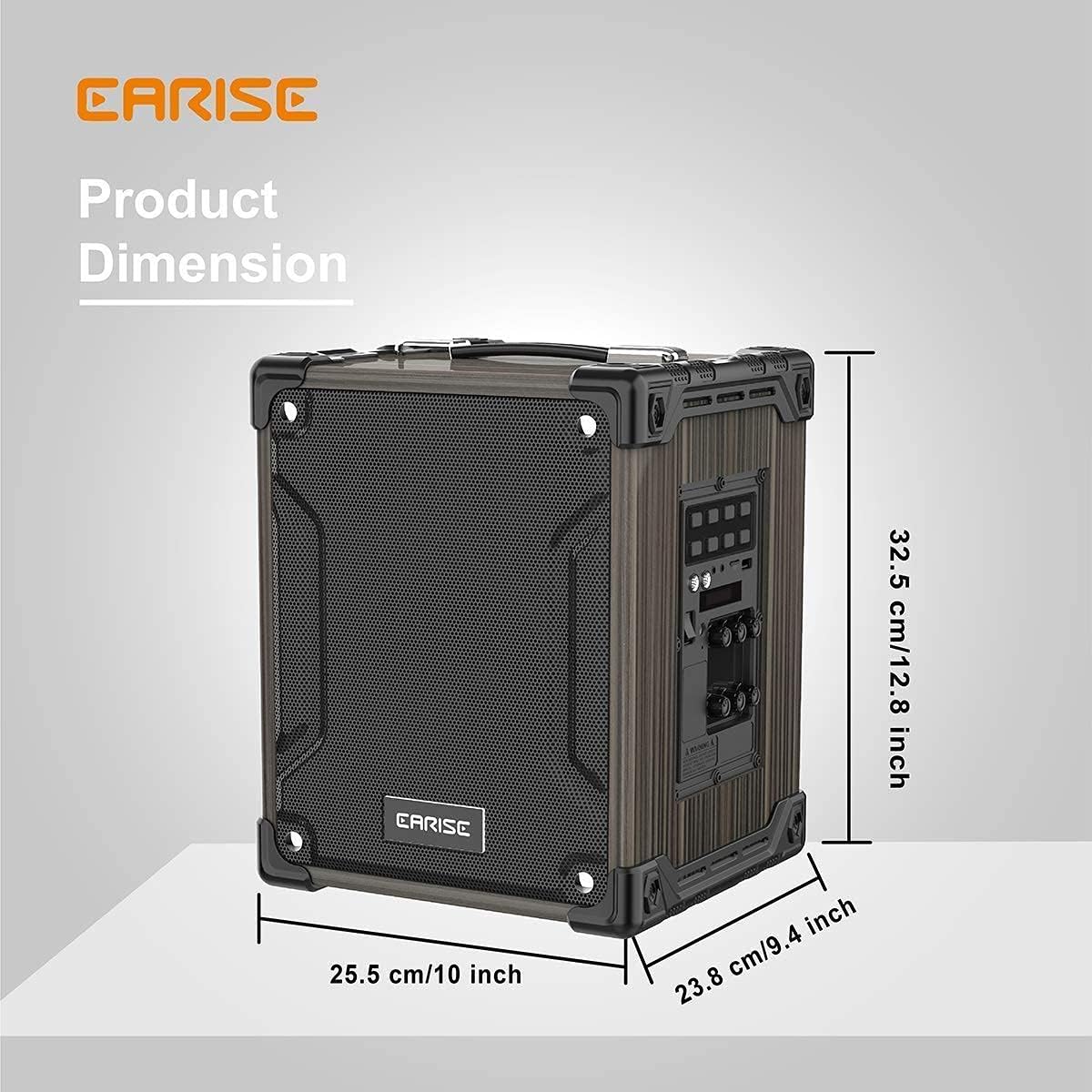
Image: Product dimensions of the EARISE M37, measuring approximately 32.5 cm (12.8 inches) in height, 25.5 cm (10 inches) in width, and 23.8 cm (9.4 inches) in depth.
10. Waranti dan Sokongan
For warranty information or technical support, please refer to the contact details provided with your purchase or visit the official EARISE webtapak. Simpan bukti pembelian anda untuk tuntutan waranti.


