pengenalan
This manual provides detailed instructions for the assembly, operation, and maintenance of your Mount-It! MI-1860 Floor TV Stand. This stand is designed to support televisions ranging from 32 to 55 inches, with VESA patterns up to 400x400mm, and features tempered glass shelves for media devices. Please read all instructions carefully before beginning assembly to ensure safe and correct installation.

Image: The Mount-It! MI-1860 Floor TV Stand, shown with a television mounted and media devices on its tempered glass shelves, illustrating its complete setup.
Maklumat Keselamatan
AMARAN: Failure to read and follow all instructions can result in personal injury or damage to property. If you have any questions, please contact customer support.
- Do not exceed the maximum weight capacity of 88 pounds (40 kg) for the TV mount.
- Ensure the VESA mounting pattern of your TV is compatible with the stand (Min: 100x100mm, Max: 400x400mm).
- Always use two people to lift and position the television during installation.
- Place the stand on a level and stable surface.
- Jauhkan kanak-kanak dan haiwan peliharaan dari kawasan perhimpunan.
- Jangan ketatkan skru terlalu ketat, kerana ini boleh menyebabkan kerosakan.
- Periksa semua sambungan secara berkala untuk memastikan ia kekal selamat.
Kandungan Pakej
Please verify that all components are present and undamaged before assembly. If any parts are missing or damaged, do not proceed with assembly and contact customer support.
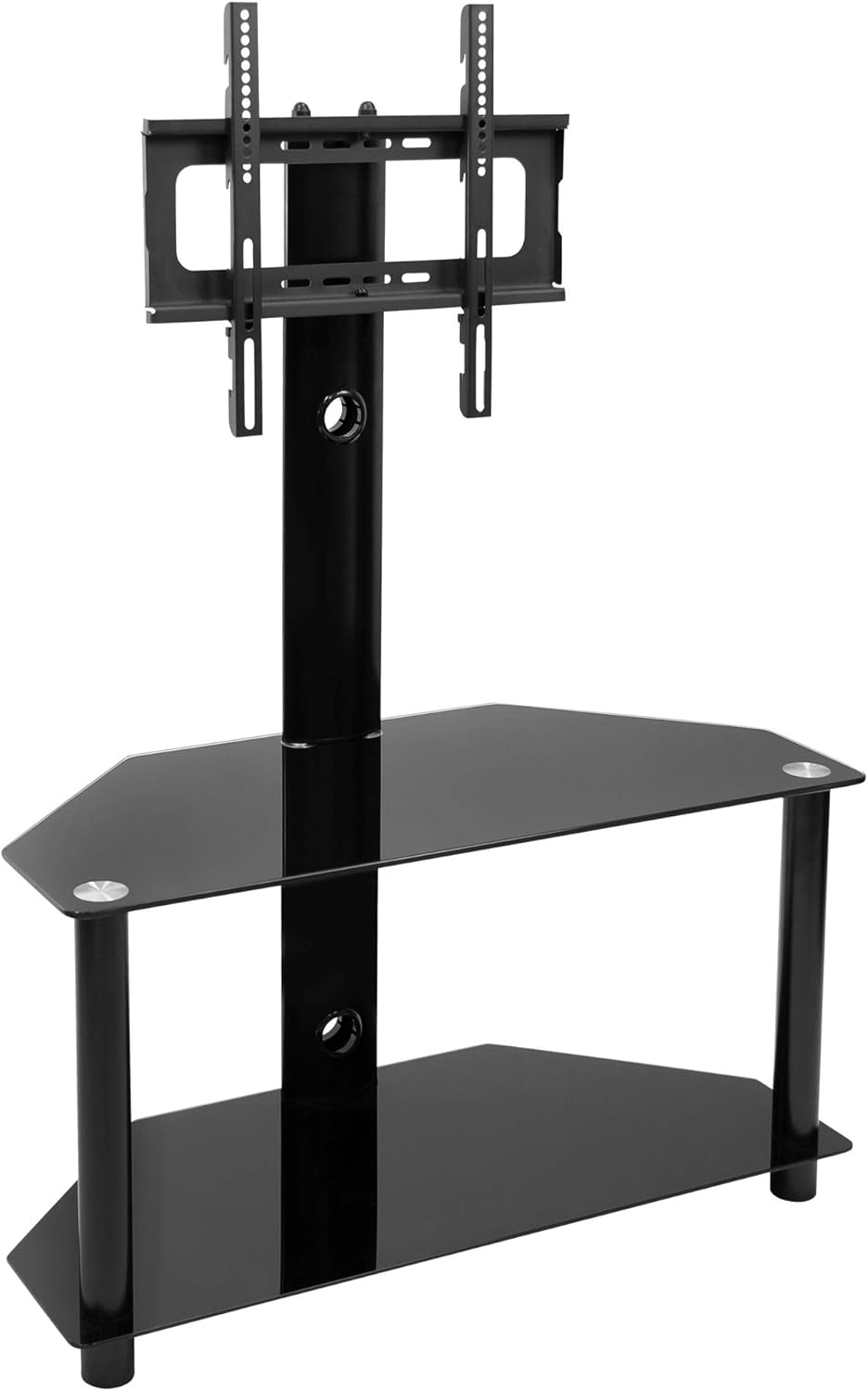
Image: The Mount-It! MI-1860 Floor TV Stand shown without a television, highlighting its structural components and tempered glass shelves.
Kandungan pakej biasa termasuk:
- Base plate (tempered glass)
- Middle shelf (tempered glass)
- Support columns (metal)
- Pemasangan pendakap TV
- Various screws, washers, and spacers for assembly and TV attachment
- Klip/pengikat pengurusan kabel
- Alat pemasangan (cth., sepana Allen)
Persediaan dan Perhimpunan
Ikuti langkah-langkah ini dengan teliti untuk pemasangan yang betul. Adalah disyorkan untuk meminta bantuan orang kedua dengan pemasangan TV.
- Pasang Pangkalan: Attach the support columns to the base tempered glass plate using the provided screws and tools. Ensure all connections are secure.
- Pasang Rak Tengah: Secure the middle tempered glass shelf to the designated support columns.
- Attach TV Mount Column: Connect the main TV mount column to the base assembly.
- Sediakan TV untuk Pemasangan:
- Identify the VESA mounting holes on the back of your television.
- Pilih skru, pencuci dan spacer yang sesuai daripada kit perkakasan yang sesuai dengan lubang pelekap TV anda.
- Attach the vertical TV brackets to the back of your television. Ensure they are level and securely fastened.
- Lekapkan TV: With assistance, carefully lift the television and hook the attached TV brackets onto the main TV mount column. Ensure the brackets are properly seated.
- Lekatkan TV: Use the safety screws or locking mechanisms provided to prevent the TV from accidentally lifting off the mount.
- Laraskan Ketinggian: The TV brackets allow for height adjustment. Loosen the securing bolts, adjust the TV to the desired height, and re-tighten the bolts. Refer to the 'Operating' section for more details.
- Pengurusan Kabel: Utilize the integrated cable management system within the main column and the provided cable ties to route and conceal TV and media device cables for a clean appearance.

Image: An exploded diagram illustrating key features of the MI-1860 TV stand, including adjustable brackets, safety screw, cable management, and tempered glass shelving.
Arahan Operasi
Your Mount-It! MI-1860 TV stand offers flexibility for optimal viewing.
TV Swivel Function
The TV mount allows for a 30-degree swivel to the left and right. Gently grasp the sides of your television and rotate it to achieve your desired viewing angle. Avoid forcing the TV beyond its intended swivel range.
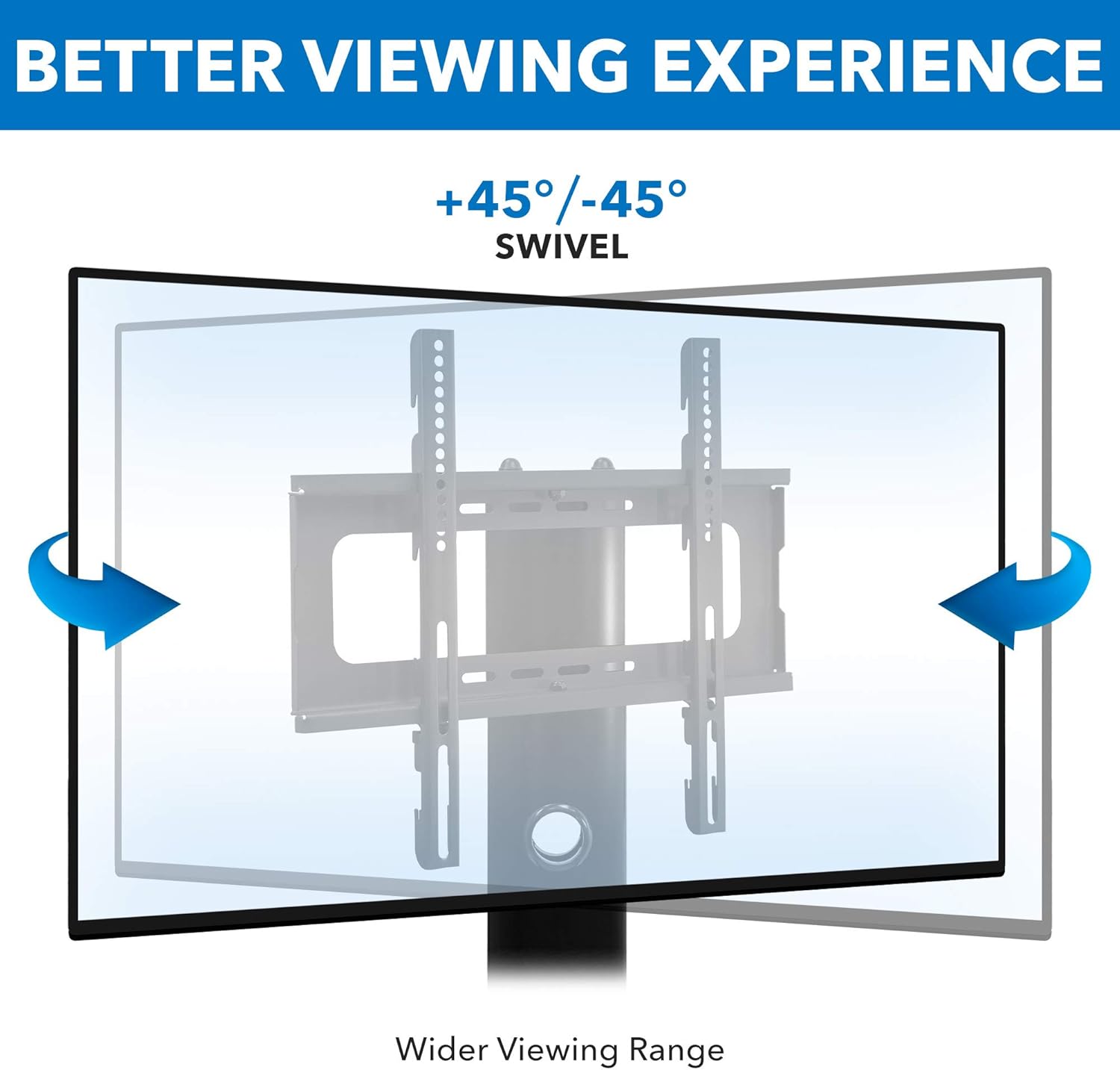
Image: A diagram demonstrating the 45-degree left and right swivel capability of the TV mount, providing a wider viewjulat ing.
Pelarasan Ketinggian
The TV mounting brackets can be adjusted vertically to achieve a comfortable viewing height. To adjust:
- With assistance, carefully support the television.
- Loosen the securing bolts on the vertical TV brackets that attach to the main column.
- Slide the TV up or down to the desired position.
- Ensure the TV is level, then securely re-tighten all securing bolts.

Image: A diagram illustrating the height adjustment mechanism of the TV mount, showing how the brackets can be raised or lowered in 2.4-inch increments.
Penyelenggaraan
Regular maintenance will help prolong the life and appearance of your TV stand.
- Membersihkan Permukaan Kaca: Use a soft, lint-free cloth and a non-abrasive glass cleaner. Avoid harsh chemicals that may damage the tempered glass finish.
- Cleaning Metal Surfaces: Lap bahagian logam dengan kain lembut,amp cloth. For stubborn marks, a mild soap solution can be used, followed by drying thoroughly.
- Semak Sambungan: Periodically (e.g., every 6 months) inspect all screws and bolts to ensure they remain tight and secure. Re-tighten if necessary.
- Elakkan beban berlebihan: Do not place items heavier than the specified weight capacity on the shelves or mount.
Menyelesaikan masalah
Jika anda menghadapi masalah dengan kaki TV anda, rujuk kepada masalah dan penyelesaian biasa berikut:
| Masalah | Kemungkinan Punca | Penyelesaian |
|---|---|---|
| Pendirian goyah atau tidak stabil. | Sambungan longgar; lantai tidak rata. | Ensure all screws are tightened. Move stand to a level surface or use shims if necessary. |
| TV tidak tahap. | Brackets unevenly installed; stand not level. | Re-check TV bracket installation. Ensure stand is on a level surface. |
| Cannot attach TV to mount. | Incorrect VESA pattern; wrong screws/spacers. | Verify your TV's VESA pattern matches the stand's compatibility. Use the correct hardware for your TV model. |
| Bahagian yang hilang semasa pemasangan. | Ralat pembungkusan. | Do not proceed with assembly. Contact Mount-It! customer support immediately for replacement parts. |
Spesifikasi
- model: MI-1860
- Bahan: Kaca Tempered, Keluli
- warna: Hitam
- Keserasian Saiz TV: 32" - 55"
- Keserasian VESA: 100x100mm, 200x100mm, 200x200mm, 300x300mm, 400x200mm, 400x300mm, 400x400mm
- Kapasiti Berat TV Maksimum: 88 paun (40 kg)
- Julat Pusing: ±30 darjah
- Berat Barang: Kira-kira 38.2 lbs
- Dimensi (Keseluruhan): Refer to diagram for detailed measurements.

Image: A detailed diagram showing the minimum and maximum dimensions of the MI-1860 TV stand, including height, width, and depth measurements.

Image: A diagram illustrating the various VESA mounting patterns supported by the MI-1860 TV stand, ranging from 100x100mm to 400x400mm, along with its 110 lb capacity (note: product description states 88lb capacity, always refer to product specific documentation).
Maklumat Waranti
Mount-It! products are designed and manufactured to high-quality standards. This product is covered by a limited warranty against defects in materials and workmanship. For specific warranty terms and conditions, please refer to the warranty card included with your product or visit the official Mount-It! webtapak.
Sokongan Pelanggan
If you have any questions regarding the assembly, operation, or maintenance of your Mount-It! MI-1860 Floor TV Stand, please contact our customer support team.
Webtapak: www.mount-it.com
e-mel: Rujuk kepada weblaman web untuk borang hubungan atau alamat e-mel.
telefon: Rujuk kepada website for phone support options.


